
- Age rating4+
- CategoryUtilities
- Developer雪婷 齐
- LanguagesSimplified Chinese+ 1 more
- Size11.0 MB
Links to the official App Store page
Download.org hosts no file of SnapFrame - On-device AI. The button opens its official App Store page, published by 雪婷 齐. Listing last checked on Nov 10, 2026.
Screenshots
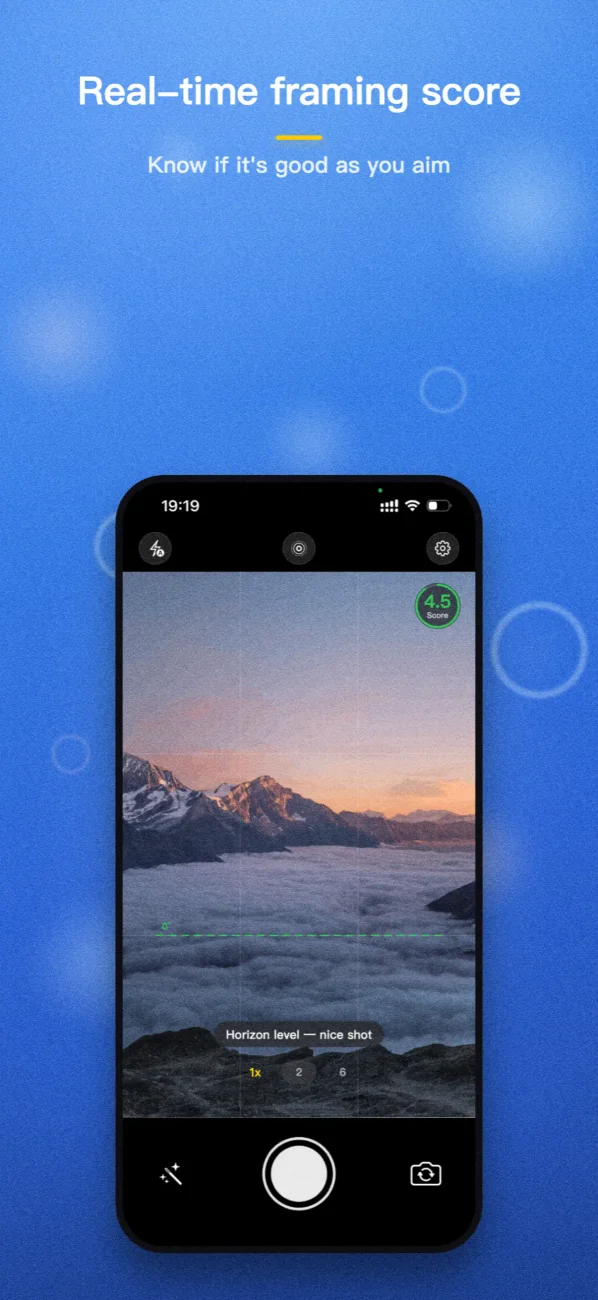


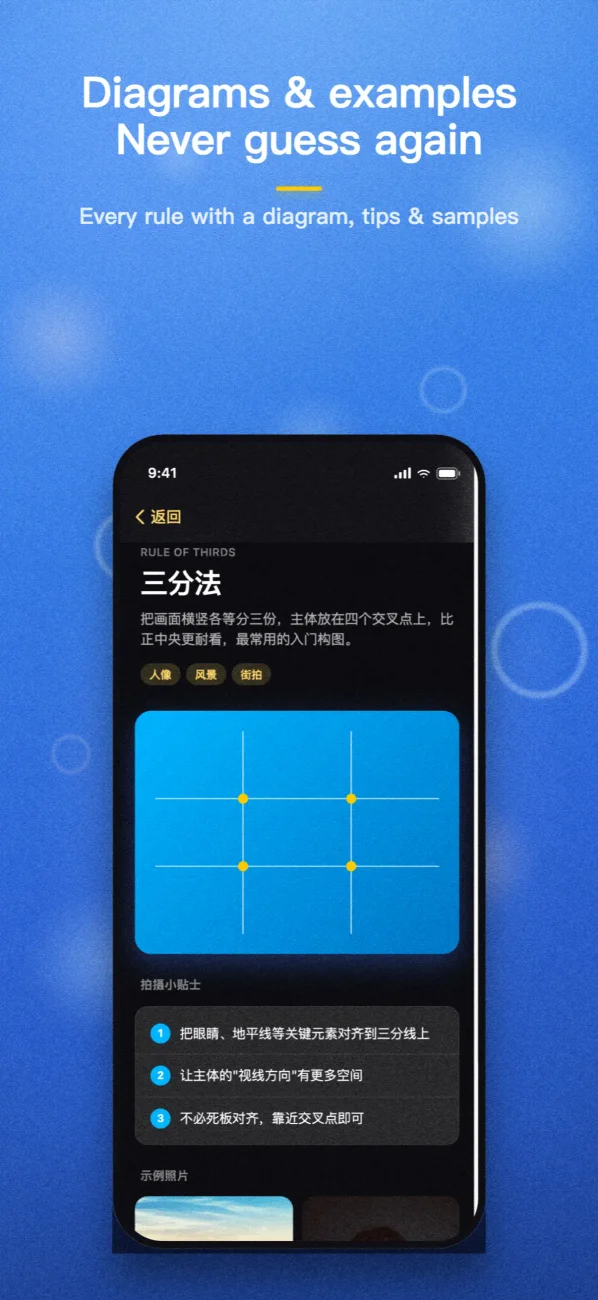
About
SnapFrame helps you frame better photos and capture yourself with the view.
Get live composition advice in single-camera mode, or use both cameras to bring two perspectives into one photo. Made for iPhone, with English and Chinese interfaces.
LIVE COMPOSITION COACH
Apple Vision analyzes faces, subjects, body poses, horizons and geometric structures on your device. Clear suggestions help you adjust framing, straighten the horizon and emphasize your subject. A 1.0-5.0 composition score shows how your framing changes.
SMART GUIDES, MANUAL CONTROL
Let SnapFrame select guides for the scene, or switch manually between thirds, center, leading lines, symmetry and horizon guides. Subject boxes and direction hints help you refine the shot. Adjust guide opacity and analysis frequency in Settings.
7 COMPOSITION GUIDES
Learn thirds, center composition, leading lines, symmetry, horizon correction, portrait framing and subject scale. Illustrated explanations, example photos, suitable scenes and practical tips help you put each technique to use.
DUAL CAMERA, TWO PERSPECTIVES
Enable Dual Camera in Settings on a supported iPhone and camera combination. Choose picture-in-picture or split screen, tap to swap the main and secondary views, drag the inset window and zoom the rear camera independently. Capture your reaction and the scene together.
LIVE PHOTOS
Capture Live Photos in single or dual camera mode. Dual Camera brings both views to life in one Live Photo saved to Photos. Allow microphone access to include sound, or capture silent dual-camera Live Photos without it.
CAMERA CONTROLS
Shoot in portrait or landscape, switch between front and rear cameras in single-camera mode, control flash, pinch to zoom and choose focal lengths. Available lenses and flash depend on your device and camera.
PHOTO METADATA WATERMARK
On iOS 26 or later, add a Liquid Glass style watermark with device model, capture time, focal length, aperture, shutter speed, ISO and authorized coordinates. It is enabled by default and can be turned off. Optionally allow location access to save shooting locations in photo EXIF.
ON-DEVICE ANALYSIS
Composition analysis runs locally through Apple Vision, without cloud AI or uploading your photos or camera frames for analysis. No account, subscription or ads.
What’s new
Version 1.2.0 · Oct 28, 2026
Capture yourself and the view with Dual Camera.
• Take photos with the front and rear cameras together, using picture-in-picture or split screen.
• Capture dual-camera Live Photos: bring both views to life in one Live Photo saved to Photos. Include sound with microphone access, or capture silent Live Photos without it.
Enable Dual Camera in Settings. A supported device and camera combination are required. Smart composition analysis is paused while Dual Camera is active.
App privacy
What 雪婷 齐 declares on the App Store about how this app handles data.
-
Data not collected
The developer does not collect any data from this app.
Privacy practices may vary, for example with the features you use or your age.
Information
- Seller
- 雪婷 齐
- Category
- Utilities
- Version
- 1.2.0
- Updated
- Oct 28, 2026
- Released
- Jun 8, 2026
- Size
- 11.0 MB
- Requires
- iOS 18.6 or later
- Age rating
- 4+
- Languages
- Simplified Chinese, English
- Copyright
- © QIXUETING
You might also like
-
 Photo to ZIP - Image to ZipZip Photos Fast, Share Easily.
-
 Clean Gallery: Photo CleanerFree Up Storage · No Ads
-
 AI Voice Recorder Pro: NotesSpeaker labels & AI summaries
-
 MeCode: QR Barcode ScannerGenerator, Photo & PDF Reader
-
 Boundless ScreenshotScreen recording to long image
-
 NuboxAccount Subscription Manager
-
 Photo SquashCompress photo gallery
-
 CleanMyPhotos: Photo CleanerDelete Duplicates & Free Space
-
 LED Scrolling Text - GlowVoxBanner Sign, Megaphone & Voice
-
 Burrow TunnelSSH & web tunnels via your frp