
SnapSort - Smart Screenshots
AI Screenshot Organizer
Designed for iPhone
Free · In-app purchases
- Age rating4+
- CategoryUtilities
- DeveloperHui Chan Seo
- LanguagesEnglish
- Size4.2 MB
Links to the official App Store page
Download.org hosts no file of SnapSort - Smart Screenshots. The button opens its official App Store page, published by Hui Chan Seo. Listing last checked on Nov 16, 2026.
Screenshots


About
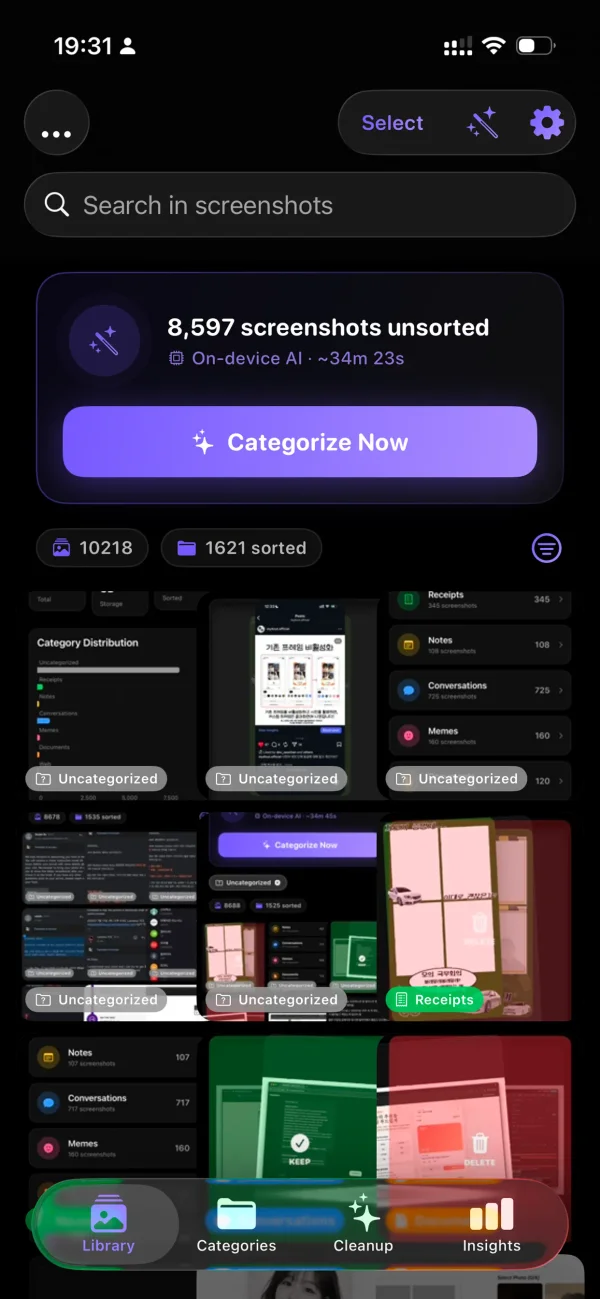
Stop drowning in screenshots. SnapSort uses on-device AI to automatically categorize, search, and clean up your screenshot library.
KEY FEATURES
• AI-Powered Categorization
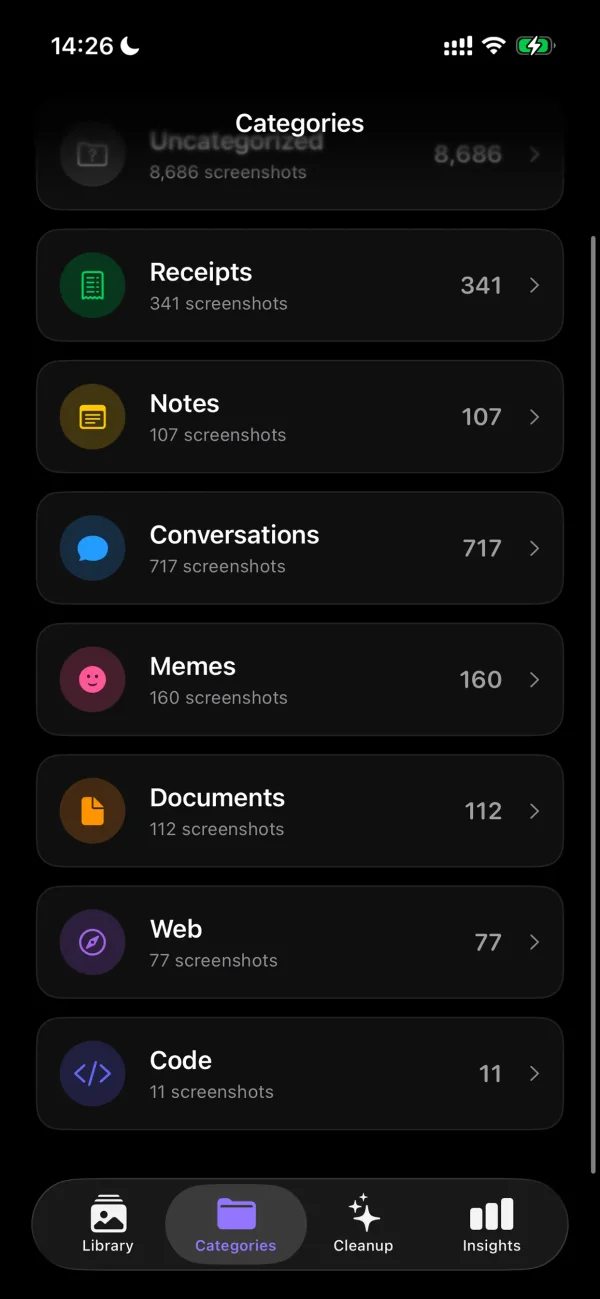
On-device Vision OCR reads your screenshots and sorts them into 8 categories: Receipts, Notes, Conversations, Memes, Documents, Web, Code, and more.
• Smart Text Search
Every screenshot is scanned for text. Search by keywords to find exactly what you need.
• Photo Detail Viewer
Tap any screenshot for a full-screen view with pinch-to-zoom, double-tap zoom, and easy sharing. Delete or organize right from the detail view.
• Tinder-Style Cleanup
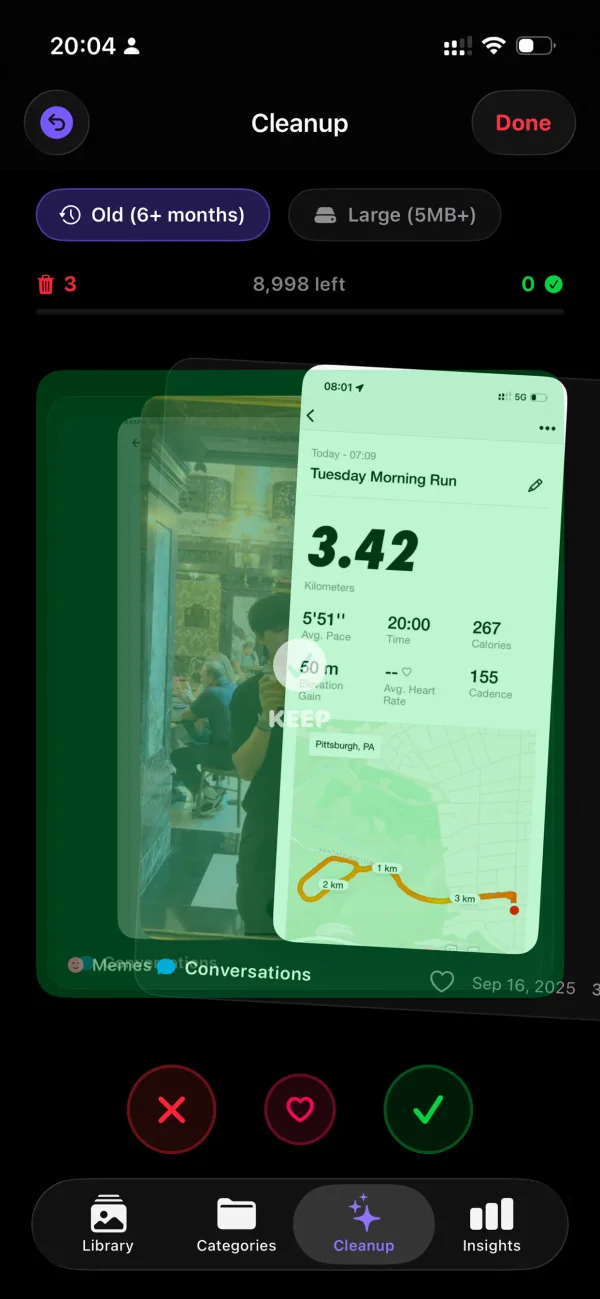
Swipe through old screenshots (6+ months) and large files (5MB+) like a card deck. Swipe left to delete, right to keep. Review your decisions and batch delete in one tap.
• Category Browser
Browse your organized screenshots by category with clean grid views and quick counts.
• Storage Insights
Charts and statistics show your screenshot distribution, storage usage, and categorization progress.
• Smooth & Responsive
Buttery smooth animations, skeleton loading screens, and fluid transitions throughout the app. Every interaction feels polished and instant.
• Beautiful Dark Design
OLED-optimized black interface that's easy on the eyes and saves battery.
DATA PROCESSING & PRIVACY
SnapSort uses ONLY Apple's built-in Vision framework for all AI processing. All analysis runs 100% on your device. NO data is sent to any external server or third-party AI service (no cloud AI, no cloud processing). Text recognition (OCR) and image classification are performed locally using Apple's on-device machine learning models. Category assignments are stored locally on your device only. No accounts, no cloud storage, no tracking, no analytics.
PERFECT FOR
• Anyone with hundreds of unsorted screenshots
• Students who screenshot lecture slides
• Shoppers saving receipts and deals
• Developers capturing code snippets
• Anyone wanting to free up photo storage
SNAPSORT PRO (Optional)
Upgrade to SnapSort Pro to remove all advertisements and support continued development.
• Pro Lifetime: $9.99 one-time purchase (Best Value)
• Pro Yearly: $4.99/year
• Pro Monthly: $0.99/month
Payment will be charged to your Apple ID account at confirmation of purchase. Subscription automatically renews unless it is canceled at least 24 hours before the end of the current period. Your account will be charged for renewal within 24 hours prior to the end of the current period. You can manage and cancel your subscriptions by going to your account settings on the App Store after purchase.
Terms of Use (EULA): https://www.apple.com/legal/internet-services/itunes/dev/stdeula/
Privacy Policy: https://seochan-company.vercel.app/snapsort/privacy
Support: https://seochan-company.vercel.app/snapsort/support
App privacy
What Hui Chan Seo declares on the App Store about how this app handles data.
-
Data not collected
The developer does not collect any data from this app.
Privacy practices may vary, for example with the features you use or your age.
Information
- Seller
- Hui Chan Seo
- Category
- Utilities
- Version
- 1.0
- Updated
- Mar 24, 2026
- Released
- Mar 24, 2026
- Size
- 4.2 MB
- Requires
- iOS 17.0 or later
- Age rating
- 4+
- Price
- Free
- In-app purchases
- Yes
- Languages
- English
- Copyright
- © 2026 Huichan Seo
You might also like
-
 Screenshot AI OrganizerFind, Tag & Search Your Photos
-
 DupeSweep: Duplicate FinderClean Photos, Videos & Files
-
 ZT File ManagerYour smart file & photo tool
-
 Lens Screenshot AISort, Organize, Search & Clean
-
 SnapInboxClean inbox for screenshots
-
 TaskFlow - AI智能任务管理专家Utilities
-
 Facility Maps - PersonalStore maps on your phone
-
 布谷 Bugu - 显化愿望与每日落地一步Utilities
-
 Screenshot Organizer +Sort Screenshots As You Go
-
 CaptureLab - Smart ScreenshotsFast Organize Your Captures