- Age rating4+
- CategoryMusic
- DeveloperRENAVE INC.
- LanguagesEnglish+ 1 more
- Size69.4 MB
Links to the official App Store page
Download.org hosts no file of SoundPad Pro. The button opens its official App Store page, published by RENAVE INC. Listing last checked on Nov 17, 2026.
Screenshots



About
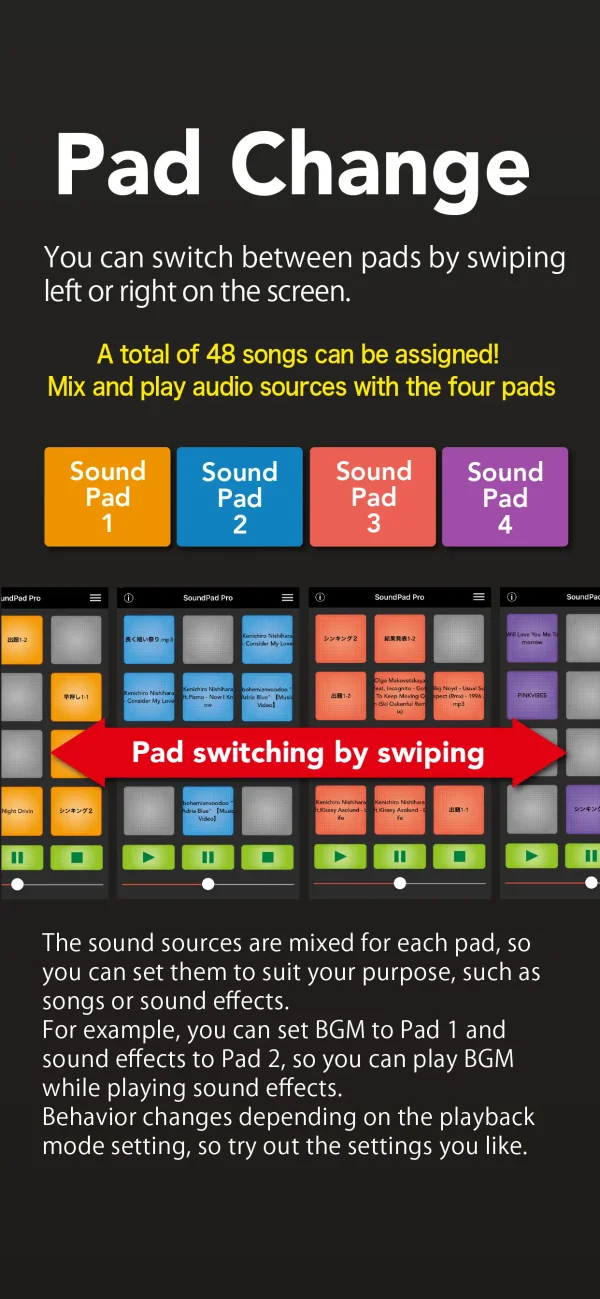
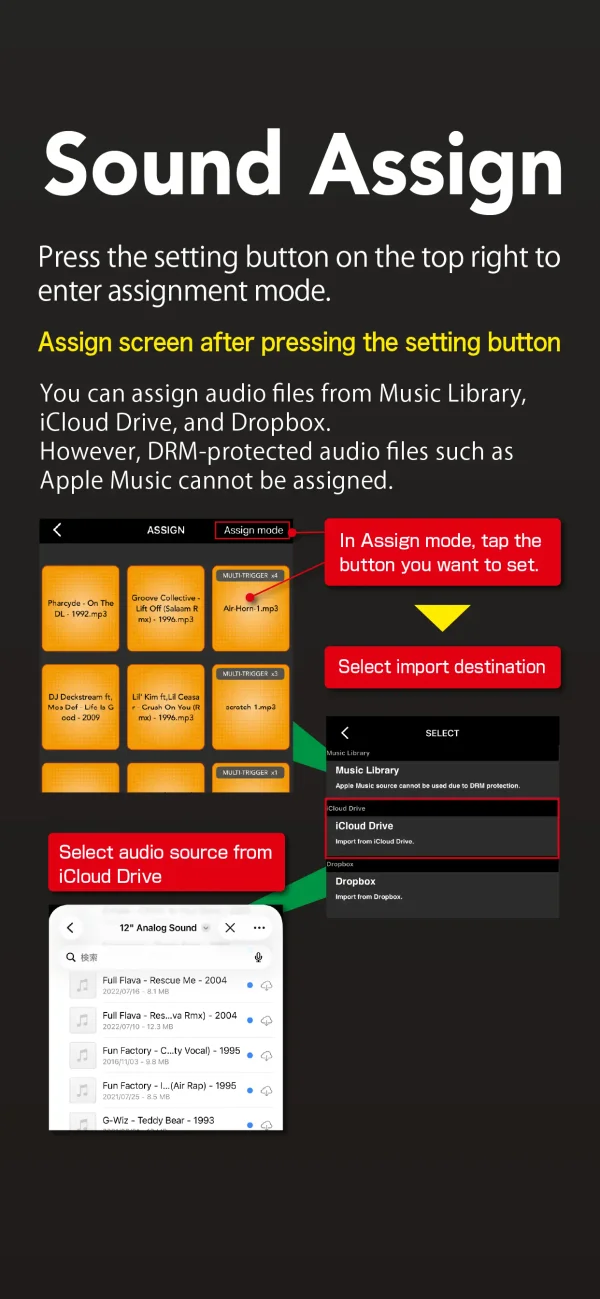
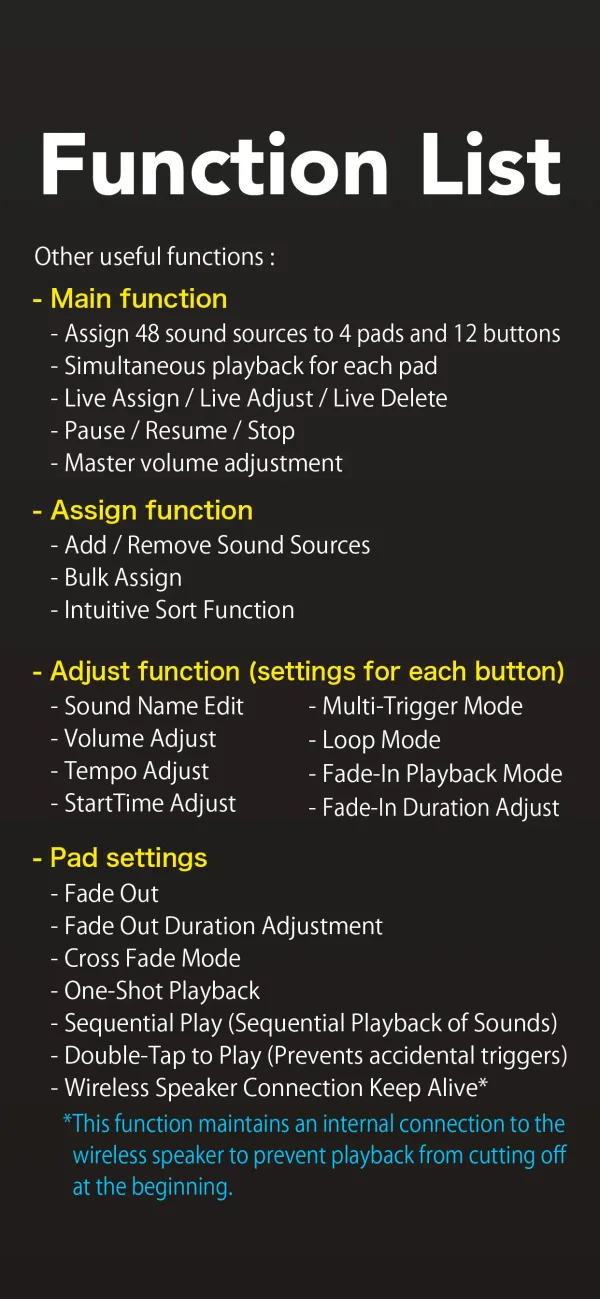
SoundPad Pro is an easy-to-use sound player application that allows you to assign music on your device to 48 buttons for playback.
It is a higher version of SoundPad with playback modes such as master volume, individual volume adjustment, tempo setting, playback start position adjustment, fade-in, fade-out, cross-fade playback, and one-shot playback.
Each of the four pads can be played individually, so it is possible to play sound effects while playin music or looped sound sources*1.
1.
For gapless loop playback, please use uncompressed sound source (e.g., wav format).
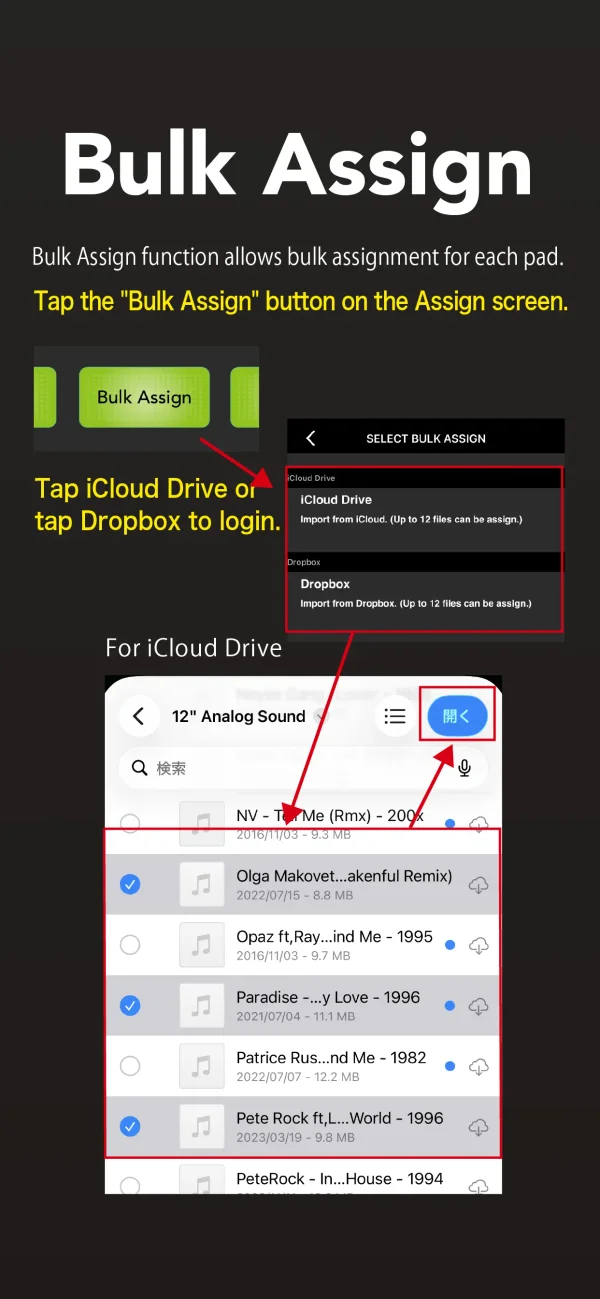
Sound sources can be downloaded and assigned from the Music library, iCloudDrive, or Dropbox. Downloading requires high-speed network communication, so a Wi-Fi environment is recommended. If you use a mobile connection, please make sure to subscribe to a flat-rate plan before using the service, as communication fees may be high.
We recommend that you use the "Airplane Mode" to avoid unexpected ring tones.
Music downloaded from AppleMusic cannot be used due to copyright protection DRM.
Various functions will operate in various ways depending on the combination of each setting, so please use the settings that suit your preference.
Even if multiple functions are enabled at the same time, they may not all work together at the same time due to exclusivity control or function conflicts, so please try the settings that best suit your purpose.
What’s new
Version 1.12.3 · Nov 16, 2026
Update information: 1.12.3
- Bug fixes on iPhone Duo.
---
Update information: 1.12.2
- Bug fix inner screen of the iPhone Duo.
---
Update information: 1.12.1
- Bug fix.
---
Update information: 1.12.0
- Compatible with iOS 27.2
- Added support for iPhone Duo
- The minimum recommended iOS version is now iOS 15.
- Added a pad layout feature. You can switch to a side-by-side (left/right) dual-pad layout when using an iPad in landscape orientation or the inner screen of a iPhone Duo.
---
Update information: 1.11.0
- Add "Disable master volume slider" function to prevent accidental volume changes.
---
Update information: 1.10.3
- Compatible with iOS 26 and iPadOS 26
- This update raises the minimum supported iOS version to iOS 12.0.
---
Update information: 1.10.2
- Add Double-tap to Play (Accidental Trigger Protection).
When enabled, playback starts with a double tap.
Enable it from: "Home > Assign > Settings > Prevent Accidental Triggers > Double-tap to Play"
---
Update information: 1.10.1
- Fixed a bug in LiveAssign / Assign function.
---
Update information: 1.10.0
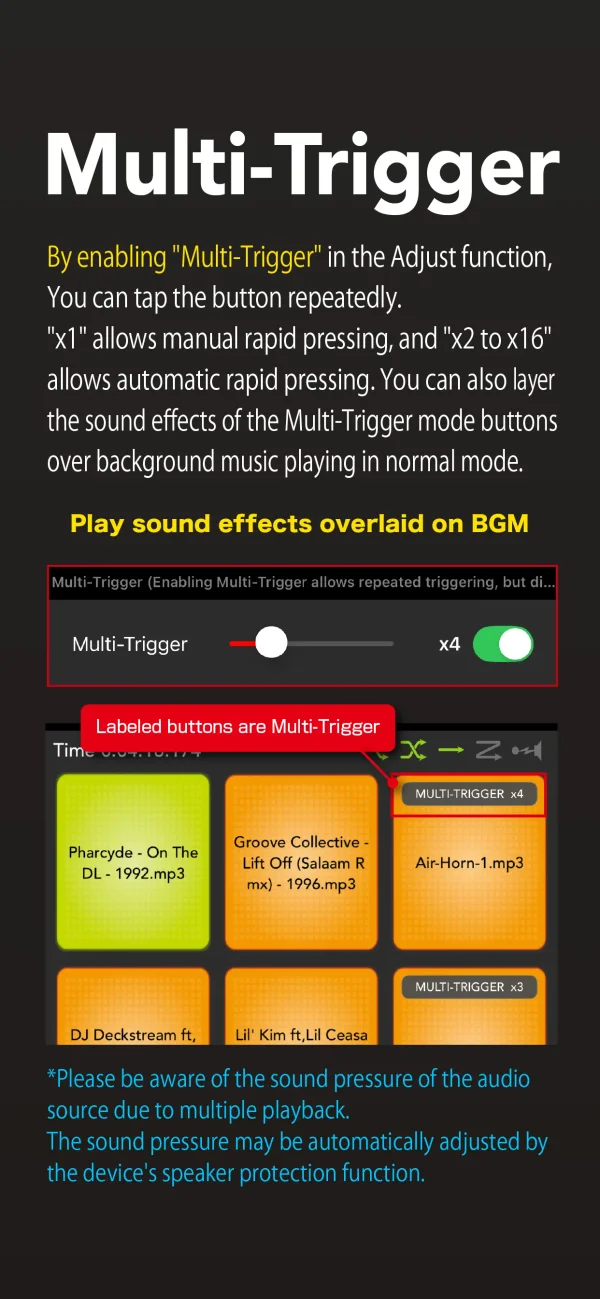
- Add Multi-Trigger function.
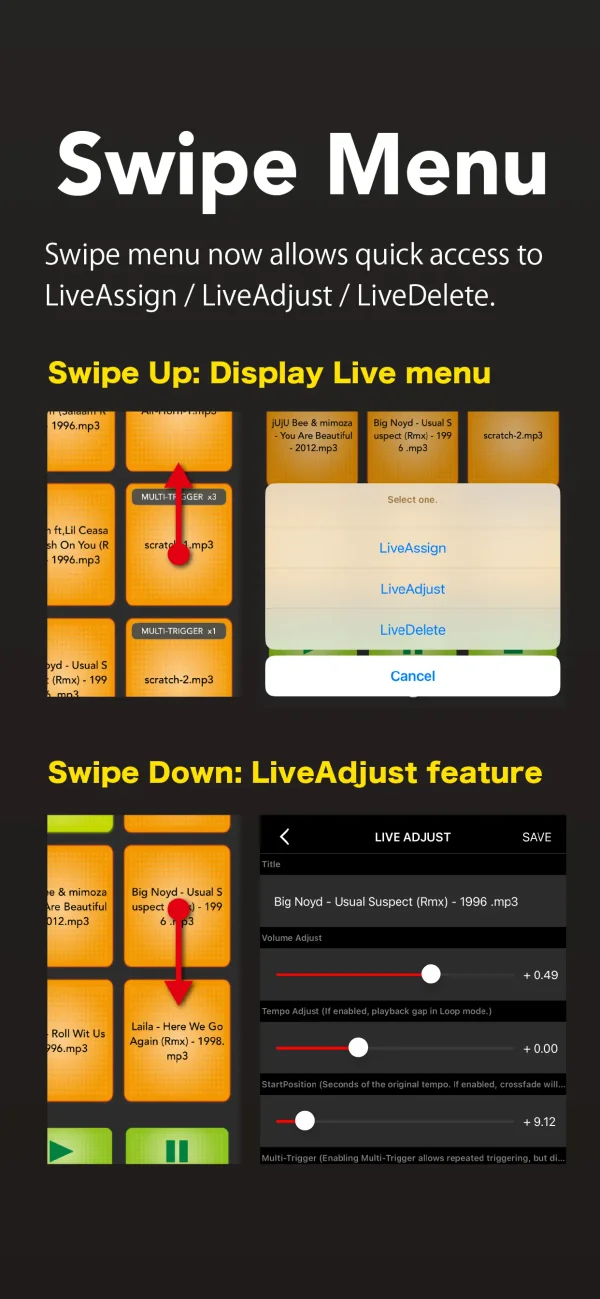
- Add LiveAssign / LiveAdjust / LiveDelete function.
- Updated screen images.
- Bug fixes.
---
Update information: 1.9.5
- Compatible with iOS 18.7 and iPadOS 18.7
---
Update information: 1.9.4
- Compatible with iOS 18.5 and iPadOS 18.5
---
Update information: 1.9.3
- Compatible with iOS 18.3 and iPadOS 18.3
- Fixed an issue where the Japanese Romaji keyboard was unavailable on iOS 18.3.
---
Update information: 1.9.2
- Compatible with iOS 18.1 and iPadOS 18.1
- Update Dropbox API
- Bug fixes.
-----
Update information: 1.9.1
- Fixed a bug in the display change function of the assigned sound source name.
- Fixed a bug in the layout of the sort function.
- Fixed display related to Dropbox assignment.
- Fixed internal reload handling.
- Updated screen images.
-----
Update information: 1.9.0
- Added sequential playback function.
The sound source set to the pad will be automatically playback sequentially.
You can use it by enabling "Sequential Playback" on the settings screen.
-----
Update information: 1.8.6
- Compatible with iOS 17.1 and iPadOS 17.1
-----
Update information: 1.8.5
- Fixed an alert bug in Music Library.
- Fixed a screen display bug of Dropbox.
-----
Update information: 1.8.4
- Compatible with iOS 16.4.1 and iPadOS 16.4.1
- You can now operate the assignment screen while the sound source is playing.
- Icon change
- Minor display corrections
- Bug fix.
-----
Update information: 1.8.3
- Change primary language to English.
- Edit screenshot.
-----
Update information: 1.8.2
- English localization added.
- Fixed minor bugs.
-----
Update information: 1.8.1
- Fixed a display bug.
---
Note:
In order to solve a bug in sound source data assignment, modifications have been made to the data storage directory structure. Although we have performed automatic migration as much as possible for sound sources already assigned in the previous version, some sound sources in iCloud and Dropbox may need to be reassigned. When applying the update, please make sure to do so when you have time to check the assigned sound sources.
App privacy
What RENAVE INC. declares on the App Store about how this app handles data.
-
Data not linked to you
May be collected but is not linked to your identity.
- Identifiers
Privacy practices may vary, for example with the features you use or your age.
Information
- Seller
- RENAVE INC.
- Category
- Music
- Version
- 1.12.3
- Updated
- Nov 16, 2026
- Released
- Oct 24, 2017
- Size
- 69.4 MB
- Requires
- iOS 15.0 or later
- Age rating
- 4+
- Languages
- English, Japanese
- Copyright
- © REAVE INC.
You might also like
-
 SoundPad LiveMusic
-
 PonPlayerMusic
-
 SoundsCuteSoundboard App Cart wall App
-
 LivePlaybackAppMusic
-
 Time Director ProBroadcast timing tool
-
 CueZy 9 Pad SamplerPlay your Music Dramatically!
-
 KLANG2Music
-
 Ultimate Soundboard ProPodcasting, sports, pro audio.
-
 SoundBoard Pro StudioSoundboard for Live Shows
-
 AG08 ControllerMusic