
- Age rating4+
- CategoryUtilities
- DeveloperHartwig Hopfenzitz
- LanguagesGerman+ 1 more
- Size5.9 MB
Links to the official App Store page
Download.org hosts no file of Speed Dial Easy. The button opens its official App Store page, published by Hartwig Hopfenzitz. Listing last checked on Nov 12, 2026.
Screenshots


About
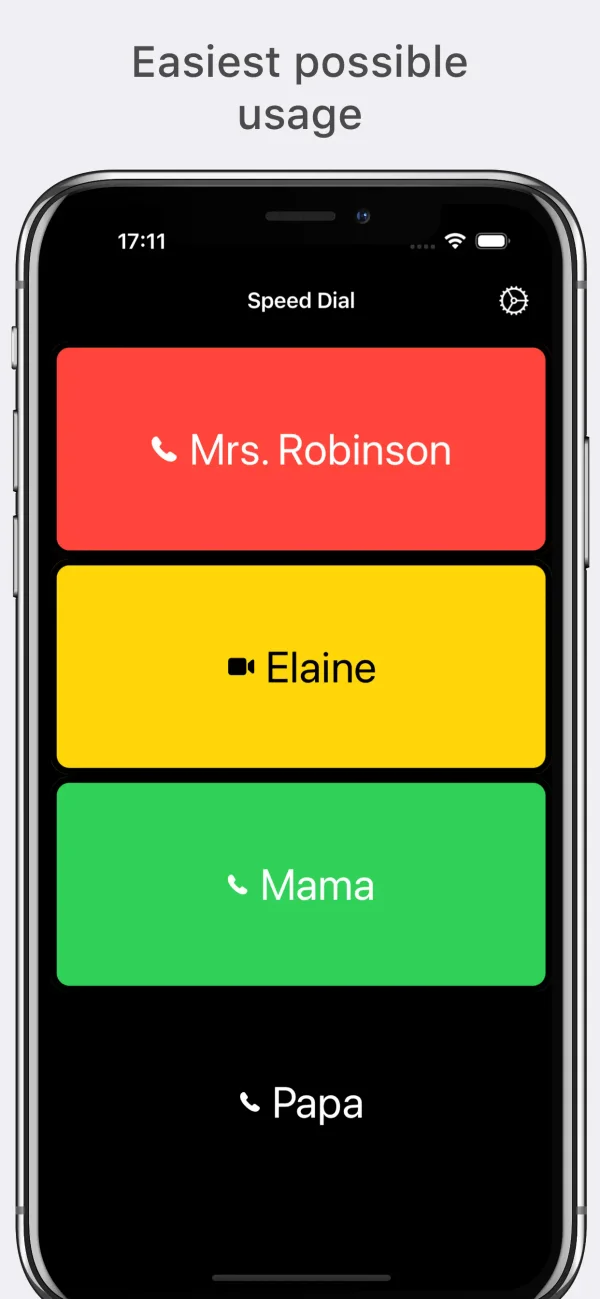
I built this simply but helpful speed dial app for my father. He kept getting lost in the phone app. Therefore, the user guidance is deliberately designed to be simple and catchy.
You can make both phone calls and FaceTime calls (video or audio only).
No confusing options, no "nifty" abbreviations of abbreviations.
Start SpeedDial, tap on a name and start the call.
My wife was so excited that SHE has been using SpeedDial very intensively since then.
Therefore, it is not only a support for elderly people who find it difficult to use modern user interfaces, but also and especially something for people who simply want to reach the 9 most important people in their lives with a fingertip.
SpeedDial only has two screen pages.
There are one to nine short dial entries on the main page.
The entries automatically make the best possible use of the available space. They are colorfully designed so that they are more catchy.
You can set up the entries on the second page.
You only need the names and the associated phone numbers.
If you do not want to use all of the nine possible entries, you simply leave the name slot empty. Entries without a name are not displayed on the main page. It's that easy...
... and the space saved will be used for the other entries, which then get more display space.
Supports VoiceOver.
Important: For security reasons, IOS does not allow any app to simply call a number. Therefore, a short question always appears when a phone call is intended. This can be answered immediately with a short tap. This security question is a very useful function and does not interfere.
Have fun..
What’s new
Version 1.1.2 · Jan 11, 2026
Just an update for IOS 26
App privacy
What Hartwig Hopfenzitz declares on the App Store about how this app handles data.
-
Data not collected
The developer does not collect any data from this app.
Privacy practices may vary, for example with the features you use or your age.
Information
- Seller
- Hartwig Hopfenzitz
- Category
- Utilities
- Version
- 1.1.2
- Updated
- Jan 11, 2026
- Released
- Dec 23, 2020
- Size
- 5.9 MB
- Requires
- iOS 26.0 or later
- Age rating
- 4+
- Languages
- German, English
- Copyright
- © 2024 Hartwig Hopfenzitz
You might also like
-
 Quick Fav Dial - Smart DialerOne-Tap Photo Speed Dial
-
 AccessibleLabelsLabels for the blind
-
 ConnectEasyConnect me easily! Call/text!
-
 NineOneOne – Emergency DialerCustomizable One-Touch Calling
-
 Photo Vault – Store FilesDelete Duplicate Photos Smart.
-
 Ready CallAll your essential numbers
-
 Smart & Fast DialerWelcome to Smart & Fast Dialer
-
 Hourly Chime & Speaking ClockTime Announcements & Reminders
-
 WebCapture- full page captureFull page scrolling screenshot