
- Age rating4+
- CategoryProductivity
- DeveloperNornio
- LanguagesEnglish
- Size2.3 MB
Links to the official App Store page
Download.org hosts no file of StudioTools Connect. The button opens its official App Store page, published by Nornio. Listing last checked on Nov 21, 2026.
Screenshots
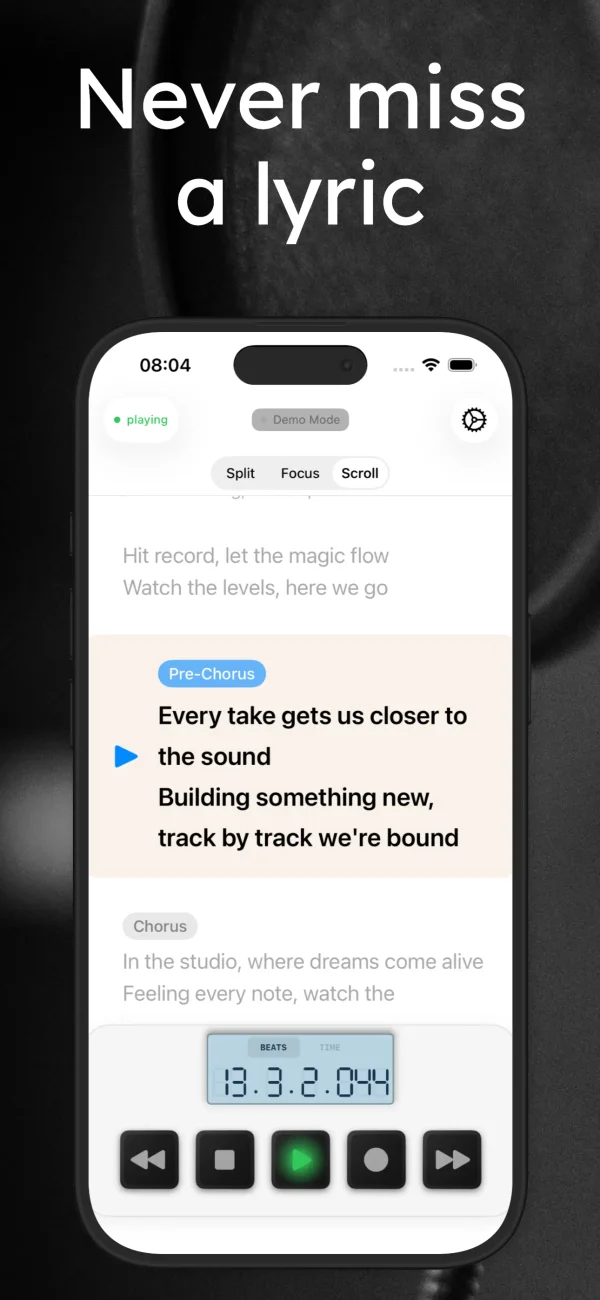

About
Transform your iPhone or iPad into a professional studio companion with StudioTools Connect – the free iOS app that seamlessly integrates with StudioTools for Mac.
WHAT IS STUDIOTOOLS CONNECT?
StudioTools Connect brings your recording session to your iOS device, providing real-time DAW status, timecode display, and synchronized lyrics prompting. Perfect for vocalists, musicians, and producers who want hands-free access to essential session information.
KEY FEATURES
Real-Time DAW Integration
• Live recording status (Recording, Playing, Idle)
• Accurate timecode display synced with Logic Pro, Pro Tools, and other HUI supported DAWs
• Multiple timecode format support (SMPTE, Bars.Beats, Minutes:Seconds, Samples)
• Customizable display options (hide frames, keep screen awake)
Professional Lyrics Prompter
• Timecode-synchronized lyrics display
• Automatic scrolling and highlighting during playback
• Current + Next section preview
• Large, readable text optimized for distance viewing
• Perfect for vocal recording sessions
Studio Remote Control
• Monitor recording state from anywhere in the room
• Clean, distraction-free interface
• Works over your local Wi-Fi network
• No internet connection required
PERFECT FOR:
• Vocalists recording in the booth
• Musicians tracking instruments away from the computer
• Producers monitoring sessions from the live room
• Podcasters following scripts during recording
• Voice-over artists tracking narration
HOW IT WORKS
1. Install StudioTools on your Mac (separate purchase)
2. Download StudioTools Connect on your iOS device (FREE)
3. Connect both devices to the same Wi-Fi network
4. StudioTools Connect automatically finds your Mac
5. Tap your Mac's name to connect
6. Start recording - it's that simple!
REQUIREMENTS
• StudioTools for Mac (version 2.1 or later) - available on the Mac App Store
• iOS 17.0 or later
• Mac and iOS device on the same local network
• Compatible DAW: Logic Pro, Pro Tools, or any DAW with HUI/MIDI control surface support
PRIVACY & SECURITY
• All communication happens locally on your network
• No data sent to external servers
• No account registration required
ABOUT STUDIOTOOLS
StudioTools is a professional macOS application that bridges your DAW with smart home automation, video recording, and now iOS devices. StudioTools Connect extends this functionality to your iPhone and iPad, making your entire studio smarter and more connected.
SUPPORT
Questions or feedback? Contact us at studiotools@norn.io or visit norn.io/studiotools
---
Note: StudioTools Connect is a companion app and requires StudioTools for Mac (sold separately) to function.
What’s new
Version 1.0.3 · Nov 3, 2026
• A new, sharper LED time display that fills its space, shows whether it's counting Bars or Min:Sec, and keeps its width as the numbers grow • The teleprompter and the time display use much less processing power during playback — smoother, and easier on your battery
Improvements and bug fixes
App privacy
What Nornio declares on the App Store about how this app handles data.
-
Data not collected
The developer does not collect any data from this app.
Privacy practices may vary, for example with the features you use or your age.
Information
- Seller
- Nornio AB
- Category
- Productivity
- Version
- 1.0.3
- Updated
- Nov 3, 2026
- Released
- Dec 8, 2025
- Size
- 2.3 MB
- Requires
- iOS 17.6 or later
- Age rating
- 4+
- Price
- Free
- Languages
- English
- Copyright
- © 2025 Nornio AB
You might also like
-
 Par: AI Memory & AppsUse the apps your AI builds
-
 Helg: Family ManagerCapture now, decide weekly
-
 Flux HA DashboardA Dashboard for Home Assistant
-
 Organizea - Task PlannerKanban for modern projects
-
 AidemFind clip fast by video memo.
-
 Study Planner AISyllabus to study plans
-
 Wall Portfolio for ArtistArt portfolio as PDF, web page
-
 OverdeckMobile streaming controller
-
 Live Timecode NotesTake notes with real timecode
-
 AbilityNotesProductivity