StudioTools Connect
DAW Remote & Lyrics Display
iPhone, iPad için tasarlandı
Ücretsiz
- Yaş sınırı4+
- KategoriÜretkenlik
- GeliştiriciNornio
- Dillerİngilizce
- Boyut2,3 MB
Resmi App Store sayfasına bağlanır
Download.org, StudioTools Connect için hiçbir dosya barındırmaz. Düğme, uygulamanın App Store üzerindeki sayfasını açar; uygulamayı orada Nornio yayınlar. Sayfanın son kontrolü: 21.11.2026.
Ekran görüntüleri

Hakkında
Geliştirici bu metni dilinizde sunmamış.
Transform your iPhone or iPad into a professional studio companion with StudioTools Connect – the free iOS app that seamlessly integrates with StudioTools for Mac.
WHAT IS STUDIOTOOLS CONNECT?
StudioTools Connect brings your recording session to your iOS device, providing real-time DAW status, timecode display, and synchronized lyrics prompting. Perfect for vocalists, musicians, and producers who want hands-free access to essential session information.
KEY FEATURES
Real-Time DAW Integration
• Live recording status (Recording, Playing, Idle)
• Accurate timecode display synced with Logic Pro, Pro Tools, and other HUI supported DAWs
• Multiple timecode format support (SMPTE, Bars.Beats, Minutes:Seconds, Samples)
• Customizable display options (hide frames, keep screen awake)
Professional Lyrics Prompter
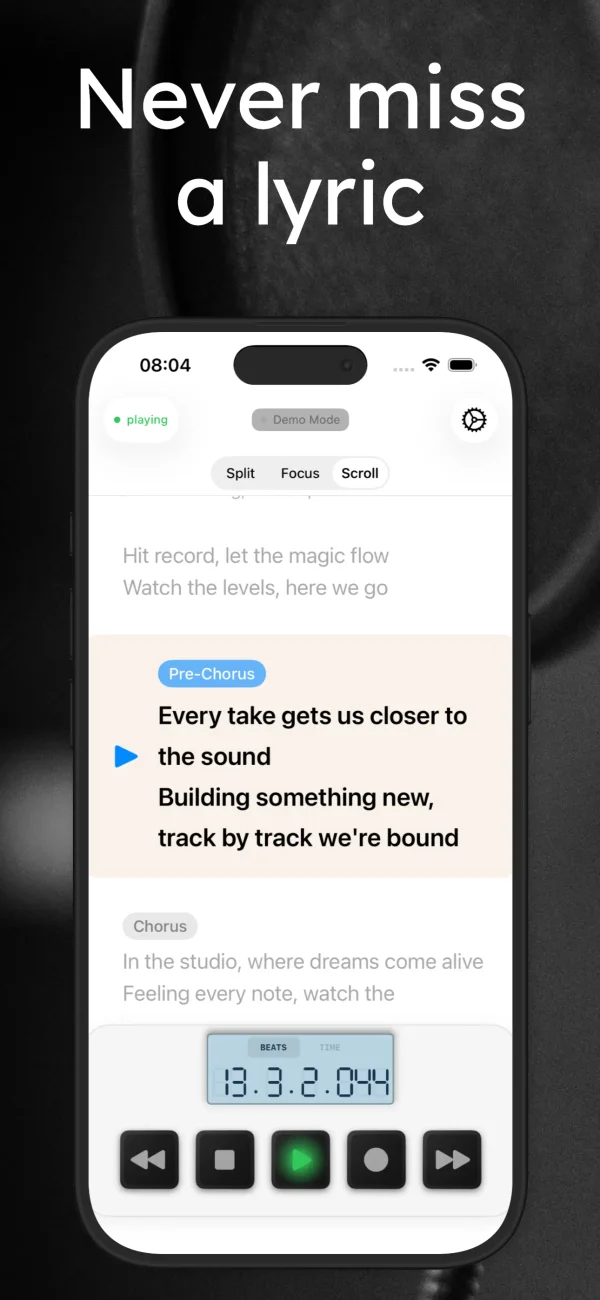
• Timecode-synchronized lyrics display
• Automatic scrolling and highlighting during playback
• Current + Next section preview
• Large, readable text optimized for distance viewing
• Perfect for vocal recording sessions
Studio Remote Control
• Monitor recording state from anywhere in the room
• Clean, distraction-free interface
• Works over your local Wi-Fi network
• No internet connection required
PERFECT FOR:
• Vocalists recording in the booth
• Musicians tracking instruments away from the computer
• Producers monitoring sessions from the live room
• Podcasters following scripts during recording
• Voice-over artists tracking narration
HOW IT WORKS
1. Install StudioTools on your Mac (separate purchase)
2. Download StudioTools Connect on your iOS device (FREE)
3. Connect both devices to the same Wi-Fi network
4. StudioTools Connect automatically finds your Mac
5. Tap your Mac's name to connect
6. Start recording - it's that simple!
REQUIREMENTS
• StudioTools for Mac (version 2.1 or later) - available on the Mac App Store
• iOS 17.0 or later
• Mac and iOS device on the same local network
• Compatible DAW: Logic Pro, Pro Tools, or any DAW with HUI/MIDI control surface support
PRIVACY & SECURITY
• All communication happens locally on your network
• No data sent to external servers
• No account registration required
ABOUT STUDIOTOOLS
StudioTools is a professional macOS application that bridges your DAW with smart home automation, video recording, and now iOS devices. StudioTools Connect extends this functionality to your iPhone and iPad, making your entire studio smarter and more connected.
SUPPORT
Questions or feedback? Contact us at studiotools@norn.io or visit norn.io/studiotools
---
Note: StudioTools Connect is a companion app and requires StudioTools for Mac (sold separately) to function.
Yenilikler
Sürüm 1.0.3 · 03.11.2026
• A new, sharper LED time display that fills its space, shows whether it's counting Bars or Min:Sec, and keeps its width as the numbers grow • The teleprompter and the time display use much less processing power during playback — smoother, and easier on your battery
Improvements and bug fixes
Uygulama gizliliği
Bu uygulamanın verileri nasıl işlediği hakkında Nornio tarafından App Store üzerinde yapılan beyan.
-
Veri toplanmıyor
Geliştirici bu uygulamadan hiçbir veri toplamıyor.
Gizlilik uygulamaları, örneğin kullandığınız özelliklere veya yaşınıza göre değişiklik gösterebilir.
Bilgiler
- Satıcı
- Nornio AB
- Kategori
- Üretkenlik
- Sürüm
- 1.0.3
- Güncellendi
- 03.11.2026
- Yayın tarihi
- 08.12.2025
- Boyut
- 2,3 MB
- Gereksinim
- iOS 17.6 veya sonrası
- Yaş sınırı
- 4+
- Fiyat
- Ücretsiz
- Diller
- İngilizce
- Telif hakkı
- © 2025 Nornio AB