
SupplyAssist: Pantry & Recipes
Grocery List & Meal Planner
Designed for iPhone
Free
- Age rating4+
- CategoryFood & Drink
- DeveloperKAJOHN YOGARAJAH
- LanguagesEnglish+ 1 more
- Size9.6 MB
Links to the official App Store page
Download.org hosts no file of SupplyAssist: Pantry & Recipes. The button opens its official App Store page, published by KAJOHN YOGARAJAH. Listing last checked on Nov 23, 2026.
Screenshots



About
SupplyAssist shows you what's left at home and what you need from the store. Your pantry, grocery list, recipes and meal plan live in one app, and you share it all with your family, partner or roommates via iCloud.
When a product drops below its minimum stock, SupplyAssist puts it on "Needed". After shopping, the app adds everything to your supplies. When you cook a recipe, it subtracts the ingredients.
PANTRY & SUPPLIES
• Products with amount, category and minimum stock
• Tiles and numbers show you what's missing
• Below the minimum stock it says "Needed"
• Swipe right to put a product on the shopping list
• New: package sizes. Tap + or − to change the amount by one package
GROCERY LIST
• Your list as tiles, sorted by category
• Start shopping, tap a tile, into the cart
• Finish shopping and everything you bought is in your supplies
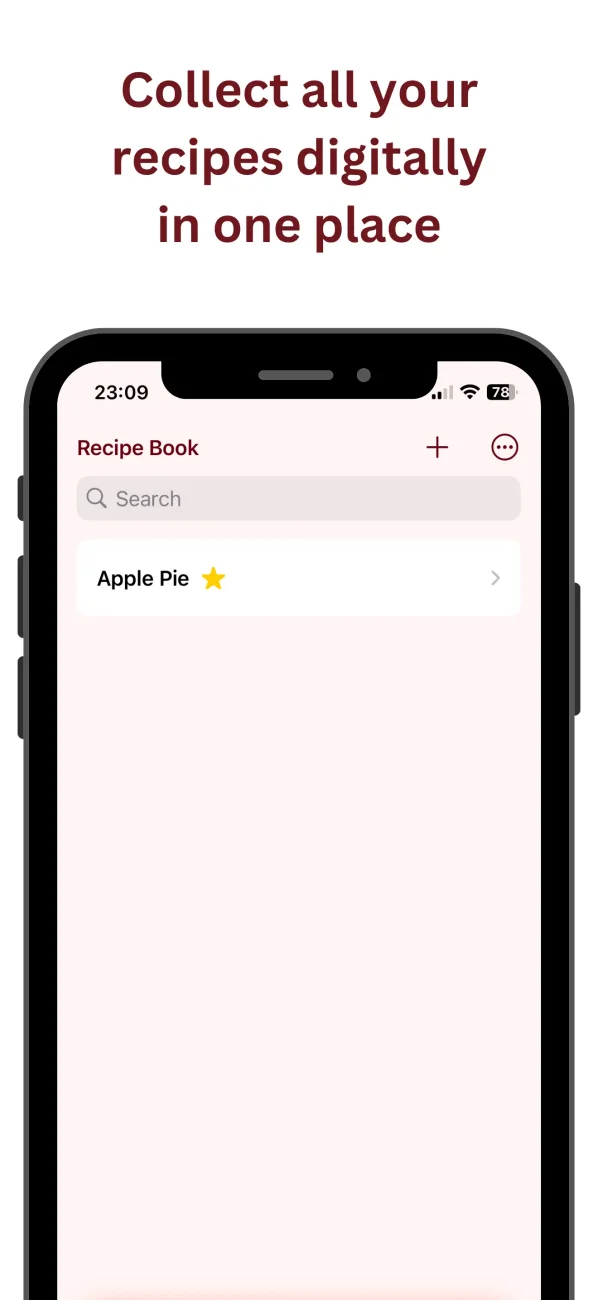
RECIPE BOOK
• Recipes with photo, ingredients, steps, time and portions
• Change the portions and the ingredient amounts follow
• Step-by-step cooking mode with a timer. The timer rings even in silent mode and runs as a Live Activity on the Lock Screen
• Put missing ingredients on the shopping list with one tap
• "Recipe Cooked" subtracts the ingredients from your supplies
WEEKLY MEAL PLANNER
• Spread your recipes across days and meals
• The week strip shows you which days are still free
• Create a shopping list for selected days
• Move meals or start cooking right away
SHARED HOUSEHOLD
• Create several homes, each with its own supplies, shopping list, recipes and meal plan
• Share a home with your family, partner or roommates via iCloud and edit it together
• Copy or move products and recipes between homes
HOME SCREEN
• Tiles for favorite supplies, favorite recipes, the shopping list and today's meals
• Below them, the "Needed" list
YOUR DATA STAYS YOURS
• Syncs through your iCloud, no sign-up, no extra account
• Free, no ads, no subscription
• Light and dark design
Questions or ideas? Get in touch via the support page. I build SupplyAssist on my own, and every App Store rating helps the app grow.
What’s new
Version 2.0 · Nov 9, 2026
New in SupplyAssist 2.0:
• Multiple homes: each home has its own supplies, shopping list, recipes and meal plan.
• Share a home: invite others via iCloud and edit supplies, shopping list and recipes together.
• Copy between homes: copy or move products and recipes to another home.
• Cooking timer on the Lock Screen: the timer rings as an alarm, even in silent mode, and runs as a Live Activity.
• Package sizes: tap + or − to change the amount by one package.
• Teaspoons and tablespoons: add recipe ingredients in tsp and tbsp.
• New design: supplies and shopping list by category, recipes with photos and a meal plan with a week strip.
Enjoying SupplyAssist? As a solo developer, I read every rating.
App privacy
What KAJOHN YOGARAJAH declares on the App Store about how this app handles data.
-
Data not collected
The developer does not collect any data from this app.
Privacy practices may vary, for example with the features you use or your age.
Information
- Seller
- KAJOHN YOGARAJAH
- Category
- Food & Drink
- Version
- 2.0
- Updated
- Nov 9, 2026
- Released
- Oct 18, 2026
- Size
- 9.6 MB
- Requires
- iOS 26.0 or later
- Age rating
- 4+
- Price
- Free
- Languages
- English, German
- Copyright
- © 2026 Kajohn Yogarajah
You might also like
-
 xNotes - AI for Meeting, StudyVoice Recorder with Summaries
-
 ZEUS mobileProductivity
-
 LangdockAI chat for your workspace
-
 Minimal Launcher – on pointDumb Phone Home Screen
-
 Habit Hearts - Habit TrackerDaily Goal & Routine Planner
-
 GMX FreePhoneProductivity
-
 Zoll-IdentAuthenticator for Customs
-
 Habit Tracker : HabyBuild Atomic Habits for Life
-
 Shared, the Family OrganizerCalendar, agenda, co-parenting
-
 ALE RainbowConnect and communicate