
- Age rating4+
- CategoryUtilities
- DeveloperGiulio Mecocci
- LanguagesEnglish
- Size2.9 MB
Links to the official App Store page
Download.org hosts no file of Tapeze (Typing). The button opens its official App Store page, published by Giulio Mecocci. Listing last checked on Nov 14, 2026.
Screenshots
About
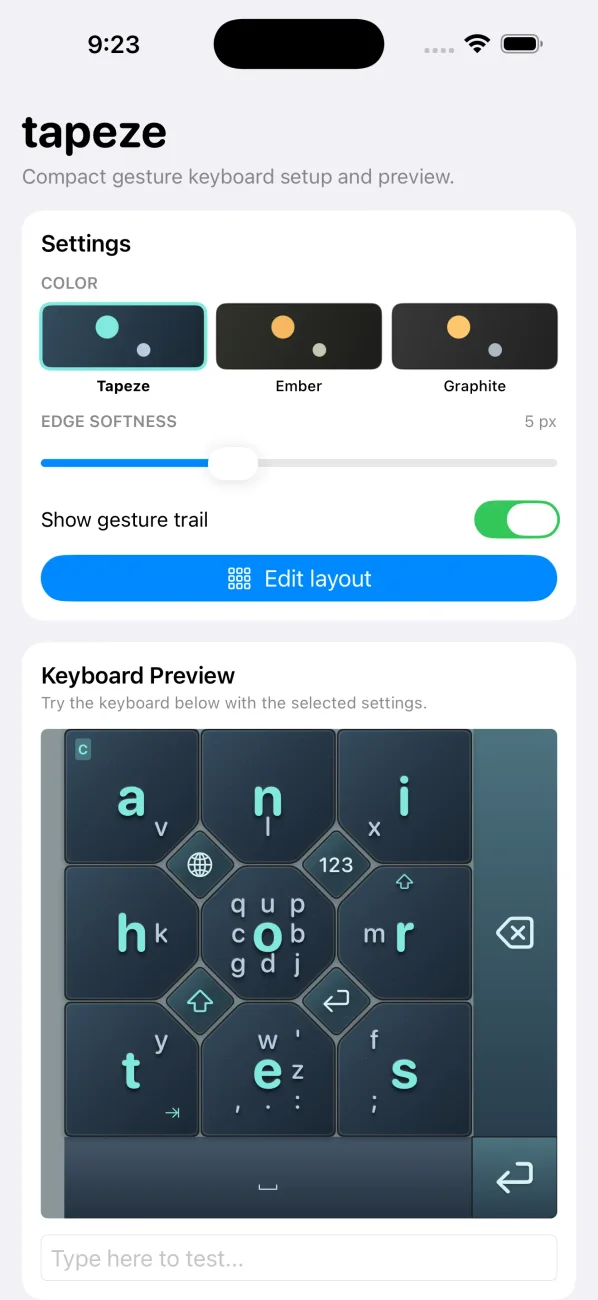
Tapeze is a compact gesture keyboard. Nine large keys hold the most common letters. Everything else — the rest of the alphabet, numbers, symbols and punctuation — lives in short swipes from those same nine keys.
Because the keys are large, you hit them without looking. Because every swipe starts from a key you already know, the layout becomes muscle memory instead of a hunt.
HOW IT WORKS
• Tap a key to type the letter in its centre
• Swipe from a key toward a neighbouring letter to type it
• Swipe out and back for a capital
• Draw a small circle on a key for its capital
• Sweep sideways across three keys for a space, downward to delete
• Swipe up from the space strip to reveal the symbols
BUILT AROUND YOUR THUMBS
Space and delete have no dedicated keys. They are full-width strips along the bottom and top edges, so they sit under your thumb wherever your hand rests. Swipe along the delete strip to remove a whole word; swipe along the space strip to move the cursor a character at a time.
CAPITALS THAT BEHAVE
Sentences capitalise themselves — at the start of a document, after a new line, and once a sentence ends. Any gesture the keyboard reads as a capital resolves to a letter, so a rounded stroke never leaves a stray symbol behind.
MAKE IT YOURS
Resize the keyboard, move the controls to either side, hide the on-key labels once you have learned the layout, and switch the gesture trail on or off.
PRIVACY
Tapeze does not collect your data. What you type is not recorded, not stored and not sent anywhere. Full Access is required so the keyboard can read the layout settings you choose in the app and paste from the clipboard — nothing leaves your device.
What’s new
Version 1.1.3 · Nov 13, 2026
- Redesigned layout editor built around one large focused key
- The app now warns when the keyboard needs Full Access to use your chosen color
App privacy
What Giulio Mecocci declares on the App Store about how this app handles data.
-
Data not collected
The developer does not collect any data from this app.
Privacy practices may vary, for example with the features you use or your age.
Information
- Seller
- Giulio Mecocci
- Category
- Utilities
- Version
- 1.1.3
- Updated
- Nov 13, 2026
- Released
- Sep 12, 2026
- Size
- 2.9 MB
- Requires
- iOS 16.0 or later
- Age rating
- 4+
- Languages
- English
- Copyright
- © 2026 Giulio Mecocci
You might also like
-
 SuperType: Voice KeyboardSpeak. It types it clean.
-
 VoiceType: AI Voice TypingTalk to type in any app
-
 Swipeys KeyboardOne thumb, no row hunting.
-
 mazecHandwriting input method
-
 WurstfingerThe Keyboard for Fat Fingers
-
 TypeFlow: Smart KeyboardSmart Typing & Urdu - English
-
 Sidekey: Wireless KeyboardTrackpad, shortcuts & voice
-
 zellopon keyboardMake typing fun and easy
-
 SweetKeyboard ProUtilities
-
 Romanized Sindhi KeyboardUtilities