
Teleprompt Overlay
Read scripts over your camera
Designed for iPhone, iPad
Free · In-app purchases
- Age rating4+
- CategoryPhoto & Video
- DeveloperApplifyer, LLC
- LanguagesEnglish+ 6 more
- Size5.5 MB
Links to the official App Store page
Download.org hosts no file of Teleprompt Overlay. The button opens its official App Store page, published by Applifyer, LLC. Listing last checked on Nov 18, 2026.
Screenshots


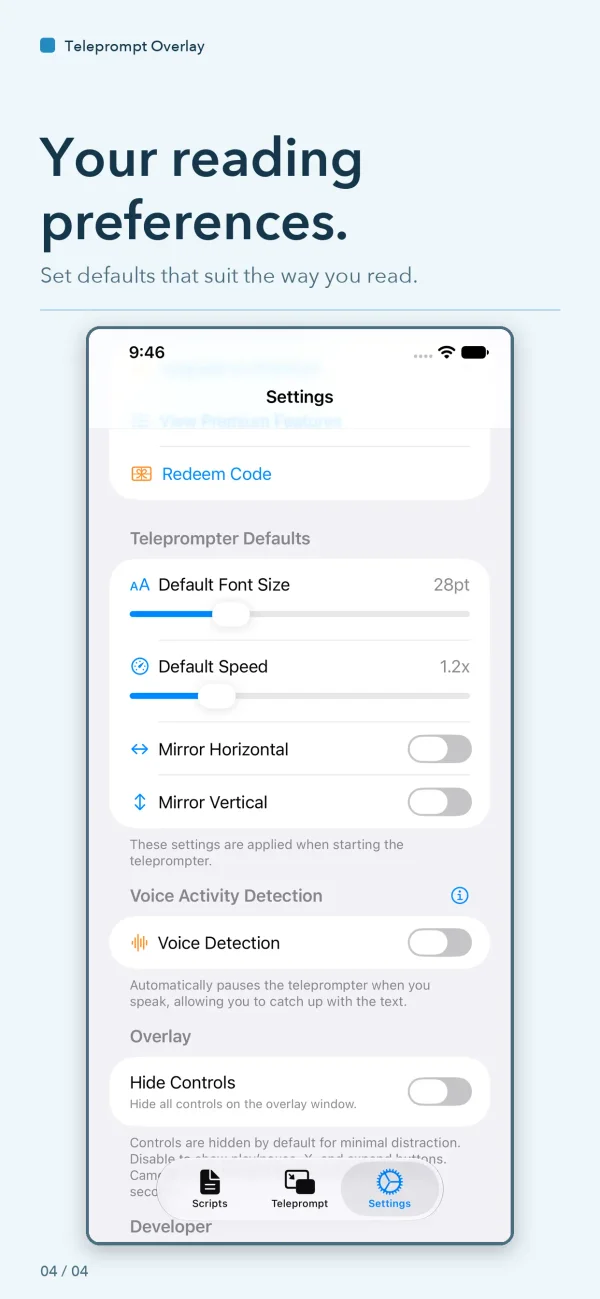
About
Read your script while you record with Teleprompt Overlay for iPhone and iPad.
Keep your words near the lens in a floating Picture in Picture panel. Open a compatible camera or recording app, set a comfortable reading speed, and focus on your delivery.
READ AND RECORD
- Write, paste, edit, and import scripts.
- Keep the script visible in Picture in Picture while using another app.
- Adjust text size, colors, scrolling speed, panel placement, and opacity.
- Mirror text for a compatible teleprompter rig.
- Use play, pause, and restart controls when you need them.
VOICE CONTROL
Voice scrolling uses sound levels on your device to run your chosen speed while you speak and pause when you stop. It does not recognize words, transcribe audio, or automatically match your pace. Voice audio is not recorded or uploaded. Microphone availability can depend on the recording app.
CAMERA VIDEO AND SCREEN CAPTURE
The floating panel is drawn on your screen, rather than added to the camera feed. Screen recordings and whole-screen sharing can include it. Make a short test recording in your setup first.
FREE AND PREMIUM
The app is free to download with creation and import allowances. Reading is not limited to one hour. Optional monthly or yearly Premium subscriptions remove the free limits. Your App Store purchase screen shows the current price and available terms for your region. Use Restore Purchases in the app for an existing Apple subscription.
Subscriptions renew automatically unless cancelled through your Apple account before renewal. Manage or cancel them in App Store subscription settings. Cross-platform account and sync features are in beta and may differ from the public store version.
Setup and support: https://telepromptoverlay.app/help
Platforms: https://telepromptoverlay.app/platforms
Privacy: https://applifyer.com/teleprompt_privacy
Terms: https://applifyer.com/teleprompt_terms
Apple standard EULA: https://www.apple.com/legal/internet-services/itunes/dev/stdeula/
What’s new
Version 2.6.4 · Nov 16, 2026
• Voice scrolling works with Bluetooth earbuds and USB microphones, with a new microphone picker in Settings.
• Voice detection now ignores keyboard taps and stops scrolling right after you stop speaking.
• The text keeps scrolling while the Camera app records.
• A small Listening / Speaking chip replaces the old microphone icon in the floating window.
• Closing the floating window now ends the session, so it no longer reopens when you leave the app.
• New languages: Spanish, German, French, Dutch and Albanian.
App privacy
What Applifyer, LLC declares on the App Store about how this app handles data.
-
Data not collected
The developer does not collect any data from this app.
Privacy practices may vary, for example with the features you use or your age.
Information
- Seller
- Applifyer, LLC
- Category
- Photo & Video
- Version
- 2.6.4
- Updated
- Nov 16, 2026
- Released
- Nov 26, 2025
- Size
- 5.5 MB
- Requires
- iOS 16.0 or later
- Age rating
- 4+
- Price
- Free
- In-app purchases
- Yes
- Languages
- English, Albanian, Dutch, French, German, Portuguese, Spanish
- Copyright
- © Applifyer, LLC
You might also like
-
 Teleprompter PiP - Any CameraFloating Prompter, Auto Cue
-
 PromptFly TeleprompterFloating Voice Cue Prompter
-
 Teleprompter-float above appsTeleprompter for all creator
-
 Teleprompter TikCueRead Script, Prompt for Video
-
 Wispim: Voice TeleprompterBest teleprompter for video
-
 NanoPrompter: TeleprompterFree Teleprompter for Video
-
 Teleprompter-Floating DialogueShoot video teleprompter
-
 Teleprompter: Camera OverlayScript follows your voice · 4K
-
 Teleprompter AI & Video-CueRead to camera, record video