
TimeSlicer Camera
Slit‑scan video camera
Designed for iPhone
Free · In-app purchases
- Age rating4+
- CategoryPhoto & Video
- Developeryoshihiro kunihara
- LanguagesEnglish+ 1 more
- Size1.5 MB
Links to the official App Store page
Download.org hosts no file of TimeSlicer Camera. The button opens its official App Store page, published by yoshihiro kunihara. Listing last checked on Nov 18, 2026.
Screenshots




About
TimeSlicer lets you enjoy slit‑scan visuals—“thin vertical slices” of time layered continuously—in real time on your phone. The more your subject moves, the more motion turns into flowing patterns, transforming everyday scenes, people, and trails of light into art made of time.
Key Features
- Real‑time slit‑scan: shoot while checking results with a live preview.
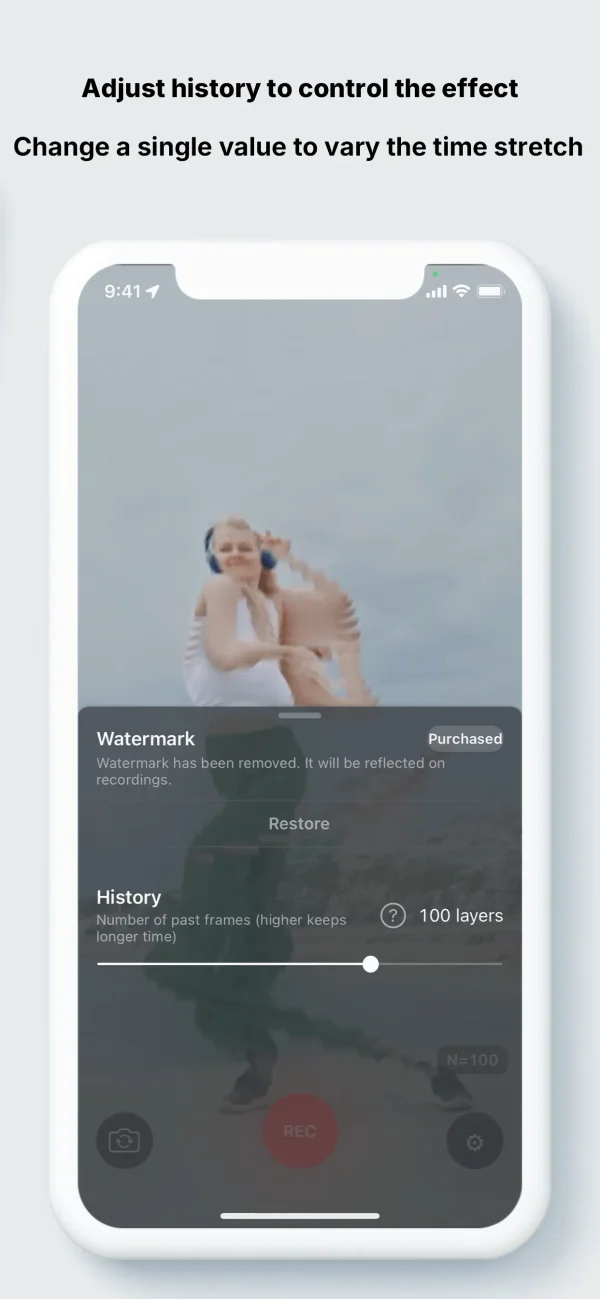
- Intuitive control: adjust History to instantly control how long the effect stretches.
- Fast 64‑bit processing: GPU‑powered rendering for smooth preview and recording.
- One‑tap recording: simple REC/STOP UI with countdown for up to 60‑second takes.
- Front/back camera switch: toggle with a tap.
- Save as is: save the effected video to your Photos library.
- Minimal HUD: compact history readout that stays out of your way.
How to Use
1. Open the app to see the live preview.
2. Open Controls (gear icon) and adjust History to set intensity. Move your subject or pan the camera to create unique patterns.
3. Tap REC to start recording. When you stop, the video is saved to Photos automatically.
Great For
- Visualizing motion trails in dance, fashion, and runway.
- Abstracting flows of cityscapes and night lights.
- Turning small daily actions into graphic visuals.
- Adding striking cuts to music videos and short‑form social posts.
In‑App Purchase
- Remove watermark (one‑time, non‑consumable).
Privacy & Permissions
- Processing happens on‑device. Recorded videos are saved to the user’s Photos library.
- No account required. Network access is used only when needed (help pages, in‑app purchases, etc.).
Tips
- Increasing History creates longer “flows”; lowering it produces crisper shapes.
- Continuous movements (walking, spinning, waving fabric or lights) yield richer patterns.
- Panning the camera at a steady speed stripes the background; keeping the camera fixed emphasizes deformation around the subject.
Design your own time.
Capture the “afterglow” of motion with TimeSlicer.
TimeSlicer was inspired by artist Toshio Iwai’s “Marshmallow Scope.” It’s based on a media installation originally created in 2008 and reimagined for iOS to play and explore on your phone.
What’s new
Version 1.0.2 · Oct 28, 2025
- Updated Support, Marketing, and Privacy Policy URLs to the latest pages.
App privacy
What yoshihiro kunihara declares on the App Store about how this app handles data.
-
Data not collected
The developer does not collect any data from this app.
Privacy practices may vary, for example with the features you use or your age.
Information
- Seller
- yoshihiro kunihara
- Category
- Photo & Video
- Version
- 1.0.2
- Updated
- Oct 28, 2025
- Released
- Oct 26, 2025
- Size
- 1.5 MB
- Requires
- iOS 16.6 or later
- Age rating
- 4+
- Price
- Free
- In-app purchases
- Yes
- Languages
- English, Japanese
- Copyright
- © 2025 RINPA
You might also like
-
 Face PortalA magic portal for your face
-
 SLIT_STUDIOAll-in-one slit-scan camera.
-
 UgokistReal-time camera effector
-
 PoloskaSlit-Scan camera
-
 SliceTimeCamSlitscan Camera app
-
 Motion Camera: Trail EffectsDynamic Photo & Video Creator
-
 Timetracks4DA camera that cuts out time
-
 ATOMxGALAXIESSphere dance w/ camera footage
-
 (d)effectReal-time glitch camera
-
 Mulch CamTime-mulch camera & VJ source