
Timezone Spoofer
Spoof browser timezone easily
Designed for iPhone, iPad, Mac, iPod touch
Free
- Age rating4+
- CategoryUtilities
- DeveloperZero Day Labs FZE
- LanguagesEnglish
- Size2.6 MB
Links to the official App Store page
Download.org hosts no file of Timezone Spoofer. The button opens its official App Store page, published by Zero Day Labs FZE. Listing last checked on Nov 18, 2026.
Screenshots

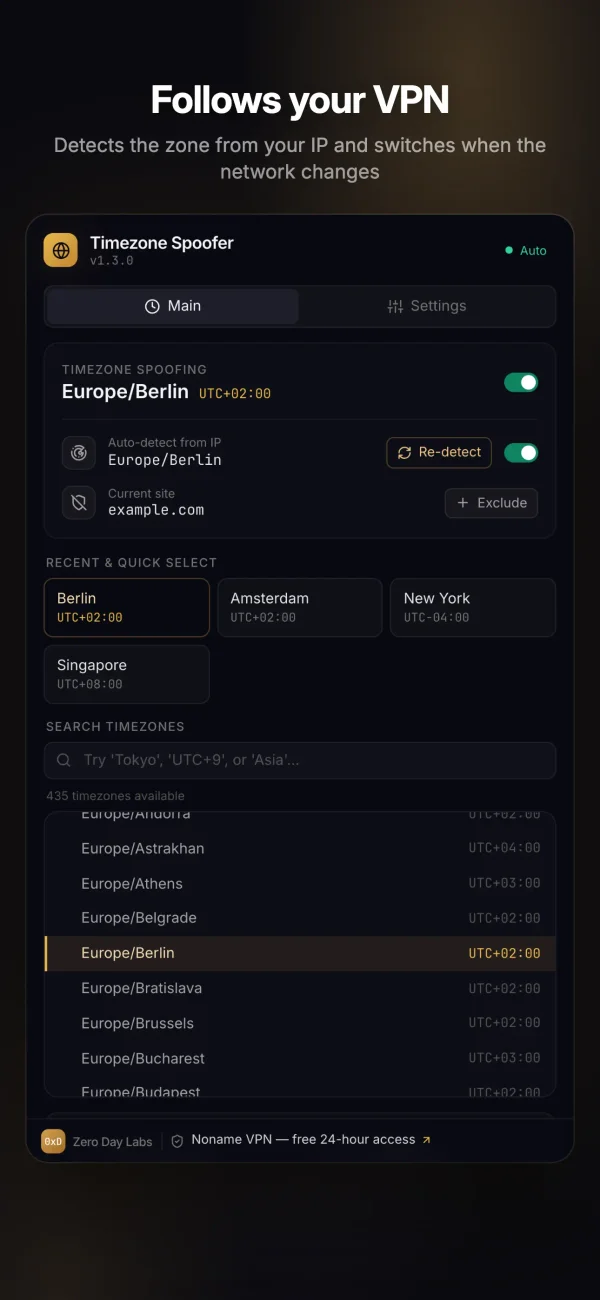
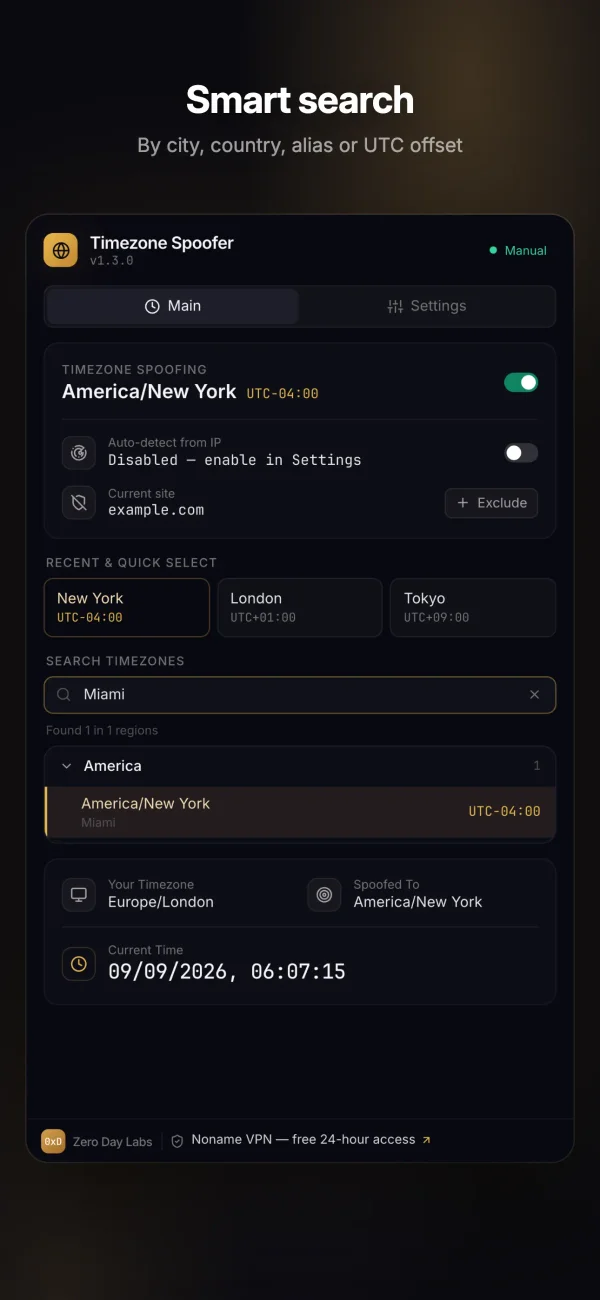

About
Timezone Spoofer lets you override your browser's timezone to any location worldwide. Perfect for developers, QA testers, and anyone who needs to simulate different time zones.
KEY FEATURES
• 400+ IANA Timezones — complete database covering every region
• Instant Search — find timezones by city, country, region, or UTC offset (33,000+ city names indexed)
• Easy Toggle — enable/disable spoofing with one click
• Site Exclusion List — disable spoofing on specific domains
• IP Auto-detect — automatically detect timezone from your IP address
• Theme Support — Light, Dark, and System theme options
• Keyboard Navigation — navigate timezone list with arrow keys
• Tabbed Interface — clean Main and Settings tabs with category navigation
• Toast Notifications — confirmation for every action
• Per-tab Badge — see spoofing status (active, excluded, disabled) at a glance
• Multilingual — English and Russian interface
• Works everywhere — overrides timezone APIs in all frames including iframes
HOW IT WORKS
1. Click the extension icon in Safari's toolbar
2. Enable timezone spoofing with the toggle
3. Search for your desired timezone (e.g., "Tokyo", "Miami", "UTC+5")
4. Select from results — the page reloads automatically
The extension overrides JavaScript's Date and Intl.DateTimeFormat APIs to return values for your selected timezone. All data stays local in your browser.
PERFECT FOR
• Testing timezone-dependent web features
• QA validation of international applications
• Debugging date/time displays and calendars
• Simulating user experiences across the globe
• Checking timezone-specific content
PRIVACY
• No data collection or tracking
• No analytics
• All settings stored locally in your browser
• Optional IP detection uses a configurable public API (off by default)
• No personal data is transmitted
What’s new
Version 1.3.0 · Sep 10, 2026
• New look: the popup was rebuilt on the Zero Day Labs design system — amber accent on dark glass cards, Inter and JetBrains Mono, inline icons instead of emoji. Both light and dark themes
• Faster: the popup is interactive in under 0.1 s and opens in a single frame — no resize, no theme flash, no font swap
• Main tab: one hero card with the spoofing toggle, current zone and live offset, auto-detect and current-site rows; recent zones as tiles; search with city aliases and match hints; keyboard navigation in the zone list (⌘F, arrows, Enter, Esc)
• Settings: segmented theme and language controls, re-check interval chips, geolocation API field, excluded sites
• Zero Day Labs footer with a short line about our other products
• New icon: amber globe with clock hands
App privacy
What Zero Day Labs FZE declares on the App Store about how this app handles data.
-
Data not collected
The developer does not collect any data from this app.
Privacy practices may vary, for example with the features you use or your age.
Information
- Seller
- Zero Day Labs FZE
- Category
- Utilities
- Version
- 1.3.0
- Updated
- Sep 10, 2026
- Released
- Mar 18, 2026
- Size
- 2.6 MB
- Requires
- iOS 15.0 or later
- Age rating
- 4+
- Price
- Free
- Languages
- English
- Copyright
- © 2026 Vladislav Starshinov
You might also like
-
 UA Switcher for Safari — LiteSpoof browser & desktop sites
-
 All SensorsLive data from 21 sensors
-
 MeshDropPrivate nearby file sharing
-
 VaultMeshPassword manager. P2P sync.
-
 GeoSpoof: Location ChangerGPS, Safari & Timezone Spoofer
-
 AuraVideoYour Private Player
-
User Agent Switcher for SafariSpoof browser & desktop sites
-
 ExitAnty: Multi-AccountBrowser profiles with proxy
-
 Remotely ProA terminal client for the road
-
 SnapClean ProStrip Metadata, Shrink Size