
- Age rating4+
- CategoryMusic
- DeveloperMatthew Schwartz
- LanguagesEnglish
- Size43.0 MB
Links to the official App Store page
Download.org hosts no file of TinyPitch. The button opens its official App Store page, published by Matthew Schwartz. Listing last checked on Nov 12, 2026.
Screenshots
About
"Tiny Pitch is by far the best pitch pipe app for the Apple watch." -Pixiepepper56, 5-star review
"It is simple enough for elementary students to use yet crafted with attention to the most subtle details useful to pros." --SternVocalStudio, 5-star review
"The only pitch pipe I'll ever need." -JacobMusic100, 5-star review
--
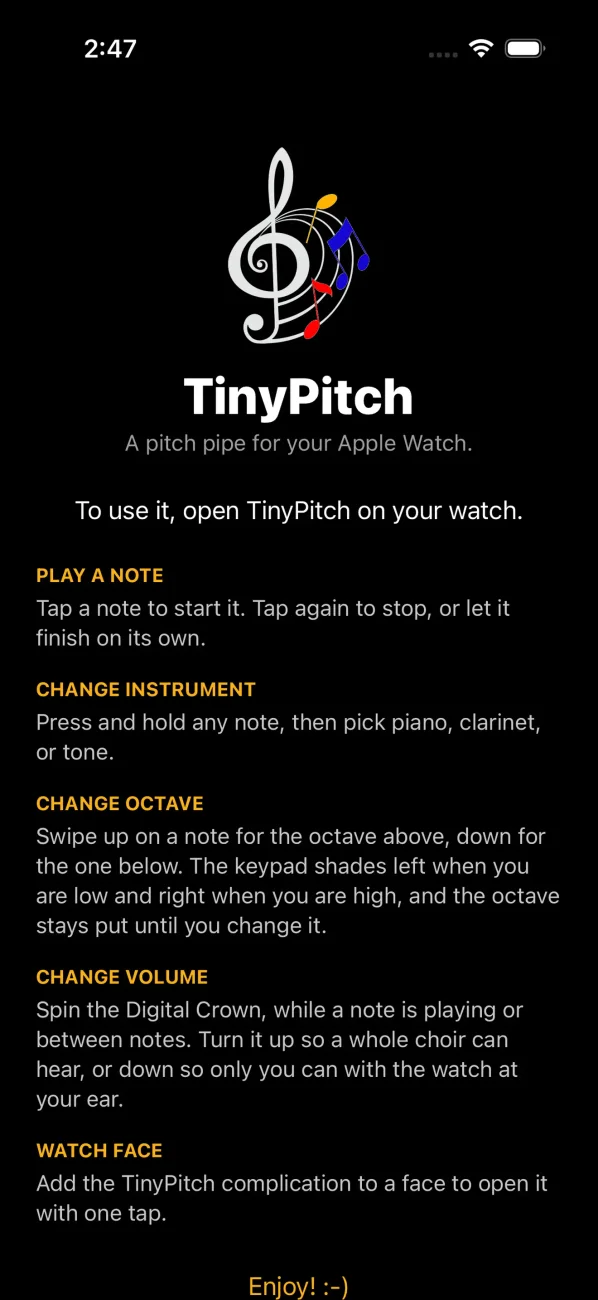
TinyPitch is a pitch pipe that lives on your wrist. Give a choir its starting note, check your own pitch, or find a key without digging your phone out of your pocket.
TAP TO PLAY
Every note of the 12-tone chromatic scale is on one screen. Tap a note to start it, tap again to stop, or let it fade out on its own.
THREE INSTRUMENTS
Press and hold any note to choose piano, clarinet, or a pure tone.
THREE OCTAVES, AND IT REMEMBERS
Swipe up on a note for the octave above, down for the one below. Your choice stays until you change it — including the next time you open the app — so you are not resetting it after every note. The keypad shades to the left when you are in the low octave and to the right when you are in the high one, so you can always see where you are.
VOLUME IN YOUR FINGERTIPS
Spin the Digital Crown, while a note is playing or between notes. Loud enough for a whole choir, or quiet enough that only you hear it with the watch held to your ear.
ONE TAP FROM YOUR WATCH FACE
Add the TinyPitch complication to any face, including the modern Infograph faces, and your starting note is one tap away.
No phone required once it is installed. No account, no ads, no subscription.
What’s new
Version 1.7 · Sep 17, 2026
Instrument switching works again. It used to rely on Force Touch, which Apple removed from the Apple Watch, so on newer watches there was no way to reach piano, clarinet, and tone. Now you press and hold any note to pick one.
The octave stays where you put it. Swiping up or down used to move only the note that was sounding; every note after it snapped back to the middle. Now it sticks until you change it, and it is remembered the next time you open the app. You can also swipe with nothing playing.
You can see which octave you are in. The keypad shades toward the left in the low octave and toward the right in the high one, and stays flat in the middle.
No more click when you jump between notes quickly. Notes now fade in and out over a few milliseconds instead of being cut off.
The note you are playing stays lit while you change octaves.
The watch face complication shows up properly. It used to appear as an empty dot on most faces; it now works on all of them, including the modern Infograph faces.
Rebuilt for the latest watchOS.
App privacy
What Matthew Schwartz declares on the App Store about how this app handles data.
-
Data not collected
The developer does not collect any data from this app.
Privacy practices may vary, for example with the features you use or your age.
Information
- Seller
- Matthew Schwartz
- Category
- Music
- Version
- 1.7
- Updated
- Sep 17, 2026
- Released
- Oct 3, 2018
- Size
- 43.0 MB
- Requires
- iOS 15.0 or later
- Age rating
- 4+
- Price
- $0.99
- Languages
- English
- Copyright
- © 2026
You might also like
-
 TinyPitch ReimaginedDigital tuning fork
-
 Kamerton - tuning forkPlay tones on you wrist
-
 GuitarTuningWatchLet's tune your guitar quickly
-
 Musical KeyboardMusic Keyboard for your watch
-
 Tuning Fork: 432, 440, 442 HzReference Pitch for Watch
-
 Beacon - Worship Team AppSetlists and Chord Sheets
-
 Wrist PipeA pitch pipe for your wrist!
-
 RagaMalika CarnaticMusic
-
 Fine Chromatic Tuner WatchGuitar, Bass, Ukulele and more
-
 RUN IT DOWN: Song Form & BarsBars, key, tempo. All offline.