- Age rating17+
- CategoryUtilities
- Developerheekyung moon
- LanguagesEnglish
- Size84.3 MB
Links to the official App Store page
Download.org hosts no file of TV Antenna Pointer & Towers. The button opens its official App Store page, published by heekyung moon. Listing last checked on Nov 28, 2026.
Screenshots


About
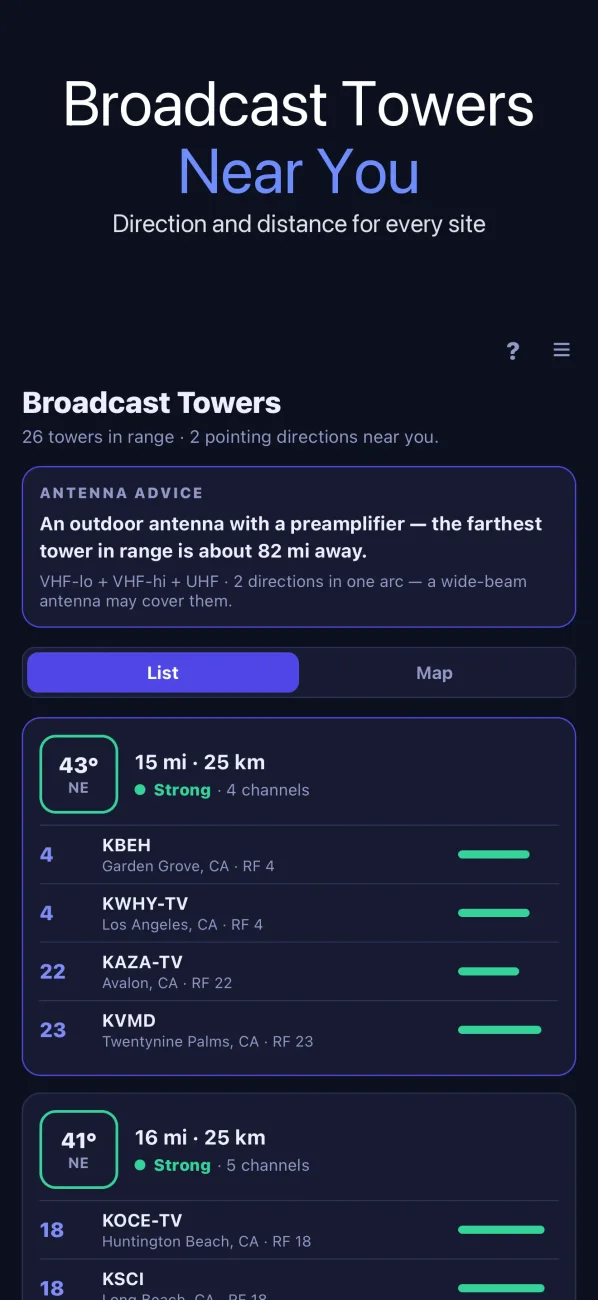
TV Antenna Pointer & Towers shows the TV transmitters near you and turns your phone into a compass that points your antenna straight at them.
▶ POINT YOUR ANTENNA
Pick a nearby tower and turn your phone until the needle lines up and turns green. A short vibration tells you when you are on target. Headings use true north: the phone's own true heading, or magnetic north corrected with the declination for where you are.
▶ TOWERS NEAR YOU
The Towers tab lists broadcast sites around you, nearest first, with compass direction and distance in miles and kilometers. Switch to Map for an offline radar view with 10, 25 and 50 mile rings, then tap a dot to select that site and aim at it.
▶ BUILT-IN DATA THAT WORKS OFFLINE
Transmitter locations are bundled in the app:
• United States: FCC license records with RF channel, an estimated signal grade from distance and power, and a suggestion for the antenna type and bands you need
• Canada: ISED records of operational digital TV stations, with channel
• Australia: ACMA licensed transmitter locations, with channel
• France: ANFR transmitter sites, direction and distance
• Portugal: OpenStreetMap transmitter sites, direction and distance
• Thailand: NBTC registered digital TV sites, with MUX channels (operation not confirmed)
▶ ANYWHERE ELSE: Set my transmitter
Outside these countries, enter your transmitter's coordinates in decimal or degrees-minutes-seconds, or paste a Google Maps or Apple Maps link. The link must contain the pin's coordinates; short share links are not supported. The compass then points to that spot and shows the distance. The needle appears only once the compass has a steady true-north reading, and the entry is always marked as entered by you.
▶ SETUP GUIDE
Numbered steps on the Guide tab take you from aiming to running a channel scan on your TV or tuner, so the new channels actually appear. These steps appear where built-in transmitter data covers your area.
▶ SOURCES YOU CAN CHECK
Every dataset and its license is listed under "Data sources & licences" with links.
QUESTIONS
• My country is not listed. Find your local transmitter on a map, copy its coordinates and use Set my transmitter.
• The compass looks off. Move away from metal and electrical appliances and turn slowly; steel frames indoors bend the reading.
• Why is there no signal grade? Grades need published transmitter power, which only the US records include.
Signal grades are estimates. Terrain, buildings, your antenna and the weather all change real reception, so confirm the final aim with your TV's signal meter or a channel scan.
What’s new
Version 1.7.12 · Nov 26, 2026
• Each tower in the “Towers” list in TV Antenna Pointer & Towers now has an arrow that turns as you turn your phone.
• The radar map now shows which way your phone is facing.
• Tapping “Map” scrolls straight down to the radar.
App privacy
What heekyung moon declares on the App Store about how this app handles data.
-
Data used to track you
May be used to track you across apps and websites owned by other companies.
- Identifiers
- Usage data
-
Data not linked to you
May be collected but is not linked to your identity.
- Identifiers
- Usage data
- Diagnostics
Privacy practices may vary, for example with the features you use or your age.
Information
- Seller
- heekyung moon
- Category
- Utilities
- Version
- 1.7.12
- Updated
- Nov 26, 2026
- Released
- Jul 29, 2026
- Size
- 84.3 MB
- Requires
- iOS 16.4 or later
- Age rating
- 17+
- Price
- Free
- Languages
- English
- Copyright
- © 2026 Moon
You might also like
-
 AntennascopeFind & Align Your TV Antenna
-
 Antenna Finder : Aerial PointOTA HDTV tower signal aligner
-
 DishAim: Satellite FinderDish Pointer, Sat Alignment
-
 RCA Signal Finder.Antenna signal finder
-
 AimtennaUtilities
-
 Digital TV AntennasFind nearby TV stations
-
 SatCatcher-Dish Set & PointingSatellite Dish Install & Align
-
 Antenna PointerUtilities
-
 Satellite map AR SatFinder 3DAntenna mobile signal finder
-
 DishPointer (Satellite Finder)Quick Precise Sat-Dish Install