Typewall: Canvas Notes
Mind map & sticky idea board
Designed for iPhone, iPad
Free
- Age rating4+
- CategoryProductivity
- DeveloperAKINALP FIDAN
- LanguagesEnglish
- Size29.3 MB
Links to the official App Store page
Download.org hosts no file of Typewall: Canvas Notes. The button opens its official App Store page, published by AKINALP FIDAN. Listing last checked on Nov 16, 2026.
Screenshots


About
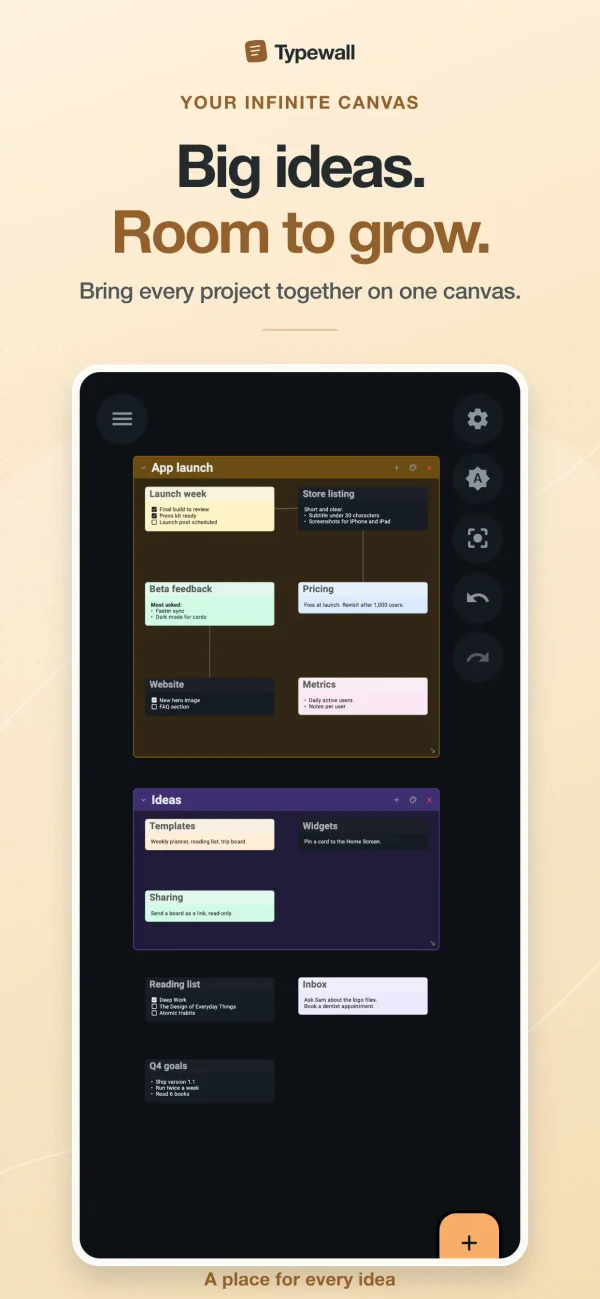
Typewall is a wall for typed notes: long-press anywhere on a huge canvas, type, and lay out your ideas so you can see them all at once.
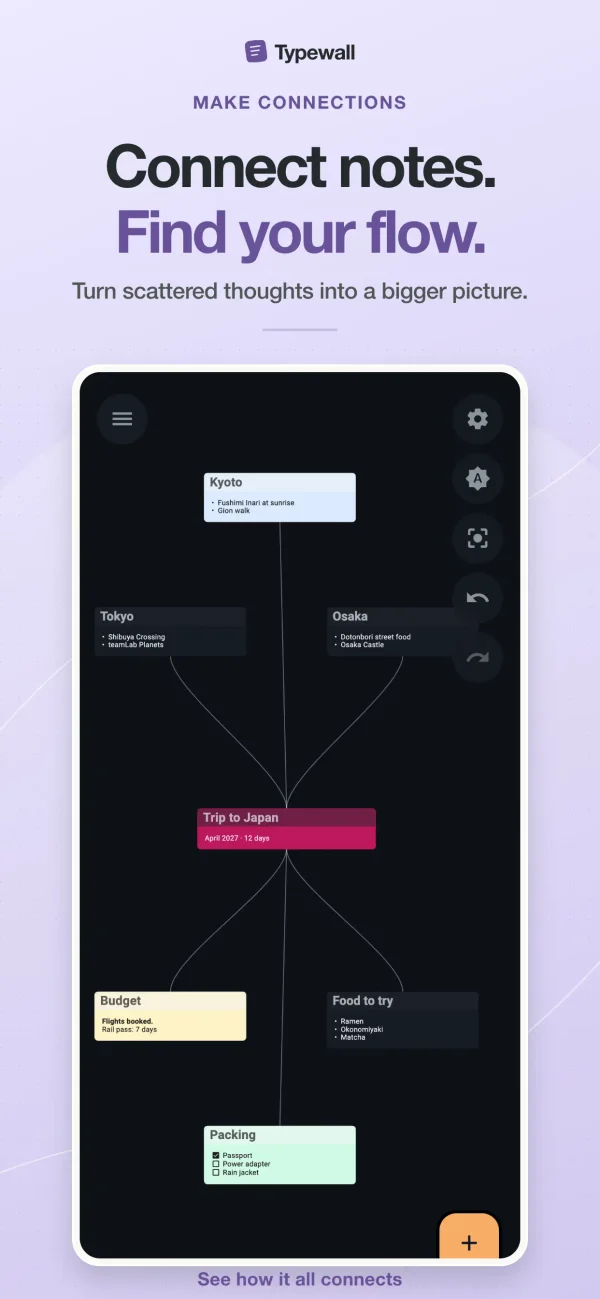
Most canvas apps are built for drawing with a pencil. Typewall is built for typing. Every note is a card you can move, color, group and connect, so a pile of loose thoughts becomes a map you can read at a glance.
WRITE WITHOUT FRICTION
• Long-press an empty spot to create a card and start typing right away.
• Long-press a card to edit it. The cursor lands where your finger is.
• Bold, italic, underline and strikethrough.
• Checklists, bullet lists and numbered lists.
• Cards grow with your text, and you can drag their width to fit.
LAY IT OUT YOUR WAY
• Pan and pinch to zoom across a canvas the size of 400 pages.
• Color cards and text from the palette, or pick any custom color. Your recent colors stay one tap away.
• Drag from the dot on a card's edge to another card to connect them. Tap a line to remove it.
• Gather related cards into a group with a large title. Move the group and its cards move with it. Resize, collapse or rename it anytime.
• Search your notes and jump straight to the card you need.
• Undo and redo every change.
YOUR NOTES STAY YOURS
• No account, no ads, no tracking.
• Notes are saved on your device. Turn on sync to keep them in your own iCloud or Google Drive and pick up on your other devices.
• Export a backup file whenever you like and import it again later.
USE IT FOR
• Brainstorming and mind maps
• Planning projects, trips and weekly to-dos
• Outlining essays, talks and stories
• Study notes and research
• A board of ideas you keep coming back to
A short Getting Started board on first launch shows every gesture in about a minute. Delete it when you are done.
Works on iPhone and iPad, in light and dark mode.
App privacy
What AKINALP FIDAN declares on the App Store about how this app handles data.
-
Data linked to you
May be collected and linked to your identity.
- User content
Privacy practices may vary, for example with the features you use or your age.
Information
- Seller
- AKINALP FIDAN
- Category
- Productivity
- Version
- 1.0.0
- Updated
- Oct 30, 2026
- Released
- Oct 30, 2026
- Size
- 29.3 MB
- Requires
- iOS 17.6 or later
- Age rating
- 4+
- Price
- Free
- Languages
- English
- Copyright
- © 2026 Akinalp Fidan
You might also like
-
 Longhand NotesProductivity
-
 ふとメモ | いつでも即書けるメモアプリProductivity
-
 Decision Engine AIDecide faster. Think smarter
-
 Mena: Mind Map & Concept MapVisual Notes, Thinking & AI
-
 AI ChecklistProductivity
-
 Archium: document organizerSmart Scan, OCR, Doc Organizer
-
 Proxy Browser - Fast & SafePrivate Browser & Fast Proxy
-
 Vanofi: AI BrowserAI Social Browser & Workspace
-
 NoteMagnetClean visual note boards
-
 Prazo: Calendar & To-Do ListDaily planner & reminders