
TypeWhisper App
Private Voice-to-Text
Designed for iPhone, iPad, Mac
Free · In-app purchases
- Age rating4+
- CategoryProductivity
- DeveloperMarco Hillger
- LanguagesEnglish+ 4 more
- Size62.7 MB
Links to the official App Store page
Download.org hosts no file of TypeWhisper App. The button opens its official App Store page, published by Marco Hillger. Listing last checked on Nov 22, 2026.
Screenshots




About
Private speech-to-text for iPhone and iPad.
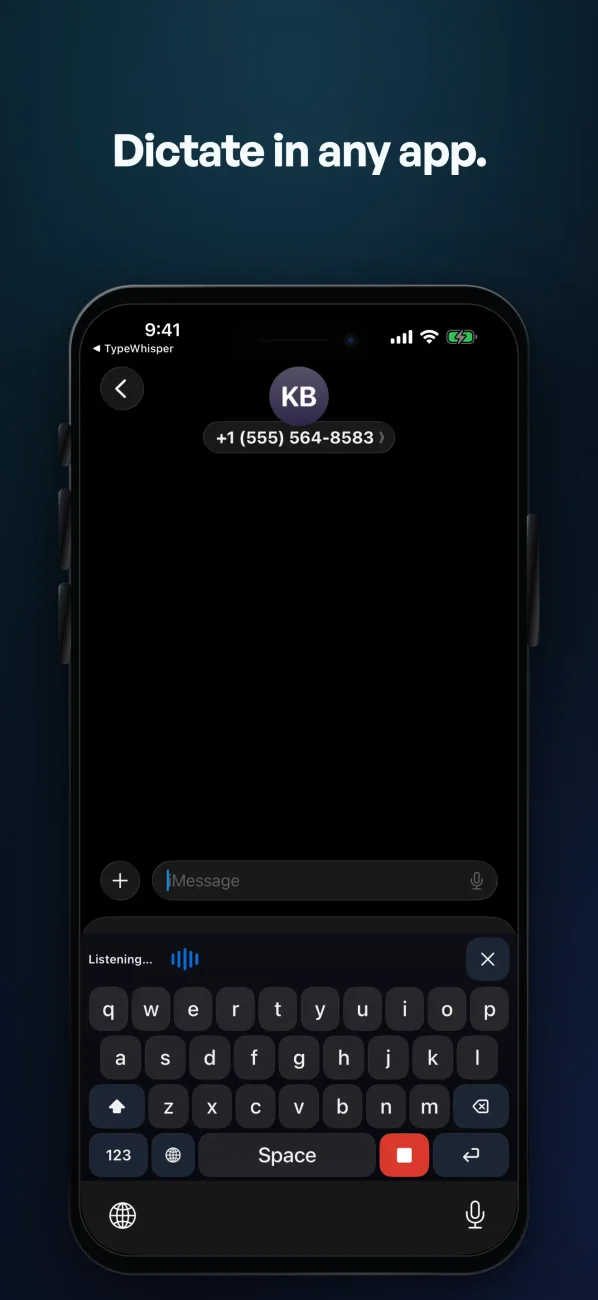
TypeWhisper turns your voice into text with on-device AI models or optional cloud providers. Dictate in the app, transcribe existing audio and video files, or use the TypeWhisper keyboard to enter text in other apps.
DICTATE YOUR WAY
• Transcribe with WhisperKit, Apple Speech, Parakeet, or optional cloud engines including Gemini and Soniox
• See a live transcription preview while speaking with WhisperKit, Apple Speech, Live Local, and selected cloud engines. Parakeet transcribes after you stop.
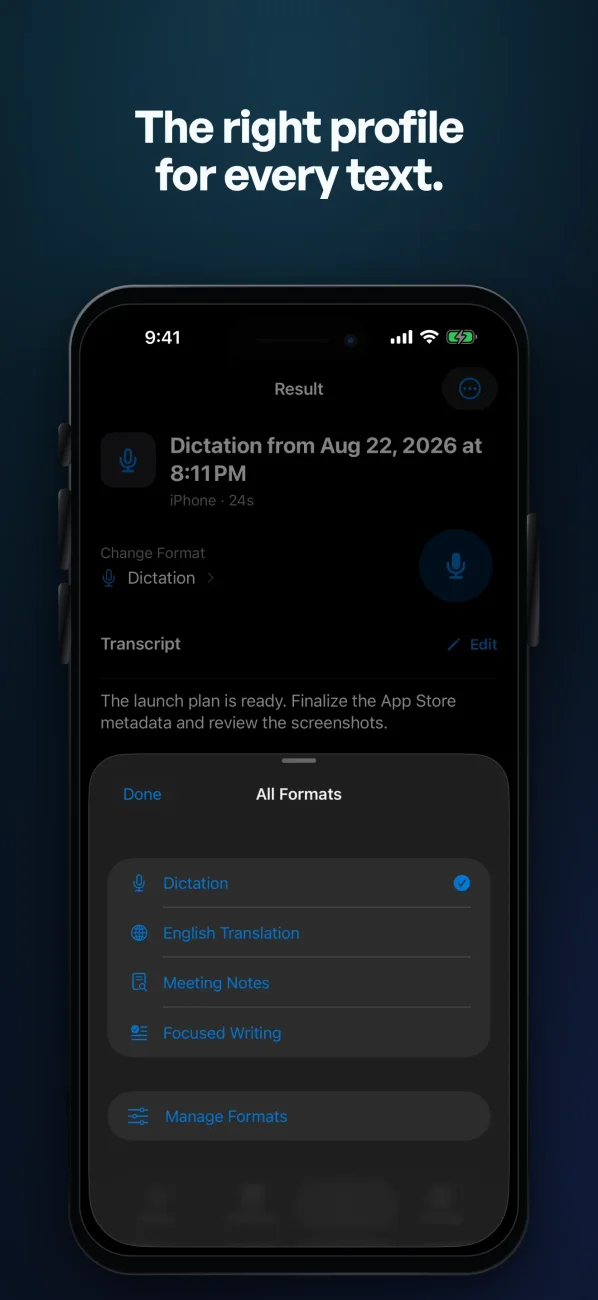
• Use profiles for languages, models, translation targets, and whisper mode
• Translate dictated text on-device with Apple Translate
VOICE KEYBOARD
• Dictate into text fields across iOS
• Switch profiles directly from the keyboard
• Expand reusable snippets with date, time, and clipboard placeholders
• Type with English, German, Spanish, French, and Italian layouts
ORGANIZE AND REFINE
• Search your transcription history
• Review incoming recordings in an Inbox and browse history by device
• Review original and processed text
• Read transcripts and results aloud with voices installed on your device
• Improve names and specialist terms with a personal dictionary
• Transcribe audio and video files
TYPEWHISPER PREMIUM
• Ask questions about a transcript with your selected writing service
• Transcribe and write with your paired Mac’s models and text-processing workflows
• Separate speakers on device, name them, and correct their turns
• Save optional local voice profiles to suggest names in later recordings
• Improve fresh transcripts and teach TypeWhisper trusted corrections
• Turn recordings into reviewable email drafts with a subject and body
• Sync History and Inbox, dictionary entries, and snippets between signed-in TypeWhisper installations on iPhone and iPad through iCloud or a chosen cloud folder
Transcript questions use your selected writing service: on-device, Mac, or cloud. The chat shows where text is sent and is not saved.
Mac features require TypeWhisper for Mac 1.8 or later on the same local network and access to Premium features on both devices. The connection is encrypted. Models selected on the Mac may use cloud providers configured there.
Speaker detection runs after transcription and can make mistakes with similar voices or overlapping speech. You can correct assignments in the transcript. Voice profiles stay on the device that created them.
IPHONE, IPAD, AND APPLE WATCH
• Transfer recordings from Apple Watch to iPhone for processing and playback
PRIVACY FIRST
• Use on-device models to keep transcription local
• No advertising or third-party tracking
• Synced dictionary and snippet content stays in the cloud location you choose and does not pass through the TypeWhisper entitlement service
Core local dictation, dictionary, and snippet features remain available without an account or subscription. Some models and cloud providers require an internet connection, model downloads, or your own provider credentials.
Terms of Use (EULA): https://www.apple.com/legal/internet-services/itunes/dev/stdeula/
What’s new
Version 1.3.0 · Nov 21, 2026
With Ask History, you ask questions about all your recordings and get answers with their sources. You can also transcribe a saved recording again and compare the results.
• Ask History (Premium): In History, tap Ask and ask in your own words, typed or spoken, for example "What did I agree with the print shop last week?" TypeWhisper finds the matching passages on your device, your writing service answers, and each answer lists its sources. Tap a source to open the recording. Conversations are saved and, with History sync, also appear on your other iPhone and iPad. For questions worded differently from what you said, download the optional search model in Settings under Ask History.
• Dictate without opening TypeWhisper (Premium): when TypeWhisper is not running, the keyboard records and transcribes by itself with Apple Speech, a Parakeet model or a cloud service. Music pauses while you dictate. Settings > Keyboard turns it off.
• Siri: say "Ask TypeWhisper about my recordings" to hear a short answer. The question is saved in Ask History.
• Ask About Transcript has the same new layout, and you can ask by voice there too.
• Transcribe Again: in History, open an entry, tap … and choose Transcribe Again. Pick another speech recognition, language or format, compare the new result with the current text and keep the one you prefer. Earlier versions are kept, so you can switch back.
• New speech recognition: Fluid Speech Pro by FluidVoice, a Parakeet model for the same 25 languages as Fast Local. It recognizes English more accurately than Fast Local Ultra and transcribes long recordings faster. Download it in Settings under Speech Recognition. It needs a device with at least 4 GB of memory.
• Insert emoji by name: while dictating, say an emoji name followed by "emoji", for example "thumbs up emoji" or "red heart emoji". This works in English and German, in the app and with the keyboard. Turn it off in Settings under Snippets.
• Parakeet models no longer put an "unk" marker in the text in place of quotation marks, dashes or "&". Abbreviations such as R&D now keep their "&".
• Apple Speech now transcribes long Apple Watch recordings in full, including right after you open the app. Previously, such a recording could end up with only its last word.
• A recording now starts right away, even while speech recognition is still getting ready, for example after you switch to another one. Previously, words said during that time could be lost. If you stop before it is ready, the recording waits in History and is transcribed there, and you can record again right away.
• Keyboard dictation with Apple Speech or a Parakeet model on iOS 27 is fast again. Keyboard dictation with a Whisper model no longer stops with a timeout. Previously, the text could take up to half a minute to appear.
• While a speech model loads, the Record tab and Settings show the current step. The first load after an install or update can take a few minutes, and TypeWhisper now says so.
• The keyboard records as soon as you tap the microphone, even while speech recognition is still loading. Previously, you had to wait until it was ready.
• Between keyboard dictations, TypeWhisper now mutes the microphone and records nothing.
• Speech recognition you choose in the Record tab starts loading right away, so the next recording waits less.
• On Apple Watch, the status symbol pulses while your iPhone receives or transcribes a recording.
App privacy
What Marco Hillger declares on the App Store about how this app handles data.
-
Data linked to you
May be collected and linked to your identity.
- Purchases
- Identifiers
Privacy practices may vary, for example with the features you use or your age.
Information
- Seller
- Marco Hillger
- Category
- Productivity
- Version
- 1.3.0
- Updated
- Nov 21, 2026
- Released
- Aug 31, 2026
- Size
- 62.7 MB
- Requires
- iOS 18.0 or later
- Age rating
- 4+
- Price
- Free
- In-app purchases
- Yes
- Languages
- English, French, German, Italian, Spanish
- Copyright
- © 2026 TypeWhisper
You might also like
-
 KeyVox: AI Voice KeyboardNo Subscription. AI Dictation.
-
 Diction: Speech to TextPrivate AI Voice Keyboard
-
 Dictus: AI Voice KeyboardPrivate dictation, voice notes
-
 Pelican: AI Chat AssistantAsk anything. Get it done.
-
 Whispr: Voice to Text KeyboardPrivate AI Dictation, Offline
-
 VivaDicta - Speech to TextVoice Transcription with AI
-
 KeeForge: KeePass ManagerPasswords, 2FA Codes, Passkeys
-
 OpenWhispr: Voice to TextVoice Transcription & Notes
-
 Spokenly: Audio to Text AI appTranscribe Voice Notes & Talk
-
 DictaWiz: AI Keyboard & NotesPrivate Voice to Text Recorder