
- Age rating4+
- CategoryProductivity
- DeveloperUniAuth Inc.
- LanguagesEnglish
- Size5.0 MB
Links to the official App Store page
Download.org hosts no file of UniClip - Clipboard Sync. The button opens its official App Store page, published by UniAuth Inc. Listing last checked on Nov 23, 2026.
Screenshots


About
macOS forgets what you copied the moment you copy something else. Windows has had a clipboard history since 2018. UniClip is that, for the Mac — and it follows you to your iPhone and iPad.
Copy on your Mac. Paste on your phone. Search everything you have copied, going back weeks.
A KEYBOARD, NOT A PANEL
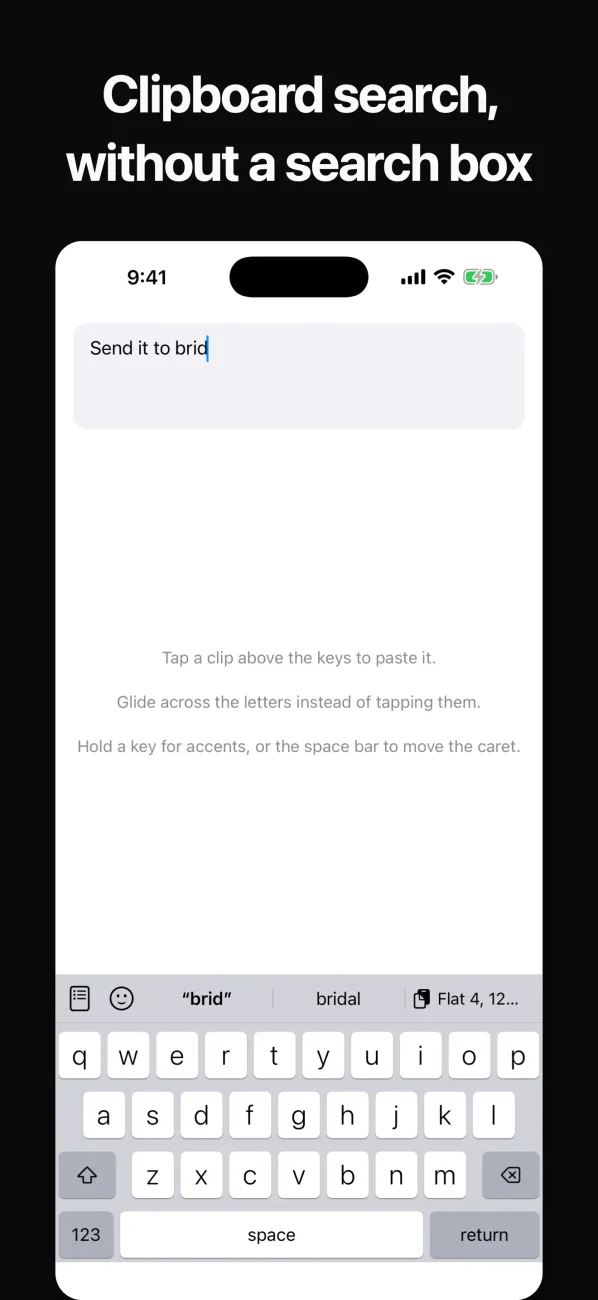
UniClip's iPhone keyboard is a real keyboard — full QWERTY, emoji, autocorrect and glide typing — with your clipboard along the top. Leave it as your default and everything you have copied is one tap away, wherever you are typing. No switching keyboards, no opening an app.
Start typing something you copied earlier and it appears beside the word suggestions. That is clipboard search, without a search box.
PRIVATE IN A WAY YOU CAN CHECK
Everything is encrypted on your device, with a key derived from a passphrase only you know, before it is uploaded. The server stores text it has no way to read. Search runs on your device, because there is nothing on the server worth indexing.
IT REFUSES TO RECORD THINGS IT SHOULDN'T
Anything an app marks as confidential is never stored — that one is not a setting, because the marker is another app asking not to be recorded. Password managers are excluded when you install it, and you can add your own. Anything shaped like an API key, a private key, a security code or a payment card stays on the device that copied it, masked in the list, and is never uploaded.
HONEST ABOUT WHAT IPHONE CAN DO
Your Mac captures everything you copy. iPhone and iPad save what you hand over — through the share sheet, or the paste button in the app — because iOS does not let any app read the clipboard on its own. Apple closed that in iOS 16, and we would rather say so than imply otherwise.
Free. No account needed to use it on one device; sign in with UniAuth to sync.
What’s new
Version 1.6 · Nov 17, 2026
Ready for iPhone Duo. The app and its keyboard resize across the Duo's folded and unfolded displays — a list closed, a grid of cards open — and this version carries the 'made for iPhone Duo' badge.
Also fixed: a tall empty gap under "Signed in" in Settings, and several privacy and sync gaps behind the scenes.
App privacy
What UniAuth Inc. declares on the App Store about how this app handles data.
-
Data linked to you
May be collected and linked to your identity.
- User content
- Identifiers
Privacy practices may vary, for example with the features you use or your age.
Information
- Seller
- UniAuth Inc.
- Category
- Productivity
- Version
- 1.6
- Updated
- Nov 17, 2026
- Released
- Aug 14, 2026
- Size
- 5.0 MB
- Requires
- iOS 17.0 or later
- Age rating
- 4+
- Languages
- English
- Copyright
- © 2026 UniAuth Inc.
You might also like
-
 Uniclip - Universal ClipboardCopy & paste across devices
-
 Rep by kimchilabsYour notes, on repeat…
-
 Taphrase - Snippet KeyboardQuick Replies & Text Expansion
-
 Syncra - Cloud ClipboardClipboard Sync Across Devices
-
 murmr voiceProductivity
-
 ALClip: Cross-Device ClipboardClipboard & File Sharing
-
 MiniFocusMinimal Pomodoro timer
-
 Phrase Keyboard: KeyBurstPaste Saved Text Fast
-
 Snippet Keyboard - Quick PasteCanned replies in one tap
-
 Insight Pill: Learn in SecondsDiscover & learn everyday.