
Vibers Log
Project Journal for Makers
Designed for iPhone, iPad
Free · In-app purchases
- Age rating4+
- CategoryProductivity
- DeveloperAndrew Hoffart
- LanguagesEnglish
- Size2.6 MB
Links to the official App Store page
Download.org hosts no file of Vibers Log. The button opens its official App Store page, published by Andrew Hoffart. Listing last checked on Nov 18, 2026.
Screenshots



About
Vibers Log is a build journal for people who make things: apps, websites, furniture, art, side projects of any kind.
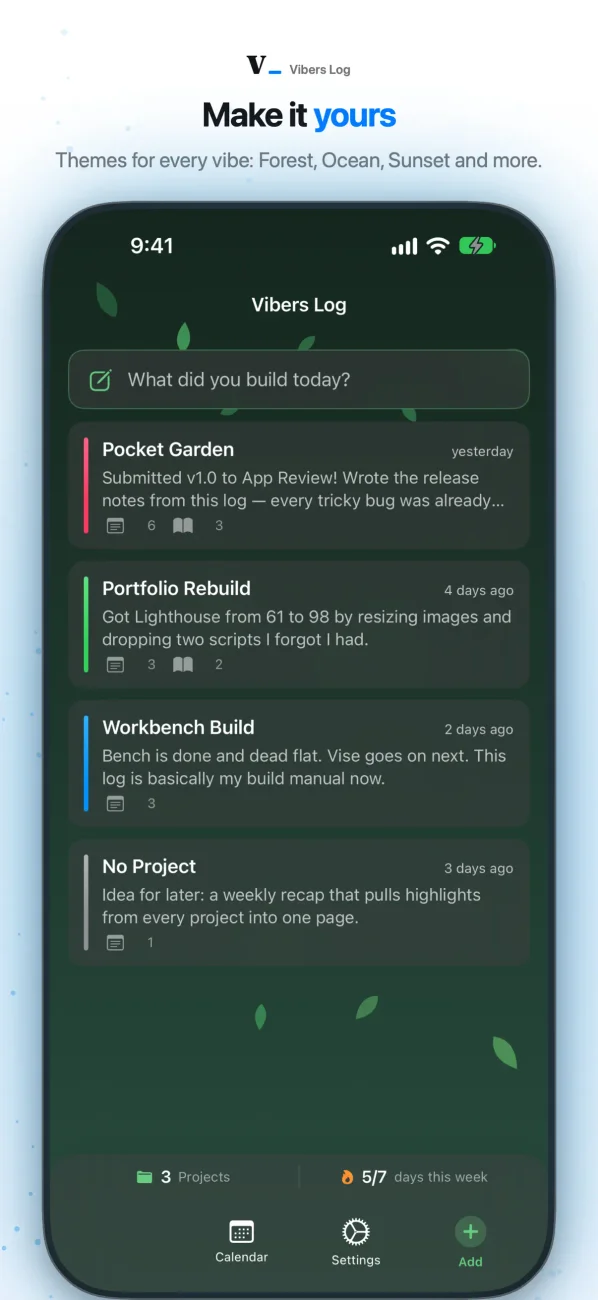
Write a line about what you did today. Vibers Log files it under the right project and lines it up on a timeline, so weeks from now you can see exactly how you got here.
LOG IN SECONDS
Open the app and start typing. Your current project is already picked, and the keyboard is up. One line a day is enough.
ORGANIZED BY PROJECT, NOT BY DATE
Every project gets its own timeline. See all your projects at a glance, then open one to read the whole story start to finish.
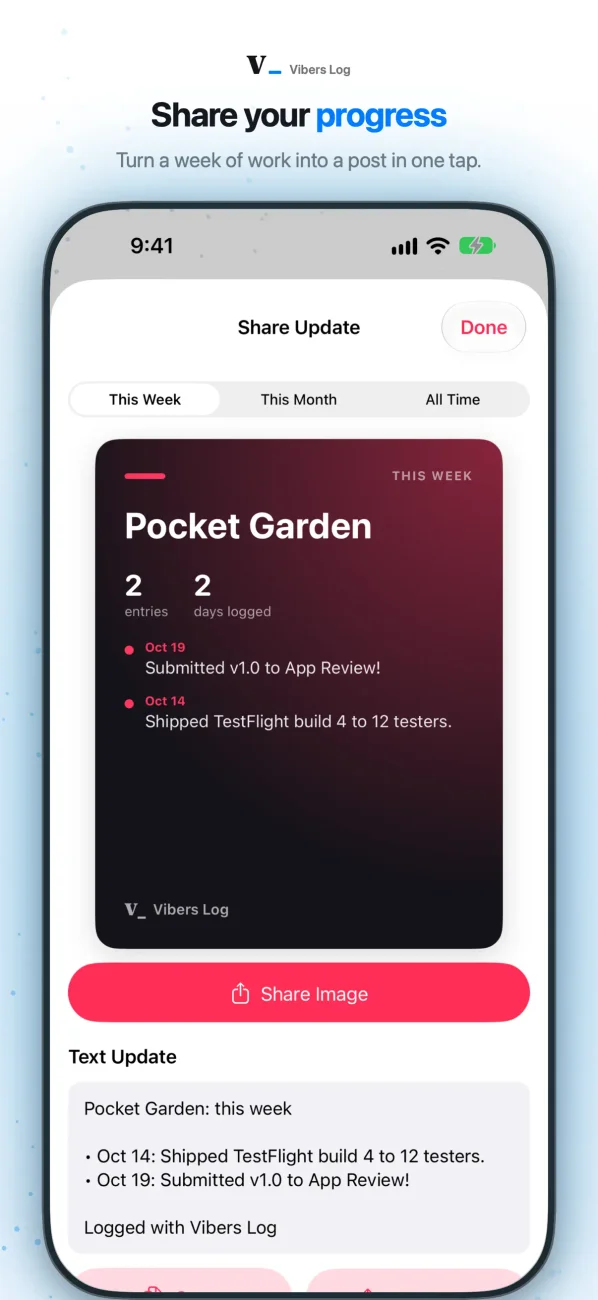
SHARE YOUR PROGRESS
Turn this week's entries into a clean image card or a text update, ready for X, Discord, a team chat, or your release notes.
STORIES INSIDE PROJECTS
Tag entries like "Onboarding" or "Launch" to follow one thread through a bigger build.
A DAILY NUDGE
An optional reminder asks "What did you build today?" and tapping it takes you straight to writing.
REFLECT WITH ON-DEVICE AI (Pro)
Get an honest recap of a project's journey, polish updates so they are ready to post, and see the obstacles you hit and how you got past them. It runs on your iPhone, so your journal stays private.
MADE FOR IPHONE DUO
Unfold to see your projects and a full timeline side by side. Fold it for quick one-handed logging on the outer screen.
ALSO
• iCloud sync across iPhone and iPad
• Home Screen widgets for quick entries and recent progress
• Calendar view of everything you've logged
• Themes: Sunset, Ocean Deep, Forest, Starry Night, Rainbow and more (Pro)
Free includes 3 projects. Upgrade once to Vibers Log Pro for unlimited projects, every theme, premium widgets, and AI features.
What’s new
Version 1.1 · Oct 21, 2026
• Share Update: turn a week of entries into an image card or text update.
• Faster logging: the app opens straight in, the keyboard is ready, and your current project is pre-picked.
• Daily reminder (optional), and a "days this week" count on the home screen.
• A cleaner home screen that shows all your projects at a glance.
• Free now includes 3 projects.
• Made for iPhone Duo: projects and timeline side by side when unfolded.
• Refreshed V_ icon, plus fixes for project colors and the bottom bar.
App privacy
What Andrew Hoffart declares on the App Store about how this app handles data.
-
Data not collected
The developer does not collect any data from this app.
Privacy practices may vary, for example with the features you use or your age.
Information
- Seller
- Andrew Hoffart
- Category
- Productivity
- Version
- 1.1
- Updated
- Oct 21, 2026
- Released
- Feb 9, 2026
- Size
- 2.6 MB
- Requires
- iOS 26.0 or later
- Age rating
- 4+
- Price
- Free
- In-app purchases
- Yes
- Languages
- English
- Copyright
- © 2026 Quilt.Basic
You might also like
-
 WoendPlan your weekend activities
-
 Goals TimelineSee your goals across time
-
 Daily Task Planner - PlannduTo-do list, calendar & notes
-
 Glazr DOCX File Editor ProEdit DOCX Offline • Export PDF
-
 Classycal – Calendar & TasksAgenda, reminders, with style
-
 Oriveo: Multi-Model AI ChatVoice & images, no API key
-
 Prism NotesCapture thoughts and links
-
 Cue: Personal AI AssistantOne Assistant for Work & Life
-
 Pomodoro Timer: Tempo FocusStudy Tracker & App Blocker
-
 Notely: Offline NotepadFast private memo organizer