
WordClock Widget - Text Clock
For your StandBy & Home Screen
Designed for iPhone, iPad
- Age rating4+
- CategoryUtilities
- DeveloperTobias Weissert
- LanguagesGerman+ 20 more
- Size1.6 MB
Links to the official App Store page
Download.org hosts no file of WordClock Widget - Text Clock. The button opens its official App Store page, published by Tobias Weissert. Listing last checked on Nov 12, 2026.
Screenshots


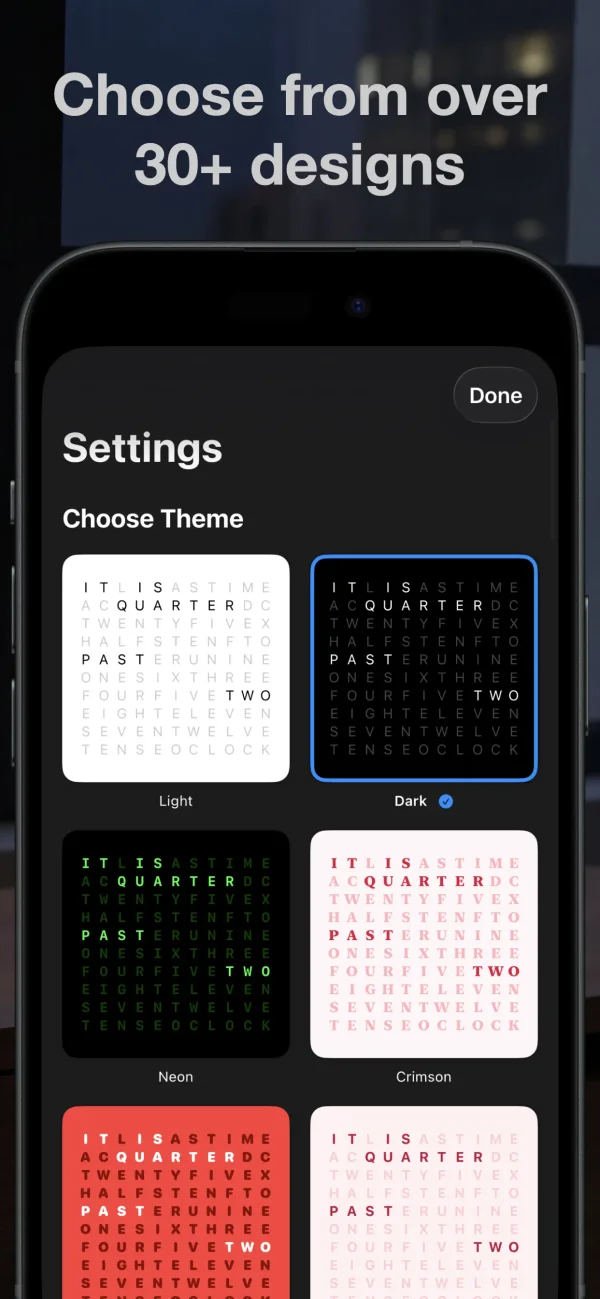
About
Turn your iPhone into an elegant word clock that displays time in beautiful typography. See the current time expressed in natural language, right on your home screen.
BEAUTIFUL TYPOGRAPHY
Word Clock transforms the way you see time. Instead of traditional digits, time is displayed as elegant words arranged in a grid. Each minute, the display updates to show the current time in a visually stunning way.
MULTIPLE LANGUAGES
Choose from 20+ languages including English, German, French, Spanish, Italian, Japanese, Chinese, and more. Each language has its own unique way of expressing time, making Word Clock perfect for language learners and multilingual users.
CUSTOMIZABLE THEMES
Personalize your clock with beautiful themes. Choose from light, dark, neon, and color-themed options. Each theme features carefully selected colors that make the active words pop while keeping inactive words subtle.
HOME SCREEN WIDGET
Keep time visible at all times with beautiful home screen widgets. Available in small and large sizes, Word Clock widgets update automatically and blend seamlessly with your home screen design.
STAND BY MODE
Perfect for nightstand use, Word Clock supports StandBy mode on iPhone. Display time elegantly while your phone charges, creating a beautiful ambient clock for your bedroom.
KEY FEATURES
• Word-based time display in elegant typography
• Support for 20+ languages
• Multiple beautiful themes
• Home screen widgets (small and large)
• StandBy mode support
• Real-time updates every minute
• Clean, minimalist interface
• No ads, no subscriptions
PRIVACY FIRST
Word Clock doesn't collect any data. Everything runs locally on your device. No tracking, no analytics, no external servers.
Whether you're looking for a unique way to display time, want to practice reading time in different languages, or simply appreciate beautiful design, Word Clock brings elegance to your iPhone.
Start experiencing time differently today!
What’s new
Version 1.1.7 · Nov 6, 2026
Improved safe-area layout for the clock display.
App privacy
What Tobias Weissert declares on the App Store about how this app handles data.
-
Data not collected
The developer does not collect any data from this app.
Privacy practices may vary, for example with the features you use or your age.
Information
- Seller
- Tobias Weissert
- Category
- Utilities
- Version
- 1.1.7
- Updated
- Nov 6, 2026
- Released
- Nov 10, 2025
- Size
- 1.6 MB
- Requires
- iOS 17.0 or later
- Age rating
- 4+
- Languages
- German, Danish, English, French, Greek, Hebrew, Italian, Japanese, Catalan, Dutch, Norwegian Bokmål, Portuguese + 9 more
- Copyright
- © 2026 Tobias Weissert
You might also like
-
 Word Clock Pro: WidgetTime into type art
-
 Word Clock · Text Time WidgetRetro · Flip · Neon · Tile
-
 Custom Word Clock - TextTimeNumbers are so last year
-
 Wortuhr – Word ClockThe time in words
-
 A Word ClockTime in Words
-
 StrikodoScan and create Barcodes
-
 Text Clock WidgetUtilities
-
 BongiUtilities
-
 KelloMechanical Watch Analyzer
-
 Becard - Digital Business CardDigital Business Card