Expressive Clock
Sam Beckman- 3 歳以上対象年齢
- ツールカテゴリ
- 2026/11/24更新日
- 無料価格
app.expressiveclockのGoogle Play公式ページにリンクしています。最終確認:2026/11/25。

スクリーンショット



このアプリについて
Googleによる英語 (アメリカ合衆国)からの自動翻訳です。
アラーム、タイマー、ストップウォッチ、そしてダイナミックアイランドコントロール機能を備えた美しい時計。
Expressive Clockをご紹介します。日常の必需品と斬新で表現力豊かなデザインを融合させた、モダンなAndroid時計アプリです。
**まるで生きているかのような時計**
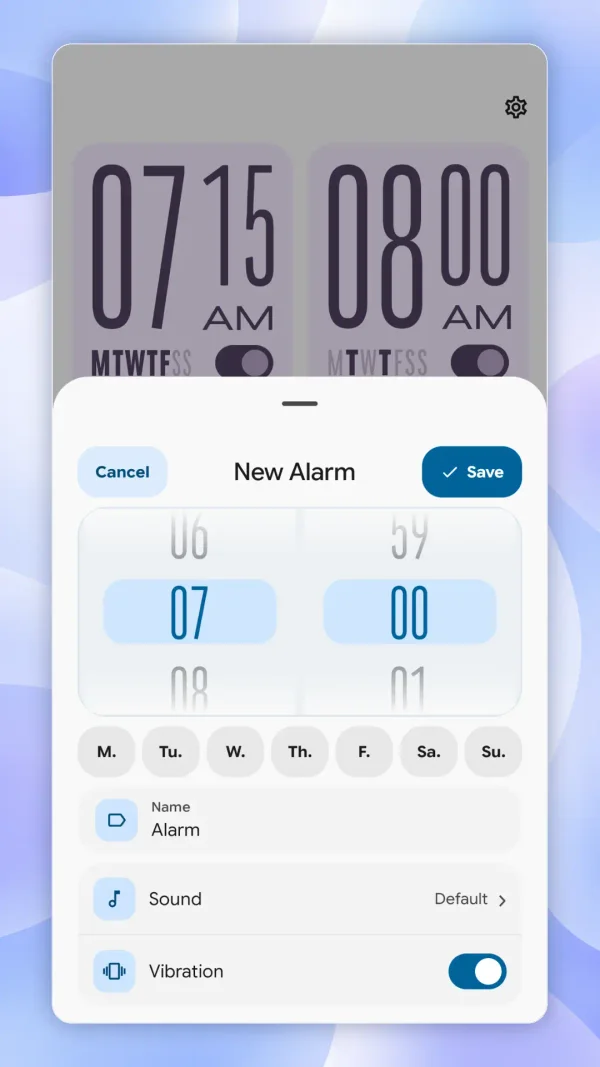
洗練されたMaterial 3 Expressiveインターフェースは、滑らかなアニメーション、遊び心のある操作、そして美しくアニメーションする数字が特徴です。日々の時間管理を少しでも楽しくするために、あらゆるディテールにこだわってデザインされています。
**時間管理に必要なすべてが揃っています**
• アラーム:アラームを設定・管理して、スケジュール管理をサポートします。
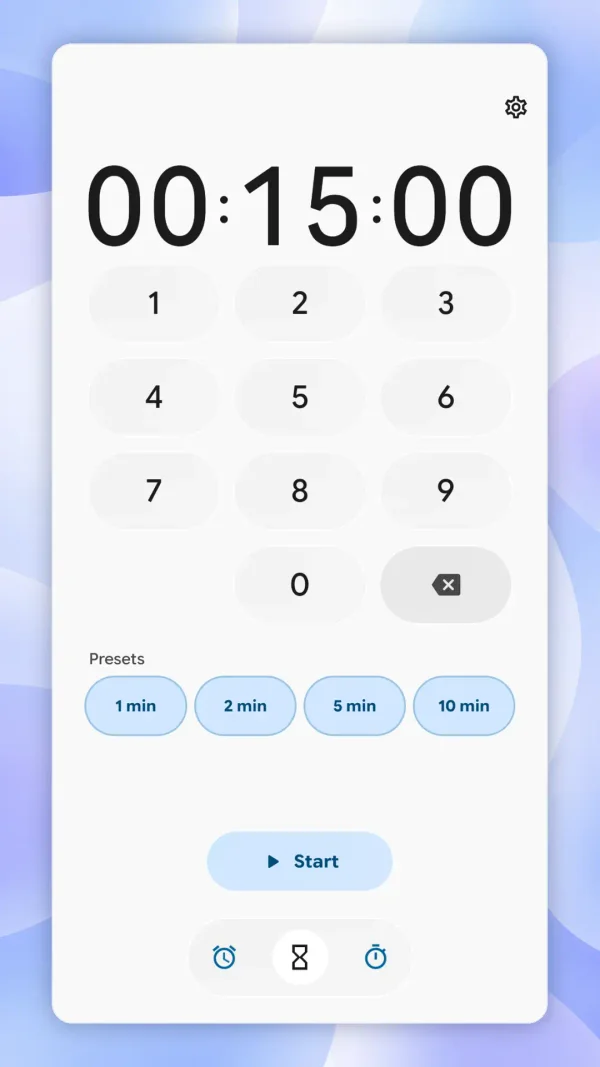
• タイマー:料理、ワークアウト、休憩など、あらゆる場面でカウントダウンを設定できます。
• ストップウォッチ:専用のストップウォッチで経過時間を計測できます。
**いつでもどこでも使えるタイマー**
ダイナミックアイランドスタイルのオーバーレイにより、他のアプリを使用中でも、アクティブなタイマーとストップウォッチのコントロールにアクセスできます。時計アプリにいちいち切り替えることなく、カウントダウンを常に確認できます。
### ダイナミックアイランドスタイルオーバーレイとアクセシビリティサービス
Expressive Clockは、他のアプリを使用しながら、アクティブなタイマーのカウントダウンを表示したり、ストップウォッチのコントロールにアクセスしたりできる、オプションのダイナミックアイランドスタイルオーバーレイを提供します。このオーバーレイを他のアプリやシステムバー上に表示するために、Expressive ClockはAndroidのAccessibilityService APIを使用します。
アクセシビリティサービスは、このオーバーレイ機能をサポートするためだけに使用されます。画面上のコンテンツを読み取ったり、キー操作やジェスチャーをキャプチャしたり、個人情報や機密性の高いユーザーデータを収集または共有したりすることはありません。このサービスはオプションであり、Androidのアクセシビリティ設定で有効にする必要があります。オーバーレイ機能を使用しない場合は、有効にしない、またはいつでも無効にすることができます。
アクセシビリティサービスは、ユーザーに代わってアクションを自動化したり、他のアプリでのアクティビティを監視したりするために使用されることはありません。
**きめ細やかなパーソナライズ**
タイマーのプリセット、カスタムタイマーサウンド、その他の便利な設定で、自分に合った操作感を実現できます。アプリの起動画面を選択し、サポートされている設定をカスタマイズして、時計の使い方に合わせて調整できます。
Expressive Clockは、日々の生活で頼りにしている機能と、お使いのデバイスに自然に馴染むモダンなAndroidデザインを融合させたアプリです。
原文を表示
Meet Expressive Clock, a modern Android clock app that combines the everyday essentials with a fresh, expressive design.
**A clock that feels alive**
Enjoy a refined Material 3 Expressive interface with fluid animations, playful interactions and beautifully animated numbers. Every detail is designed to make everyday timekeeping feel a little more delightful.
**Everything you need to keep track of time**
• Alarms: Set and manage alarms to help you stay on schedule.
• Timers: Create countdowns for cooking, workouts, breaks and everything in between.
• Stopwatch: Track elapsed time with a dedicated stopwatch.
**Your timer, always within reach**
With the Dynamic Island-style overlay, active timers and stopwatch controls can stay accessible while you use other apps. Keep track of your countdown without constantly switching back to the clock.
### Dynamic Island-Style Overlay and Accessibility Service
Expressive Clock offers an optional Dynamic Island-style overlay that lets you view active timer countdowns and access stopwatch controls while using other apps. To display this overlay over other apps and system bars, Expressive Clock uses Android's AccessibilityService API.
The Accessibility Service is used solely to support this overlay functionality. It does not read on-screen content, capture key presses or gestures, or collect or share personal or sensitive user data. The service is optional and must be enabled by you in Android's Accessibility settings. You can choose not to enable it, or disable it at any time, if you do not wish to use the overlay feature.
The Accessibility Service is not used to automate actions on your behalf or to monitor your activity in other apps.
**Thoughtful personalisation**
Make the experience work for you with timer presets, custom timer sounds and other useful settings. Choose the app's startup screen and tailor supported preferences to suit the way you use your clock.
Expressive Clock brings together the features you rely on every day with a modern Android design that feels right at home on your device.
データ セーフティ
このアプリが収集・共有するデータについて、Sam BeckmanがGoogle Playで申告している内容です。
- 第三者と共有されるデータはありません詳しくは、デベロッパーが共有を申告する方法についての説明をご覧ください
- データは収集されません詳しくは、デベロッパーが収集を申告する方法についての説明をご覧ください
新機能
バージョン 0.1.16 · 2026/11/24
What's new:
• Schedule alarms for specific future dates, with easy switching to repeating weekdays.
• Enjoy clearer date labels, smoother alarm-card animations, consistent alarm editing on phones and foldables, and improved selection feedback.
開発元の連絡先
- メールsupport@samuelbeckman.com
- プライバシーポリシーsamuelbeckman.github.io
- 住所Se 10 273 Fowler Rd Illawong NSW 2234 Australia
情報
- 提供元
- Sam Beckman
- カテゴリ
- ツール
- バージョン
- 0.1.16
- 更新日
- 2026/11/24
- リリース
- 2026/10/13
- 必要条件
- Android 8.0以降
- 対象年齢
- 3 歳以上
- 価格
- 無料
- パッケージ名
- app.expressiveclock