Mr. Battery
Eugeniy Radzivill- 3 歳以上対象年齢
- カスタマイズカテゴリ
- 2025/8/23更新日
- ¥110価格
com.watchfacestudio.batareikinのGoogle Play公式ページにリンクしています。最終確認:2026/11/28。
このアプリについて
Googleによる英語 (アメリカ合衆国)からの自動翻訳です。
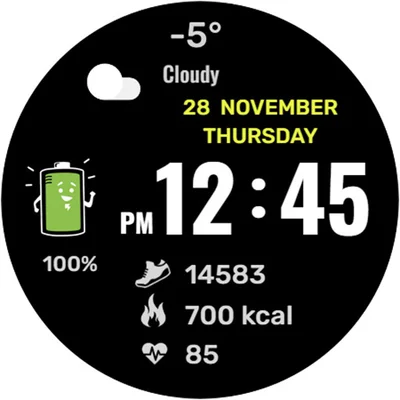
Wear OS プラットフォーム上のスマートウォッチのウォッチフェイス
Wear OS プラットフォーム上のスマートウォッチのウォッチフェイスは、次の機能をサポートしています。
・曜日、月の多言語表示。言語はスマートフォンの設定と同期されます
- 12/24時間モードの自動切り替え。スマートフォンの設定に従って同期が行われます
- バッテリーキン氏の面白い写真によるバッテリー残量の表示
- 歩数の表示
- 歩数に応じた消費カロリーを表示
- 現在の心拍数の表示 (心拍数センサーの場合、ウォッチの領域にタトゥーがあると障害となり、タトゥーがある場合は心拍数が表示されない場合がありますのでご注意ください)
カスタマイズ
ダイヤル設定メニューで、現在時刻 (時、分、AM/PM インジケーター、ドット区切り記号) を表示するためのカラー ソリューションの 1 つを設定できます。
文字盤の情報ゾーンをカスタマイズして、現在の天気を表示できます。これを行うには、ダイヤル メニューで天気アプリケーションからのデータの出力をこの追加機能に設定します。もちろん、時計の他のアプリケーションからのデータの出力を設定することもできます。ただし、時計の文字盤上での表示が最適化されていないため、正しく表示されないか、まったく表示されない可能性があることに注意してください。
また、ウォッチフェイスに 2 つのタップゾーンが追加されており、ウォッチフェイスのメニューで設定して、任意のアプリケーションに素早くアクセスできます。
重要!インフォメーション ゾーンとタップ ゾーンの正しい動作を保証できるのは、Samsung ウォッチのみです。申し訳ございませんが、他メーカーの時計での動作保証は致しかねます。ウォッチフェイスを購入する際は、この点を考慮してください。
Samsung Galaxy Watch Ultra ウォッチには天気を表示する機能も 1 つあります。2024 年 11 月 27 日現在、このウォッチの天気データ (Samsung のストック アプリケーション) はソフトウェアが原因で正しく表示されません。サードパーティのアプリケーションからの気象データを使用できます。
このウォッチフェイス用にオリジナルのAODモードを作成しました。表示するには、ウォッチのメニューで有効にする必要があります。
コメントや提案については、電子メールでご連絡ください:eradzivill@mail.ru
ソーシャルネットワークに参加しましょう
https://vk.com/eradzivill
https://radzivill.com
https://t.me/eradzivill
https://www.facebook.com/groups/radzivill
心から、
ユージェニー・ラジヴィル
原文を表示
The watch face for smartwatches on the Wear OS platform supports the following functionality:
- Multilingual display of the day of the week and month. The language is synchronized with the settings of your smartphone
- Automatic switching of 12/24 hour modes. Synchronization occurs in accordance with the settings of your smartphone
- Display of battery charge with funny pictures of Mr. Batterykin
- Display of the number of steps taken
- Display of burned calories in accordance with the steps taken
- Display of the current heart rate (please note that for the heart rate sensor, the presence of tattoos in the area of the watch is an obstacle, and if they are present, the heart rate may not be shown)
CUSTOMIZATION
You can set one of the color solutions for displaying the current time (hours, minutes, AM / PM indicator and dots-separator) in the dial settings menu
You can customize the information zone on the dial to display the current weather. To do this, set the output of data from the Weather application to this complication in the dial menu. Of course, you can set the output of data from any other application of your watch. But I want to warn you that they may not be optimized for display on the watch face and either be displayed incorrectly or not be displayed at all.
Also, 2 tap zones have been added to the watch face, which can be configured in the watch face menu for quick access to any application
IMPORTANT! I can guarantee the correct operation of the information zone and tap zones only on Samsung watches. Unfortunately, I cannot guarantee operation on watches from other manufacturers. Please take this into account when purchasing a watch face.
There is also one feature in displaying the weather on the Samsung Galaxy Watch Ultra watch - as of 11/27/24, weather data (stock Samsung application) in this watch is displayed incorrectly due to software. You can use weather data from third-party applications.
I made an original AOD mode for this watch face. In order for it to be displayed, you need to activate it in the menu of your watch.
For comments and suggestions, please write to e-mail: eradzivill@mail.ru
Join us on social networks
https://vk.com/eradzivill
https://radzivill.com
https://t.me/eradzivill
https://www.facebook.com/groups/radzivill
Sincerely,
Eugeniy Radzivill
データ セーフティ
このアプリが収集・共有するデータについて、Eugeniy RadzivillがGoogle Playで申告している内容です。
- 第三者と共有されるデータはありません詳しくは、デベロッパーが共有を申告する方法についての説明をご覧ください
- データは収集されません詳しくは、デベロッパーが収集を申告する方法についての説明をご覧ください
開発元の連絡先
- ウェブサイトradzivill.com
- メールeradzivill@mail.ru
- プライバシーポリシーeradzivill.wixsite.com
- 住所дер. Терновка, ул. Песочная, д. 4 Наро-Фоминск Московская область Россия 143300
情報
- 提供元
- Eugeniy Radzivill
- カテゴリ
- カスタマイズ
- 更新日
- 2025/8/23
- リリース
- 2024/11/27
- 対象年齢
- 3 歳以上
- 価格
- ¥110
- パッケージ名
- com.watchfacestudio.batareikin