Mr. Battery
Eugeniy Radzivill- Classificação LivreClassificação etária
- PersonalizaçãoCategoria
- 23/08/2025Atualizado
- R$ 4,89Preço
Leva à página oficial de com.watchfacestudio.batareikin na Google Play. Última verificação em 28/11/2026.
Sobre este app
Tradução automática do Google. Idioma original: Inglês (Estados Unidos).
Mostrador de relógio para smartwatches na plataforma Wear OS
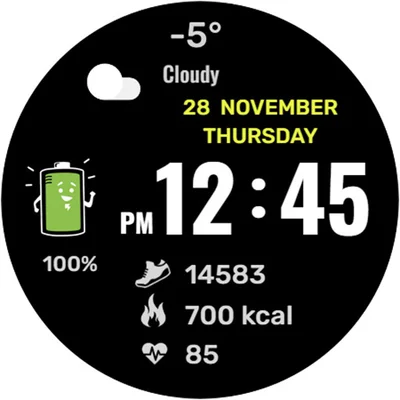
O mostrador do relógio para smartwatches na plataforma Wear OS oferece suporte às seguintes funcionalidades:
- Exibição multilíngue do dia da semana e do mês. O idioma é sincronizado com as configurações do seu smartphone
- Comutação automática dos modos 12/24 horas. A sincronização ocorre de acordo com as configurações do seu smartphone
- Exibição da carga da bateria com fotos engraçadas do Sr. Batterykin
- Exibição do número de etapas realizadas
- Exibição das calorias queimadas de acordo com os passos realizados
- Exibição da frequência cardíaca atual (observe que para o sensor de frequência cardíaca, a presença de tatuagens na área do relógio é um obstáculo e, se estiverem presentes, a frequência cardíaca pode não ser exibida)
PERSONALIZAÇÃO
Você pode definir uma das soluções de cores para exibir a hora atual (horas, minutos, indicador AM/PM e separador de pontos) no menu de configurações do mostrador
Você pode personalizar a zona de informações no mostrador para exibir o clima atual. Para fazer isso, defina a saída de dados do aplicativo Weather para esta complicação no menu de discagem. Claro, você pode definir a saída de dados de qualquer outro aplicativo do seu relógio. Mas quero avisá-lo de que eles podem não estar otimizados para exibição no mostrador do relógio e ser exibidos incorretamente ou nem mesmo serem exibidos.
Além disso, 2 zonas de toque foram adicionadas ao mostrador do relógio, que podem ser configuradas no menu do mostrador do relógio para acesso rápido a qualquer aplicativo
IMPORTANTE! Posso garantir o correto funcionamento da zona de informação e das zonas de toque apenas nos relógios Samsung. Infelizmente, não posso garantir o funcionamento em relógios de outros fabricantes. Leve isso em consideração ao comprar um mostrador de relógio.
Há também um recurso na exibição do clima no relógio Samsung Galaxy Watch Ultra - a partir de 27/11/24, os dados meteorológicos (aplicativo padrão da Samsung) neste relógio são exibidos incorretamente devido ao software. Você pode usar dados meteorológicos de aplicativos de terceiros.
Eu criei um modo AOD original para este mostrador. Para que seja exibido, você precisa ativá-lo no menu do seu relógio.
Para comentários e sugestões, escreva para o e-mail: eradzivill@mail.ru
Junte-se a nós nas redes sociais
https://vk.com/eradzivill
https://radzivill.com
https://t.me/eradzivill
https://www.facebook.com/groups/radzivill
Sinceramente,
Eugeniy Radzivill
Mostrar o texto original
The watch face for smartwatches on the Wear OS platform supports the following functionality:
- Multilingual display of the day of the week and month. The language is synchronized with the settings of your smartphone
- Automatic switching of 12/24 hour modes. Synchronization occurs in accordance with the settings of your smartphone
- Display of battery charge with funny pictures of Mr. Batterykin
- Display of the number of steps taken
- Display of burned calories in accordance with the steps taken
- Display of the current heart rate (please note that for the heart rate sensor, the presence of tattoos in the area of the watch is an obstacle, and if they are present, the heart rate may not be shown)
CUSTOMIZATION
You can set one of the color solutions for displaying the current time (hours, minutes, AM / PM indicator and dots-separator) in the dial settings menu
You can customize the information zone on the dial to display the current weather. To do this, set the output of data from the Weather application to this complication in the dial menu. Of course, you can set the output of data from any other application of your watch. But I want to warn you that they may not be optimized for display on the watch face and either be displayed incorrectly or not be displayed at all.
Also, 2 tap zones have been added to the watch face, which can be configured in the watch face menu for quick access to any application
IMPORTANT! I can guarantee the correct operation of the information zone and tap zones only on Samsung watches. Unfortunately, I cannot guarantee operation on watches from other manufacturers. Please take this into account when purchasing a watch face.
There is also one feature in displaying the weather on the Samsung Galaxy Watch Ultra watch - as of 11/27/24, weather data (stock Samsung application) in this watch is displayed incorrectly due to software. You can use weather data from third-party applications.
I made an original AOD mode for this watch face. In order for it to be displayed, you need to activate it in the menu of your watch.
For comments and suggestions, please write to e-mail: eradzivill@mail.ru
Join us on social networks
https://vk.com/eradzivill
https://radzivill.com
https://t.me/eradzivill
https://www.facebook.com/groups/radzivill
Sincerely,
Eugeniy Radzivill
Segurança dos dados
O que Eugeniy Radzivill declara na Google Play sobre os dados que este app coleta e compartilha.
- Os dados não são compartilhados com terceirosSaiba mais sobre como os desenvolvedores declaram o compartilhamento
- Nenhum dado foi coletadoSaiba mais sobre como os desenvolvedores declaram a coleta
Contato do desenvolvedor
- Siteradzivill.com
- E-maileradzivill@mail.ru
- Política de privacidadeeradzivill.wixsite.com
- Endereçoдер. Терновка, ул. Песочная, д. 4 Наро-Фоминск Московская область Россия 143300
Informações
- Oferecido por
- Eugeniy Radzivill
- Categoria
- Personalização
- Atualizado
- 23/08/2025
- Lançamento
- 27/11/2024
- Classificação etária
- Classificação Livre
- Preço
- R$ 4,89
- Nome do pacote
- com.watchfacestudio.batareikin