Wave Launcher
Live Wallpapers by Wave Studio広告を含む · アプリ内課金
- 3 歳以上対象年齢
- カスタマイズカテゴリ
- 2026/11/20更新日
- 無料価格
wave.launcherのGoogle Play公式ページにリンクしています。最終確認:2026/11/21。
スクリーンショット

このアプリについて
Googleによる英語 (アメリカ合衆国)からの自動翻訳です。
液体ガラス効果、壁紙ギャラリー、アイコンパックを備えたモダンなランチャー
Wave Launcher ― Androidホーム画面をあなただけのものに。
あなたのスマホを、パーソナルで洗練された、まさにあなただけの空間へと変身させましょう。Wave Launcherは、あなたのスマホを思い通りにデザインし、使い心地も思い通りにできるべきだという理念に基づき、ゼロから開発されたモダンなホーム画面代替アプリです。
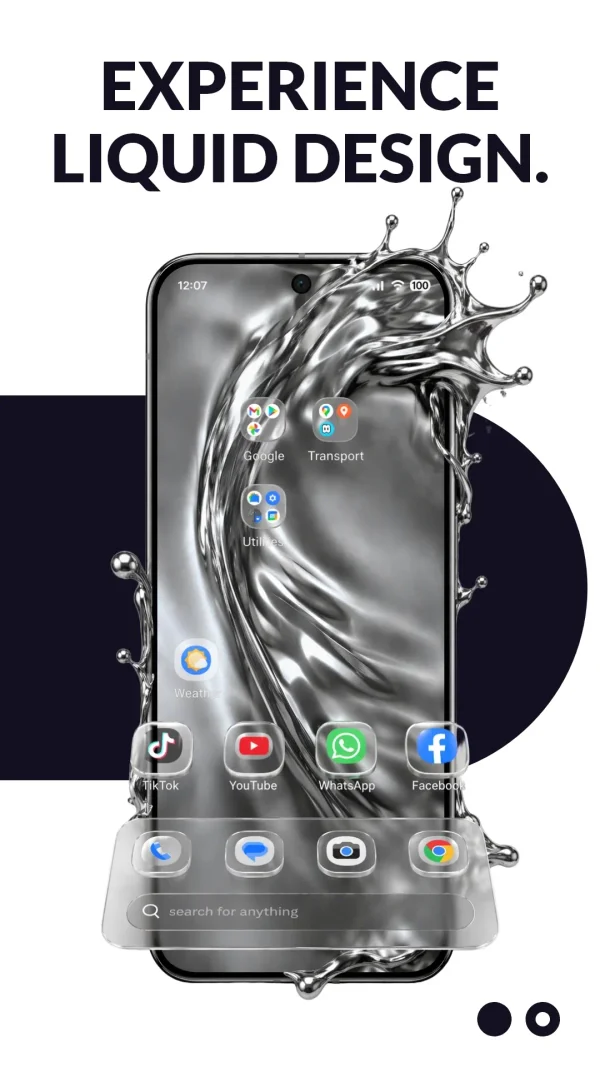
リキッドグラスデザイン
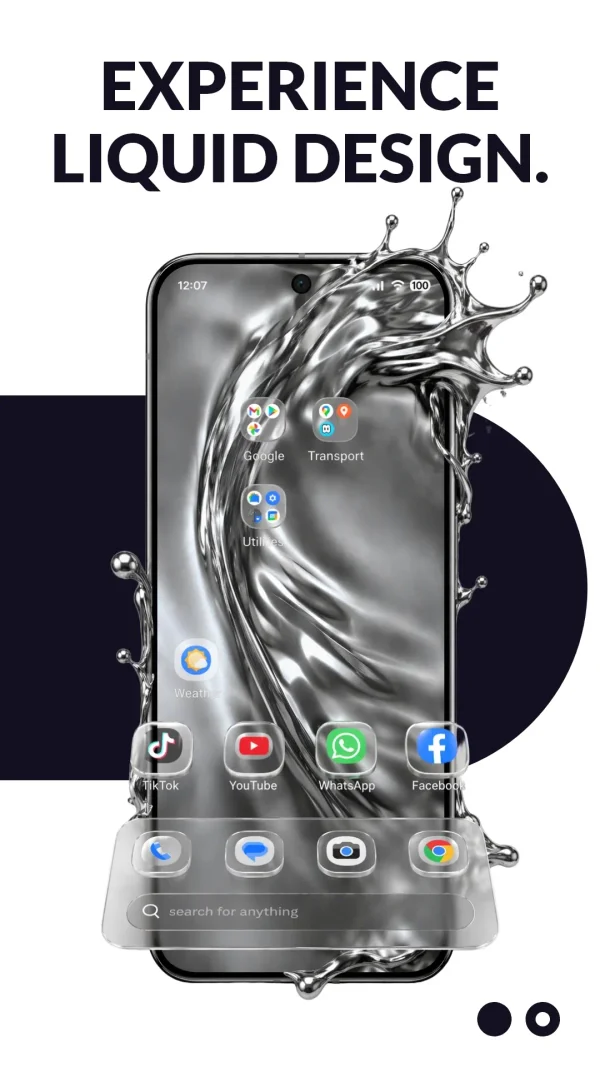
Wave Launcherは、深み、透明感、そしてエレガンスをあらゆる面にもたらす、独自のリキッドグラスビジュアルスタイルを採用しています。アイコン、ドック、UI要素は壁紙とリアルタイムで融合し、高度なシェーダーレンダリングによってシームレスでレイヤード感のある外観を実現します。これは単なるランチャーではありません。まさに視覚体験です。
壁紙ギャラリー
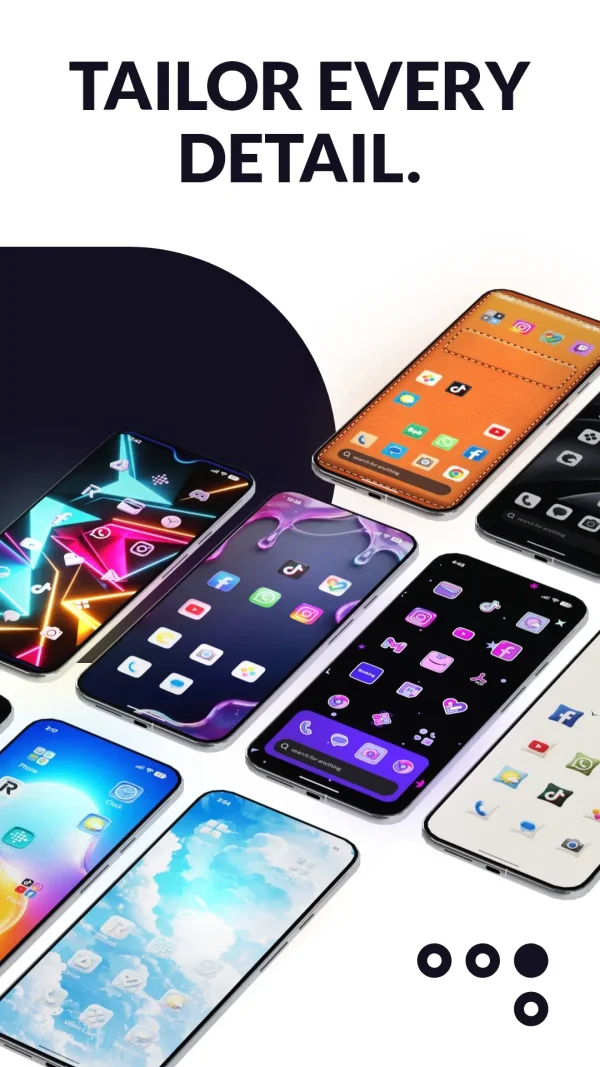
ランチャーから離れることなく、壁紙を見つけて適用できます。ミニマルから鮮やかな色彩、抽象画から風景画まで、様々なカテゴリとスタイルから厳選された、定期的に更新されるコレクションをご覧ください。適用前に壁紙をプレビューしたり、自分の写真をインポートしてピンチズームで正確にトリミングしたりすることも可能です。もっとダイナミックな壁紙をお探しですか?アニメーションや3Dライブ壁紙で、ホーム画面を生き生きと彩りましょう。
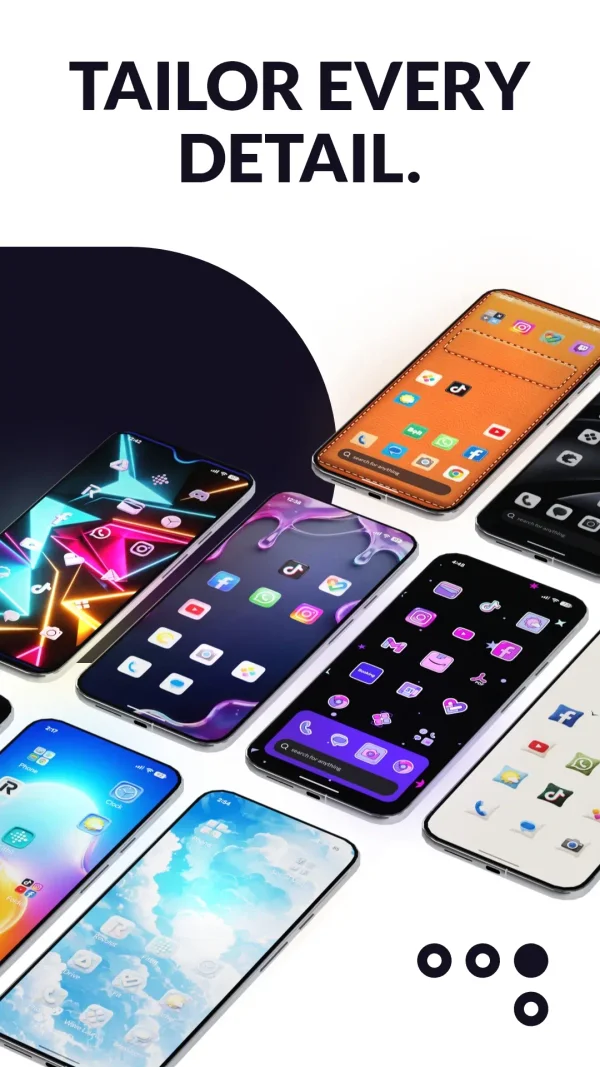
アイコンパックとアイコンスタイル
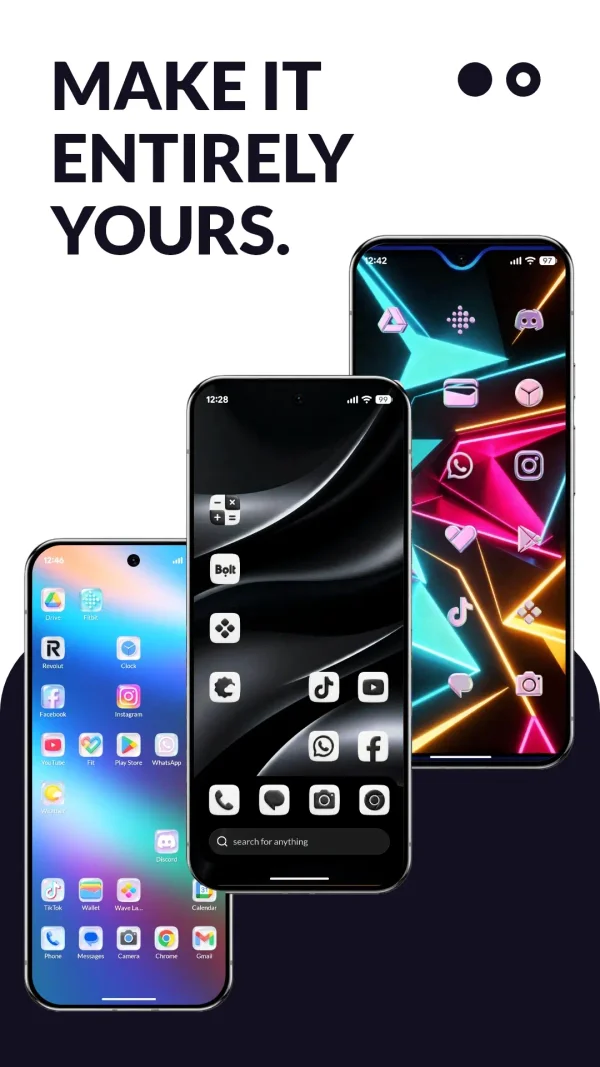
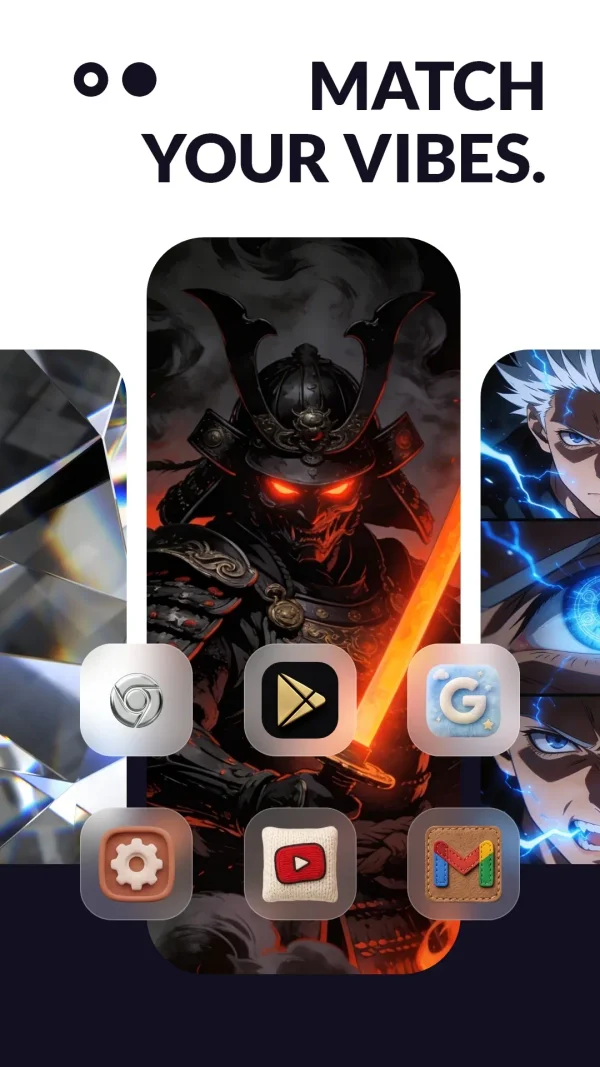
サードパーティ製アイコンパックに対応しているので、ワンタップで画面上のすべてのアプリの外観をガラッと変更できます。Waveはさらに、アイコンの形状(円形、四角形、スクエアなど)をカスタマイズしたり、ラベルの表示/非表示を切り替えたり、アイコンサイズを調整したり、中央揃えまたは全幅表示を選択したりできます。すべてのアイコンを思い通りにカスタマイズできます。
柔軟なホームグリッド
ホーム画面はあなたのニーズに合わせて変化します。ゆったりとした3カラムレイアウトから、密集した6カラムレイアウトまで、複数のグリッドサイズから選択できます。アプリやウィジェットを自由にドラッグ&ドロップし、直感的なハンドルでウィジェットのサイズを変更し、すべてを思い通りの場所に配置できます。フォルダを作成したり、グリッドに配置を戻したり、スタック全体をホーム画面にピン留めしたりすることも可能です。
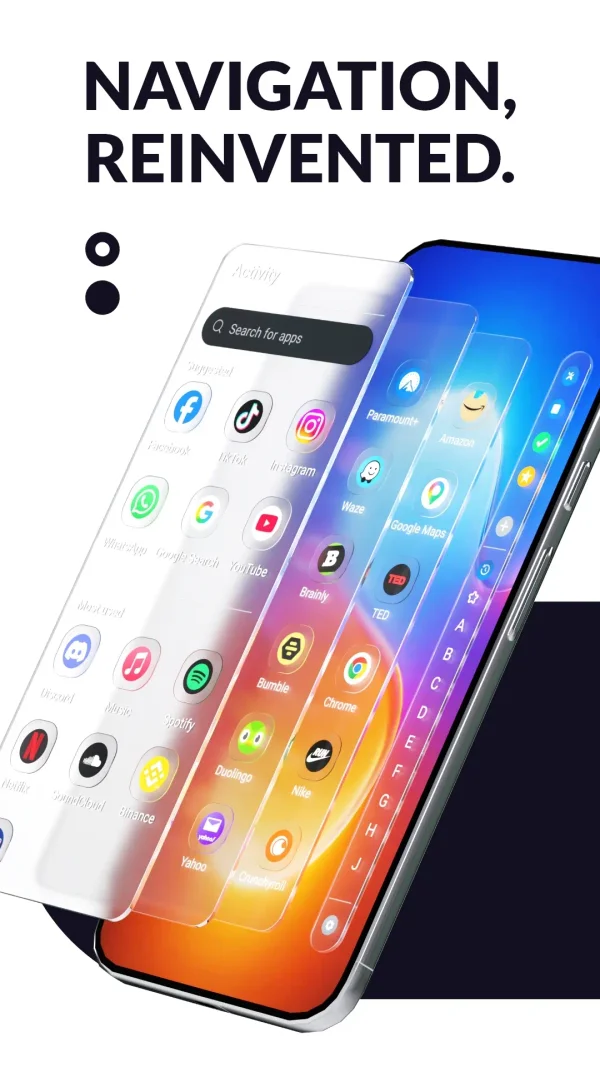
スマートアプリドロワー
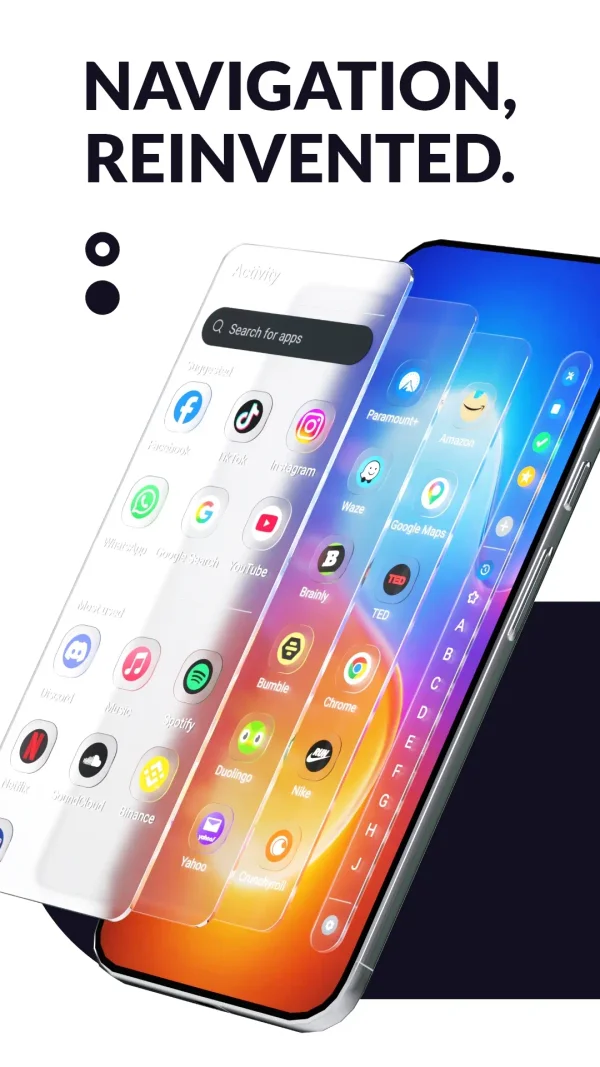
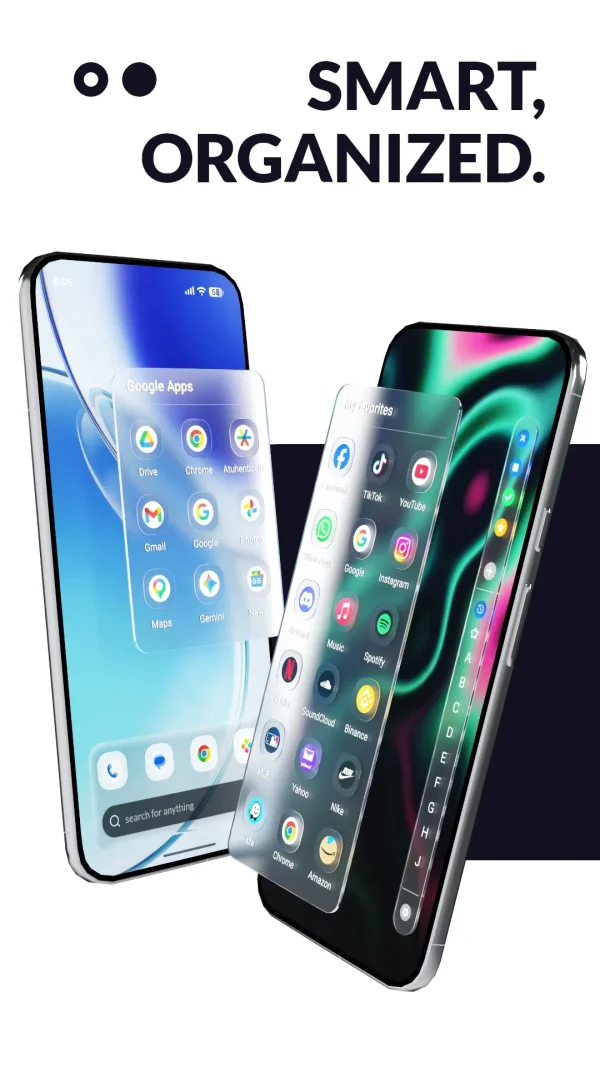
上にスワイプすると、スムーズなカードスタイルのアプリドロワーが表示されます。2つの強力なナビゲーションモードを搭載。素早くアプリにジャンプできるアルファベット順のインデックスモードと、グループ分けして閲覧できる整理されたスタックモードです。内蔵の検索機能でアプリを瞬時に見つけられるほか、最近インストールしたアプリ、最近使用したアプリ、よく使うアプリ、お気に入りアプリなど、使用状況に基づいてランチャーがおすすめアプリを表示してくれます。
スタック - 自分好みに整理
アプリを名前、色、アイコンでカスタマイズしたスタックにグループ化できます。スタックを使えば、アルファベット順だけでなく、自分の思考パターンに合わせてデジタルライフを整理できます。スタックはグリッド表示またはリスト表示で閲覧でき、ページ間をスワイプしたり、自由に並べ替えたり、生体認証やPINコードで機密性の高いスタックをロックすることも可能です。
カスタマイズ可能なドック
ドックは単なるアイコンの列ではありません。有効/無効を切り替えたり、検索バーを追加したり、カスタムカラー、透明度、ぼかしの強度でスタイルを設定したり、独自の液体ガラス効果を適用したりできます。電話、メッセージ、カメラ、メール、ブラウザなど、必要なアプリにワンタップで素早くアクセスできます。
パワフルな検索機能
ランチャーに検索機能が内蔵されています。アプリ、連絡先、ファイル、ウェブ検索結果を、1つの検索バーから検索できます。お好みの検索エンジンを選択し、検索対象ソースをカスタマイズすれば、アプリを切り替えることなく検索結果が表示されます。
パーソナライズされたニュースフィード
ブラウザを開かなくても最新情報を入手できます。スワイプするだけで、ビジネス、テクノロジー、スポーツなど、あなたの興味に合わせたニュースフィードにアクセスできます。カテゴリやプロバイダーでフィルタリングしたり、記事をスクロールしたりして、ホーム画面から気になるニュースをチェックできます。
テーマ
あらかじめ用意されたテーマを閲覧して適用したり、要素ごとにカスタマイズしてより深く掘り下げたりできます。Waveのレイヤードテーマシステムを使えば、背景からアクセントカラーまで、ランチャー全体のビジュアルアイデンティティをコントロールできるので、どの画面も統一感のあるデザインに仕上がります。
日常使いのために設計
Wave Launcherは、毎日のメイン端末として、高速でスムーズ、そして信頼性の高い動作を実現するように設計されています。滑らかなアニメーション、ハードウェアアクセラレーションによるレンダリング、そして画面端まで対応するディスプレイにより、フラッグシップモデルからミドルレンジモデルまで、あらゆる端末で洗練された操作感を提供します。
あなたのスマートフォン。あなたのスタイル。あなたのためのランチャー。
原文を表示
Wave Launcher — Make your Android home screen truly yours.
Transform your phone into something that feels personal, polished, and entirely you. Wave Launcher is a modern home screen replacement built from the ground up around one idea: your phone should look and feel the way you want it to.
LIQUID GLASS DESIGN
Wave Launcher introduces a signature liquid glass visual style that brings depth, transparency, and elegance to every surface. Icons, the dock, and UI elements blend with your wallpaper in real time, creating a seamless, layered look powered by advanced shader rendering. It's not just a launcher. It's a visual experience.
WALLPAPER GALLERY
Discover and apply wallpapers without ever leaving the launcher. Browse a curated, regularly updated collection across multiple categories and styles, from minimal to vibrant, abstract to scenic. Preview any wallpaper before applying, or import your own photos and crop them with pinch-to-zoom precision. Want something more dynamic? Explore animated and 3D live wallpapers for a home screen that truly comes alive.
ICON PACKS & ICON STYLING
Support for third-party icon packs means you can completely change the look of every app on your screen with a single tap. But Wave goes further — customize icon shapes (circle, squircle, square, and more), toggle labels on or off, adjust icon sizes, and choose between centered or full-width styles. Every icon, your way.
FLEXIBLE HOME GRID
Your home screen adapts to you. Choose from multiple grid sizes — from a spacious 3-column layout to a dense 6-column setup. Drag and drop apps and widgets freely, resize widgets with intuitive handles, and organize everything exactly where you want it. Create folders, scatter them back to the grid, or pin entire stacks to your home screen.
SMART APP DRAWER
Swipe up to reveal a smooth, card-style app drawer with two powerful navigation modes: an alphabetical index for quick jumping, or organized stacks for grouped browsing. Find any app instantly with built-in search, or let the launcher surface suggestions based on your usage — recently installed, recently used, most used, and favorited apps are always within reach.
STACKS — ORGANIZE YOUR WAY
Group your apps into custom stacks with personalized names, colors, and icons. Stacks let you organize your digital life the way your mind works — not just alphabetically. Browse stacks in grid or list layouts, swipe between pages, reorder them freely, and even lock sensitive stacks behind biometric or PIN security.
CUSTOMIZABLE DOCK
The dock is more than a row of icons. Enable or disable it, add a search bar, style it with custom colors, transparency, and blur intensity, or apply the signature liquid glass effect. Set up quick access to your essential apps — phone, messages, camera, email, browser — all one tap away.
POWERFUL SEARCH
Search is built right into the launcher. Find apps, contacts, files, and web results from a single search bar. Choose your preferred search engine, control which sources are included, and get results without switching apps.
PERSONALIZED NEWS FEED
Stay informed without opening a browser. Swipe to access a built-in news feed tailored to your interests — business, tech, sports, and more. Filter by category or provider, scroll through articles, and keep up with what matters to you, right from your home screen.
THEMES
Browse and apply pre-built themes, or dive deeper with per-element customization. Wave's layered theme system lets you control the visual identity of your entire launcher — from background surfaces to accent colors — so every screen feels cohesive.
BUILT FOR EVERYDAY USE
Wave Launcher is designed to be fast, smooth, and reliable as your daily driver. Fluid animations, hardware-accelerated rendering, and edge-to-edge display support ensure a polished experience — whether you're on a flagship or a mid-range device.
Your phone. Your style. Your launcher.
データ セーフティ
このアプリが収集・共有するデータについて、Live Wallpapers by Wave StudioがGoogle Playで申告している内容です。
- このアプリはサードパーティと以下の種類のデータを共有することがあります位置情報、財務情報、デバイスまたはその他の ID
- このアプリは以下の種類のデータを収集することがあります位置情報、個人情報、他 4 件
- データは送信中に暗号化されます
開発元の連絡先
- ウェブサイトlivewallpapers.com
- メールoffice@wavekeyboard.com
- プライバシーポリシーwave.studio
- 住所DRUMUL PADUREA NEAGRA NR. 1-17 BL. A56 AP. 02, SECTORUL 1 014044 BUCURESTI Romania
情報
- 提供元
- Live Wallpapers by Wave Studio
- カテゴリ
- カスタマイズ
- バージョン
- 1.0.44
- 更新日
- 2026/11/20
- リリース
- 2026/4/28
- 必要条件
- Android 7.0以降
- 対象年齢
- 3 歳以上
- 価格
- 無料
- アプリ内課金
- ¥860~¥8,800/アイテム
- パッケージ名
- wave.launcher
類似のアプリ
-
 XOS Launcher -Cool Stylish
カスタマイズ
-
 Strip Hi-tech Launcher 2025
カスタマイズ
-
 HiOS Launcher - Fast
カスタマイズ
-
 Minimal Widgets
カスタマイズ
-
 EDGE Lighting -LED Borderlight
カスタマイズ
-
 Wallpaper For Iphone - Wallway
カスタマイズ
-
 GRUBL™4D ライブ壁紙 + AI
カスタマイズ
-
 Niagara Launcher ‧ ホーム画面
カスタマイズ
-
 Everything Widgets
カスタマイズ
-
 4K壁紙
カスタマイズ
-
 PurpleLine Icon Pack : LineX
カスタマイズ
-
 Pie Launcher version 2026
カスタマイズ