
- 対象年齢4+
- カテゴリミュージック
- 開発元AINARS SABLOVSKIS
- 言語英語
- サイズ4.0 MB
App Storeの公式ページにリンクしています
Download.orgはaiMetronomeのファイルを一切ホストしていません。ボタンを押すと、AINARS SABLOVSKISが公開しているApp Storeのアプリページが開きます。ページの最終確認:2026/11/23。
スクリーンショット


概要
開発元はこのテキストをお使いの言語で提供していません。
aiMetronome — pro-level metronome features in a one-time purchase, no subscription. Built by a musician, for musicians.
New in 3.0: Italian tempo names under Play, practice tempo for tunes (50–150%), loops right from the main screen, up to 360 BPM, a smarter torch and full iPhone Duo support.
--- TUNES ---
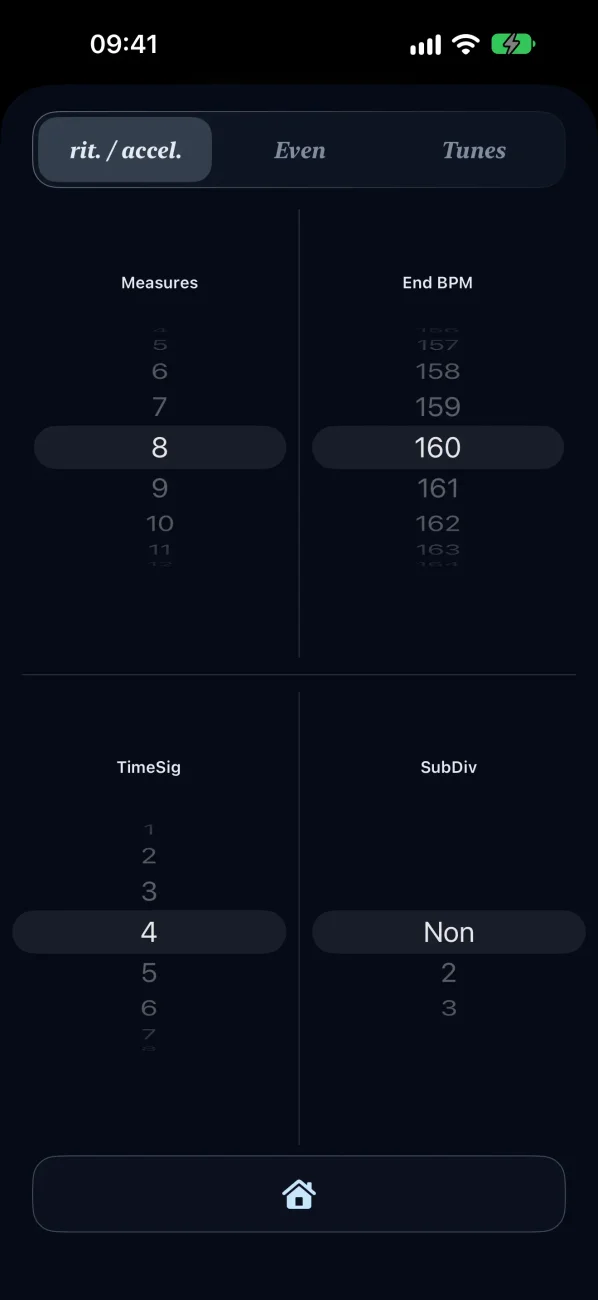
A tune is a saved sequence of blocks, each with its own time signature, tempo, subdivisions and length in bars, plus an optional rit. / accel. ramp into the next block, a cesura (silent gap) at its end, and a count-in flag for the first block.
New: practice tempo. Play any tune at 50–150% of its written tempo. Each tune remembers its own setting, so you can bring it up to speed day by day.
--- IMPORT MIDI & MUSICXML ---
Drop a MIDI or MusicXML file from any notation app (Sibelius, MuseScore, Dorico, Logic). aiMetronome reads tempo markings, time-signature changes, repeats, voltas, cesuras and fermatas — and builds the tune for you. No more re-typing a 100+bar piece bar by bar.
--- SHARE & BACK UP ---
Send one tune (.aitune) or your whole library (.aitunes) via AirDrop, Files or iCloud Drive. Great for teachers handing out rehearsal plans, or for backup.
--- LOOP & JUMP TO ANY BAR ---
Long-press a block to set loop start / end. New: Play repeats the loop right from the main screen, framed on the tune bar. Drag the red playhead dot to jump to any bar.
--- TEMPO ---
Accurate from 10 to 360 BPM. Twist the big knob for fast moves, use +/– for 1 BPM steps, or tap the centre to set tempo by feel — taps are averaged, so the BPM settles smoothly.
New: the Italian tempo marking — from Larghissimo through Andante and Allegro to Prestissimo — appears under Play and follows your tempo.
Ritardando / accelerando ramps over any number of beats or bars, from any tempo to any target.
--- aiVolume™ ---
aiVolume™ listens and adapts the click volume to your dynamic range.
• Loud playing: click turns up.
• Quiet playing: click backs off.
• Volume Boost (10 / 20 s): a clearer click for count-ins, then back to aiVolume™.
The click sits naturally in the background of your music — and disappears in the quiet moments where it would otherwise stand out.
• Lessons — backs off during discussion, comes up when you play.
• Recording sessions — goes quiet in exposed passages, less bleed into the mic.
• Live — rises with stage volume, drops when the audience could hear it leaking from in-ears.
--- TIME SIGNATURES & CLICK SOUNDS ---
Any time signature with a notation-style picker — numerator over denominator, like engraved music. Subdivisions in a simple wheel. Claves, Click or Beep — or mix them, with any timbre at half velocity on non-accented beats for a fuller texture that still tracks the downbeat.
--- VISUAL & PRACTICAL ---
• On-screen flash, device torch, or both — optionally brighter on beat 1. At fast tempos the torch flashes main beats or beat 1 only, so it stays in time.
• Layouts for iPhone SE through Pro Max, iPhone Duo (folded and unfolded) and every iPad (Split View / Slide Over included).
• Works in the background — close the screen, save battery.
• Bluetooth output to headphones or speakers; the aiVolume™ mic keeps listening to your playing in the room.
• Your device won't auto-lock while aiMetronome is on screen.
• Clean, dark interface.
Tip: keep the mic 0.5–2 m from the sound source, not on the instrument itself (e.g. a piano body) — that inflates readings and confuses aiVolume™.
--- NO SUBSCRIPTION, NO IN-APP PURCHASES ---
Every feature is included in your one-time purchase, and updates are free. No premium tier, no per-feature unlocks, no ads, no tracking. The metronome you buy stays the metronome you have.
--- FROM THE DEVELOPER ---
I'm a musician, and aiMetronome started because I waited too long for one that behaved the way I needed. Every feature here exists because it solved a real practice annoyance. Made by a musician, for musicians.
ainars
新機能
バージョン 3.0 · 2026/11/21
aiMetronome 3.0
NEW
• Italian tempo names: Largo, Andante, Allegro, Presto and more appear right under Play and change as you turn the tempo.
• Practice tempo for tunes: play any tune at 50–150% of its speed. Each tune remembers its own practice tempo.
• Loops on the main screen: Play repeats your tune's loop, shown right on the tune bar.
• Tempos up to 360 BPM.
• Made for iPhone Duo: layouts for both screens, the divider sits right on the fold, and a hint shows where the microphone is.
IMPROVED
• Torch flash reworked: steady at every tempo. At very fast tempos it flashes only the main beats or beat 1 of each bar, so it stays in time. Without a time signature it rests above 240 BPM and its button turns red.
• Screen flash timing fine-tuned to land right on the click.
• The tune bar sits at the bottom of the screen on every device, in every orientation.
• Bigger tempo knob on smaller screens.
FIXED
• The torch flash no longer makes the click stutter.
• many litle things under the hood to let you focus on practice.
アプリのプライバシー
このアプリのデータの取り扱いについて、AINARS SABLOVSKISがApp Storeで申告している内容です。
-
データの収集なし
開発元はこのアプリからデータを収集しません。
プライバシーの取り扱いは、ご利用の機能やお客様の年齢などに応じて異なる場合があります。
情報
- 販売元
- AINARS SABLOVSKIS
- カテゴリ
- ミュージック
- バージョン
- 3.0
- 更新日
- 2026/11/21
- リリース
- 2026/3/24
- サイズ
- 4.0 MB
- 必要条件
- iOS 18.0以降
- 対象年齢
- 4+
- 価格
- ¥500
- 言語
- 英語
- 著作権
- © Ainars Sablovskis
こちらもおすすめ
-
 Flute Fingering & Tuningミュージック
-
 Metronome: Practice & Tempoミュージック
-
 OverScores: Read and Remember書き込み対応の楽譜リーダー
-
 Maestro Score楽譜を書く・読む・聴く
-
 Time Guru メトロノーム iPad版リズム&タイミング練習
-
 Piano Transcriberミュージック
-
 基準音ドローン:合唱 吹奏楽 音程の支え耳を鍛えるピッチ確認 ボイトレ 合奏 伴奏
-
 Trombone Tuner – XTuner PROAccurate Trombone Tuner App
-
 Harmonomics Ear Trainingミュージック
-
 KORG EZ Rec電子ピアノの音をそのままスマートフォンへ!