
- Age rating4+
- CategoryMusic
- DeveloperAINARS SABLOVSKIS
- LanguagesEnglish
- Size4.0 MB
Links to the official App Store page
Download.org hosts no file of aiMetronome. The button opens its official App Store page, published by AINARS SABLOVSKIS. Listing last checked on Nov 23, 2026.
Screenshots

About
aiMetronome — pro-level metronome features in a one-time purchase, no subscription. Built by a musician, for musicians.
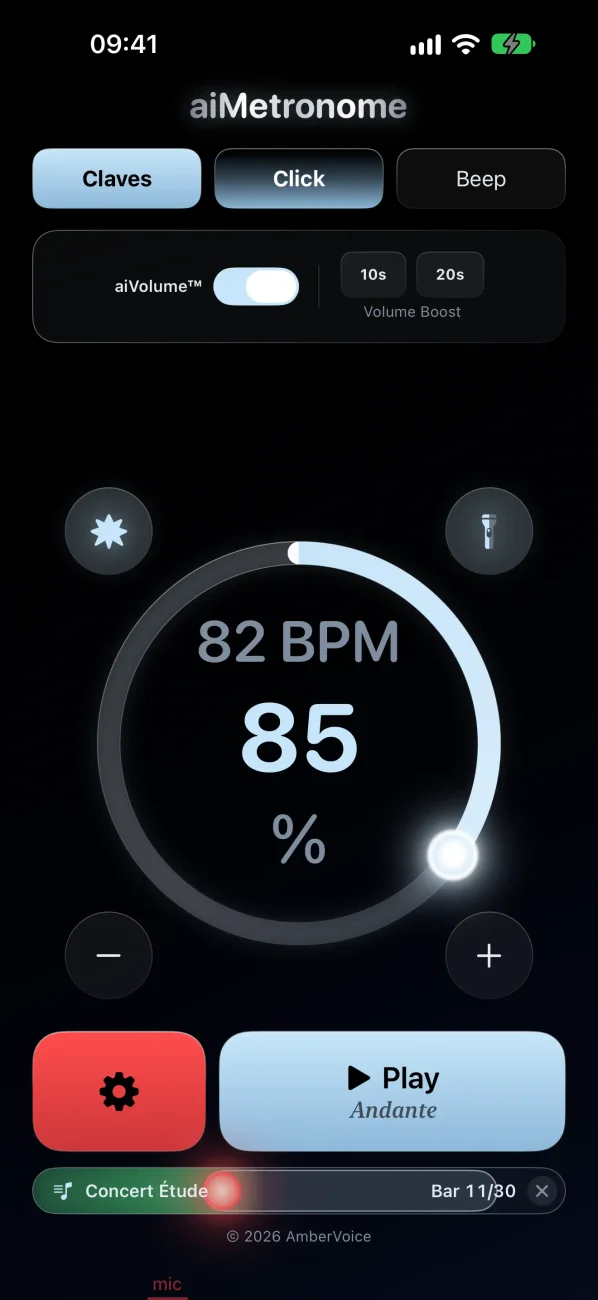
New in 3.0: Italian tempo names under Play, practice tempo for tunes (50–150%), loops right from the main screen, up to 360 BPM, a smarter torch and full iPhone Duo support.
--- TUNES ---
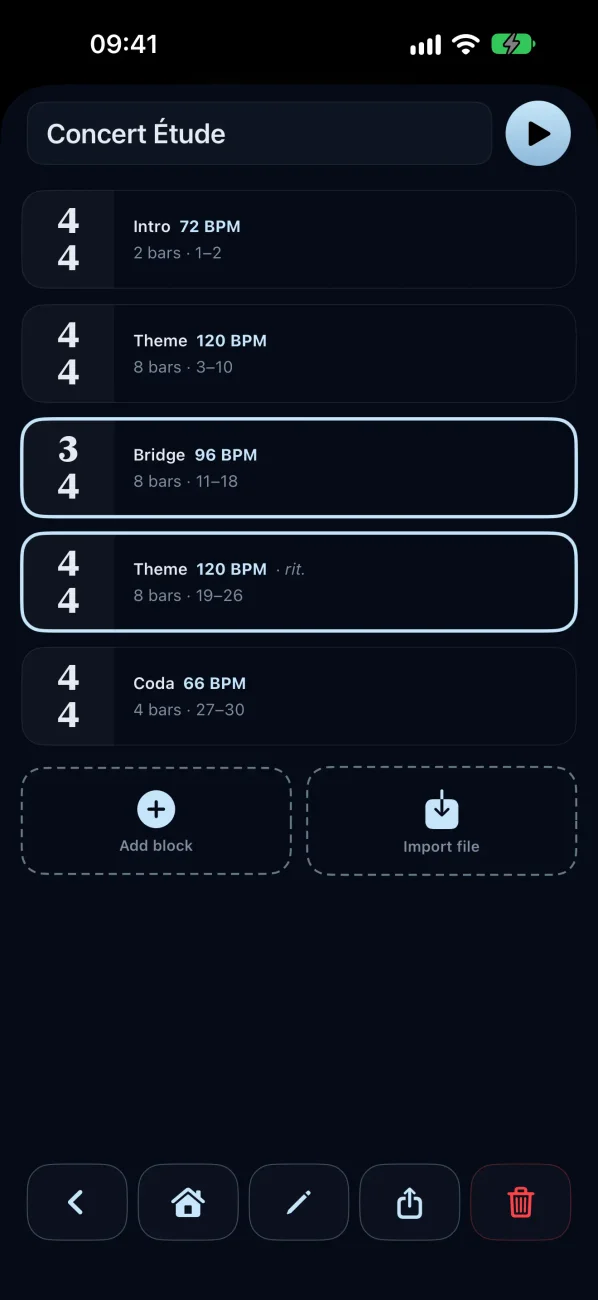
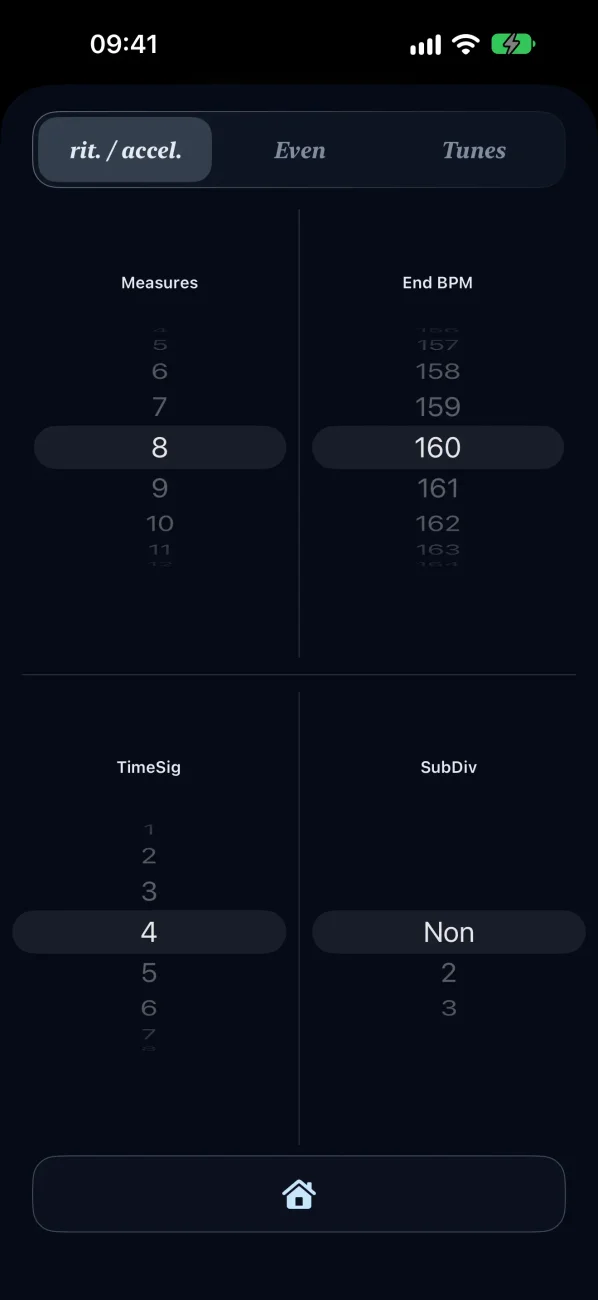
A tune is a saved sequence of blocks, each with its own time signature, tempo, subdivisions and length in bars, plus an optional rit. / accel. ramp into the next block, a cesura (silent gap) at its end, and a count-in flag for the first block.
New: practice tempo. Play any tune at 50–150% of its written tempo. Each tune remembers its own setting, so you can bring it up to speed day by day.
--- IMPORT MIDI & MUSICXML ---
Drop a MIDI or MusicXML file from any notation app (Sibelius, MuseScore, Dorico, Logic). aiMetronome reads tempo markings, time-signature changes, repeats, voltas, cesuras and fermatas — and builds the tune for you. No more re-typing a 100+bar piece bar by bar.
--- SHARE & BACK UP ---
Send one tune (.aitune) or your whole library (.aitunes) via AirDrop, Files or iCloud Drive. Great for teachers handing out rehearsal plans, or for backup.
--- LOOP & JUMP TO ANY BAR ---
Long-press a block to set loop start / end. New: Play repeats the loop right from the main screen, framed on the tune bar. Drag the red playhead dot to jump to any bar.
--- TEMPO ---
Accurate from 10 to 360 BPM. Twist the big knob for fast moves, use +/– for 1 BPM steps, or tap the centre to set tempo by feel — taps are averaged, so the BPM settles smoothly.
New: the Italian tempo marking — from Larghissimo through Andante and Allegro to Prestissimo — appears under Play and follows your tempo.
Ritardando / accelerando ramps over any number of beats or bars, from any tempo to any target.
--- aiVolume™ ---
aiVolume™ listens and adapts the click volume to your dynamic range.
• Loud playing: click turns up.
• Quiet playing: click backs off.
• Volume Boost (10 / 20 s): a clearer click for count-ins, then back to aiVolume™.
The click sits naturally in the background of your music — and disappears in the quiet moments where it would otherwise stand out.
• Lessons — backs off during discussion, comes up when you play.
• Recording sessions — goes quiet in exposed passages, less bleed into the mic.
• Live — rises with stage volume, drops when the audience could hear it leaking from in-ears.
--- TIME SIGNATURES & CLICK SOUNDS ---
Any time signature with a notation-style picker — numerator over denominator, like engraved music. Subdivisions in a simple wheel. Claves, Click or Beep — or mix them, with any timbre at half velocity on non-accented beats for a fuller texture that still tracks the downbeat.
--- VISUAL & PRACTICAL ---
• On-screen flash, device torch, or both — optionally brighter on beat 1. At fast tempos the torch flashes main beats or beat 1 only, so it stays in time.
• Layouts for iPhone SE through Pro Max, iPhone Duo (folded and unfolded) and every iPad (Split View / Slide Over included).
• Works in the background — close the screen, save battery.
• Bluetooth output to headphones or speakers; the aiVolume™ mic keeps listening to your playing in the room.
• Your device won't auto-lock while aiMetronome is on screen.
• Clean, dark interface.
Tip: keep the mic 0.5–2 m from the sound source, not on the instrument itself (e.g. a piano body) — that inflates readings and confuses aiVolume™.
--- NO SUBSCRIPTION, NO IN-APP PURCHASES ---
Every feature is included in your one-time purchase, and updates are free. No premium tier, no per-feature unlocks, no ads, no tracking. The metronome you buy stays the metronome you have.
--- FROM THE DEVELOPER ---
I'm a musician, and aiMetronome started because I waited too long for one that behaved the way I needed. Every feature here exists because it solved a real practice annoyance. Made by a musician, for musicians.
ainars
What’s new
Version 3.0 · Nov 21, 2026
aiMetronome 3.0
NEW
• Italian tempo names: Largo, Andante, Allegro, Presto and more appear right under Play and change as you turn the tempo.
• Practice tempo for tunes: play any tune at 50–150% of its speed. Each tune remembers its own practice tempo.
• Loops on the main screen: Play repeats your tune's loop, shown right on the tune bar.
• Tempos up to 360 BPM.
• Made for iPhone Duo: layouts for both screens, the divider sits right on the fold, and a hint shows where the microphone is.
IMPROVED
• Torch flash reworked: steady at every tempo. At very fast tempos it flashes only the main beats or beat 1 of each bar, so it stays in time. Without a time signature it rests above 240 BPM and its button turns red.
• Screen flash timing fine-tuned to land right on the click.
• The tune bar sits at the bottom of the screen on every device, in every orientation.
• Bigger tempo knob on smaller screens.
FIXED
• The torch flash no longer makes the click stutter.
• many litle things under the hood to let you focus on practice.
App privacy
What AINARS SABLOVSKIS declares on the App Store about how this app handles data.
-
Data not collected
The developer does not collect any data from this app.
Privacy practices may vary, for example with the features you use or your age.
Information
- Seller
- AINARS SABLOVSKIS
- Category
- Music
- Version
- 3.0
- Updated
- Nov 21, 2026
- Released
- Mar 24, 2026
- Size
- 4.0 MB
- Requires
- iOS 18.0 or later
- Age rating
- 4+
- Price
- $2.99
- Languages
- English
- Copyright
- © Ainars Sablovskis
You might also like
-
 Flute Fingering & TuningIntonation Fingerings
-
 Metronome: Practice & TempoPrecise Timing & Rhythm Tools
-
 OverScores: Read and RememberSheet Music Reader with Markup
-
 Maestro ScoreWrite and print sheet music
-
 Time Guru Metronome for iPadRhythm & Timing Trainer
-
 Piano TranscriberMusic
-
 Tuning Drone & Tanpura ToneEar training & pitch anchor
-
 Trombone Tuner – XTuner PROAccurate Trombone Tuner App
-
 Harmonomics Ear TrainingIntervals, chords & scales
-
 KORG EZ RecRecord piano sound to iPhone!