DM Flowchart Designer
AI Diagram & Process Map Maker
iPhone, iPad, Mac向けに設計
無料 · アプリ内課金
- 対象年齢4+
- カテゴリ仕事効率化
- 開発元JOSHUA CHARLES JORDAN
- 言語英語
- サイズ11.8 MB
App Storeの公式ページにリンクしています
Download.orgはDM Flowchart Designerのファイルを一切ホストしていません。ボタンを押すと、JOSHUA CHARLES JORDANが公開しているApp Storeのアプリページが開きます。ページの最終確認:2026/11/27。
スクリーンショット

概要
開発元はこのテキストをお使いの言語で提供していません。
Create professional flowcharts in minutes — or let AI build them for you.
DM Flowchart Designer is a powerful, native flowchart editor for Mac, iPad and iPhone. Describe what you need in plain language, and the built-in AI assistant will generate a complete, styled flowchart instantly. Then refine it visually with a full suite of editing tools.
AI-POWERED GENERATION
Chat with the AI to plan your flowchart, then generate it with one click. The AI understands node types, connection styles, color coding, and layout — so you get a polished result, not just boxes and arrows. Already have a flowchart? The AI can see your canvas and modify it based on your instructions.
Works with Claude, GPT-4o, Gemini, and Grok — bring your own API key and choose your preferred model. Or use any chat AI you already have: copy a ready-made prompt, paste the answer back, and the chart is built for you.
RECORD & TRANSCRIBE
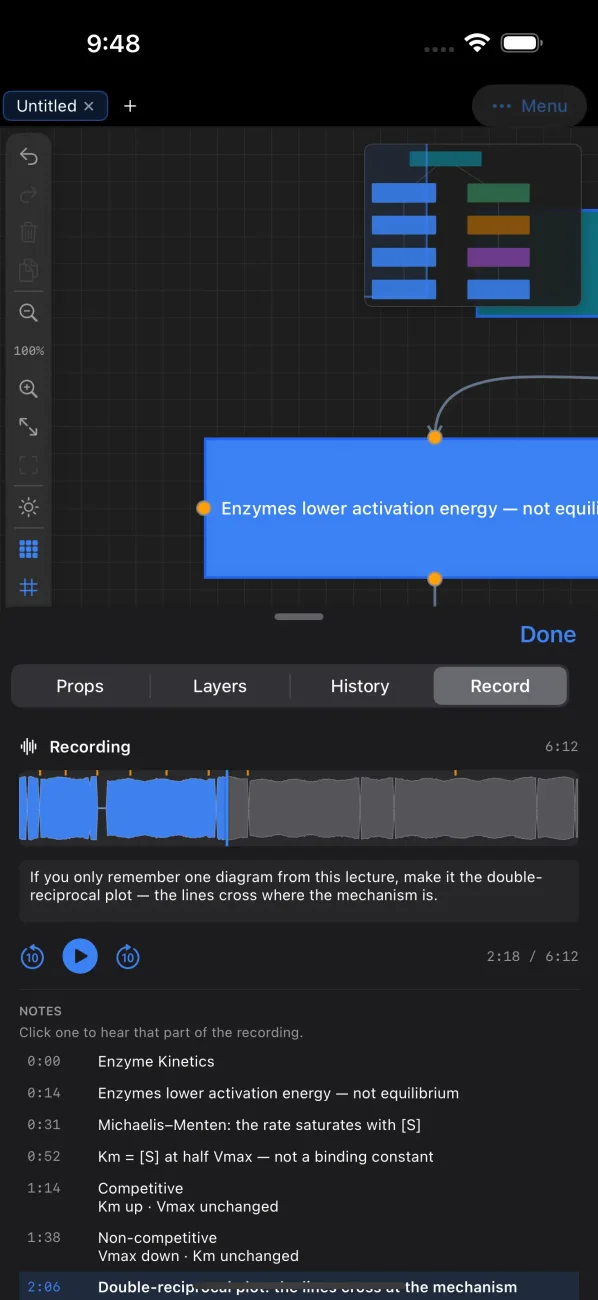
Record a meeting, a lecture or your own thinking out loud, or import an audio file. The app turns it into a transcript on your device that you can read, correct and play back, and you can share the audio afterwards. Recording and the transcript are free.
With Pro, a recording becomes a diagram: the AI lays out what was said as a flowchart, an argument map or notes, and each note plays back the moment it came from. Pin photos, sketches and typed notes to the recording as it happens. Pro also adds Whisper transcription (English), which runs on your device and keeps up when several people are talking in a room.
FULL-FEATURED EDITOR
• 10+ node shapes: process, decision, input/output, cards, icons, notes, and more
• Rich styling: gradients, shadows, custom fonts, colors, and badges
• Flexible connections: curved, straight, and smooth lines with multiple dash patterns and arrow styles
• Swimlanes and layers for larger charts
• Body text on any node for descriptions and details
• Import images and place annotation pins directly on them
• Dark and light canvas themes
EXPORT & SHARE
• Export to PNG, PDF, and SVG
• Save and open standard JSON files
• Share flowcharts across Mac, iPad and iPhone
BUILT FOR YOUR WORKFLOW
• Multiple tabs for working on several flowcharts at once
• Searchable canvas to find any node instantly
• Undo history with visual playback
• Auto-save and crash recovery
• Starter templates to get going fast
Upgrade to Pro to unlock AI generation, diagrams from recordings, Whisper transcription, all templates, PDF/SVG export, and multiple tabs.
Hosted AI is an optional auto-renewable subscription ($14.99/month). Payment is charged to your Apple Account at confirmation of purchase, and renews automatically unless cancelled at least 24 hours before the end of the current period. Manage or cancel any time in your Apple Account settings. Every other feature works without it, and you can use your own AI provider key instead.
Terms of Use (EULA): https://www.apple.com/legal/internet-services/itunes/dev/stdeula/
Privacy Policy: https://dependentmedia.com/dm-flowchart-designer-privacy-policy/
新機能
バージョン 2.59.0 · 2026/11/26
New
• Record & Transcribe is now free. Record a meeting or a lecture, or import an audio file, and get a transcript you can read, correct and play back. The transcript is made on your device.
• Pro adds what is built on a recording: a diagram made from what was said, photos, sketches and notes pinned to the moment they happened, and Whisper transcription, which keeps up when several people are talking in a room.
• A Record & Transcribe button on the welcome screen, so a new chart can start from a recording.
• Share a recording's audio from the review screen or from Earlier Recordings: save it to Files, AirDrop it or mail it.
• When a transcript has far fewer words than people speak in that time, the app shows the rate and says speech may be missing.
• Help has a new Rate on the App Store item.
Fixes
• iPhone: the recording bar fits an upright phone. It used to run off both edges and cover the shape strip.
• Mac: the level meter no longer flashes "no signal" over a recording that is picking up sound.
• Mac: the Photo button in the recording bar no longer has a grey button outline drawn over its icon.
アプリのプライバシー
このアプリのデータの取り扱いについて、JOSHUA CHARLES JORDANがApp Storeで申告している内容です。
-
ユーザーに関連付けられないデータ
収集される場合がありますが、ユーザーの識別情報には関連付けられません。
- ユーザーコンテンツ
プライバシーの取り扱いは、ご利用の機能やお客様の年齢などに応じて異なる場合があります。
情報
- 販売元
- JOSHUA CHARLES JORDAN
- カテゴリ
- 仕事効率化
- バージョン
- 2.59.0
- 更新日
- 2026/11/26
- リリース
- 2026/3/10
- サイズ
- 11.8 MB
- 必要条件
- iOS 17.0以降
- 対象年齢
- 4+
- 価格
- 無料
- アプリ内課金
- あり
- 言語
- 英語
- 著作権
- © Copyright 2026 Joshua Jordan. All rights reserved.