DM Flowchart Designer
AI Diagram & Process Map Maker
iPhone, iPad, Mac için tasarlandı
Ücretsiz · Uygulama içi satın alma
- Yaş sınırı4+
- KategoriÜretkenlik
- GeliştiriciJOSHUA CHARLES JORDAN
- Dillerİngilizce
- Boyut11,8 MB
Resmi App Store sayfasına bağlanır
Download.org, DM Flowchart Designer için hiçbir dosya barındırmaz. Düğme, uygulamanın App Store üzerindeki sayfasını açar; uygulamayı orada JOSHUA CHARLES JORDAN yayınlar. Sayfanın son kontrolü: 27.11.2026.
Ekran görüntüleri

Hakkında
Geliştirici bu metni dilinizde sunmamış.
Create professional flowcharts in minutes — or let AI build them for you.
DM Flowchart Designer is a powerful, native flowchart editor for Mac, iPad and iPhone. Describe what you need in plain language, and the built-in AI assistant will generate a complete, styled flowchart instantly. Then refine it visually with a full suite of editing tools.
AI-POWERED GENERATION
Chat with the AI to plan your flowchart, then generate it with one click. The AI understands node types, connection styles, color coding, and layout — so you get a polished result, not just boxes and arrows. Already have a flowchart? The AI can see your canvas and modify it based on your instructions.
Works with Claude, GPT-4o, Gemini, and Grok — bring your own API key and choose your preferred model. Or use any chat AI you already have: copy a ready-made prompt, paste the answer back, and the chart is built for you.
RECORD & TRANSCRIBE
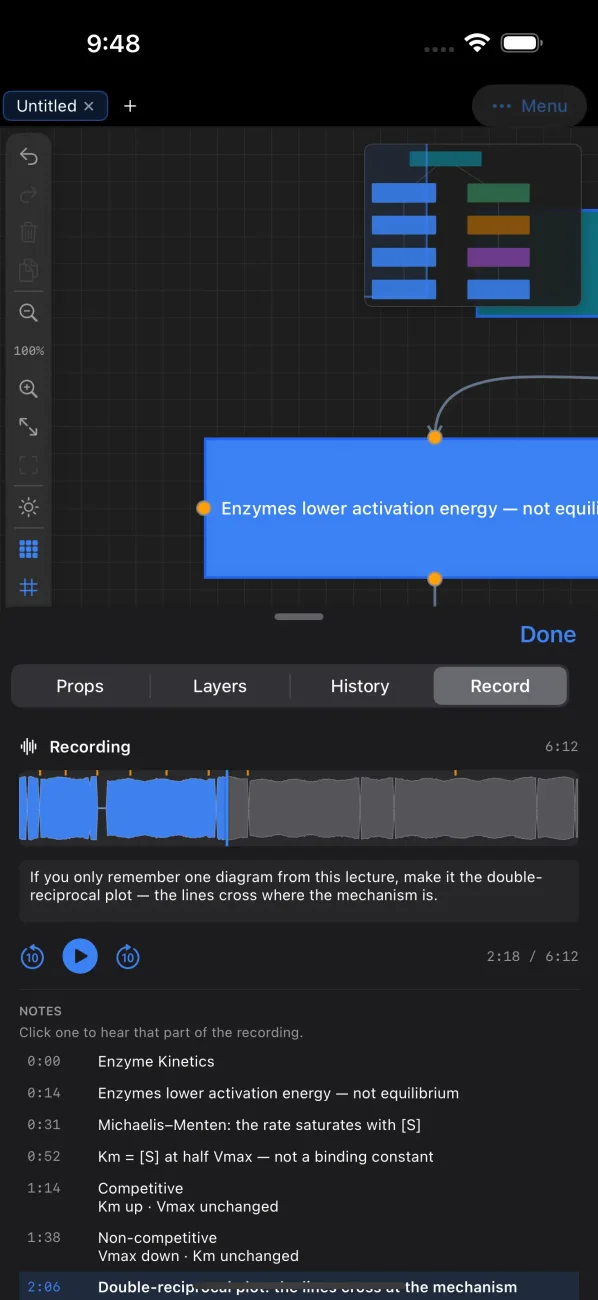
Record a meeting, a lecture or your own thinking out loud, or import an audio file. The app turns it into a transcript on your device that you can read, correct and play back, and you can share the audio afterwards. Recording and the transcript are free.
With Pro, a recording becomes a diagram: the AI lays out what was said as a flowchart, an argument map or notes, and each note plays back the moment it came from. Pin photos, sketches and typed notes to the recording as it happens. Pro also adds Whisper transcription (English), which runs on your device and keeps up when several people are talking in a room.
FULL-FEATURED EDITOR
• 10+ node shapes: process, decision, input/output, cards, icons, notes, and more
• Rich styling: gradients, shadows, custom fonts, colors, and badges
• Flexible connections: curved, straight, and smooth lines with multiple dash patterns and arrow styles
• Swimlanes and layers for larger charts
• Body text on any node for descriptions and details
• Import images and place annotation pins directly on them
• Dark and light canvas themes
EXPORT & SHARE
• Export to PNG, PDF, and SVG
• Save and open standard JSON files
• Share flowcharts across Mac, iPad and iPhone
BUILT FOR YOUR WORKFLOW
• Multiple tabs for working on several flowcharts at once
• Searchable canvas to find any node instantly
• Undo history with visual playback
• Auto-save and crash recovery
• Starter templates to get going fast
Upgrade to Pro to unlock AI generation, diagrams from recordings, Whisper transcription, all templates, PDF/SVG export, and multiple tabs.
Hosted AI is an optional auto-renewable subscription ($14.99/month). Payment is charged to your Apple Account at confirmation of purchase, and renews automatically unless cancelled at least 24 hours before the end of the current period. Manage or cancel any time in your Apple Account settings. Every other feature works without it, and you can use your own AI provider key instead.
Terms of Use (EULA): https://www.apple.com/legal/internet-services/itunes/dev/stdeula/
Privacy Policy: https://dependentmedia.com/dm-flowchart-designer-privacy-policy/
Yenilikler
Sürüm 2.59.0 · 26.11.2026
New
• Record & Transcribe is now free. Record a meeting or a lecture, or import an audio file, and get a transcript you can read, correct and play back. The transcript is made on your device.
• Pro adds what is built on a recording: a diagram made from what was said, photos, sketches and notes pinned to the moment they happened, and Whisper transcription, which keeps up when several people are talking in a room.
• A Record & Transcribe button on the welcome screen, so a new chart can start from a recording.
• Share a recording's audio from the review screen or from Earlier Recordings: save it to Files, AirDrop it or mail it.
• When a transcript has far fewer words than people speak in that time, the app shows the rate and says speech may be missing.
• Help has a new Rate on the App Store item.
Fixes
• iPhone: the recording bar fits an upright phone. It used to run off both edges and cover the shape strip.
• Mac: the level meter no longer flashes "no signal" over a recording that is picking up sound.
• Mac: the Photo button in the recording bar no longer has a grey button outline drawn over its icon.
Uygulama gizliliği
Bu uygulamanın verileri nasıl işlediği hakkında JOSHUA CHARLES JORDAN tarafından App Store üzerinde yapılan beyan.
-
Sizinle ilişkilendirilmeyen veriler
Toplanabilir ancak kimliğinizle ilişkilendirilmez.
- Kullanıcı içeriği
Gizlilik uygulamaları, örneğin kullandığınız özelliklere veya yaşınıza göre değişiklik gösterebilir.
Bilgiler
- Satıcı
- JOSHUA CHARLES JORDAN
- Kategori
- Üretkenlik
- Sürüm
- 2.59.0
- Güncellendi
- 26.11.2026
- Yayın tarihi
- 10.03.2026
- Boyut
- 11,8 MB
- Gereksinim
- iOS 17.0 veya sonrası
- Yaş sınırı
- 4+
- Fiyat
- Ücretsiz
- Uygulama içi satın alma
- Evet
- Diller
- İngilizce
- Telif hakkı
- © Copyright 2026 Joshua Jordan. All rights reserved.
Bunları da beğenebilirsiniz
-
 ListTaskTickÜretkenlik
-
 Mind Map: Smart MindÜretkenlik
-
 Mind Ace: Mind Map, BrainstormÜretkenlik
-
 ThinkMap: AI Problem SolverÜretkenlik
-
 VPASS - visitor managementÜretkenlik
-
 DrawViewerÜretkenlik
-
 Bubble PlanÜretkenlik
-
 Mind Map AI - MapTheseÜretkenlik
-
 Chart Maker: AI Graph CreatorÜretkenlik
-
 KnowledgeBase BuilderÜretkenlik