- 対象年齢4+
- カテゴリユーティリティ
- 開発元SeungYoun YI
- 言語英語ほか1言語
- サイズ1.5 MB
App Storeの公式ページにリンクしています
Download.orgはElsewhen: World Clockのファイルを一切ホストしていません。ボタンを押すと、SeungYoun YIが公開しているApp Storeのアプリページが開きます。ページの最終確認:2026/11/16。
スクリーンショット


概要
開発元はこのテキストをお使いの言語で提供していません。
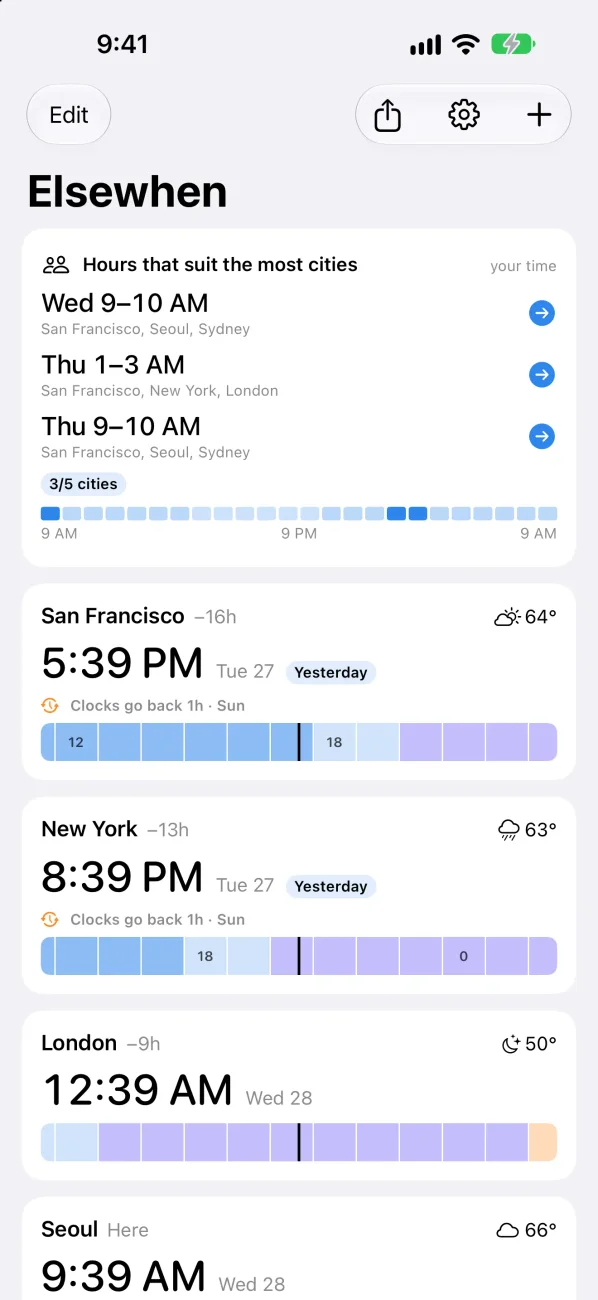
Elsewhen is a world clock for people whose friends, family and teammates live in other time zones.
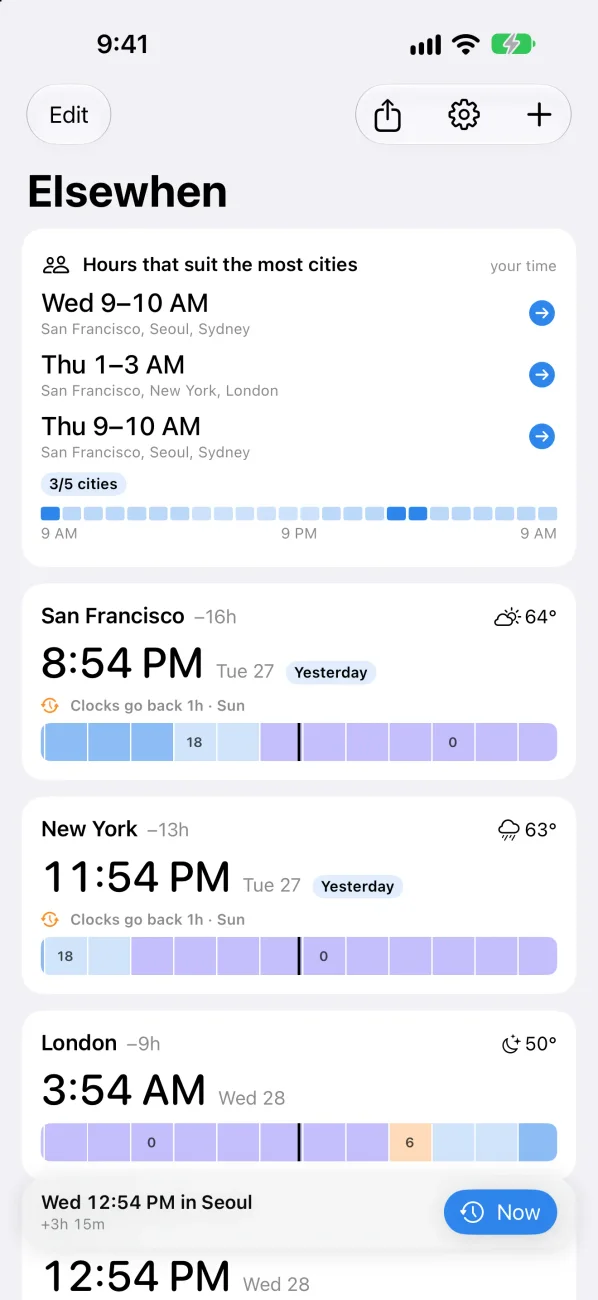
Each city is a lane: its current time, date and weather on a 24-hour track shaded for night, day and working hours. Drag any track and every city moves together, so you can see in a second that 6 pm in San Francisco is 2 am in London and the next morning in Seoul. Tap a city's time to type an exact moment in that city's zone, like 8 am in New York on Tuesday.
The overlap card does the scheduling math. It looks a week ahead, skips each city's weekend, and lists the next windows when everyone, or the most cities, are inside working hours, in your own time. Tap one and every lane jumps there. Share the moment you land on as a tidy list that names your city.
Widgets bring it to your Home Screen and Lock Screen in your 12- or 24-hour choice and your language. Pick one city for a small widget or a Lock Screen clock, three for the Lock Screen list, or several for the medium and large widgets.
Features:
- One lane per city: time, date, weather, offset and a day/night track
- Drag the timeline, or tap a time and type one, and every city moves together
- Overlap card: the next weekday windows everyone shares, one tap to jump
- Daylight saving heads-up a week before a city's clocks change
- Search by city, country or code (NYC, EST, Japan), in English or Korean
- Home Screen and Lock Screen widgets, including a three-city Lock Screen widget
- Share the shifted times as text
- Rename and reorder cities, choose which appear in widgets
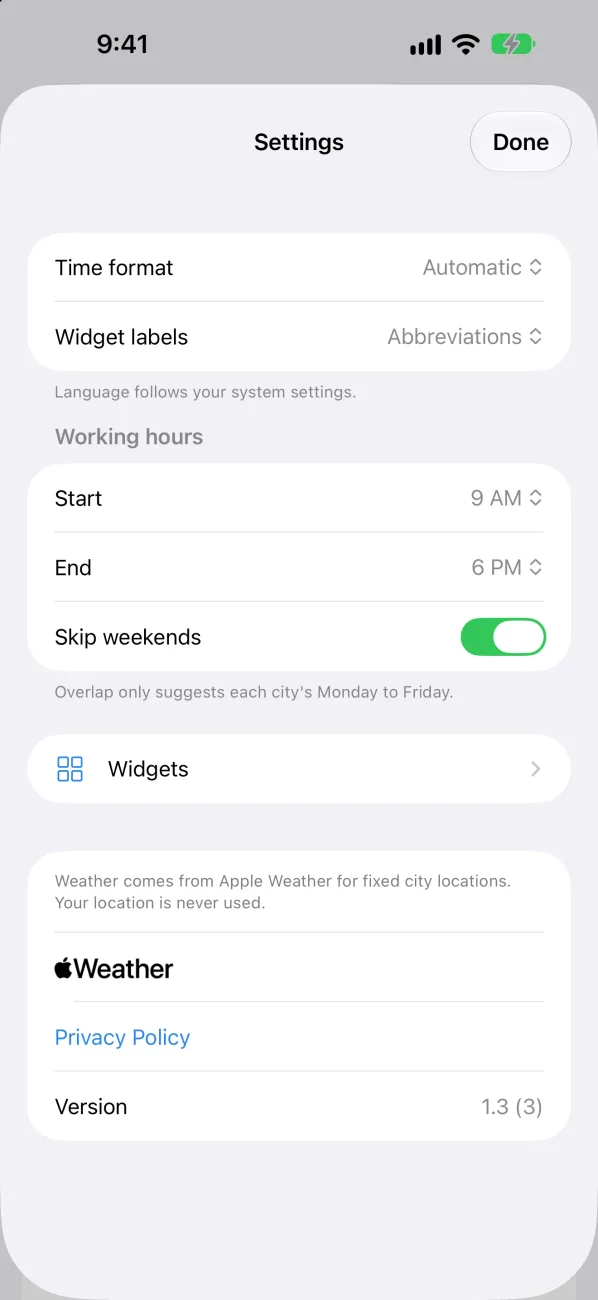
- 12-hour or 24-hour time, editable working hours
- VoiceOver can move the timeline
- Current conditions from Apple Weather
- Free, with no subscription, account, ads or analytics
Elsewhen needs no permissions and collects no data. Your city list and preferences stay on your iPhone. The only network use is Apple Weather (WeatherKit) for each city's current conditions, looked up by fixed city coordinates and never your location.
Also available for Mac as a menu bar clock.
新機能
バージョン 1.3 · 2026/10/29
- The overlap card skips weekends, labels each window with its day, and jumps there when you tap it
- Tap a city's time to type a time in that city's zone
- A three-city Lock Screen widget, and widgets now follow your 24-hour and language choice
- Daylight saving heads-up a week before a city's clocks change
- Search cities in Korean, by country, or by codes like NYC and EST
- VoiceOver can move the timeline, with haptics while you drag
- Shared times now name your city
- Widget clocks change every minute
- Every screen fits the largest text sizes, with stronger contrast
アプリのプライバシー
このアプリのデータの取り扱いについて、SeungYoun YIがApp Storeで申告している内容です。
-
データの収集なし
開発元はこのアプリからデータを収集しません。
プライバシーの取り扱いは、ご利用の機能やお客様の年齢などに応じて異なる場合があります。
情報
- 販売元
- SeungYoun YI
- カテゴリ
- ユーティリティ
- バージョン
- 1.3
- 更新日
- 2026/10/29
- リリース
- 2026/7/13
- サイズ
- 1.5 MB
- 必要条件
- iOS 17.0以降
- 対象年齢
- 4+
- 価格
- 無料
- 言語
- 英語, 韓国語
- 著作権
- © 2026 SeungYoun YI
こちらもおすすめ
-
 Time Strip: Time Zonesユーティリティ
-
 HourFrame: Desk Clockユーティリティ
-
 漢数字時計 · ウィジェット漢数字の文字盤
-
 Cyatal: Digital Clock & Widgetユーティリティ
-
 Light: Athan, Qibla Finderユーティリティ
-
 WorldClocksy for Women世界時計ウィジェット
-
 Live Weather Forecast Proユーティリティ
-
 World Clock & Time Converterユーティリティ
-
 Vizzy.Siteユーティリティ
-
 StandBy Hub: スタンバイ ウィジェット時計・カウントダウン・ダッシュボード