- 対象年齢4+
- カテゴリミュージック
- 開発元Techné Media
- 言語英語
- サイズ58.8 MB
App Storeの公式ページにリンクしています
Download.orgはGuide Trackのファイルを一切ホストしていません。ボタンを押すと、Techné Mediaが公開しているApp Storeのアプリページが開きます。ページの最終確認:2026/11/17。
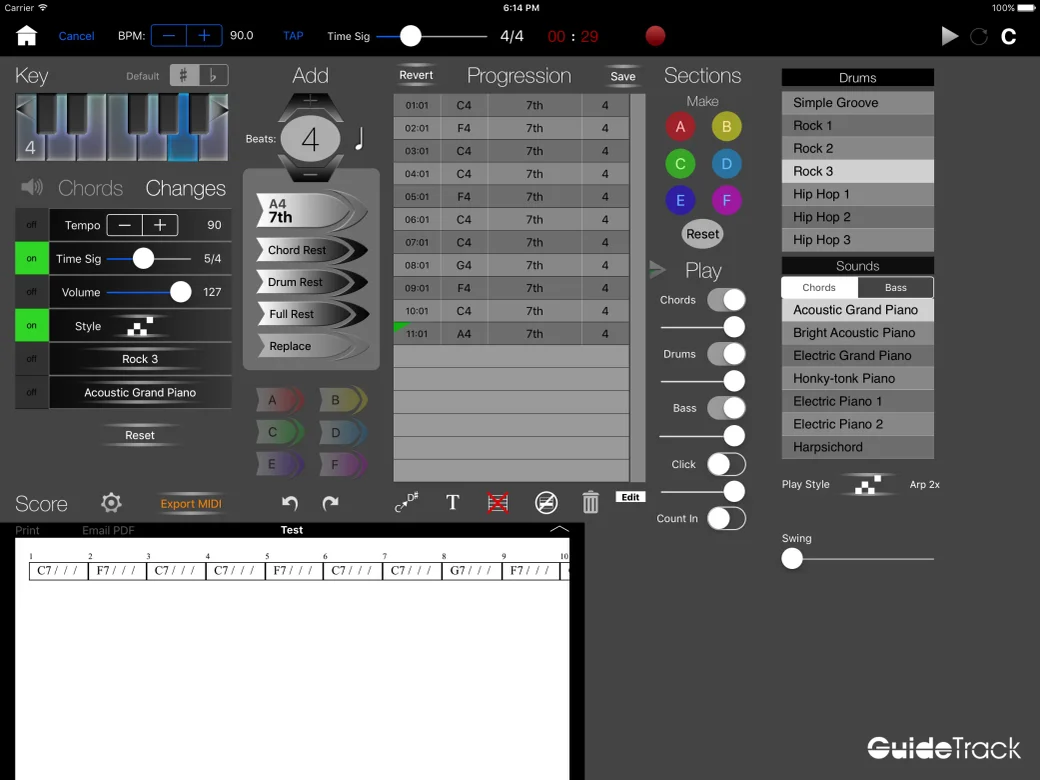
スクリーンショット


概要
開発元はこのテキストをお使いの言語で提供していません。
From the US Store:
Songwriter's pre-production tool extraordinaire ! *****
by Mythmongrel - Version - 1.2.0 - Oct 31, 2014
The best app for easily laying out the form of a composition. It's does exactly what it's meant to do and it keeps getting better. Highly recommend it.
Accept No Substitutes. *****
by Focusking - Version - 1.2.0 - Oct 9, 2014
Get this app, and you are in for a pleasant surprise; it's versatile, it's multi-purpose, and it knocks the competition out of the game. And, unlike other developers, this dev responds promptly, and positively.
Are you a songwriter, electronic composer or are you in a band? Do you record your music and sometimes have trouble getting started or laying down tracks to record on top of? If the answer to either of these questions is yes then you owe it to yourself to own Guide Track!
Guide Track is the primary go-to tool when you want to quickly create a precise guide track for recording when you know the song structure and the style.
Simply enter in the time signature (which you can change at any time during the song), which chords (or rests) for how many beats and the beat style—Guide Track does the rest for you!
Use inter-app audio or AudioBus 2 or save your track to file and you are ready to start recording for real with a perfect smart click track and guide chords, drums and bass.
Save hours of messing around and get to what matters—your creativity. Once done you can mute the guide track to reveal your perfectly structured recording. It's like a sculptor using a mold when casting, except instead of bronze, you end up with perfectly structured music. You may want to even keep your guide track in there or record one of the parts such as bass or arpeggios as a real track, especially if you use a professional synth via MIDI out.
You can also use Guide Track to print out chord sheets for your band or to capture song ideas or for recording aid.
Features
• Records stereo WAV file that can be copied and pasted, saved to Dropbox or emailed
• Supports Inter-app recording and Audiobus 2
• Saves 5-track Type 1 MIDI files
• Direct output to any MIDI device
• All major chord families covered with chord inversions with choice of accidentals
• Independent automated bass track with separate octave and sound controls
• Change bass note to any desired value for a given chord change
• Over 35 stock drum patterns
• Click and Count-in
• Add lyrics to your score
• 128 GM Sounds on two different synths
• Several chord play styles including 6 arpeggio patterns
• Instant chord sheet which can be printed or emailed as PDF
• Add various rests or chords as needed
• Transpose songs any time
• Time signatures that readjust beat structures for you
• Preview chords before inserting
• Undo and Redo
• Automate changes to tempo, time signature, volume, play style and more during playback
• Define up to 6 reusable named sections for ultra fast song creation
• Innovative section navigator helps you move around your song
• Rearrange or insert chords, rests or sections
• Looping playback
新機能
バージョン 2.2.5 · 2025/11/25
—Maintenance update
アプリのプライバシー
このアプリのデータの取り扱いについて、Techné MediaがApp Storeで申告している内容です。
-
データの収集なし
開発元はこのアプリからデータを収集しません。
プライバシーの取り扱いは、ご利用の機能やお客様の年齢などに応じて異なる場合があります。
情報
- 販売元
- Hologramophone Research, Inc.
- カテゴリ
- ミュージック
- バージョン
- 2.2.5
- 更新日
- 2025/11/25
- リリース
- 2014/6/4
- サイズ
- 58.8 MB
- 必要条件
- iOS 15.6以降
- 対象年齢
- 4+
- 価格
- ¥800
- 言語
- 英語
- 著作権
- © 2025 Techné Media. All rights reserved.