- Độ tuổi4+
- Danh mụcNhạc
- Nhà phát triểnTechné Media
- Ngôn ngữTiếng Anh
- Kích thước58,8 MB
Liên kết đến trang App Store chính thức
Download.org không lưu trữ tệp nào của Guide Track. Nút này mở trang ứng dụng trên App Store, nơi Techné Media phát hành ứng dụng. Trang được kiểm tra lần cuối: 17/11/2026.
Ảnh chụp màn hình


Giới thiệu
Nhà phát triển chưa cung cấp nội dung này bằng ngôn ngữ của bạn.
From the US Store:
Songwriter's pre-production tool extraordinaire ! *****
by Mythmongrel - Version - 1.2.0 - Oct 31, 2014
The best app for easily laying out the form of a composition. It's does exactly what it's meant to do and it keeps getting better. Highly recommend it.
Accept No Substitutes. *****
by Focusking - Version - 1.2.0 - Oct 9, 2014
Get this app, and you are in for a pleasant surprise; it's versatile, it's multi-purpose, and it knocks the competition out of the game. And, unlike other developers, this dev responds promptly, and positively.
Are you a songwriter, electronic composer or are you in a band? Do you record your music and sometimes have trouble getting started or laying down tracks to record on top of? If the answer to either of these questions is yes then you owe it to yourself to own Guide Track!
Guide Track is the primary go-to tool when you want to quickly create a precise guide track for recording when you know the song structure and the style.
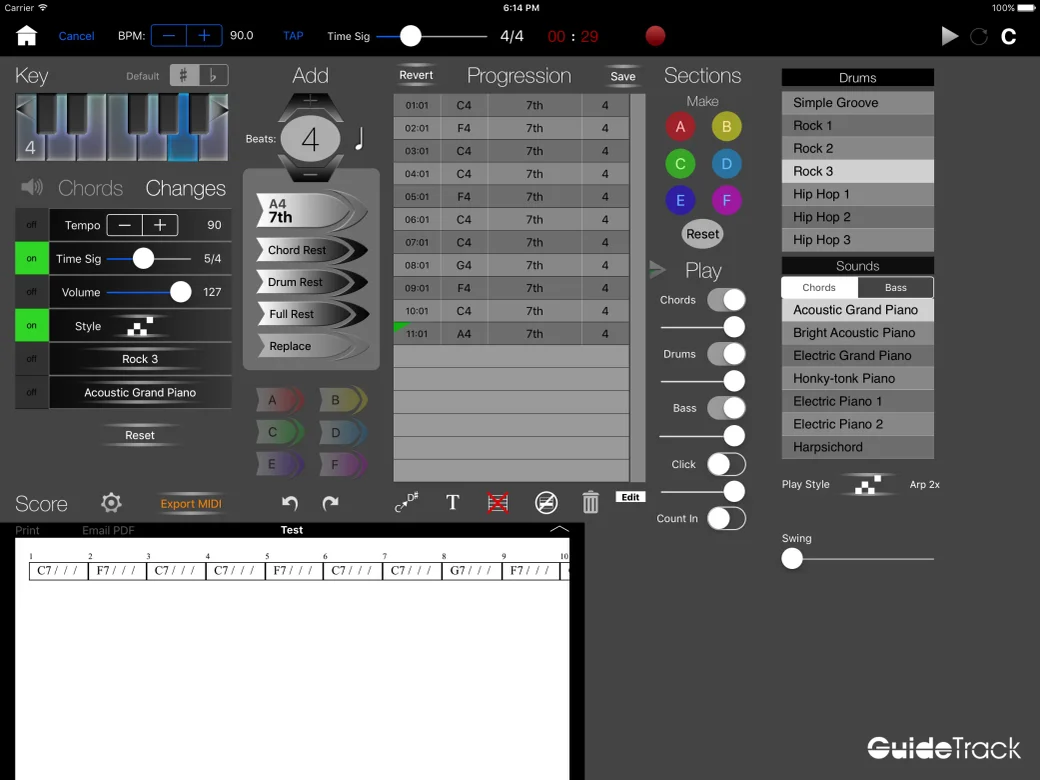
Simply enter in the time signature (which you can change at any time during the song), which chords (or rests) for how many beats and the beat style—Guide Track does the rest for you!
Use inter-app audio or AudioBus 2 or save your track to file and you are ready to start recording for real with a perfect smart click track and guide chords, drums and bass.
Save hours of messing around and get to what matters—your creativity. Once done you can mute the guide track to reveal your perfectly structured recording. It's like a sculptor using a mold when casting, except instead of bronze, you end up with perfectly structured music. You may want to even keep your guide track in there or record one of the parts such as bass or arpeggios as a real track, especially if you use a professional synth via MIDI out.
You can also use Guide Track to print out chord sheets for your band or to capture song ideas or for recording aid.
Features
• Records stereo WAV file that can be copied and pasted, saved to Dropbox or emailed
• Supports Inter-app recording and Audiobus 2
• Saves 5-track Type 1 MIDI files
• Direct output to any MIDI device
• All major chord families covered with chord inversions with choice of accidentals
• Independent automated bass track with separate octave and sound controls
• Change bass note to any desired value for a given chord change
• Over 35 stock drum patterns
• Click and Count-in
• Add lyrics to your score
• 128 GM Sounds on two different synths
• Several chord play styles including 6 arpeggio patterns
• Instant chord sheet which can be printed or emailed as PDF
• Add various rests or chords as needed
• Transpose songs any time
• Time signatures that readjust beat structures for you
• Preview chords before inserting
• Undo and Redo
• Automate changes to tempo, time signature, volume, play style and more during playback
• Define up to 6 reusable named sections for ultra fast song creation
• Innovative section navigator helps you move around your song
• Rearrange or insert chords, rests or sections
• Looping playback
Có gì mới
Phiên bản 2.2.5 · 25/11/2025
—Maintenance update
Quyền riêng tư của ứng dụng
Những gì Techné Media khai báo trên App Store về cách ứng dụng này xử lý dữ liệu.
-
Dữ liệu không được thu thập
Nhà phát triển không thu thập bất kỳ dữ liệu nào từ ứng dụng này.
Phương thức đảm bảo quyền riêng tư có thể khác nhau, chẳng hạn như tuỳ theo các tính năng bạn sử dụng hoặc độ tuổi của bạn.
Thông tin
- Người bán
- Hologramophone Research, Inc.
- Danh mục
- Nhạc
- Phiên bản
- 2.2.5
- Cập nhật
- 25/11/2025
- Phát hành
- 04/06/2014
- Kích thước
- 58,8 MB
- Yêu cầu
- iOS 15.6 trở lên
- Độ tuổi
- 4+
- Giá
- 149.000đ
- Ngôn ngữ
- Tiếng Anh
- Bản quyền
- © 2025 Techné Media. All rights reserved.