
- 対象年齢17+
- カテゴリ仕事効率化
- 開発元Chuchen Technology (Xiamen) Co., Ltd
- 言語英語
- サイズ2.5 MB
App Storeの公式ページにリンクしています
Download.orgはiFocuspaceのファイルを一切ホストしていません。ボタンを押すと、Chuchen Technology (Xiamen) Co., Ltdが公開しているApp Storeのアプリページが開きます。ページの最終確認:2026/11/20。
スクリーンショット

概要
開発元はこのテキストをお使いの言語で提供していません。
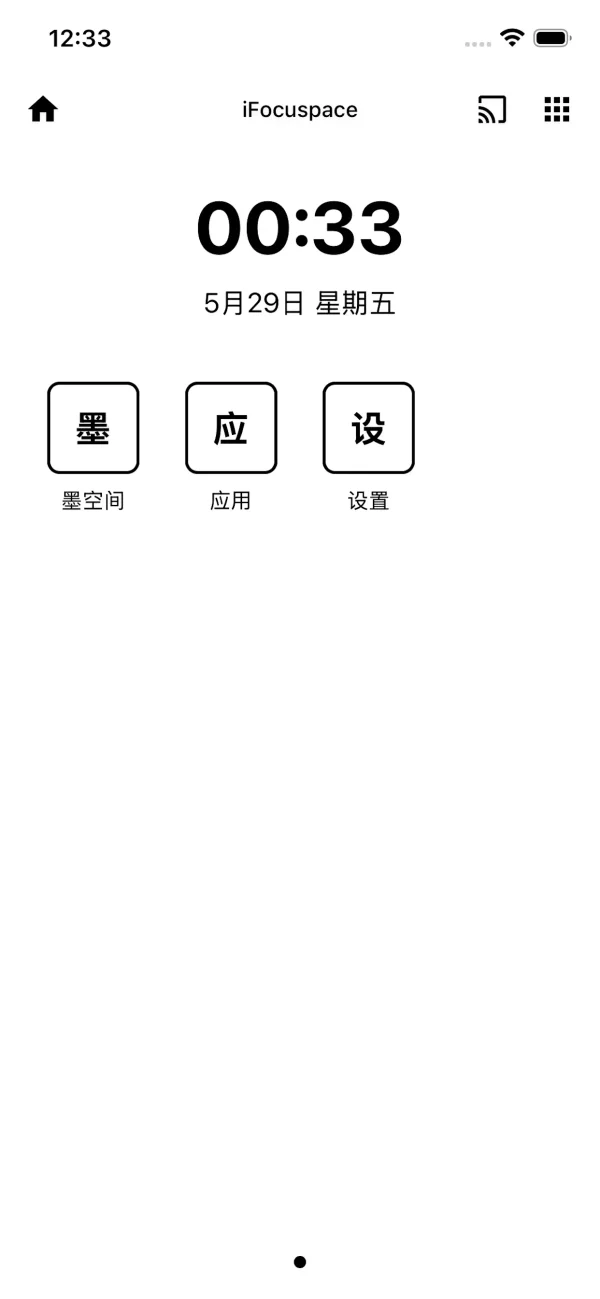
iFocuspace 让你把任何网页内容投屏到 E-Ink 墨水屏阅读设备, 享受纸质般的专注阅读体验。
主要特性:
• 一键投屏到 EDCBook / m5paper-s3 等支持的墨水屏设备
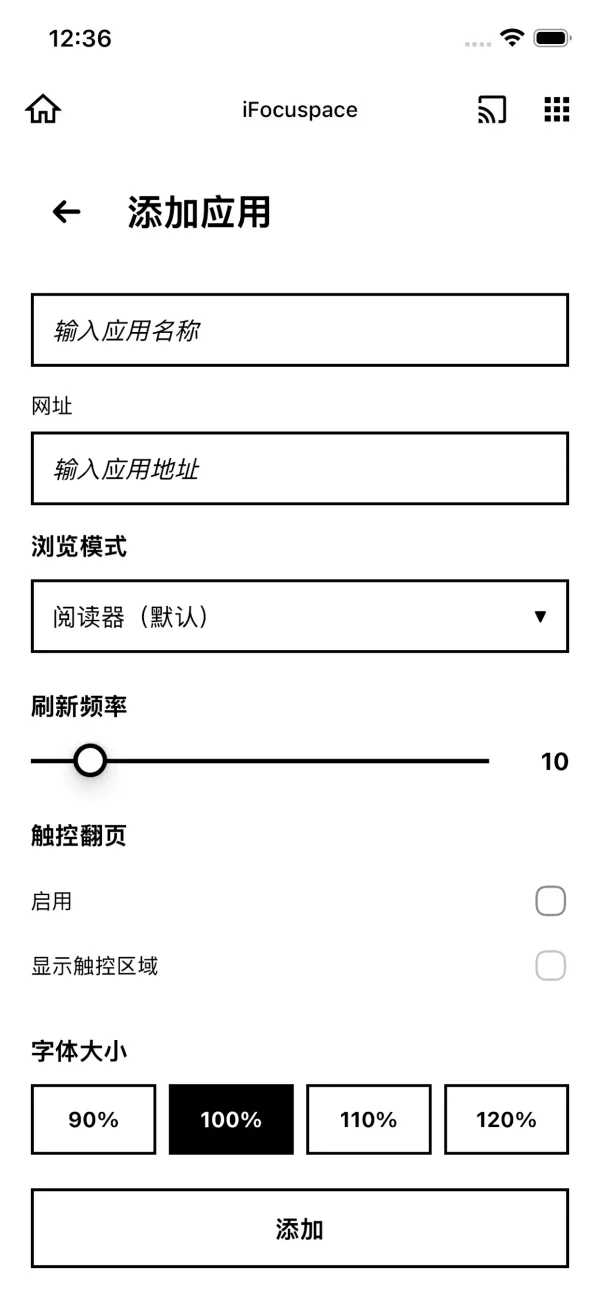
• 自定义网页应用,任意 URL 加入应用列表
• 反向触控:在墨水屏上直接翻页、点击
• 字体缩放 / 翻页区域可自定义
适合长时间阅读、学习、写作场景。
关于隐私:
iFocuspace 不收集任何用户数据,所有操作均在本地完成。
完整隐私政策见 keychar.com/privacy.html。
iFocuspace casts any web content to E-Ink reading displays for a
paper-like focused reading experience.
Key features:
• One-tap casting to EDCBook / m5paper-s3 e-ink devices
• Add any URL as a web app — works with WeChat Read, Readest, and other reading sites
• Reverse touch: turn pages and tap directly on the e-ink screen
• Customizable font size, scale, and tap-to-turn zones
• Screen stays on during casting — just place the phone on your
desk for uninterrupted reading
Suitable for long reading sessions, study, and writing.
Compatible hardware at keychar.com.
Privacy:
iFocuspace collects no user data. Everything runs locally.
Full privacy policy at keychar.com/privacy.html.
新機能
バージョン 1.0.2 · 2026/6/9
### v1.0.2 — 2026-06
**New**
- Setting to show or hide the top status bar (time + battery) while casting. Settings → Cast → **Show status bar when casting**. Default on; turning it off hands that height back to the cast content.
**Bug Fixes**
- Per-app **Font scale** now takes effect on iOS.
- **Show touch zones** no longer draws the zones when Touch page-turn is turned off.
- Cast no longer goes dark: WebViews are pinned to light appearance, so sites that ship a dark theme render correctly on the grayscale e-ink panel.
- Bottom-edge swipe-up to open the app list now works when the cast status bar is hidden.
### v1.0.2 — 2026-06
**新增**
- 投屏时可选择是否显示顶部状态栏(时间和电量)。设置 → 投屏 → **投屏显示状态栏**。默认开启;关闭后这部分高度会让给投屏内容。
**修复**
- 每个应用单独的**字体缩放**在 iOS 上现在能正常生效。
- 关闭「触控翻页」后,**显示触控区域**不再画出触控区域。
- 投屏不再变暗:WebView 强制使用浅色模式,微信读书等自带深色主题的网站在墨水屏上能正常显示。
- 隐藏投屏状态栏时,底部上滑打开应用列表的手势现在依然可用。
アプリのプライバシー
このアプリのデータの取り扱いについて、Chuchen Technology (Xiamen) Co., LtdがApp Storeで申告している内容です。
-
データの収集なし
開発元はこのアプリからデータを収集しません。
プライバシーの取り扱いは、ご利用の機能やお客様の年齢などに応じて異なる場合があります。
情報
- 販売元
- Chuchen Technology (Xiamen) Co., Ltd
- カテゴリ
- 仕事効率化
- バージョン
- 1.0.2
- 更新日
- 2026/6/9
- リリース
- 2026/6/2
- サイズ
- 2.5 MB
- 必要条件
- iOS 16.0以降
- 対象年齢
- 17+
- 価格
- 無料
- 言語
- 英語
- 著作権
- © 2026 Keychar (Chuchen Technology Xiamen Co., Ltd)
こちらもおすすめ
-
 ReNext: Cognitive Execution OS仕事効率化
-
 SimpleGoal - Annual Plan Map仕事効率化
-
 Deepod仕事効率化
-
 StayBack仕事効率化
-
 Visual Intent - Schedule by AI仕事効率化
-
 Markdown Widget Tasks NotesMD Home Screen Checklist
-
 しまう - メモ・付箋・スクショをAI整理しまうものも、やることも、毎日ここに
-
 LittleMarks: Life Tracker仕事効率化
-
 Again_最纯净的稍后阅读器仕事効率化
-
 Nextpod - AI 播客 APP, 播客笔记仕事効率化