- 対象年齢4+
- カテゴリスポーツ
- 開発元株式会社S-CADE
- 言語英語
- サイズ4.7 MB
App Storeの公式ページにリンクしています
Download.orgはJumpEyeのファイルを一切ホストしていません。ボタンを押すと、株式会社S-CADEが公開しているApp Storeのアプリページが開きます。ページの最終確認:2026/11/25。
スクリーンショット
概要
JUMP EYE
□概要□
JUMP EYEは跳躍時間から跳躍高を計算するために作られたアプリです。
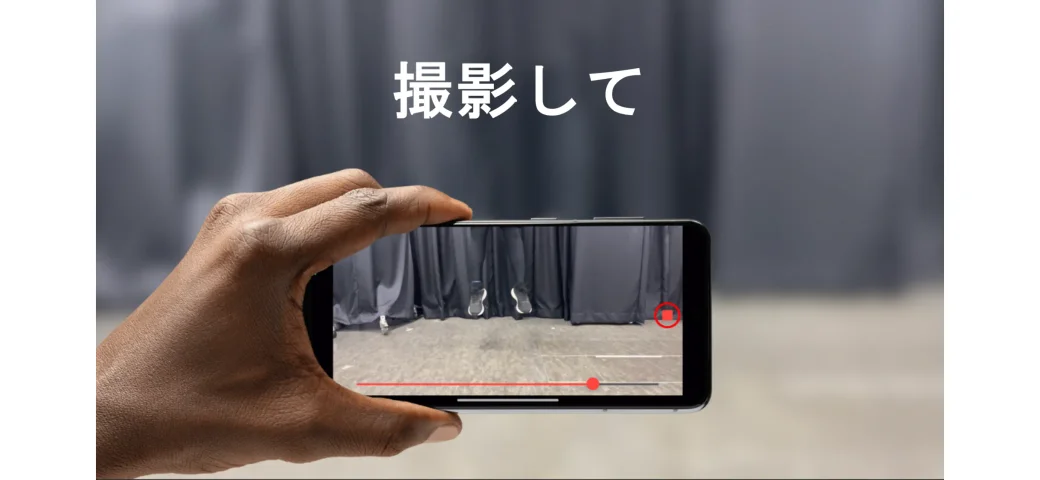
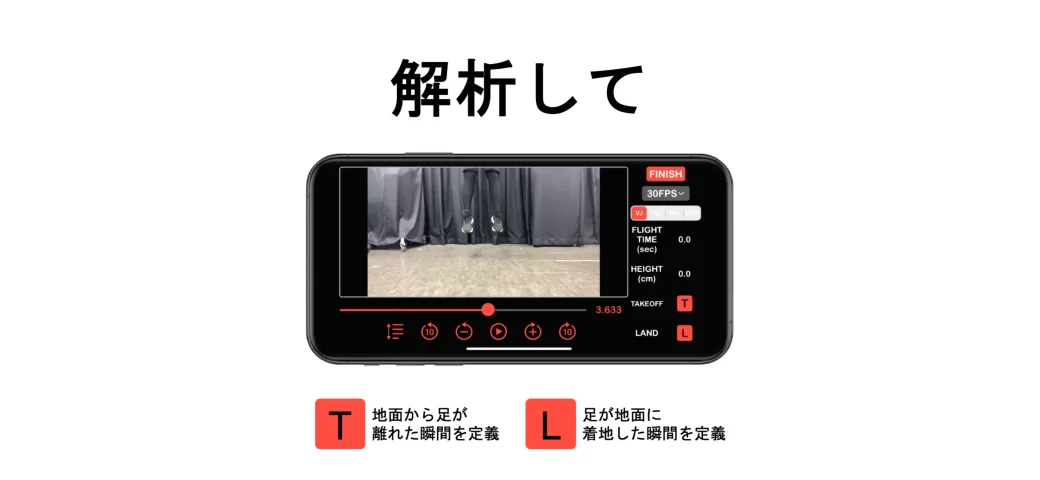
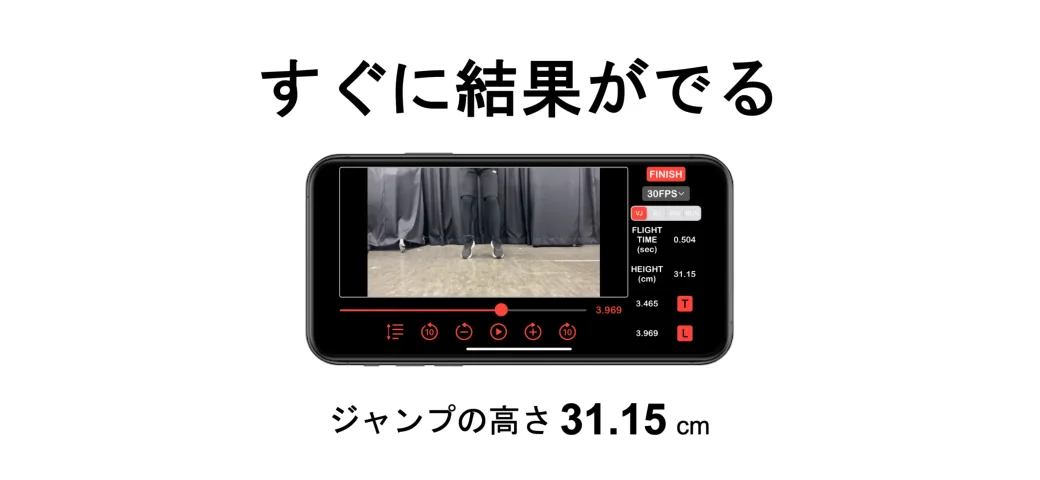
iPhoneでのハイスピードカメラで撮影したスローモーション動画をコマ送りし、離地、接地のコマを選択することで、滞空時間を計算し、自動的に跳躍高を算出します。
□方法□
1. アプリを開き、選手の足にフォーカスを合わせます。
2. 垂直跳びをスローモーション機能で撮影、もしくはフォトライブラリから動画を読み込みます。
3. 動画を再生し、手動でコマ送りをし、離地と接地の瞬間を見つけ、「スタート」と「ストップ」を押します。
4. 跳躍時間から自動で跳躍高を計算します。
□主な機能□
・アプリで開いた動画は自動的に(時:分:秒)というタイトルで保存され、長押しすることによって名前の変更、動画の削除をすることができます。
・タイトルに跳躍高が自動的に付きます。
・カメラロール内の動画も取り込みも可能です。
・マニュアルフォーカス機能により、接地と離地をはっきりと検出できます。
・3つのコマ送り機能(スライド、10コマ送り、1コマ送り)により、素早く接地と離地のコマを見つけることができます。
・ズーム機能が付いています。
・5回跳躍のリバウンドジャンプを撮影することでRJIndexも算出可能です
□注意□
跳躍高計算は、「離地時と接地時の身体重心高が同じ」という仮定で行っています。したがって、着地時に足を曲げたりすることによって過大評価する可能性があります。
◆カメラロール内のスロー動画使用上の注意◆
JumpEye内のカメラアプリを起動できない場合は、設定アプリを開き、検索窓で「JumpEye」と検索して下さい。
検索結果に出てきた「JumpEye」をタップすると、JumpEyeのプライバシー設定画面へ移動します。
その後、写真、マイク、カメラ全て許可を与えて下さい。
□General Information□
JUMP EYE has been developed to calculate the vertical jump height by using the flight time.
Use your iPhone's high-speed camera to measure the flight time during a vertical jump.
□Procedure□
1. Open JUMP EYE and adjust the camera’s focus on an athlete's feet.
2. Simply record videos of a vertical jump using Slo-Mo (120/240 fps) or import the ones you want from the Photo Library.
3. Once we playback the video, we have to then manually go through frame by frame to identify and mark the takeoff and landing frames (press “start” and “stop”).
4. The formula then automatically calculates the duration of the flight and the jump height.
□Main characteristics□
・Videos are given an automatic file name (hh:mm:ss), which can be edited by holding down on the icon for one second, then we can rename or delete the file.
・After marking the frames, the jump height is automatically labelled after the file name.
・You can also import movies from the Photo Library.
・Manual focus makes feet and floor easily identifiable and precise.
・You can playback the movie in 3 ways (manual slider, frame by frame, and 10 frame mode).
・The pinch-to-zoom feature is available.
・The Rebound Jump Index (RJI) can be calculated by continuous jumping (press “RJindex”).
□Note□
The equation to calculate jump height is justified only if the center of mass height is the same at takeoff and landing. Therefore, if you land on the ground in a crouched position, your jump height will be overestimated.
◆Attention on using slow videos in the camera roll◆
if you can not start the camera application in JumpEye,
please open the settings application and search "JumpEye" in the search window.
Tap "JumpEye" in the search results, you will go to the privacy settings screen of JumpEye.
After that, please give permission for all photos, microphone, camera.
新機能
バージョン 7.2.2 · 2025/12/20
軽微な修正を行いました
アプリのプライバシー
このアプリのデータの取り扱いについて、株式会社S-CADEがApp Storeで申告している内容です。
-
ユーザーに関連付けられないデータ
収集される場合がありますが、ユーザーの識別情報には関連付けられません。
- 位置情報
- ID
- 使用状況データ
- 診断
プライバシーの取り扱いは、ご利用の機能やお客様の年齢などに応じて異なる場合があります。
情報
- 販売元
- S-CADE, CORPORATION
- カテゴリ
- スポーツ
- バージョン
- 7.2.2
- 更新日
- 2025/12/20
- リリース
- 2019/8/9
- サイズ
- 4.7 MB
- 必要条件
- iOS 16.6以降
- 対象年齢
- 4+
- 価格
- ¥500
- 言語
- 英語
- 著作権
- © Hikaru Ono,Daichi Yamashita