- Yaş sınırı4+
- KategoriSpor
- Geliştirici株式会社S-CADE
- Dillerİngilizce
- Boyut4,7 MB
Resmi App Store sayfasına bağlanır
Download.org, JumpEye için hiçbir dosya barındırmaz. Düğme, uygulamanın App Store üzerindeki sayfasını açar; uygulamayı orada 株式会社S-CADE yayınlar. Sayfanın son kontrolü: 25.11.2026.
Ekran görüntüleri


Hakkında
Geliştirici bu metni dilinizde sunmamış.
JUMP EYE
◆Attention on using slow videos in the camera roll◆
The playback speed of slow videos saved in the camera roll will be edited to normal speed forcibly instead of slow at the beginning and the end of the video. If you load the video as it is, the playback speed at the beginning and end of the video will not be slow in JumpEye as well, so you will not be able to measure the video accurately.
To fix this issue, go to the Photos app, select the video you want to import and tap the Edit button in the upper right corner of the playback screen.
The barcode white lines displayed at the bottom of the video on the edit screen will be narrower at the left and right edges than at the center.
By widening the spacing between the rightmost and leftmost white lines, you can slow down the playback speed of all of your videos.
After editing, please load the video in JumpEye for measurement.
In addition, if you can not start the camera application in JumpEye, please open the settings application and search "JumpEye" in the search window.
Tap "JumpEye" in the search results, you will go to the privacy settings screen of JumpEye.
After that, please give permission for all photos, microphone, camera.
□General Information□
JUMP EYE has been developed to calculate the vertical jump height by using the flight time.
Use your iPhone's high-speed camera to measure the flight time during a vertical jump.
□Procedure□
1. Open JUMP EYE and adjust the camera’s focus on an athlete's feet.
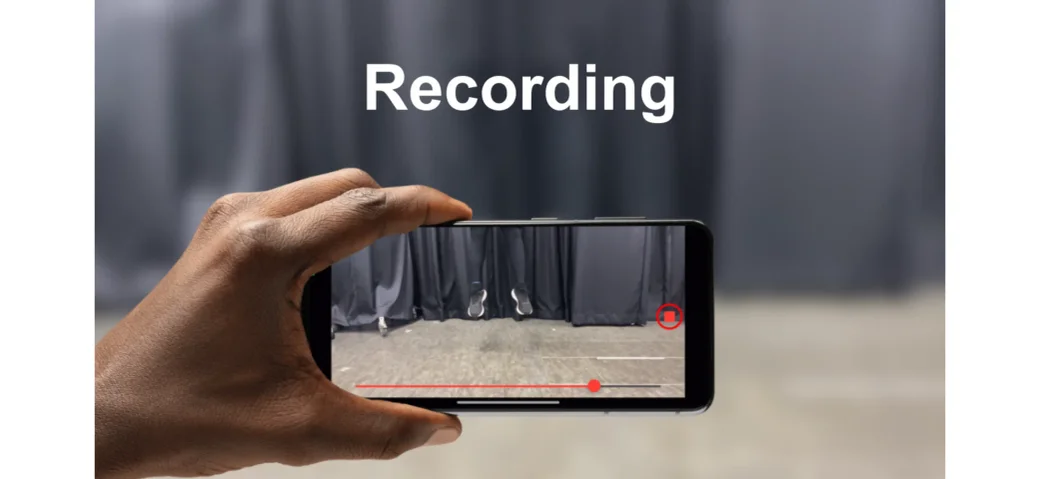
2. Simply record videos of a vertical jump using Slo-Mo (120/240 fps) or import the ones you want from the Photo Library.
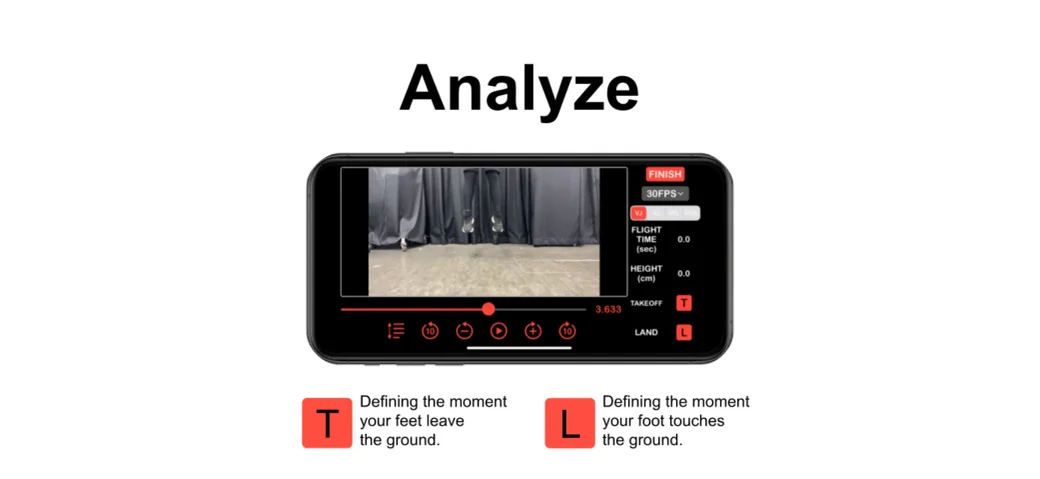
3. Once we playback the video, we have to then manually go through frame by frame to identify and mark the takeoff and landing frames (press “start” and “stop”).
4. The formula then automatically calculates the duration of the flight and the jump height.
□Main characteristics□
・Videos are given an automatic file name (hh:mm:ss), which can be edited by holding down on the icon for one second, then we can rename or delete the file.
・After marking the frames, the jump height is automatically labelled after the file name.
・You can also import movies from the Photo Library.
・Manual focus makes feet and floor easily identifiable and precise.
・You can playback the movie in 3 ways (manual slider, frame by frame, and 10 frame mode).
・The pinch-to-zoom feature is available.
・The Rebound Jump Index (RJI) can be calculated by continuous jumping (press “RJindex”).
□Note□
The equation to calculate jump height is justified only if the center of mass height is the same at takeoff and landing. Therefore, if you land on the ground in a crouched position, your jump height will be overestimated.
Yenilikler
Sürüm 7.2.2 · 20.12.2025
Minor fixed
Uygulama gizliliği
Bu uygulamanın verileri nasıl işlediği hakkında 株式会社S-CADE tarafından App Store üzerinde yapılan beyan.
-
Sizinle ilişkilendirilmeyen veriler
Toplanabilir ancak kimliğinizle ilişkilendirilmez.
- Konum
- Tanımlayıcılar
- Kullanım verileri
- Tanılama
Gizlilik uygulamaları, örneğin kullandığınız özelliklere veya yaşınıza göre değişiklik gösterebilir.
Bilgiler
- Satıcı
- S-CADE, CORPORATION
- Kategori
- Spor
- Sürüm
- 7.2.2
- Güncellendi
- 20.12.2025
- Yayın tarihi
- 09.08.2019
- Boyut
- 4,7 MB
- Gereksinim
- iOS 16.6 veya sonrası
- Yaş sınırı
- 4+
- Fiyat
- ₺149,99
- Diller
- İngilizce
- Telif hakkı
- © Hikaru Ono,Daichi Yamashita