- 対象年齢4+
- カテゴリ教育
- 開発元栋 梁
- 言語英語ほか19言語
- サイズ4.2 MB
App Storeの公式ページにリンクしています
Download.orgはLoopListen: A-B Loop Playerのファイルを一切ホストしていません。ボタンを押すと、栋 梁が公開しているApp Storeのアプリページが開きます。ページの最終確認:2026/11/25。
スクリーンショット




概要
開発元はこのテキストをお使いの言語で提供していません。
LoopListen helps you listen again, shadow speech and practise a phrase. Import listening material, record your own voice, or turn a document into speech, then repeat the part you want to learn.
TAP A, TAP B
Tap A at the start and B at the end of a phrase to loop it. Drag the waveform handles or nudge them by 0.1 second. An optional A-point lead-in helps keep the first sound.
BUILT FOR PRACTICE
• Speed from 0.5x to 2.0x without changing pitch
• Shadowing pauses of 1–10 seconds, or as long as the loop
• Repeat forever or stop after a set number of passes
• Save multiple A-B loops and switch with a tap
• Remember position, loop settings and speed for each file
• Background audio with Lock Screen and Control Center controls
IMPORT AUDIO AND VIDEO
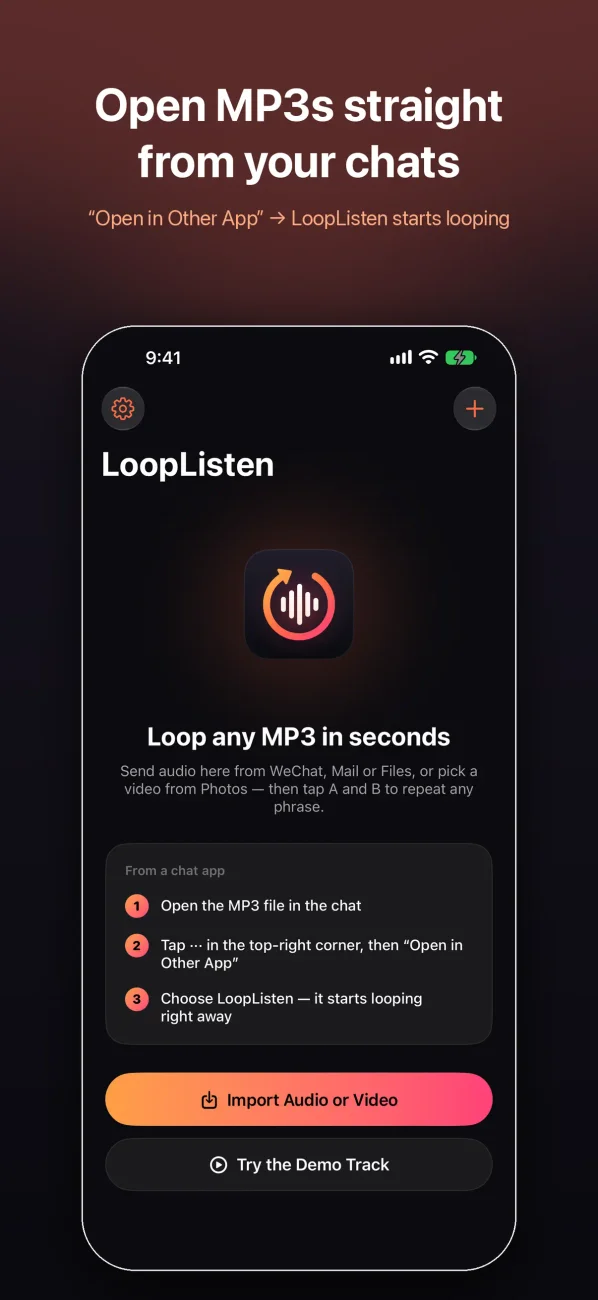
• Use Open in Other App → LoopListen from chat apps, Mail or Files
• Save to LoopListen in the share sheet accepts audio, video, TXT and DOCX. After saving, it attempts to open LoopListen; text documents enter the speech preview. If the system declines, use Open LoopListen or open the app manually
• Play MP3, M4A/AAC, ALAC, WAV, AIFF, CAF, FLAC, Opus, MP2 and M4B; some containers are converted during import
• MP4 and MOV video follows the audio through loops, speed changes and shadowing pauses
RECORD MP3
Choose + → Start Recording. Finish to save an MP3 in your library, ready for playback, loops, renaming or sharing. Microphone permission is requested on first use. An unfinished recording can be saved when you next enter recording.
TURN TEXT INTO SPEECH
Copy text in another app, then choose + → Import from Clipboard and allow pasting if iOS asks. The app does not read the clipboard at launch.
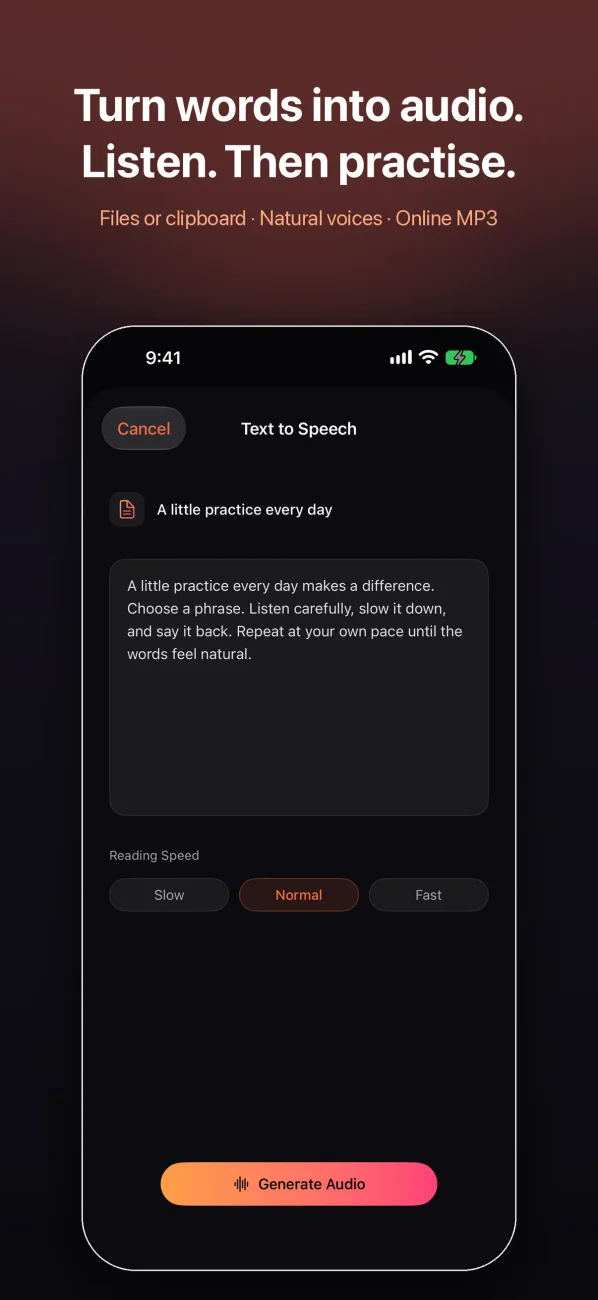
For files, Text to Speech is the last item in the + menu. Select TXT or DOCX, or open a document from another app. Scroll through the full text and choose Slow, Normal or Fast. The document language is detected on-device and a matching natural voice is selected automatically. One voice is used per document; short or mixed-language text may be misidentified. Tap Generate Audio to create an MP3 for your library, then use the same playback and loop controls.
TXT supports UTF-8, BOM-tagged UTF-16 and GB18030. DOCX extracts document text. Files are limited to 10 MB and 10,000 text characters; encrypted documents and image-only text are not supported.
An internet connection is required for generation. Only after you tap Generate Audio is the text sent to an online voice service; the source file stays on your device. If the service fails or times out, the app asks you to resubmit the file and try again later.
SIMPLE AND CLEAR
No account, advertising, in-app purchases or subscriptions. Media, microphone recordings and loop settings stay local. See the privacy policy for online text-to-speech data handling.
YOUR SCREEN, YOUR LANGUAGE
Adaptive layouts support compact and expanded screens on iPhone, iPad and Mac. Playback continues through screen-size and orientation changes. Choose Light or Dark appearance in Settings.
Interfaces are available in English, Simplified and Traditional Chinese, Japanese, Korean, Spanish, French, German, Brazilian Portuguese, Italian, Russian, Arabic, Hindi, Bengali, Indonesian, Vietnamese, Thai, Turkish, Dutch and Polish. On iPhone and iPad, open Settings → App Language to choose your interface language in system Settings. Speech voice selection follows the document language.
新機能
バージョン 1.0.4 · 2026/11/24
• Open Settings → App Language to jump to system Settings and choose among LoopListen’s 20 interface languages.
• The support guide and FAQ are now available in the same 20 languages.
アプリのプライバシー
このアプリのデータの取り扱いについて、栋 梁がApp Storeで申告している内容です。
-
データの収集なし
開発元はこのアプリからデータを収集しません。
プライバシーの取り扱いは、ご利用の機能やお客様の年齢などに応じて異なる場合があります。
情報
- 販売元
- 栋 梁
- カテゴリ
- 教育
- バージョン
- 1.0.4
- 更新日
- 2026/11/24
- リリース
- 2026/10/12
- サイズ
- 4.2 MB
- 必要条件
- iOS 17.0以降
- 対象年齢
- 4+
- 価格
- ¥150
- 言語
- 英語, アラビア語, ベンガル語, オランダ語, フランス語, ドイツ語, ヒンディー語, インドネシア語, イタリア語, 日本語, 韓国語, ポーランド語 ほか8言語
- 著作権
- © 2026 liang dong