
- 対象年齢4+
- カテゴリ仕事効率化
- 開発元Dmitrii Prokushev
- 言語英語
- サイズ2.1 MB
App Storeの公式ページにリンクしています
Download.orgはMagic Table - Image Scannerのファイルを一切ホストしていません。ボタンを押すと、Dmitrii Prokushevが公開しているApp Storeのアプリページが開きます。ページの最終確認:2026/11/18。
スクリーンショット



概要
開発元はこのテキストをお使いの言語で提供していません。
Turn any photo or document into structured data with the power of AI.
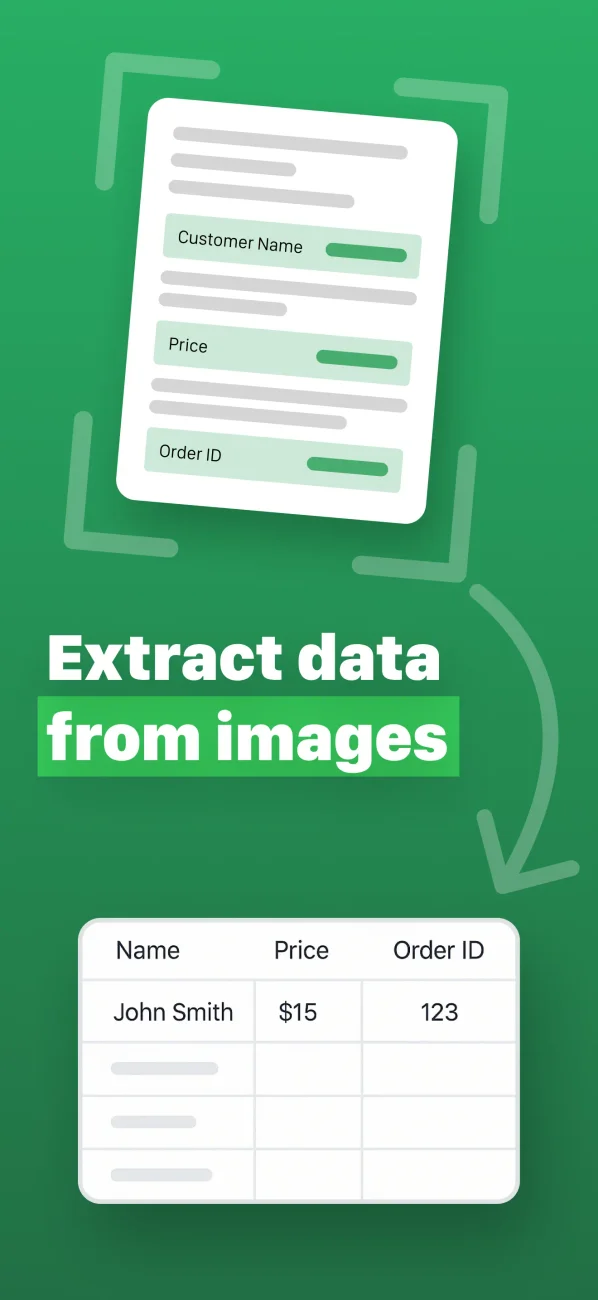
Magic Table is more than just a document scanner or image scanner - it's an AI scanner that transforms photos, receipts, and forms into clear spreadsheets. No more manual typing: simply scan documents or snap a photo, and the app instantly converts them into organized tables.
Create Your Own Tables
You are in control of your data. Define custom fields that match your workflow - customer names, invoice numbers, product codes, or research notes. Whether you perform a quick document scan or capture multiple receipts, Magic Table intelligently maps everything into rows and columns.
AI-Powered Data Extraction
Our advanced neural networks don't just do image to text - they understand the structure of tables, forms, and lists. Every receipt scanner result is clean, structured, and ready to use. Magic Table eliminates copy-paste errors and gives you accurate data in seconds.
Manage and Edit with Ease
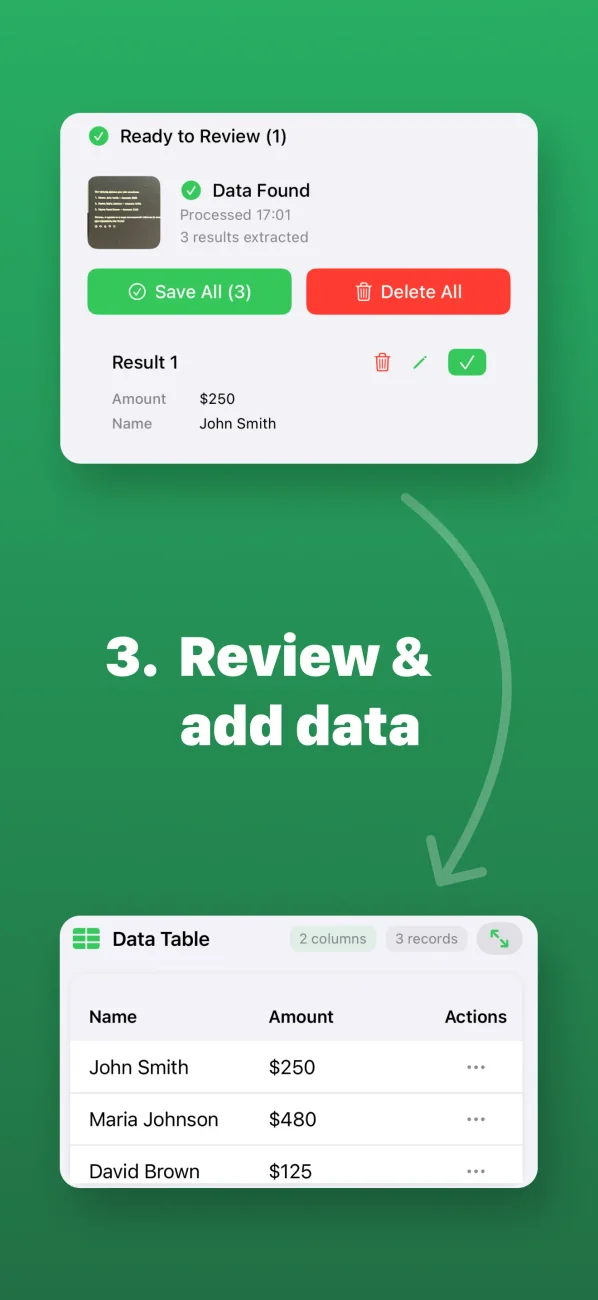
View your results in a familiar spreadsheet layout. Make quick edits, adjust rows or columns, remove duplicates, or add new entries. Everything stays neat and accessible, just like in Excel (yes, even catching users who search for "exel").
Export Anywhere
Your data belongs to you. Export results in structured formats - CSV or JSON - for instant reporting or sharing. Need to convert a PDF to CSV? Magic Table makes it effortless. Send files by email, AirDrop, or save directly to iCloud Drive, Dropbox, or Google Drive.
Who Needs Magic Table?
• Business professionals: digitize contracts, receipts, and invoices with a fast receipt scanner.
• Students: capture textbook tables, lecture notes, and research data without retyping.
• Researchers: organize scanned archives into spreadsheets.
• Administrators: streamline office work with fast document scans.
• Finance teams: manage bills and receipts by exporting them to CSV.
• Healthcare professionals: process medical forms and lab results.
• Everyday users: keep expenses, collections, or notes neatly organized.
Why Choose Magic Table?
• Save hours of manual work with instant AI extraction.
• Eliminate mistakes from manual data entry.
• Customize the structure of your tables before scanning.
• Export clean, structured data ready for spreadsheet tools.
• Use one app for all your document and data needs.
Download Magic Table today and experience how effortless data entry can be. Take a picture, let AI analyze it, and get structured information in seconds - ready for Excel, CSV, or JSON.
Terms of use: https://www.apple.com/legal/internet-services/itunes/dev/stdeula/
アプリのプライバシー
このアプリのデータの取り扱いについて、Dmitrii ProkushevがApp Storeで申告している内容です。
-
ユーザーに関連付けられないデータ
収集される場合がありますが、ユーザーの識別情報には関連付けられません。
- ID
プライバシーの取り扱いは、ご利用の機能やお客様の年齢などに応じて異なる場合があります。
情報
- 販売元
- Dmitrii Prokushev
- カテゴリ
- 仕事効率化
- バージョン
- 1.0
- 更新日
- 2025/9/23
- リリース
- 2025/9/23
- サイズ
- 2.1 MB
- 必要条件
- iOS 17.6以降
- 対象年齢
- 4+
- 価格
- 無料
- アプリ内課金
- あり
- 言語
- 英語
- 著作権
- © prokushev
こちらもおすすめ
-
 OCR Table写真の表をHTMLに変換
-
 Receipt Scanner & Exporter仕事効率化
-
 画像から表テーブル,文字,データ,JSONまで何でも読み取りAIがデータに変換出力!業務にも使えるデータ化DX推進
-
 TableScan Studio仕事効率化
-
 AI Agent for Answers by Tau34AIメール作成&スマート自動返信ツール
-
 Mindscope 2仕事効率化
-
 PST Viewer – PST MSG EML MBOX仕事効率化
-
 5 Tasks : Focus To-Do List仕事効率化
-
 ReceiptOrg: レシート管理アプリビジネス&個人経費
-
 Litho: Screenshot to Obsidian仕事効率化