
- 対象年齢12+
- カテゴリ写真/ビデオ
- 開発元BenoForge e.U.
- 言語英語
- サイズ50.4 MB
App Storeの公式ページにリンクしています
Download.orgはMemCutのファイルを一切ホストしていません。ボタンを押すと、BenoForge e.U.が公開しているApp Storeのアプリページが開きます。ページの最終確認:2026/11/25。
スクリーンショット






概要
開発元はこのテキストをお使いの言語で提供していません。
Turn your photos and videos into polished on-device video stories — sports reels, travel stories, birthday tributes, and Best Moments — for Instagram, TikTok, YouTube, Stories, and more. MemCut runs entirely on your device: no account, no cloud upload, no waiting on servers.
WHY MEMCUT
• Cinematic video stories from clips and photos already on your phone
• On-device AI finds your best shots — you stay in control of every cut
• Optional Auto Captions — on-device speech-to-text you edit before export
• Beat-synced edits that snap to your music automatically
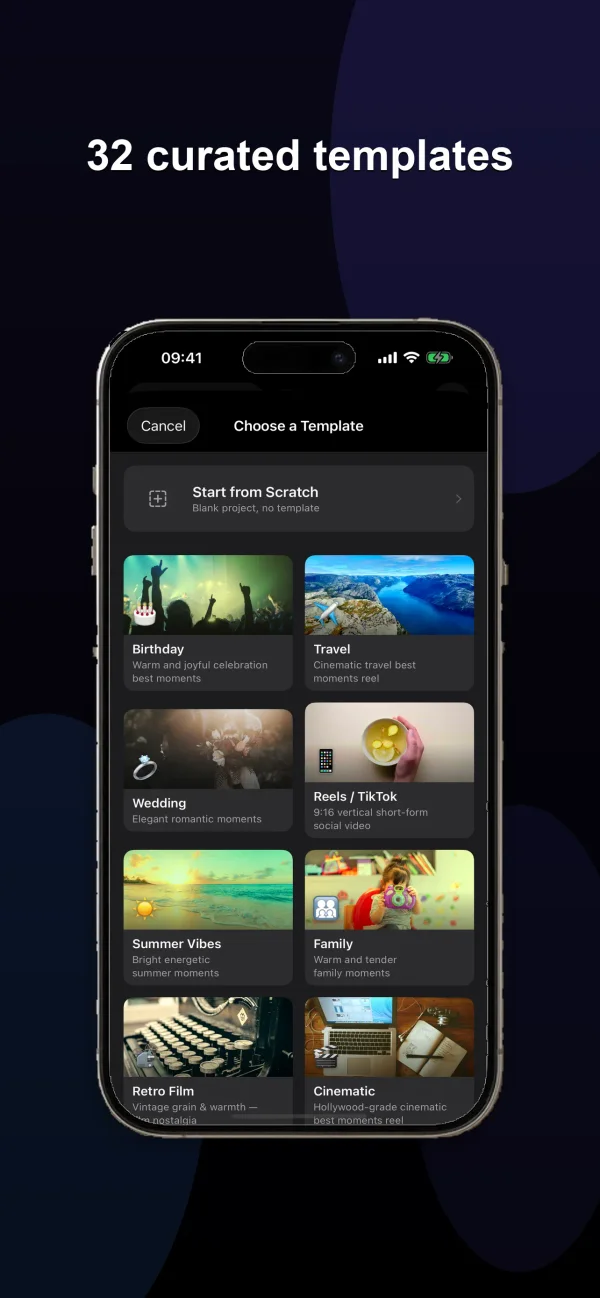
• 32 ready-made templates for holidays, travel, sports, weddings, and more — all free
• Photo Tools: cutout, blur, crop, erase, text erase, and enhance — on-device
• Import custom LUT (.cube) colour grades
• Export HD, Full HD, 4K, or 4K HDR at 30 or 60 fps
• Save finished exports to your Photos library
START FAST WITH TEMPLATES
Pick a blank project or choose from 32 curated templates — Birthday, Travel, Wedding, Reels/TikTok, Sports Best Moments, VHS Throwback, and more. Each ships with the right aspect ratio, look, and title style. Live previews show the effect before you commit.
IMPORT & ARRANGE
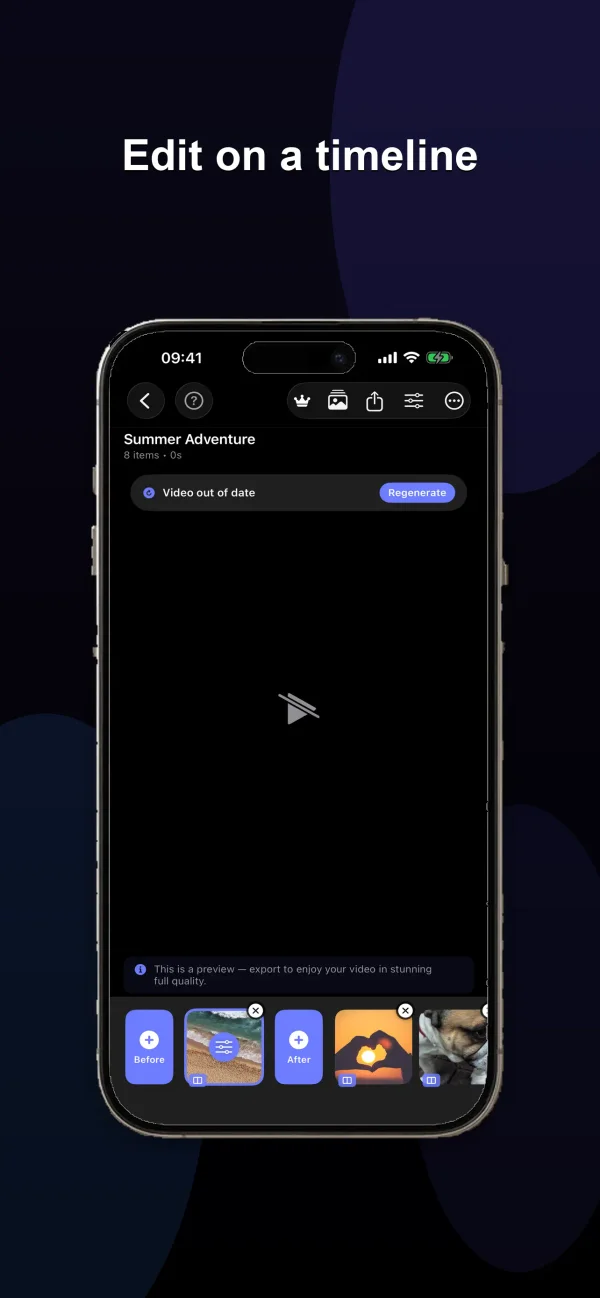
Add photos and videos from your library. Drag clips in the timeline to reorder. Trim clips, use the full clip, or let AI pick the strongest moments.
AI BEST MOMENTS
On-device AI scores your footage and detects the strongest video moments — perfect for action clips, game day, concerts, and family events. Review every suggestion, adjust trims, or turn suggestions off. Nothing exports until you approve it.
AUTO CAPTIONS
Optional on-device speech-to-text from your clip audio. Download an open speech model once (~1.5 GB), generate captions, then edit text and timing. Recognition stays on device — audio is not uploaded. Captions may be inaccurate; you review and approve them. Exporting with Auto Captions requires MemCut Premium (or clear captions to export free).
PHOTO TOOLS
Edit any photo with on-device Photo Tools — no upload required. Cut out subjects, blur backgrounds, crop, brush-erase, erase text, and auto enhance. Changes stay in your project and export with your video.
PHOTO OVERLAYS ON FULL VIDEO
Keep a full video playing underneath and drop in photos at exact moments. Video and audio keep rolling while overlays appear on top — great for reaction shots or stills over action footage.
MUSIC, BEAT SYNC & MIXED AUDIO
Import music, narration, or voiceover. Cuts can snap to the beat. Chain tracks or use Mixed mode to layer music under voiceover, with per-track trim, volume, and start time.
60+ EFFECTS & 27 TRANSITIONS
Cinematic colour grades, vintage film, VHS, neon, noir, golden hour, and more. Pair clips with fades, zooms, film burns, glitches, and other transitions. Add Ken Burns zoom, animated captions, title text, and date stamps.
COLLAGE & LAYOUT
Pair portrait photos side-by-side. Choose from 8 aspect ratios — 16:9, 9:16, 1:1, 4:5, 21:9, and more — so every export fits Reels, TikTok, YouTube, Instagram, and Stories.
EXPORT TO YOUR LIBRARY
Choose HD (720p), Full HD (1080p), 4K (2160p), or 4K HDR with real 10-bit HEVC. Pick 30 or 60 fps. Save to Photos — MemCut does not post for you.
PRIVATE BY DESIGN
Your media never leaves your device. All AI, Auto Captions speech recognition, Photo Tools, beat analysis, colour grading, and rendering run locally. No accounts. No cloud storage. No developer access to your projects.
PREMIUM (OPTIONAL)
Core editing is free — templates, effects, Photo Tools, LUT import, Auto Captions setup, and full export quality. Free exports include a small watermark and brief branding card. MemCut Premium removes ads, lets you optionally hide the watermark and ending card, and unlocks exporting videos with Auto Captions.
You are responsible for the content you import, generate (including captions), and share.
Terms of Use (EULA): https://www.apple.com/legal/internet-services/itunes/dev/stdeula/
Privacy Policy: https://memcut-video.web.app/privacy
新機能
バージョン 1.06 · 2026/11/24
What’s new in MemCut
• Auto Captions — on-device speech-to-text subtitles from your clip audio
• Optional ~1.5 GB speech model download; recognition stays on device
• Edit cue text and timing; captions may be inaccurate — you approve before export
• Exporting a video with Auto Captions requires MemCut Premium
• Photo Tools, AI Best Moments, beat sync, 32 templates, custom LUT import
• Export HD, Full HD, 4K, or 4K HDR at 30 or 60 fps
• Optional MemCut Premium: ad-free, watermark/card removal, caption export
アプリのプライバシー
このアプリのデータの取り扱いについて、BenoForge e.U.がApp Storeで申告している内容です。
-
ユーザーのトラッキングに使用されるデータ
他社のアプリやウェブサイトを横断してユーザーをトラッキングする目的で使用される場合があります。
- ID
- 使用状況データ
-
ユーザーに関連付けられないデータ
収集される場合がありますが、ユーザーの識別情報には関連付けられません。
- 位置情報
- ID
- 使用状況データ
プライバシーの取り扱いは、ご利用の機能やお客様の年齢などに応じて異なる場合があります。
情報
- 販売元
- BenoForge e.U.
- カテゴリ
- 写真/ビデオ
- バージョン
- 1.06
- 更新日
- 2026/11/24
- リリース
- 2026/9/11
- サイズ
- 50.4 MB
- 必要条件
- iOS 17.0以降
- 対象年齢
- 12+
- 価格
- 無料
- アプリ内課金
- あり
- 言語
- 英語
- 著作権
- © 2026 BenoForge e.U.
こちらもおすすめ
-
 MITO EDIT - 動画自動編集無音カット・自動字幕・リール
-
 VideoBro: みんなのVHSビデオカメラ友だちとホームビデオを撮ろう
-
 FitCam: Workout Overlays写真/ビデオ
-
 Eazy Video: 動画編集リール・ショート動画を自動作成
-
 Life2Filmあなたの1日を1分の動画に
-
 KwikMemories写真/ビデオ
-
 AI動画編集: Monito自動字幕・切り抜き・プロンプター
-
 Silverlight Studios写真/ビデオ
-
 赤ちゃんジェネレーター:AI顔赤ちゃんはどんな顔になる?
-
 Visavo: AI 写真ジェネレータークリエイティブAIプロフィール写真撮影