
- 対象年齢4+
- カテゴリミュージック
- 開発元Dolphin Computing
- 言語英語
- サイズ67.7 MB
App Storeの公式ページにリンクしています
Download.orgはSeeScore 2のファイルを一切ホストしていません。ボタンを押すと、Dolphin Computingが公開しているApp Storeのアプリページが開きます。ページの最終確認:2026/11/12。
スクリーンショット
概要
開発元はこのテキストをお使いの言語で提供していません。
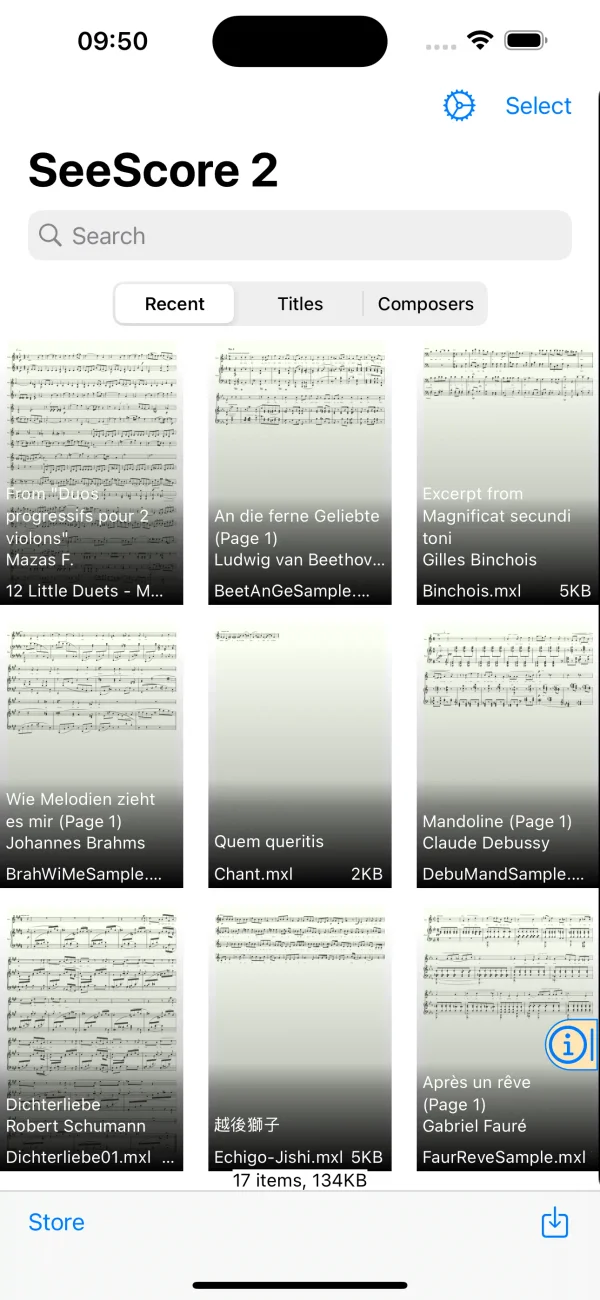
** SeeScore 2 lets you view and play MusicXML files **
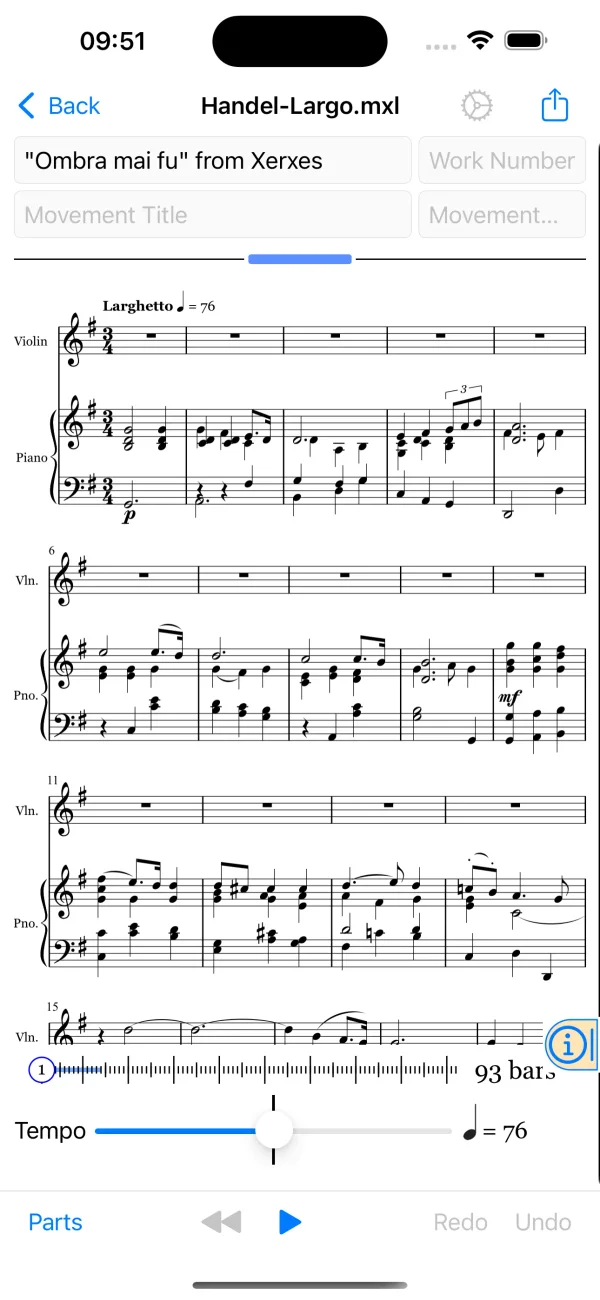
SeeScore 2 is a music score display app intended for musicians to practice or perform instrumental or vocal music from the iPad instead of using conventional paper scores. Unlike PDF score display apps which show a tiny score in the middle of the screen with large empty margins, SeeScore 2 uses flexible MusicXML layout so that when you pinch zoom the score reflows to the screen size, right up to the edge, making best use of your valuable screen pixels. Also you can choose any parts to view from multi-part music and change the size of the music to suit your distance from the iPad.
Play
SeeScore 2 will play with you. You can setup an instrument for each part in the score, and adjust the volumes. You can mute the part you play so it will accompany you, and it will turn the pages while it plays. You can hide all the parts except your own so you don't need to see the other parts while you play.
Any tempi and time signatures defined in the score are read while playing and the metronome and auto-scroll automatically follow.
Tranpose
You can instantaneously transpose the score. Notes and key signatures are all correctly updated and it will play at the new pitch.
Metronome
SeeScore 2 can play a metronome tick with a pattern which automatically adjusts to the current time signature.
Fast.
You will notice that SeeScore 2 is extremely fast and responsive. You will never have to wait for a progress bar. The screen will instantly fill with music when you scroll, pinch zoom or transpose.
PlayScore 2
You can convert your PDF files to MusicXML using PlayScore 2 (available in the App Store), then open them in SeeScore 2, or most score writing programs can output MusicXML directly.
Free SeeScore 2 can:
• Display any MusicXML score
• Pinch zoom to change the staff height
• Play any MusicXML score (auto selected instruments only)
• Search your library by title, composer, instruments
By upgrading you can:
• Display selected parts
• Set instruments
• Set individual part volumes
• Transpose
• Use the metronome tick
• Use count-in to start playing
• Export MIDI and PDF
• Add a metronome marking at the start of the score
• Count-in
• Play loop, for practising those few difficult bars
• Use your Airturn pedal
• Set title, composer etc.
If you have any problem with SeeScore 2 or encounter any files which cause problems please contact us at www.seescore.co.uk/contact/ . If something doesn't work for you please contact us before writing a review. It may be a misunderstanding or we can fix your problem.
新機能
バージョン 1.66 · 2025/11/30
Can show hidden parts
アプリのプライバシー
このアプリのデータの取り扱いについて、Dolphin ComputingがApp Storeで申告している内容です。
-
データの収集なし
開発元はこのアプリからデータを収集しません。
プライバシーの取り扱いは、ご利用の機能やお客様の年齢などに応じて異なる場合があります。
情報
- 販売元
- James Sutton
- カテゴリ
- ミュージック
- バージョン
- 1.66
- 更新日
- 2025/11/30
- リリース
- 2020/8/24
- サイズ
- 67.7 MB
- 必要条件
- iOS 15.0以降
- 対象年齢
- 4+
- 価格
- 無料
- アプリ内課金
- あり
- 言語
- 英語
- 著作権
- © Dolphin Computing Ltd
こちらもおすすめ
-
 SuperScore Musicミュージック
-
 Power Musicミュージック
-
 StaffPad Readerミュージック
-
 iGigBook Sheet Music Manager XPro Tools For Every Musician
-
 Sheet Music - 楽譜作成・作曲・スキャンPDFリーダー・電子譜面台・メトロノーム・チューナー
-
 StaffPadミュージック
-
 digitalScore:電子楽譜・譜面台アプリPDF楽譜を整理・書き込み・譜めくり
-
 Dorico - 楽譜作成・作曲アプリ記譜・音楽スコアメーカ
-
 Pianoteq 9ミュージック
-
 Enote - Sheet Music Appミュージック