- 対象年齢12+
- カテゴリエンターテインメント
- 開発元Scott Dodson
- 言語英語
- サイズ72.1 MB
App Storeの公式ページにリンクしています
Download.orgはThunderstorm Simulatorのファイルを一切ホストしていません。ボタンを押すと、Scott Dodsonが公開しているApp Storeのアプリページが開きます。ページの最終確認:2026/11/17。
スクリーンショット
概要
開発元はこのテキストをお使いの言語で提供していません。
Summon a thunderstorm on your mobile device. Relax and fall fast asleep to the sounds of rain and thunder. The screen or camera flashes when lightning strikes.*
*Defaults to screen for lightning light effects if camera flash is not available.
THUNDERSTORMS
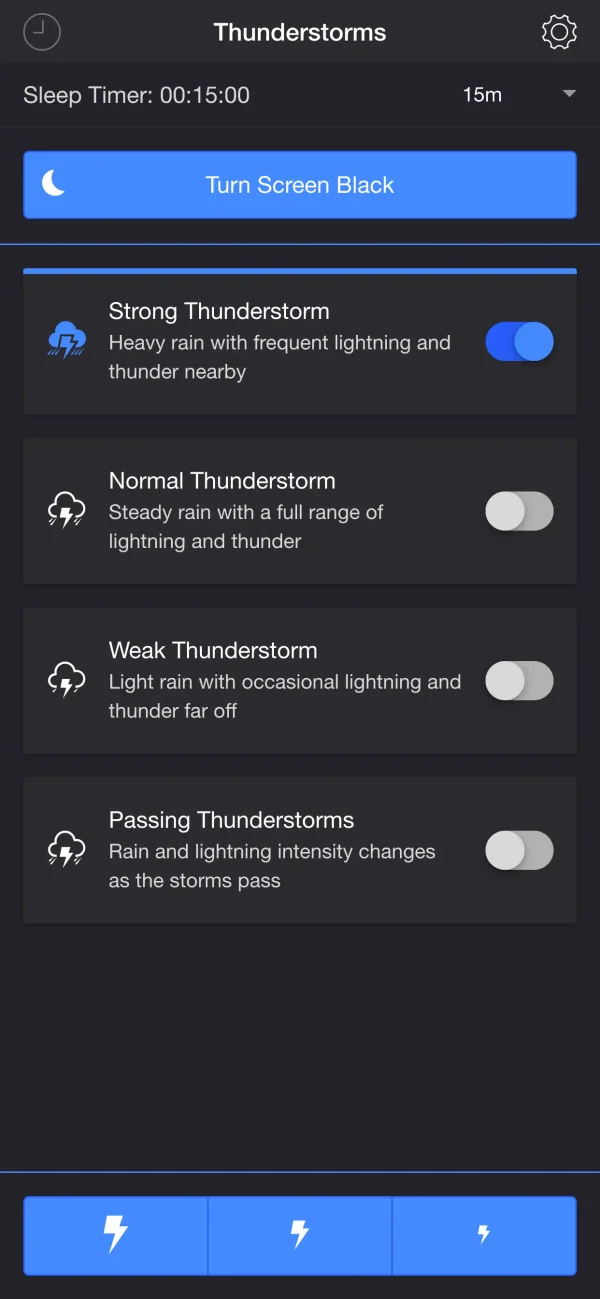
• Strong Thunderstorm — Heavy rain with frequent lightning and thunder nearby
• Normal Thunderstorm — Steady rain with a full range of lightning and thunder
• Weak Thunderstorm — Light rain with occasional lightning and thunder far off
• Passing Thunderstorms — Rain and lightning intensity changes as the storms pass
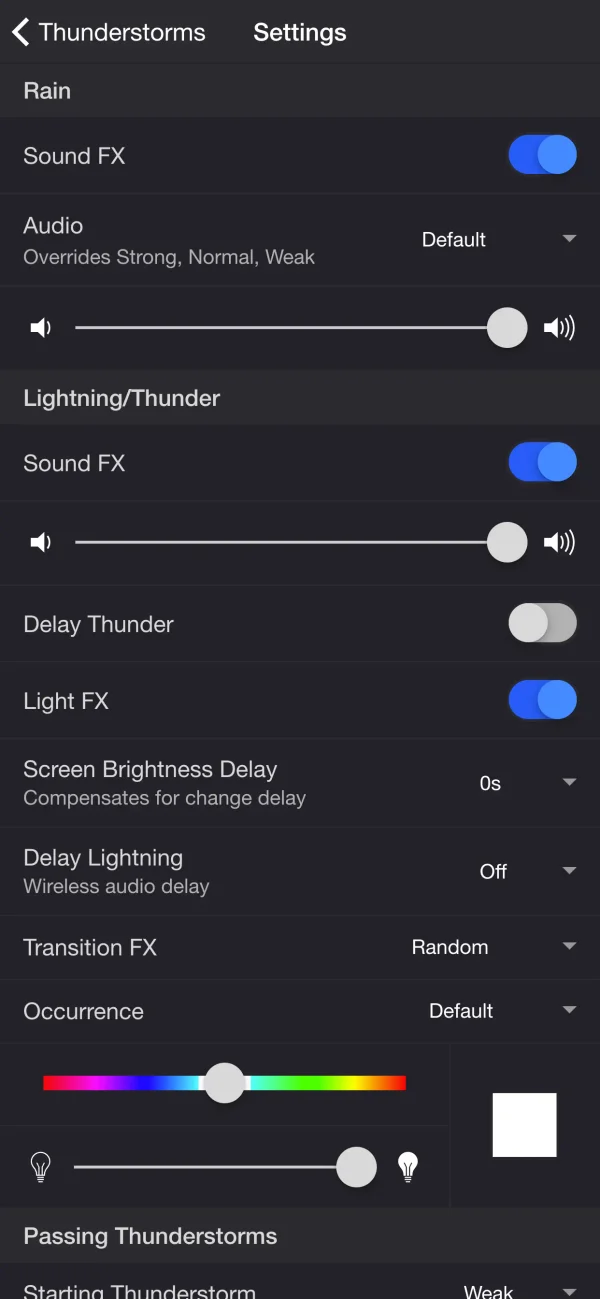
SETTINGS
Rain
• Toggle rain sound effects
• Change rain audio: Default, Heavy, Steady, Light, On Tin Roof
• Change rain volume
Lightning/Thunder
• Toggle thunder sound effects
• Change thunder volume
• Change delay lightning (Wireless audio delay offset)
• Toggle delay thunder
• Toggle lightning light effects
• Change lightning output: Camera Flash, Screen
• Change lightning transition effects
• Change lightning/thunder occurrence: Default, Occasional, Normal, Frequent
• Change color and max brightness of lightning light effects (Screen only)
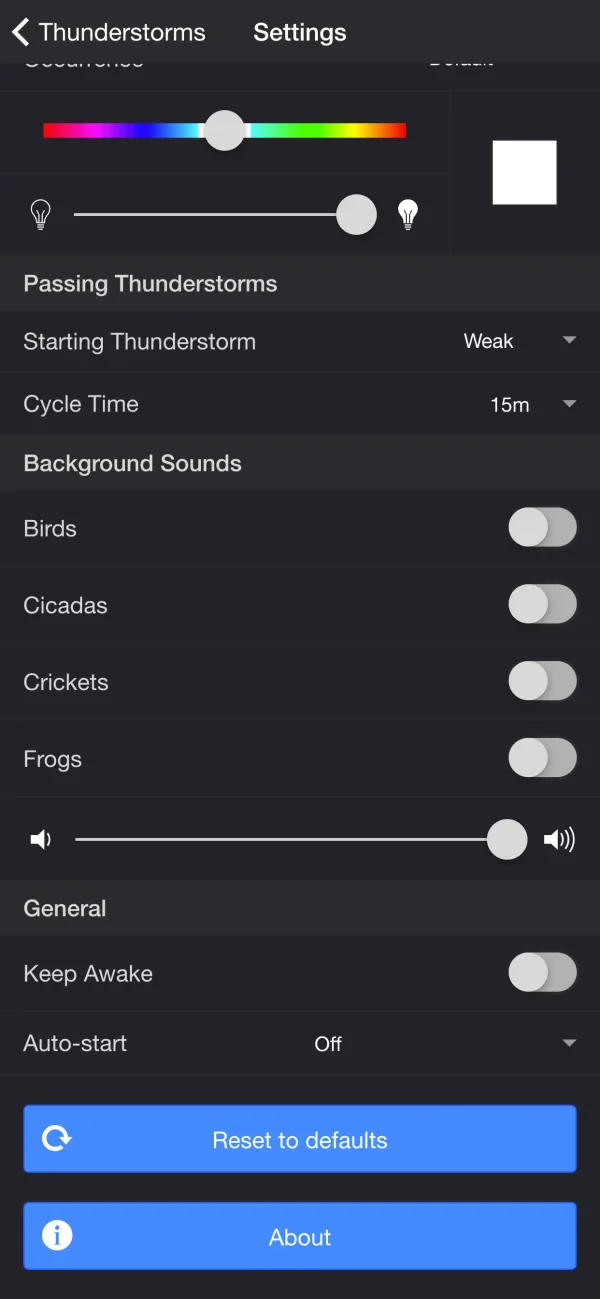
Passing Thunderstorms
• Change starting storm for Passing Thunderstorms: Weak, Normal, Strong
• Change cycle time for Passing Thunderstorms: 15m, 30m, 60m
Background Sounds
• Toggle background sounds: Birds, Cicadas, Crickets, Frogs
• Change background sounds volume
General
• Keep Awake to prevent your device from going to sleep so lightning effects remain visible
• Select a mode to automatically start when the app opens
• Choose a time to automatically stop the selected mode
• Choose a time to automatically restart the selected mode when the sleep timer ends, enabling a recurring cycle
ADDITIONAL FEATURES
• Sleep Timer — Set a timer with a gradual audio fade-out.
• Turn Screen Black — Adds a black overlay and sets the device to minimum brightness. Use the Screen Brightness Delay setting to compensate for brightness ramp-up on some devices. Set to 0.25–1 second if lightning effects do not reach peak brightness when thunder is loudest.
• Lightning on Demand — Start a storm and use the lightning buttons at the bottom of the screen for manual control.
• Bluetooth Support — Connect to Bluetooth speakers. Adjust the Delay Lightning setting to offset wireless audio delay.
Please contact me at support@thunderstorm.scottdodson.dev if you experience any issues. I'd love to hear your thoughts and appreciate you taking the time to rate and review the app. I want to continue to improve Thunderstorm Simulator and create a great experience for you and future users. Thank you! —Scott
Ad-supported version: https://apps.apple.com/us/app/thunderstorm-simulator-w-ads/id1482707561
新機能
バージョン 3.6.6 · 2026/10/7
Need help? Email support@thunderstorm.scottdodson.dev
- fixed compatibility issue
アプリのプライバシー
このアプリのデータの取り扱いについて、Scott DodsonがApp Storeで申告している内容です。
-
データの収集なし
開発元はこのアプリからデータを収集しません。
プライバシーの取り扱いは、ご利用の機能やお客様の年齢などに応じて異なる場合があります。
情報
- 販売元
- Scott Dodson
- カテゴリ
- エンターテインメント
- バージョン
- 3.6.6
- 更新日
- 2026/10/7
- リリース
- 2017/2/1
- サイズ
- 72.1 MB
- 必要条件
- iOS 15.0.0以降
- 対象年齢
- 12+
- 価格
- ¥300
- 言語
- 英語
- 著作権
- © Scott Dodson