- 対象年齢4+
- カテゴリ仕事効率化
- 開発元Alexander Fallah
- 言語英語
- サイズ63.4 MB
App Storeの公式ページにリンクしています
Download.orgはWisplyのファイルを一切ホストしていません。ボタンを押すと、Alexander Fallahが公開しているApp Storeのアプリページが開きます。ページの最終確認:2026/11/29。
スクリーンショット


概要
開発元はこのテキストをお使いの言語で提供していません。
Wisply is the privacy-first transcription app that captures meetings, interviews, and lectures with real-time speaker identification, built around Apple's on-device speech and intelligence frameworks, with optional integrations you control.
WHO SAID WHAT, AUTOMATICALLY
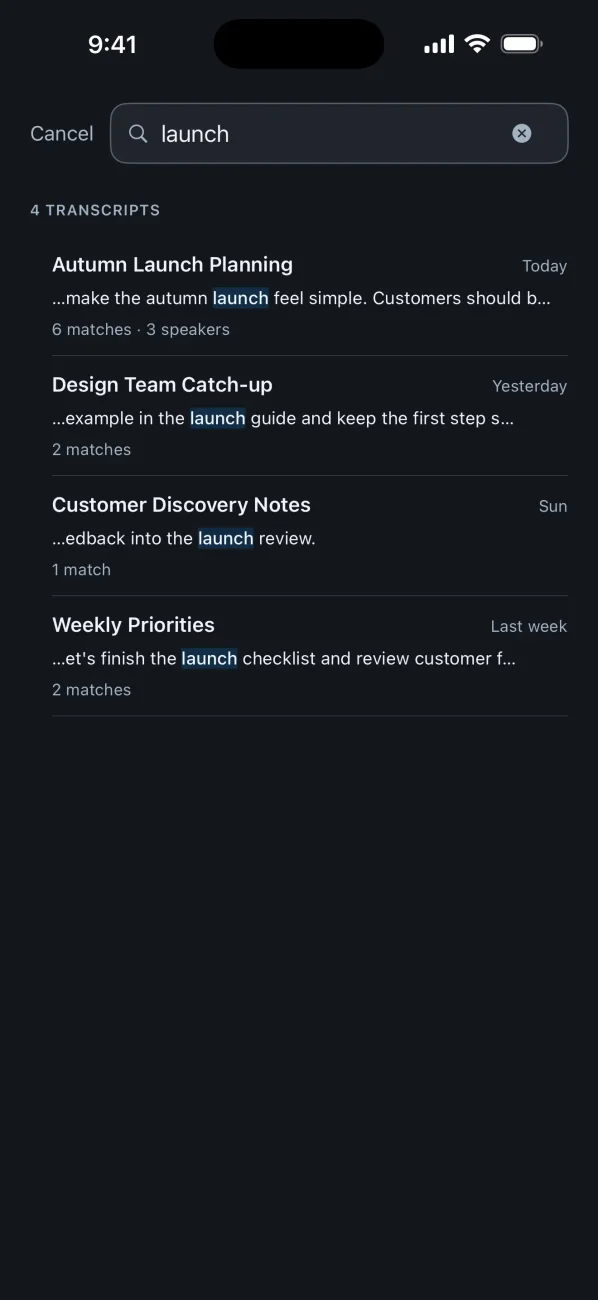
Wisply identifies each speaker and labels your transcript in real time. Core transcription and speaker diarization run on your device with no setup.
DUAL-AUDIO MEETING RECORDING (macOS)
Capture both your microphone and system audio simultaneously. Record Zoom, Teams, and Google Meet calls while Wisply separates speakers and generates timestamped notes you can actually search.
ON-DEVICE AI SUMMARIES AND CHAT
Get AI-generated summaries, action items, key decisions, follow-up questions, and transcript-grounded chat using Apple Intelligence on your device. Free on your first 3 recordings, then Wisply Pro. Optional realtime AI tools can connect to third-party services only when you enable them and grant consent.
SCREEN UNDERSTANDING (macOS)
Let Sidekick read the visible text in one window or display you pick with Apple's sharing picker. Vision OCR and Apple Foundation Models process it on your Mac. It is off by default, asks before each capture, and shows sharing indicators and a Stop control. Screen images and video frames are not uploaded. If you copy recognized text into an Interview Setup question and choose a cloud model, that reviewed question is sent directly to your chosen provider with your in-app Cloud AI consent.
INTERVIEW WORKSPACE (macOS)
Prepare questions and explore solutions with on-device coding assist or your own OpenAI or Anthropic API key. Review the question before generating, choose whether to include live transcript context, and copy a finished answer into your editor. Keyboard shortcuts work inside Wisply by default, with separate controls for optional use across apps.
EXPORT TO OBSIDIAN & MORE
Send finished recordings to your Obsidian vault as Markdown notes with frontmatter, AI insights, and speaker-attributed transcripts. Or share plain text or audio.
WATCH COMPANION
Start a voice memo on your wrist, and it arrives on your iPhone, transcribed and ready. No sync headaches.
DESIGNED FOR WHAT MATTERS
• Real-time transcription with word-level timestamps
• Speaker profiles that persist across recordings
• Cornell Notes generated automatically (macOS)
• Import audio files for transcription on iPhone and iPad
• Dark mode and accessibility support
• Optional iCloud sync across your Apple devices (Wisply Pro)
• Library export and deletion controls
FREE AND PRO
Recording, live transcription, speaker labels, audio import, export, and the Watch app are free, with no account. Your first 3 recordings include AI summaries and chat. Wisply Pro, an optional auto-renewable subscription, adds summaries, action items, and chat on every recording, Whisper Coach, Interview Setup answers and coding assist on Mac, high-precision speaker identification, and iCloud sync. Prices and any free trial are shown before you subscribe.
PRIVACY FIRST
Recording, transcription, Screen Understanding, and core AI processing happen on-device by default. Optional cloud AI sends only the content used by the feature you enable, with in-app consent. Interview Setup can send your reviewed question, selected skills, optionally enabled transcript context, and previous solution for follow-ups directly to your selected provider. Screen images and video frames are not included. If you enable iCloud sync, transcript and memo data sync through your Apple account. You can export or delete your library from Settings.
PERFECT FOR
◆ Meeting notes with automatic speaker labels
◆ Interviews where every quote needs attribution
◆ Lectures and classes you want to search later
◆ Podcasters transcribing episodes
◆ Researchers analyzing conversations
◆ Legal and medical professionals needing accuracy
Questions or feedback? Reach us at support@wisply.app or join our Discord community.
新機能
バージョン 1.11.4 · 2026/11/28
Get to your recordings faster and keep conversations moving.
• Add a customizable widget to your iPhone or Apple Watch to open Recording or Library, with a choice of accent colors.
• Use Whisper Coach with Apple Intelligence or your own OpenAI or Claude key, with clearer provider and privacy controls.
• On Mac, move between the workspace and Game Bar while keeping your conversation and drafts together.
• Read coaching suggestions more comfortably with improved contrast, text sizing, and persistent display options.
• Enjoy more reliable recording shutdown and stronger protection for newly recorded meeting audio.
• Use clearer iPad settings and smoother filtering in long transcripts.
アプリのプライバシー
このアプリのデータの取り扱いについて、Alexander FallahがApp Storeで申告している内容です。
-
ユーザーに関連付けられたデータ
収集され、ユーザーの識別情報に関連付けられる場合があります。
- 連絡先情報
- ユーザーコンテンツ
- ID
- 使用状況データ
-
ユーザーに関連付けられないデータ
収集される場合がありますが、ユーザーの識別情報には関連付けられません。
- ID
- 診断
プライバシーの取り扱いは、ご利用の機能やお客様の年齢などに応じて異なる場合があります。
情報
- 販売元
- Alexander Fallah
- カテゴリ
- 仕事効率化
- バージョン
- 1.11.4
- 更新日
- 2026/11/28
- リリース
- 2026/4/30
- サイズ
- 63.4 MB
- 必要条件
- iOS 26.0以降
- 対象年齢
- 4+
- 価格
- 無料
- アプリ内課金
- あり
- 言語
- 英語
- 著作権
- © 2026 Fallah LLC
こちらもおすすめ
-
 FluxNote Transcribe Audio Text仕事効率化
-
 Verbally: Voice Memo to Notes仕事効率化
-
 Voxia Transcribe Audio to Text仕事効率化
-
 Mynote AI- Live Interview Help仕事効率化
-
 Cadence - Audio Transcription仕事効率化
-
 Just Transcribe. Offline高速・プライベート文字起こし
-
 Murble: AI Voice Notes仕事効率化
-
 ai ノートテイカー 文字起こし 音声文字起こしノートアプリ ノート書き込み 要約 音声録音 音声文字変換
-
 文字起こし・議事録作成AI:ボイスレコーダー・音声テキスト化録音・文字起こしアプリ・会議や講義の要約・ボイスメモ・テープ
-
 VoiceCalc: AI音声電卓・計算機話すだけで計算。割引もパーセント計算も