BootChamp1.7 for macOS
Restarts a Mac straight into Windows from the menu bar
Free · Proprietary
You are on Windows — this is the macOS version.
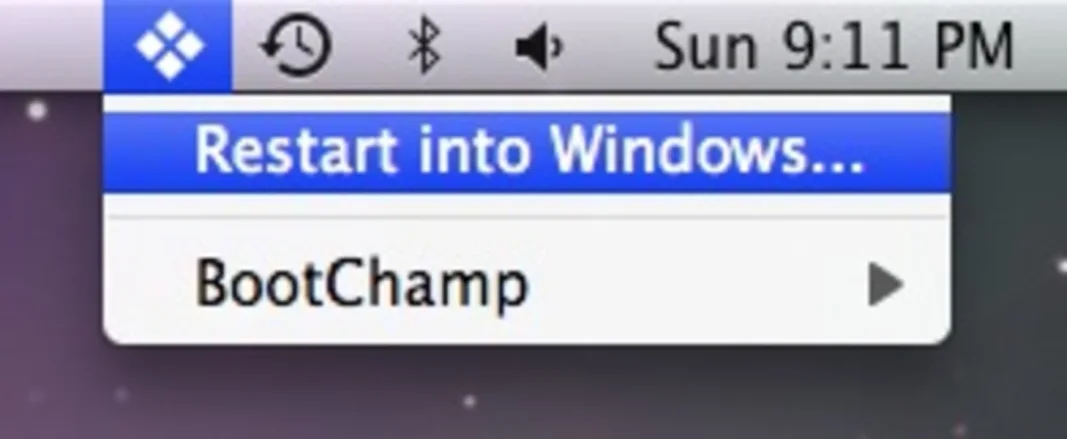
BootChamp is a menu bar utility for Mac OS X Leopard. Once it installs its icon in the menu bar, choose 'Restart into Windows' and the computer goes directly into Windows, which saves the wait for it to start back up. It asks for the administrator's password before the restart. The tool is meant for Macs that run Windows through Bootcamp, and it removes the need to hold keys during start-up.
How a restart works
The menu bar icon holds a single option, 'Restart into Windows'. Selecting it prompts for the administrator's password, then the Mac starts up in Windows without any key presses at boot.
[Release notes coming soon]
Verify the file
Compare the SHA-256 of the file you downloaded with the value below. Files exactly as the publisher released them.
-
1.7
1.7 · ZIP · 1.1 MB
SHA-256
a6494fbc9efd057d8f25ba3aa8122e2b037145cc78e1bba12c69401afc06d0bcCheck on VirusTotal Get
Files exactly as the publisher released them.
Information
- Seller
- Kainjow LLC.
- Size
- 1.1 MB
- Category
- Maintenance
- Compatibility
macOS
- Languages
English
- Age rating
- All ages
- License
- Proprietary
- Price
- Free