Skip to content

ExifTool13.64 for macOS

Check, edit and write metadata for images and videos on Mac

Phil Harvey

Free · Proprietary

Download 13.64 · 5.5 MB
  • Age rating
    0+
    All ages
  • Category
    Disc/Files
  • Developer
    Phil Harvey
  • Languages
    1
    English
  • Size
    5.5
    MB

Mac

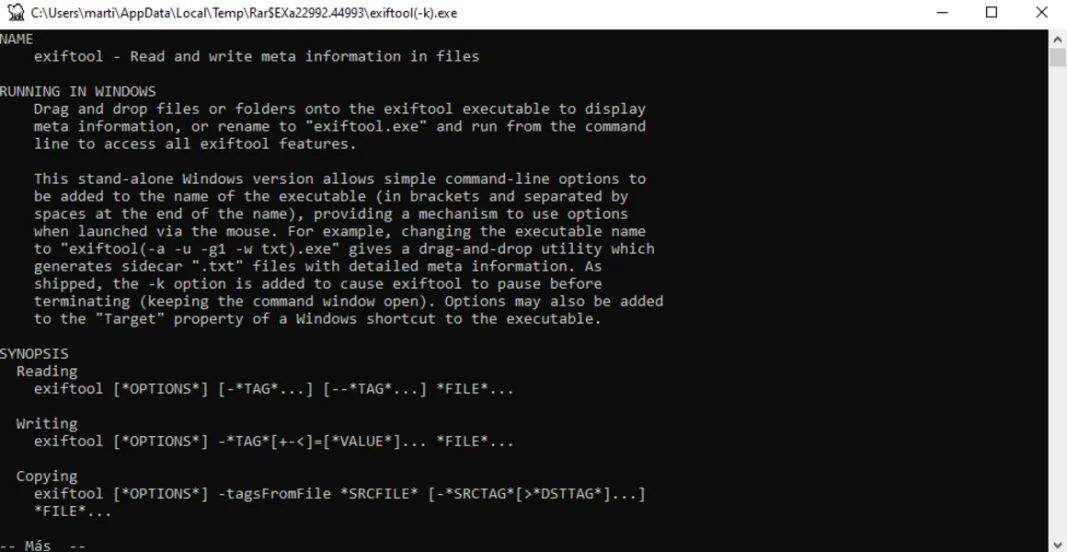
ExifTool is a command-line utility for checking, editing and writing metadata in images and videos on Mac systems. It extracts and manipulates metadata from various file types, and it handles files from Canon, Nikon and Sony cameras.

You run it from the command line, and it processes files without consuming unnecessary system resources. The formats it supports include EXIF, GPS, IPTC and XMP.

Beyond still images, ExifTool can retrieve details about video recordings. It can also analyze photos for location data.

[Release notes coming soon]

Version 13.64

Verify the file

Compare the SHA-256 of the file you downloaded with the value below. Files exactly as the publisher released them.

  • exiftool-13-64.pkg

    13.64 · PKG · 5.5 MB

    SHA-256

    97bfed92509fde13b636754adeb95ef46a6f72fecaf38708c06dbd1dcb1c65a9 Check on VirusTotal Get

Files exactly as the publisher released them.

Information

Size
5.5 MB
Category
Disc/Files
Compatibility
macOS 10.4 Tiger or later
Languages
English
Age rating
All ages
License
Proprietary
Price
Free

Version history

  • [Release notes coming soon]

    13.64
  • [Release notes coming soon]

    13.62
  • [Release notes coming soon]

    13.60
  • [Release notes coming soon]

    13.59
  • [Release notes coming soon]

    13.58
  • [Release notes coming soon]

    13.56
  • [Release notes coming soon]

    13.54
  • [Release notes coming soon]

    13.53
  • [Release notes coming soon]

    13.50
  • [Release notes coming soon]

    13.49
  • [Release notes coming soon]

    13.48
  • [Release notes coming soon]

    13.46
  • [Release notes coming soon]

    13.45
  • [Release notes coming soon]

    13.44
  • [Release notes coming soon]

    13.43
  • [Release notes coming soon]

    13.42
  • [Release notes coming soon]

    13.40
  • [Release notes coming soon]

    13.39
  • [Release notes coming soon]

    13.38
  • [Release notes coming soon]

    13.37
  • [Release notes coming soon]

    13.36
  • [Release notes coming soon]

    13.35
  • [Release notes coming soon]

    13.34
  • [Release notes coming soon]

    13.33
  • [Release notes coming soon]

    13.32
  • [Release notes coming soon]

    13.31
  • [Release notes coming soon]

    13.30
  • [Release notes coming soon]

    13.29
  • [Release notes coming soon]

    13.27
  • [Release notes coming soon]

    13.26
  • [Release notes coming soon]

    13.24
  • [Release notes coming soon]

    13.22
  • [Release notes coming soon]

    13.21
  • [Release notes coming soon]

    13.19
  • [Release notes coming soon]

    13.18
  • [Release notes coming soon]

    13.17
  • [Release notes coming soon]

    13.16
  • [Release notes coming soon]

    13.15
  • [Release notes coming soon]

    13.14
  • [Release notes coming soon]

    13.12
  • [Release notes coming soon]

    13.11
  • [Release notes coming soon]

    13.10
  • [Release notes coming soon]

    13.09
  • [Release notes coming soon]

    13.08
  • [Release notes coming soon]

    13.07
  • [Release notes coming soon]

    13.05
  • [Release notes coming soon]

    13.04
  • [Release notes coming soon]

    13.03
  • [Release notes coming soon]

    13.01
  • [Release notes coming soon]

    13.0.0

All versions ›