MacHacha4.0.1 for macOS
Splits large files into pieces other split tools can rejoin
Free · Proprietary
You are on Windows — this is the macOS version.
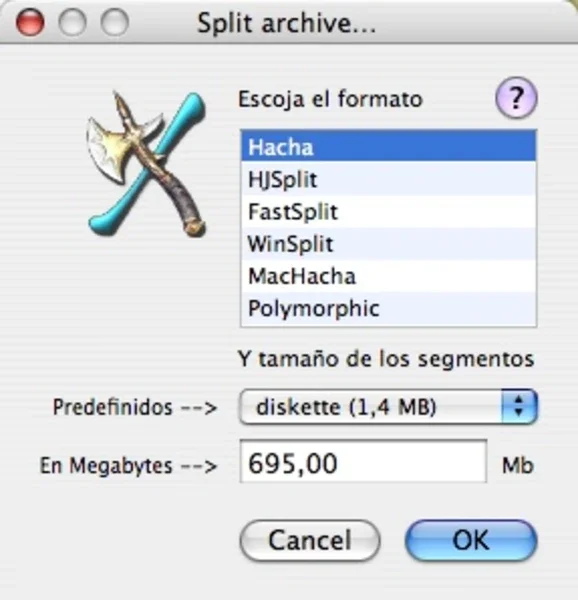
Drag a file onto the MacHacha icon and it is split into several smaller pieces. You are asked for a fragmentation size when you do it: pick one of the predefined options or type a value in Megabytes.
The pieces are written so that other splitting applications can put them back together, including Hacha, WinSplit, FastSplit, Split&Concat and HJSplit. Packets for programs built for other operating systems are handled the same way, which matters when the machine at the other end is not a Mac. Splitting is mainly a way to move data between computers, especially where the target has no Internet connection or the transfer would take too long. A self-extracting file for Windows can be made as well, using a file that has been batch-processed for the Mac. That option sits in the program's preferences menu rather than in the main window.
MacHacha is a Mac utility from Pescados Software and costs nothing to use.
[Release notes coming soon]
Verify the file
Compare the SHA-256 of the file you downloaded with the value below. Files exactly as the publisher released them.
-
4.0.1
4.0.1 · DMG · 780.2 KB
SHA-256
6dee0ff8e80f4e0672cc168505ced6c409f2b3077160a29ec093ffd501c0e302Check on VirusTotal Get
Files exactly as the publisher released them.
Information
- Seller
- Pescados Software
- Size
- 780.2 KB
- Category
- Disc/Files
- Compatibility
macOS macOS 10.15 or later
- Age rating
- All ages
- License
- Proprietary
- Price
- Free