SopCast1.6.4 for macOS
Watch and stream TV channels using P2P technology on your Mac
Free · Proprietary
You are on Windows — this is the macOS version. See the Windows version
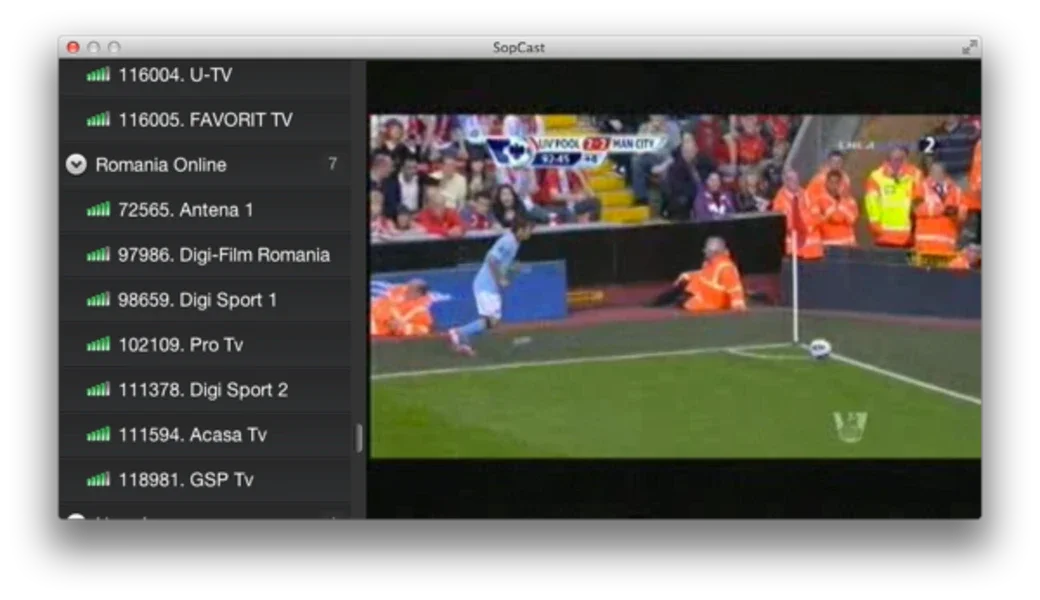
Open SopCast and you pick a channel from the list. Click a link and the channel plays in the player built into the program. The channels come from other users, and you can watch TV from across the globe. Basic use needs no configuration at all, so the first launch is mostly about choosing something to watch.
The program runs on P2P technology, which means more viewers can improve reception and image quality. You can also stream video from a chosen location, file, or directory, and other Internet users can access the contents of those broadcasts. Broadcast video has to be in ASF, WMV, RM, MP3, or SPL format. SopCast can turn a computer into a television channel, and doing that is where the setup starts. Creating your own channel requires configuring certain parameters, including ports, which you leave alone otherwise. On the developer's webpage you can put your channel in a category, advertise it to other users, and set access as public or private.
SopCast is free and runs on the Mac. The latest version is 1.6.4.
[Release notes coming soon]
Verify the file
Compare the SHA-256 of the file you downloaded with the value below. Files exactly as the publisher released them.
-
1.6.4
1.6.4 · ZIP · 5.9 MB
SHA-256
0ada7d855c8b8803d21260f56073cafea0718aead267736e396606006f9282ddCheck on VirusTotal Get
Files exactly as the publisher released them.
Information
- Seller
- SopCast.com
- Size
- 5.9 MB
- Category
- Communication
- Compatibility
macOS 10.4 Tiger or later
- Languages
English
- Age rating
- All ages
- License
- Proprietary
- Price
- Free
- Platform
- Also available on Windows