
Data Widget: remaining data
against your own plan date
Projetado para iPhone, iPad
R$ 12,90
- Classificação etária4+
- CategoriaUtilidades
- Desenvolvedor大胜 纪
- IdiomasInglêse mais 10
- Tamanho5,6 MB
Leva à página oficial na App Store
O Download.org não hospeda nenhum arquivo de Data Widget: remaining data. O botão abre a página do app na App Store, onde 大胜 纪 o publica. Página verificada pela última vez em 25/11/2026.
Capturas de tela
Sobre
O desenvolvedor não forneceu este texto no seu idioma.
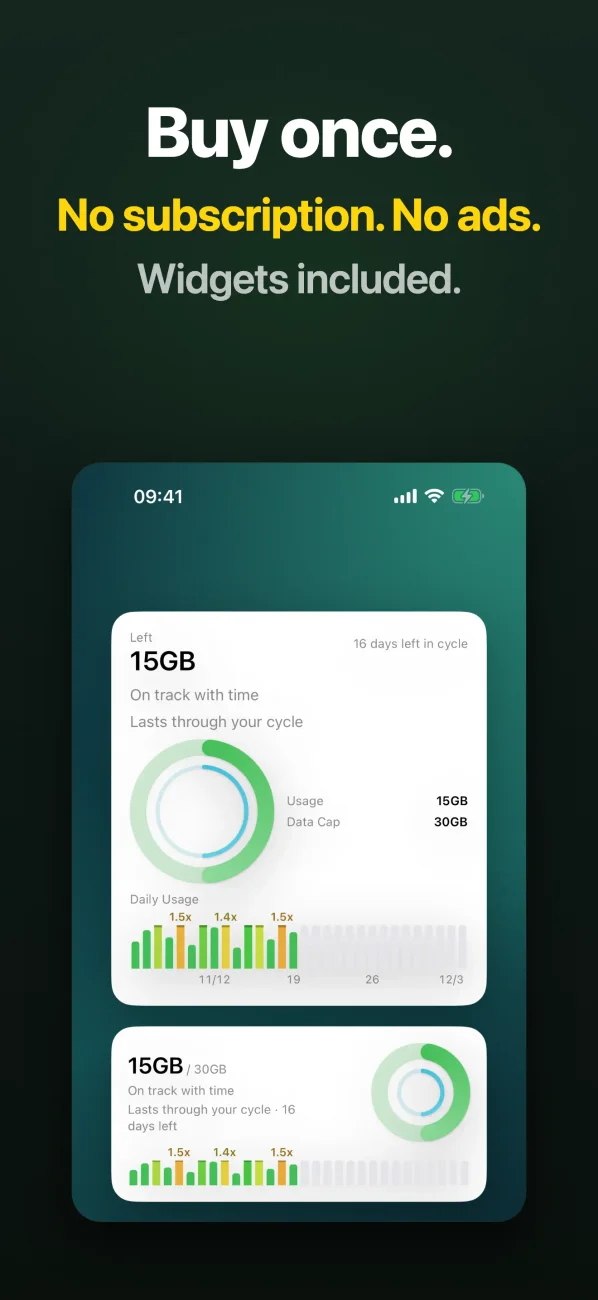
See how much data you have left this cycle — and whether you’re heading for overage. Track against your own plan date: remaining on the Home Screen, Lock Screen, and Apple Watch, with optional alerts at 80% or when you run out. No carrier login, and no extra data used just to check. It is a one-time purchase: no subscription, no ads, widgets included.
ONE-TIME PURCHASE. NO SUBSCRIPTION.
Buy once and everything below is included:
• No subscription, no trial that expires, no “Pro” tier added later
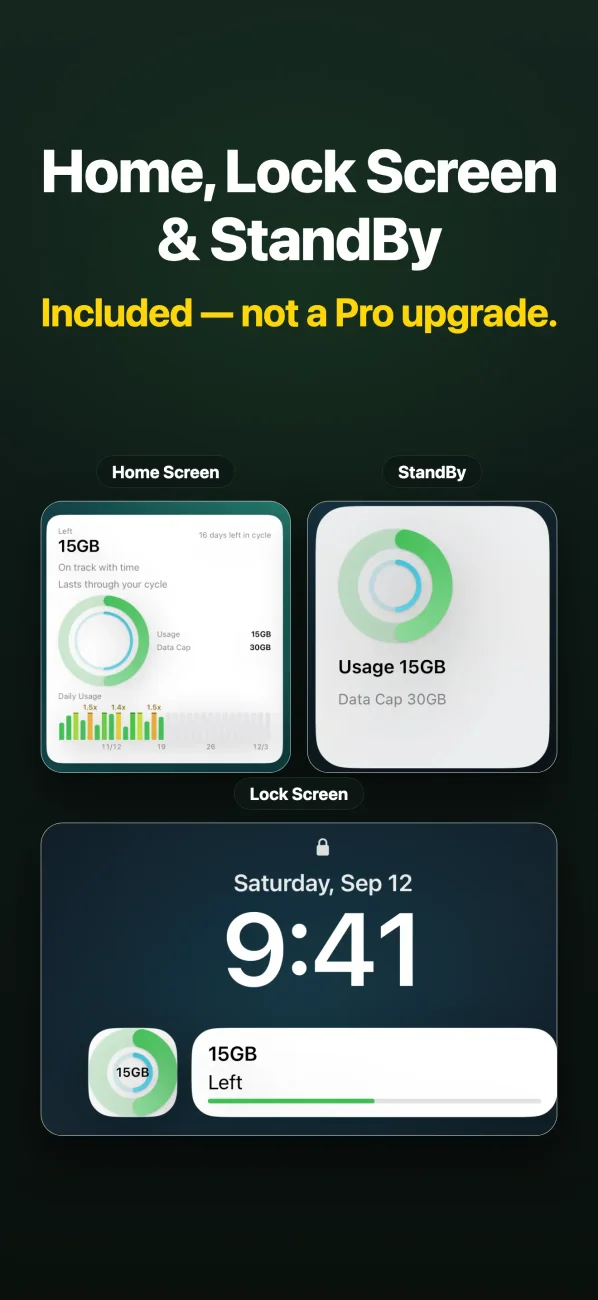
• Home Screen, Lock Screen, StandBy and Apple Watch widgets are part of the app, not an upgrade
• Nothing you already paid for gets moved behind a new plan later
YOUR PLAN DATE, NOT THEIRS
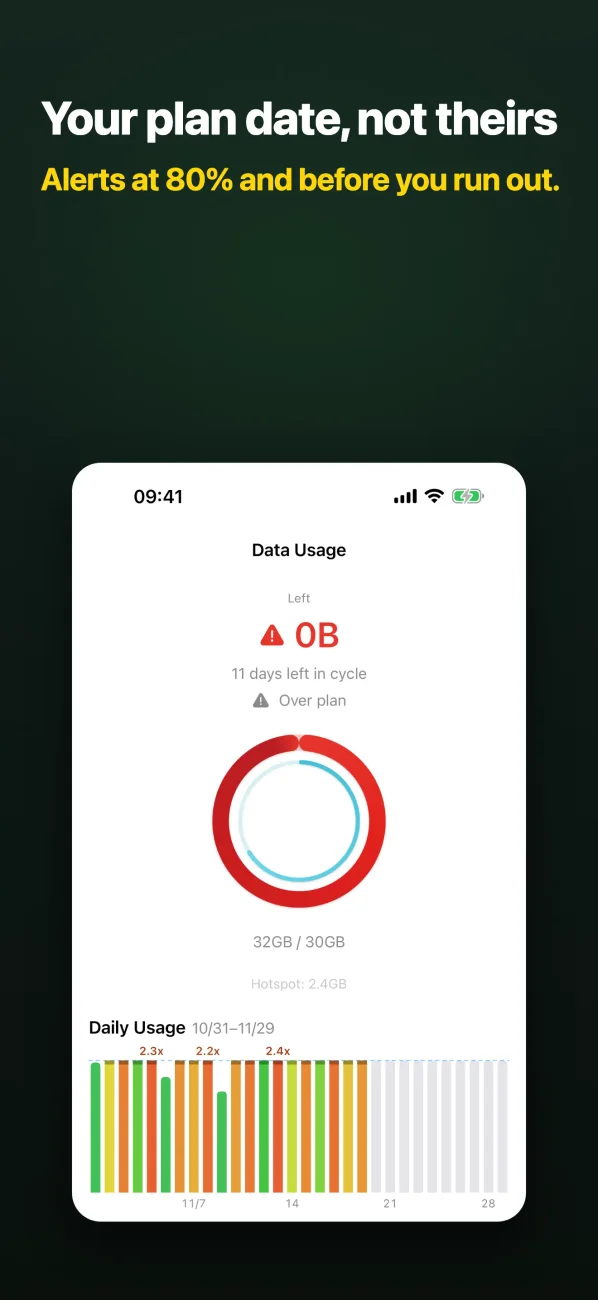
Usage in Settings doesn’t follow your billing date, and carrier apps want an account. Data Widget totals cellular bytes on-device against the cap you set:
• Monthly, weekly, or a custom cycle
• Day passes / travel eSIMs: N days from activation — they end on expiry instead of rolling over
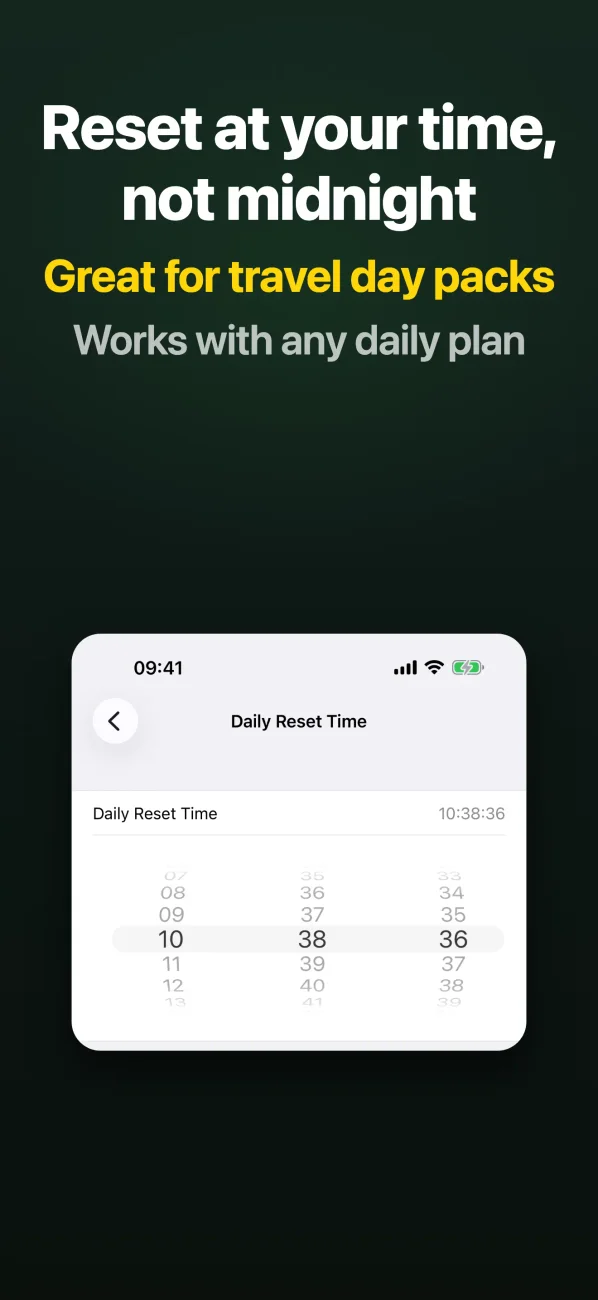
• Daily plans: pick the exact reset time (hour:minute:second) — the day doesn’t have to start at midnight, which is how travel day packs work
• Calibrate to the number on your bill (confirms before saving)
• If your plan rolls unused data, carry it into this cycle
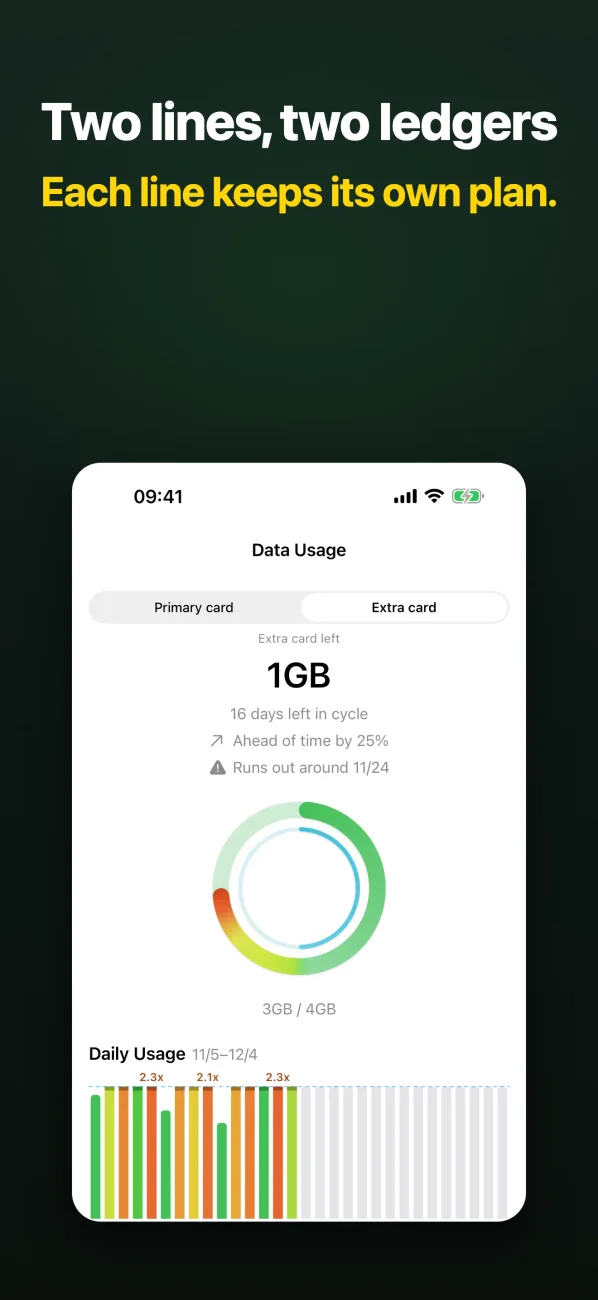
• Dual SIM / eSIM: both lines together, primary only, or split — useful with a travel eSIM
• Personal Hotspot: an optional line showing how much of the total went to it
• 5G and LTE cellular interfaces
REMAINING VS. PACE
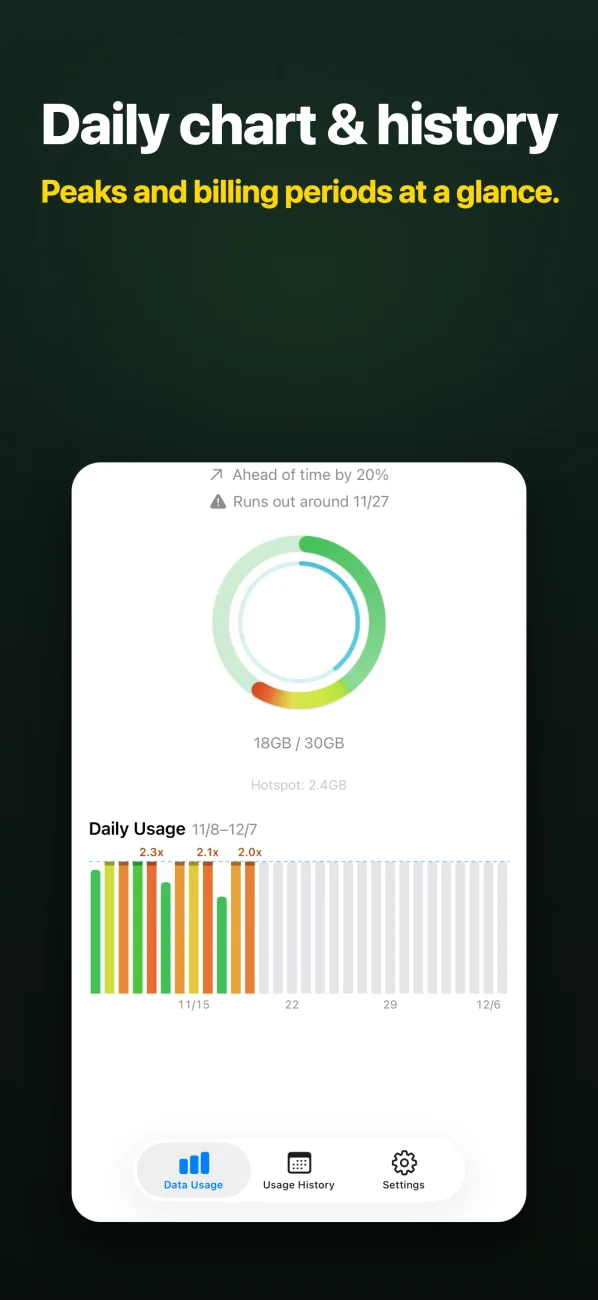
The headline number is remaining. Time and usage share one bar; the arrow is calendar pace — green if you’re under, red if you’re burning faster. Home says “12% ahead of pace” or “about N days left at this rate,” with a daily chart for spikes. History is one row per cycle, grouped by year.
GLANCE WITHOUT OPENING THE APP
Widgets on the Home Screen, Lock Screen, or StandBy show remaining in large type, plus when it last updated. Apple Watch complications show remaining on the face. In the app, tap to switch % and used | remaining.
BEFORE YOU OVERAGE
Optional alerts at 80%, 90%, or when you run out — once per tier each cycle. You can also alert when usage runs ahead of time.
PRIVATE AND HONEST
No ads. No location. No SMS scraping, no carrier-bill login.
On-device totals can differ from Settings > Cellular because of VPN, Personal Hotspot, or carrier rounding. That’s explained in Settings; calibration lines the ledger up with your plan.
Requires iOS 17 or later. Apple Watch requires watchOS 10 or later. Designed for iPhone. On iPad it only counts on cellular models.
Novidades
Versão 4.6.0 · 23/11/2026
Two new things.
[Daily plans]
A “day” in a daily plan doesn’t have to start at midnight. Many day packs — travel eSIMs above all, the kind sold for a trip — count from the moment they are activated: activate at 10:38:36 and the allowance resets at 10:38:36 every day, which is also when throttling lifts. Until now “Daily” could only start at 00:00, so the numbers never lined up.
[Set the hour, minute, second]
Open Start Date on a Daily plan and enter the reset time your provider gives you. The day’s usage counts from that moment. The default stays 00:00, so existing setups are unchanged.
[Hotspot, broken out]
Traffic from devices on your Personal Hotspot has always been part of your cellular total — that's what the carrier bills. The app now shows how much of that total it is.
[Where it appears]
Home screen: a line under the remaining figure — “Hotspot: 27 MB”. Large widget: a row next to Used.
Turn it on in Settings → Widgets → Hotspot usage. Off by default.
[Why “all cards” with two lines]
The hotspot counter is device-wide; iOS doesn't say which line carried it. With dual SIM both pages show the same number, marked “all cards”. It still resets with the primary line's cycle.
One honest note: this is measured on the phone, so it includes headers and retransmissions — the bytes the carrier actually bills. It can read a little higher than what the connected device says it downloaded.
Privacidade do app
O que 大胜 纪 declara na App Store sobre como este app lida com os dados.
-
Dados não coletados
O desenvolvedor não coleta nenhum dado deste app.
As práticas de privacidade podem variar, por exemplo, com base nos recursos que você usa ou na sua idade.
Informações
- Vendedor
- 大胜 纪
- Categoria
- Utilidades
- Versão
- 4.6.0
- Atualizado
- 23/11/2026
- Lançamento
- 08/10/2014
- Tamanho
- 5,6 MB
- Requer
- iOS 17.0 ou posterior
- Classificação etária
- 4+
- Preço
- R$ 12,90
- Idiomas
- Inglês, Árabe, Francês, Alemão, Italiano, Japonês, Coreano, Russo, Chinês simplificado, Espanhol, Chinês tradicional
- Copyright
- © 2026 DASHENG JI
Você também pode gostar
-
 PinletUtilidades
-
 Puzzle Alarm Clock, Wake Me UpUtilidades
-
 Loyal: Card WalletUtilidades
-
 Whois MasterUtilidades
-
 QuickScan:扫描识别文件证件卡包 手机扫描仪全能王Utilidades
-
 Idle Isle: Relax & Focus TimerUtilidades
-
 1Direct: Chat Without SaveUtilidades
-
 游离 - 相册清理Utilidades
-
 Memodo: Local AI Note TakerUtilidades
-
 Controle de TV - ClickerControle remoto universal TV