HMKWatch Digital 240
HMKWatch- PEGI 3Yaş sınırı
- KişiselleştirmeKategori
- 11.10.2026Güncellendi
- ₺21,99Fiyat
com.watchfacestudio.hmk_digi_240 için resmi Google Play sayfasına bağlanır. Son kontrol: 23.11.2026.

Ekran görüntüleri


Bu uygulama hakkında
Google tarafından otomatik çeviri. Orijinal dil: İngilizce (Amerika Birleşik Devletleri).
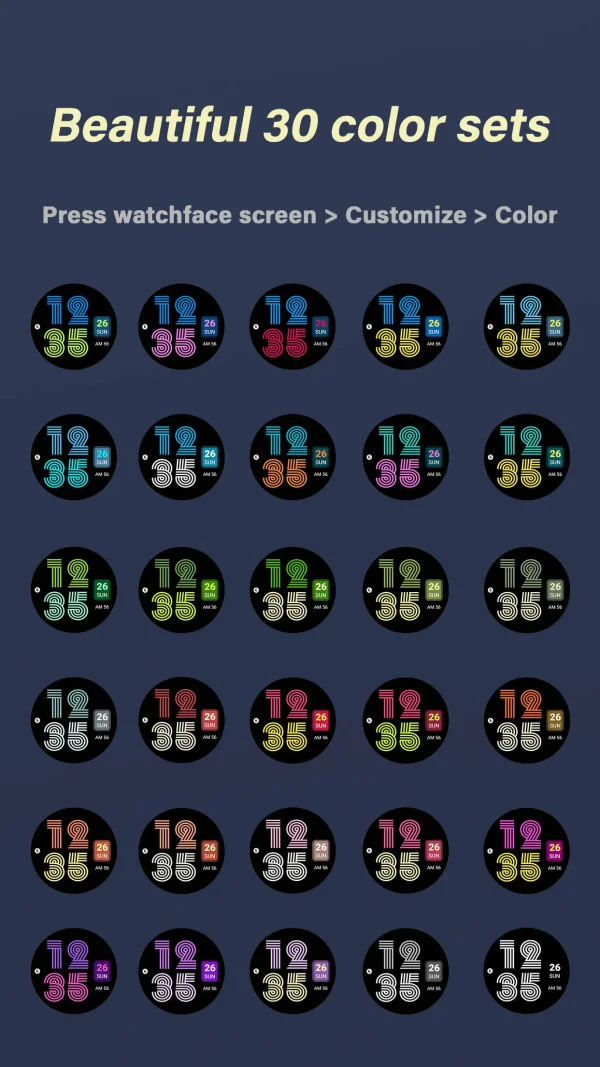
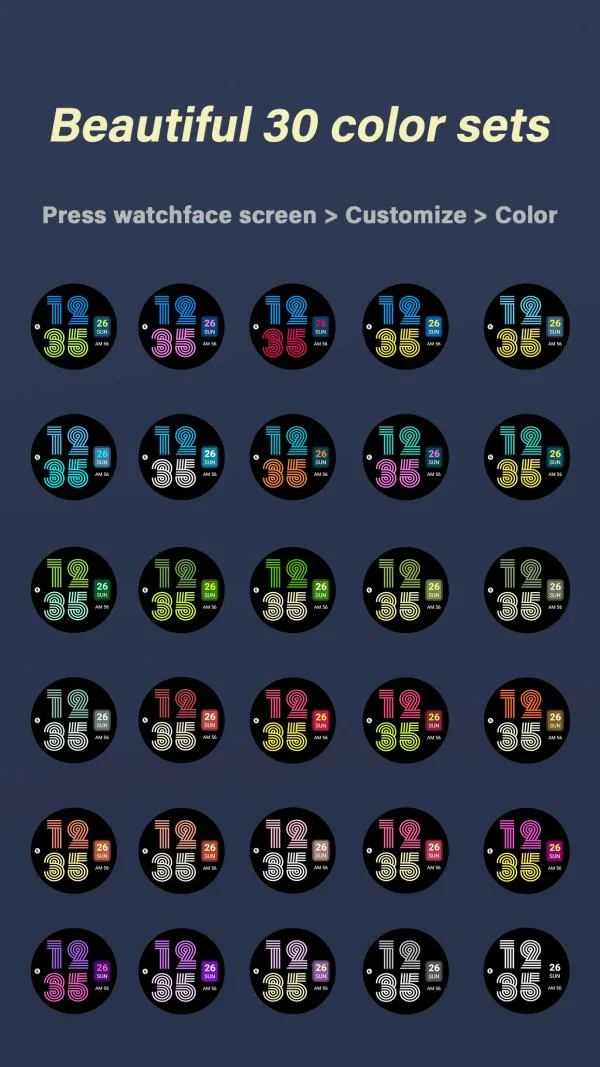
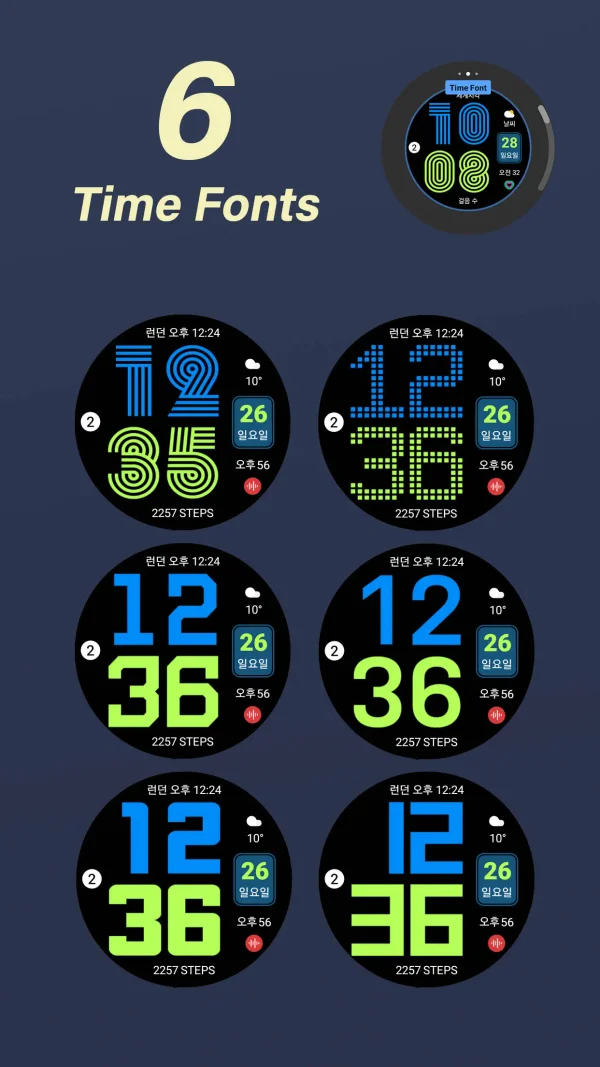
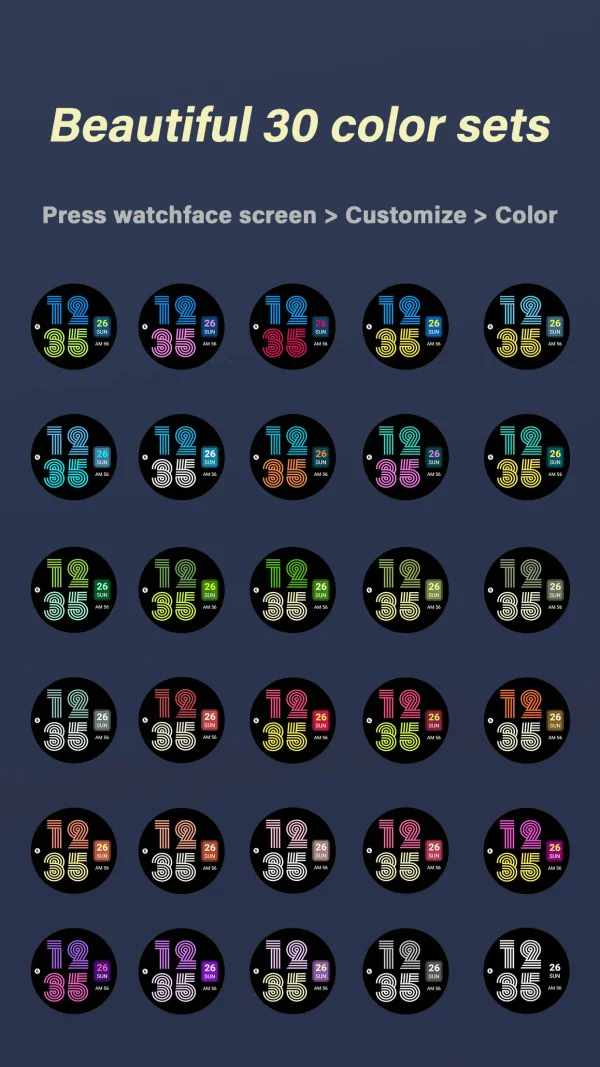
Rahat ve net dijital saat yüzü.
*Bu dijital saat kadranı, eski işletim sistemi cihazlarını destekler.
* Lütfen 'Bu uygulama hakkında' bölümüne bakarak ek uygulamalar yükleyin.
================================================= =====
[Nasıl kurulur]
https://youtu.be/tfjewHxxzQg
Ödeme butonuna basmadan önce saatinizin seçildiğinden emin olunuz.
Saati seçmek için Ödeme düğmesinin yanındaki küçük siyah üçgene basın.
Yukarıdaki yöntemi izlemezseniz, PC'nizde veya akıllı telefonunuzda Chrome veya Samsung tarayıcıyı kullanabilirsiniz.
Bir web tarayıcısı ile mağazaya girdikten sonra, saate yüklemek için Başka bir cihaza yükle'ye tıklayın.
Watch 5'in piyasaya sürülmesinden sonra Watch 4'e yeni bir kullanıcı arayüzü uygulandı.
Yeni yüklenen izleme yüzü aşağıdaki şekillerde bulunabilir.
1. 'Sık Kullanılan Saat Yüzü Listesi'ne girmek için saat ekranını basılı tutun.
2. En sağa çevirin ve 'Saat yüzü ekle'ye basın.
3. Ardından, 'Yüklü İzleme Yüzü Listesi'ne girin.
4. Satın aldığınız saat yüzünü bulun ve seçin.
================================================= =====
[Özellikler]
Pil
Takvim
Zaman formatı: 12s / 24s
Alarm
Nabız
Adım sayacı
[Komplikasyon]
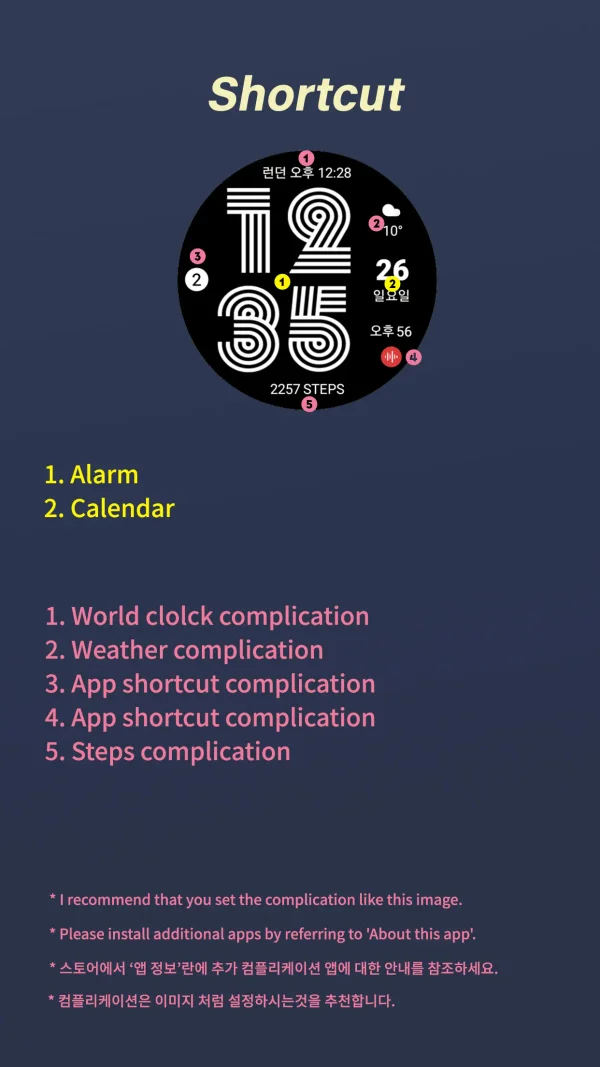
4 Uygulama kısayolları komplikasyonu
Telefon pil seviyesi
Hava komplikasyonu
Sonraki olay komplikasyonu
================================================= =====
[Ek yükleme uygulaması]
1. Akıllı telefon pil uygulaması (Ücretsiz uygulama)
Lütfen aşağıdaki bağlantının ek uygulamasını saate ve akıllı telefona yükleyin ve komplikasyonu ayarlayın.
Bağlantı açılmazsa, lütfen 'Phone Battery Complication' uygulamasını arayın ve kurun.
https://play.google.com/store/apps/details?id=com.weartools.phonebattcomp
2. Complications Suite - Wear OS (Ücretsiz uygulama)
"Complications Suite - Wear OS" ücretsiz uygulamasını yükledikten sonra, uygulama ayarlarında dünya saatini 24 saat formatında seçip uygulayın.
https://play.google.com/store/apps/details?id=com.weartools.weekdayutccomp
3. Kalp Hızı Komplikasyonu (Ücretli uygulama)
https://play.google.com/store/apps/details?id=com.weartools.heartratecomp
4. Sağlık Hizmetleri Komplikasyonları (Ücretli uygulama)
https://play.google.com/store/apps/details?id=com.weartools.hskomplikasyonlar
5. SimpleWeather(Ücretsiz uygulama)
https://play.google.com/store/apps/details?id=com.thewizrd.simpleweather
Tüm krediler orijinal uygulama oluşturucuya gider:
amoledwatchfaces - https://play.google.com/store/apps/dev?id=5591589606735981545
================================================= =====
Instagram'dan yeni haberler alın.
www.instagram.com/hmkwatch
https://hmkwatch.history.com/
Herhangi bir hatanız veya öneriniz varsa lütfen bana bir e-posta gönderin.
hmkwatch@gmail.com
Orijinal metni göster
*This digital watch face supports wear OS devices.
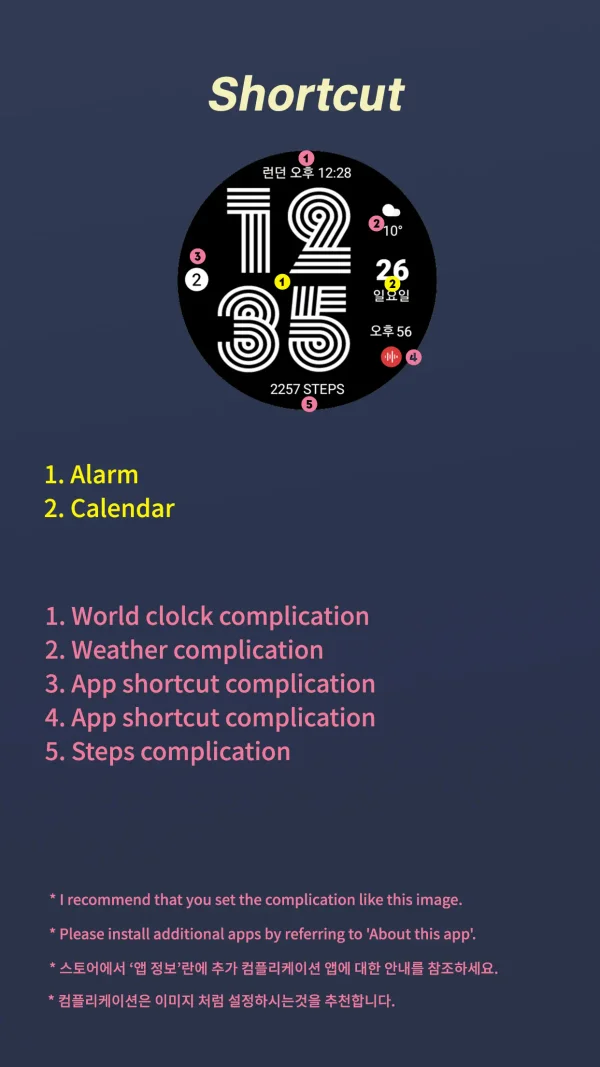
* Please install additional apps by referring to 'About this app'.
=======================================================
[How to install]
https://youtu.be/tfjewHxxzQg
Make sure your watch is selected first before you press the payment button.
Press the small black triangle next to the Payment button to select the watch.
If you don't follow the above method, you can use Chrome or Samsung browser on your PC or smartphone.
After entering the store with a web browser, click Install on another device to install it on the watch.
After the release of Watch 5, a new UI was applied to Watch 4.
The newly installed watchface can be found in the following ways.
1. Press and hold the watch screen to enter the 'Frequently Used Watch Face List'.
2. Turn it to the rightmost and press 'Add watchface'.
3. Then, enter the 'Installed Watchface List'.
4. Find and select the watch face you purchased.
=======================================================
[Features]
Battery
Calendar
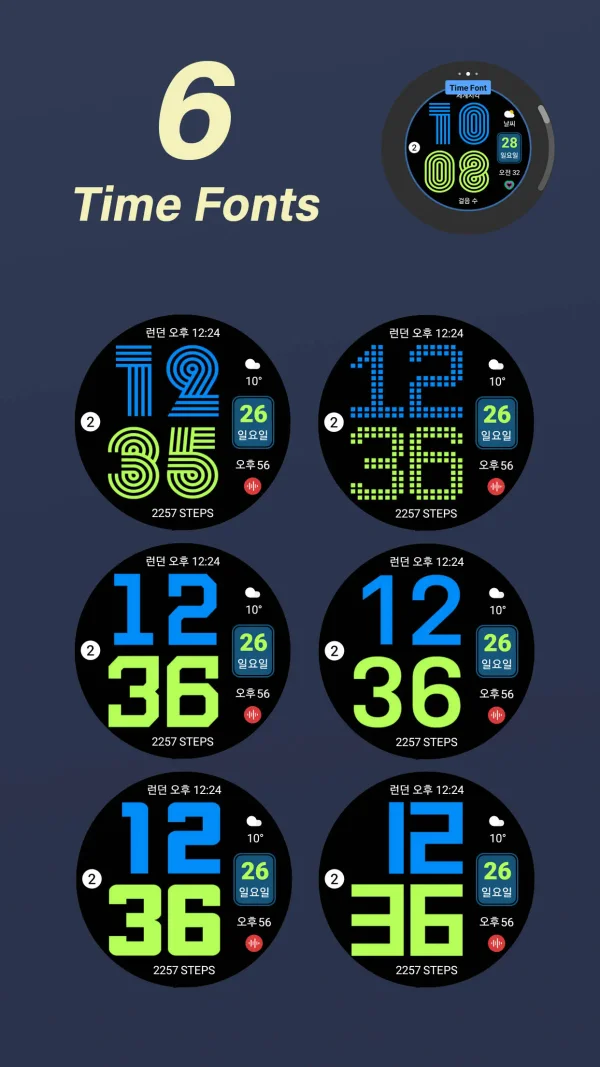
Time format : 12h / 24h
Alarm
Heart rate
Step counter
[Complication]
4 App shortcuts complication
Phone battery level
Weather complication
Next event complication
=======================================================
[Additional installation app]
1. Smart phone battery app (Free app)
Please install the additional app of the link below on the watch and smartphone, and set up the complication.
If the link does not open, please search for the 'Phone Battery Complication' app and install it.
https://play.google.com/store/apps/details?id=com.weartools.phonebattcomp
2. Complications Suite - Wear OS (Free app)
After installing the "Complications Suite - Wear OS" free app, select and apply the world clock in 24-hour format in the application settings.
https://play.google.com/store/apps/details?id=com.weartools.weekdayutccomp
3. Heart Rate Complication (Paid app)
https://play.google.com/store/apps/details?id=com.weartools.heartratecomp
4. Health Services Complications (Paid app)
https://play.google.com/store/apps/details?id=com.weartools.hscomplications
5. SimpleWeather(Free app)
https://play.google.com/store/apps/details?id=com.thewizrd.simpleweather
All credits goes to original app creator:
amoledwatchfaces - https://play.google.com/store/apps/dev?id=5591589606735981545
=======================================================
Get new news from my Instagram.
www.instagram.com/hmkwatch
https://hmkwatch.tistory.com/
Please send me an email if you have any errors or suggestions.
hmkwatch@gmail.com
Veri güvenliği
Bu uygulamanın topladığı ve paylaştığı veriler hakkında HMKWatch tarafından Google Play üzerinde yapılan beyan.
- Üçüncü taraflarla veri paylaşımı yokGeliştiricilerin, veri paylaşımını nasıl beyan ettikleri hakkında daha fazla bilgi edinin
- Veri toplanamadıGeliştiricilerin, veri toplamayı nasıl beyan ettikleri hakkında daha fazla bilgi edinin
Geliştirici iletişim bilgileri
- Web sitesiinstagram.com
- E-postahmkwatch@gmail.com
- Gizlilik politikasıblog.naver.com
- Adres중앙로6길 17 104동 804호 구로구, 서울특별시 08223 South Korea
Bilgiler
- Sunan
- HMKWatch
- Kategori
- Kişiselleştirme
- Güncellendi
- 11.10.2026
- Yayın tarihi
- 17.03.2023
- Yaş sınırı
- PEGI 3
- Fiyat
- ₺21,99
- Paket adı
- com.watchfacestudio.hmk_digi_240
Benzer uygulamalar
-
 Skinny Daylight Watch Face
Kişiselleştirme
-
 Skinny Orange Green Watch Face
Kişiselleştirme
-
 Big Blue Watch Face
Kişiselleştirme
-
 Cold Blue Watch Face
Kişiselleştirme
-
 ML2U 181 Watch Face
Kişiselleştirme
-
 Simple Indicators Watch Face
Kişiselleştirme
-
 Skinny Yellow Blue Watch Face
Kişiselleştirme
-
 Active Daylight Watch Face
Kişiselleştirme
-
 Gradient dream Watch Face
Kişiselleştirme
-
 Big Ocean Blue Watch Face
Kişiselleştirme
-
 Bold WatchFace
Kişiselleştirme
-
 Beauty Active Pro Watch Face
Kişiselleştirme