
Calclin
Roll Calculator & Formulas
iPhone, iPad için tasarlandı
Ücretsiz · Uygulama içi satın alma
- Yaş sınırı4+
- KategoriÜretkenlik
- GeliştiriciAzukid.com
- Dillerİngilizce+ 1 dil daha
- Boyut8,6 MB
Resmi App Store sayfasına bağlanır
Download.org, Calclin için hiçbir dosya barındırmaz. Düğme, uygulamanın App Store üzerindeki sayfasını açar; uygulamayı orada Azukid.com yayınlar. Sayfanın son kontrolü: 14.11.2026.
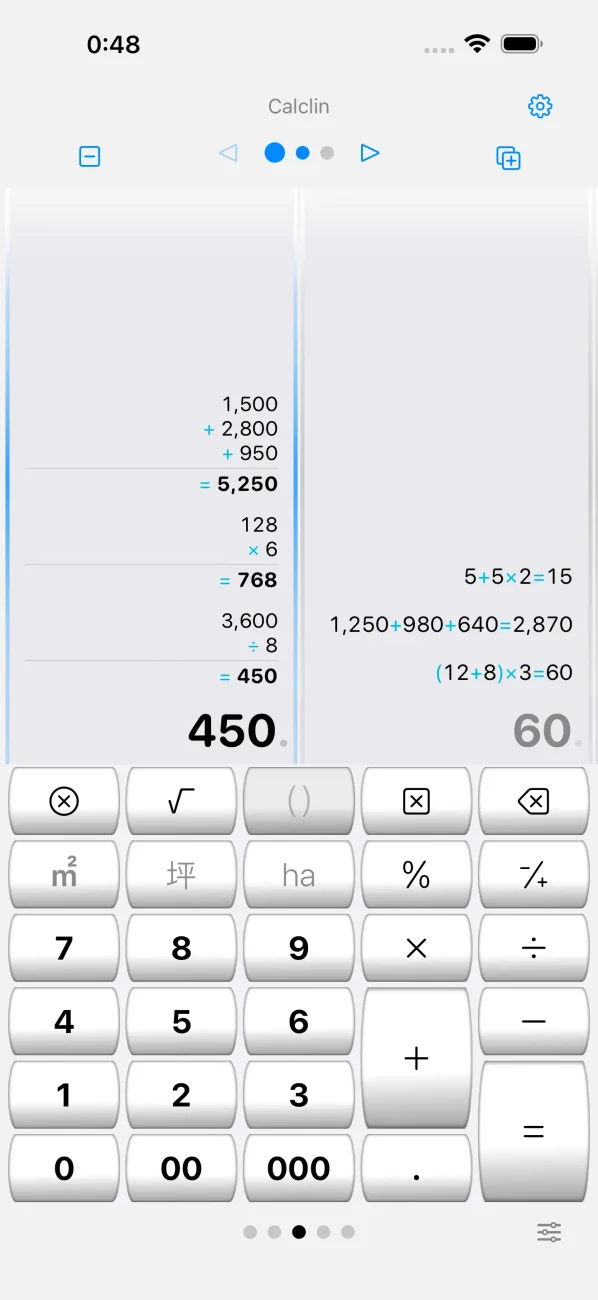
Ekran görüntüleri


Hakkında
Geliştirici bu metni dilinizde sunmamış.
A calculator memo app with history that keeps your calculation process visible like a paper roll. Switch between calculator input and formula input to handle everything from everyday math to calculations you want to keep as records.
■ Calculator mode and Formula mode
Calculator mode evaluates left to right (5+5×2=20). Formula mode respects operator precedence (5+5×2=15) and supports parentheses and roots. Switch anytime from the input row, changing the calculation style without leaving the active input area.
■ Paper-roll style history
Expressions and answers stay on the roll from the top, so you can see the flow of your calculation at a glance. Subtle side lines and top shading keep each frame easy to distinguish, even with multiple rolls. In calculator mode, a running total can be shown while you type.
■ Edit rows and add notes
In calculator mode, tap any roll row to edit and recalculate. Add a note to any history entry. Swipe left to delete; swipe right to add a memo, copy the expression, or copy the answer.
■ PDF export
Export a calculation roll as a PDF whenever you want to keep it.
■ Use multiple calculators side by side
Up to a triple deck. Add or remove panels with the [+][−] header buttons, swipe or tap to switch, and double-tap to toggle between 1-panel and 2-panel views.
■ Unit-aware calculations
Calculate with units of length, area, volume, and weight. Press a different unit key to change only the unit, or press the same unit key again to convert the number. Tap an underlined unit to pick from the conversion list.
■ TAX+ and TAX− keys
Add tax to, or remove tax from, the value you are entering or the answer you just calculated. Set up to three tax rates; each key shows its rate.
■ Customizable keyboard
Long-press any key to define it, and merge keys vertically or horizontally to create larger keys. Switch between 5 layouts (30 keys each), and export or import your arrangement.
■ Flexible display settings
Choose the decimal point and grouping symbols, the grouping style (every 3 or 4 digits, Indian style), the number of decimal digits, and the rounding mode (including round half to even). Answers are kept at full precision; rounded answers are marked with "≒", and tapping one shows every digit. Pick Auto, Light, or Dark appearance, and enlarge or reduce text size. Your settings are restored on next launch.
■ Beginner and Expert modes
Beginner mode shows labels and tips for each button. Once you are comfortable, Expert mode unlocks advanced operations such as long-press key editing.
The calculation engine uses C/C++ fixed-point decimal, stored internally in BCD arrays.
Note: Data is not encrypted. Please do not store personal or confidential information.
Yenilikler
Sürüm 2.4.0 · 10.10.2026
■ Answers kept at full precision
- Answers, not just intermediate results, are now kept at full precision
- The display is rounded to your chosen number of digits. Rounded answers are marked with "≒"; tap one to see every digit
■ Clearer unit handling
- Pressing a different unit key changes only the unit and keeps the number
e.g. 60m², press [坪] once: 60坪
- Pressing the same unit key again converts the number
e.g. 60m², press [坪] twice: 18.15坪
- Tap an underlined unit to open the conversion list and convert to the unit you choose
■ New TAX+ and TAX− keys
- Set up to three tax rates in "Key settings"; each key shows its rate
- Works on the value you are entering and on the answer you just calculated
■ Usability improvements
- Moving between Formula and Calculator modes feels more natural
- Redesigned the Formula / Calculator switch
- In Expert mode, switching between the roll and the keyboard is twice as fast
- Redesigned how options are chosen in Settings
Uygulama gizliliği
Bu uygulamanın verileri nasıl işlediği hakkında Azukid.com tarafından App Store üzerinde yapılan beyan.
-
Veri toplanmıyor
Geliştirici bu uygulamadan hiçbir veri toplamıyor.
Gizlilik uygulamaları, örneğin kullandığınız özelliklere veya yaşınıza göre değişiklik gösterebilir.
Bilgiler
- Satıcı
- Masakazu Matsuyama
- Kategori
- Üretkenlik
- Sürüm
- 2.4.0
- Güncellendi
- 10.10.2026
- Yayın tarihi
- 07.08.2010
- Boyut
- 8,6 MB
- Gereksinim
- iOS 18.0 veya sonrası
- Yaş sınırı
- 4+
- Fiyat
- Ücretsiz
- Uygulama içi satın alma
- Evet
- Diller
- İngilizce, Japonca
- Telif hakkı
- © 2010 sumpo@azukid
Bunları da beğenebilirsiniz
-
 StenneNotlar, listeler, veritabanı
-
 Spark Memo: Instant NotesÜretkenlik
-
 ieRcalcÜretkenlik
-
 MSRX AI CalculatorÜretkenlik
-
 Dencho: Tape CalculatorÜretkenlik
-
 AIChatOCRÜretkenlik
-
 Daymark PlannerÜretkenlik
-
 TapeCalc - Fraction CalculatorÜretkenlik
-
 SolverPad - Notepad CalculatorÜretkenlik
-
 ANY CalculatorÜretkenlik