Calclin
Roll Calculator & Formulas
Được thiết kế cho iPhone, iPad
Miễn phí · Mua hàng trong ứng dụng
- Độ tuổi4+
- Danh mụcHiệu Suất
- Nhà phát triểnAzukid.com
- Ngôn ngữTiếng Anh+ 1 ngôn ngữ khác
- Kích thước8,6 MB
Liên kết đến trang App Store chính thức
Download.org không lưu trữ tệp nào của Calclin. Nút này mở trang ứng dụng trên App Store, nơi Azukid.com phát hành ứng dụng. Trang được kiểm tra lần cuối: 14/11/2026.
Ảnh chụp màn hình


Giới thiệu
Nhà phát triển chưa cung cấp nội dung này bằng ngôn ngữ của bạn.
A calculator memo app with history that keeps your calculation process visible like a paper roll. Switch between calculator input and formula input to handle everything from everyday math to calculations you want to keep as records.
■ Calculator mode and Formula mode
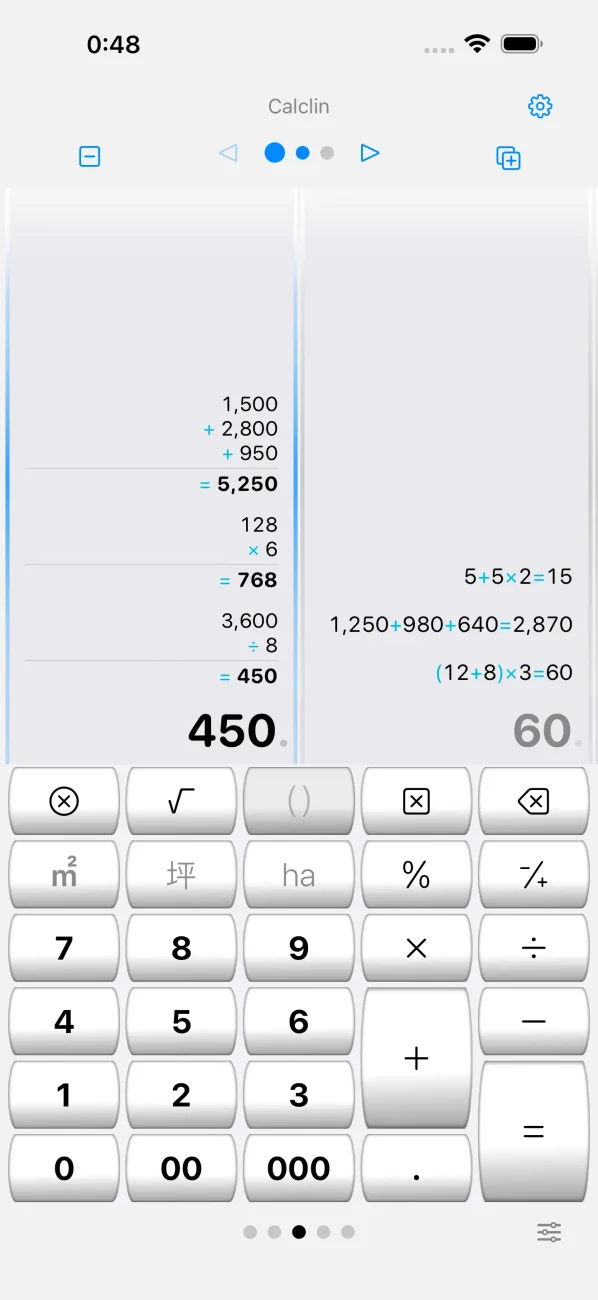
Calculator mode evaluates left to right (5+5×2=20). Formula mode respects operator precedence (5+5×2=15) and supports parentheses and roots. Switch anytime from the input row, changing the calculation style without leaving the active input area.
■ Paper-roll style history
Expressions and answers stay on the roll from the top, so you can see the flow of your calculation at a glance. Subtle side lines and top shading keep each frame easy to distinguish, even with multiple rolls. In calculator mode, a running total can be shown while you type.
■ Edit rows and add notes
In calculator mode, tap any roll row to edit and recalculate. Add a note to any history entry. Swipe left to delete; swipe right to add a memo, copy the expression, or copy the answer.
■ PDF export
Export a calculation roll as a PDF whenever you want to keep it.
■ Use multiple calculators side by side
Up to a triple deck. Add or remove panels with the [+][−] header buttons, swipe or tap to switch, and double-tap to toggle between 1-panel and 2-panel views.
■ Unit-aware calculations
Calculate with units of length, area, volume, and weight. Press a different unit key to change only the unit, or press the same unit key again to convert the number. Tap an underlined unit to pick from the conversion list.
■ TAX+ and TAX− keys
Add tax to, or remove tax from, the value you are entering or the answer you just calculated. Set up to three tax rates; each key shows its rate.
■ Customizable keyboard
Long-press any key to define it, and merge keys vertically or horizontally to create larger keys. Switch between 5 layouts (30 keys each), and export or import your arrangement.
■ Flexible display settings
Choose the decimal point and grouping symbols, the grouping style (every 3 or 4 digits, Indian style), the number of decimal digits, and the rounding mode (including round half to even). Answers are kept at full precision; rounded answers are marked with "≒", and tapping one shows every digit. Pick Auto, Light, or Dark appearance, and enlarge or reduce text size. Your settings are restored on next launch.
■ Beginner and Expert modes
Beginner mode shows labels and tips for each button. Once you are comfortable, Expert mode unlocks advanced operations such as long-press key editing.
The calculation engine uses C/C++ fixed-point decimal, stored internally in BCD arrays.
Note: Data is not encrypted. Please do not store personal or confidential information.
Có gì mới
Phiên bản 2.4.0 · 10/10/2026
■ Answers kept at full precision
- Answers, not just intermediate results, are now kept at full precision
- The display is rounded to your chosen number of digits. Rounded answers are marked with "≒"; tap one to see every digit
■ Clearer unit handling
- Pressing a different unit key changes only the unit and keeps the number
e.g. 60m², press [坪] once: 60坪
- Pressing the same unit key again converts the number
e.g. 60m², press [坪] twice: 18.15坪
- Tap an underlined unit to open the conversion list and convert to the unit you choose
■ New TAX+ and TAX− keys
- Set up to three tax rates in "Key settings"; each key shows its rate
- Works on the value you are entering and on the answer you just calculated
■ Usability improvements
- Moving between Formula and Calculator modes feels more natural
- Redesigned the Formula / Calculator switch
- In Expert mode, switching between the roll and the keyboard is twice as fast
- Redesigned how options are chosen in Settings
Quyền riêng tư của ứng dụng
Những gì Azukid.com khai báo trên App Store về cách ứng dụng này xử lý dữ liệu.
-
Dữ liệu không được thu thập
Nhà phát triển không thu thập bất kỳ dữ liệu nào từ ứng dụng này.
Phương thức đảm bảo quyền riêng tư có thể khác nhau, chẳng hạn như tuỳ theo các tính năng bạn sử dụng hoặc độ tuổi của bạn.
Thông tin
- Người bán
- Masakazu Matsuyama
- Danh mục
- Hiệu Suất
- Phiên bản
- 2.4.0
- Cập nhật
- 10/10/2026
- Phát hành
- 07/08/2010
- Kích thước
- 8,6 MB
- Yêu cầu
- iOS 18.0 trở lên
- Độ tuổi
- 4+
- Giá
- Miễn phí
- Mua hàng trong ứng dụng
- Có
- Ngôn ngữ
- Tiếng Anh, Tiếng Nhật
- Bản quyền
- © 2010 sumpo@azukid