
- Yaş sınırı4+
- KategoriFotoğraf ve Video
- GeliştiriciLucas Young
- Dillerİngilizce
- Boyut13,5 MB
Resmi App Store sayfasına bağlanır
Download.org, Gallerique için hiçbir dosya barındırmaz. Düğme, uygulamanın App Store üzerindeki sayfasını açar; uygulamayı orada Lucas Young yayınlar. Sayfanın son kontrolü: 07.11.2026.
Ekran görüntüleri

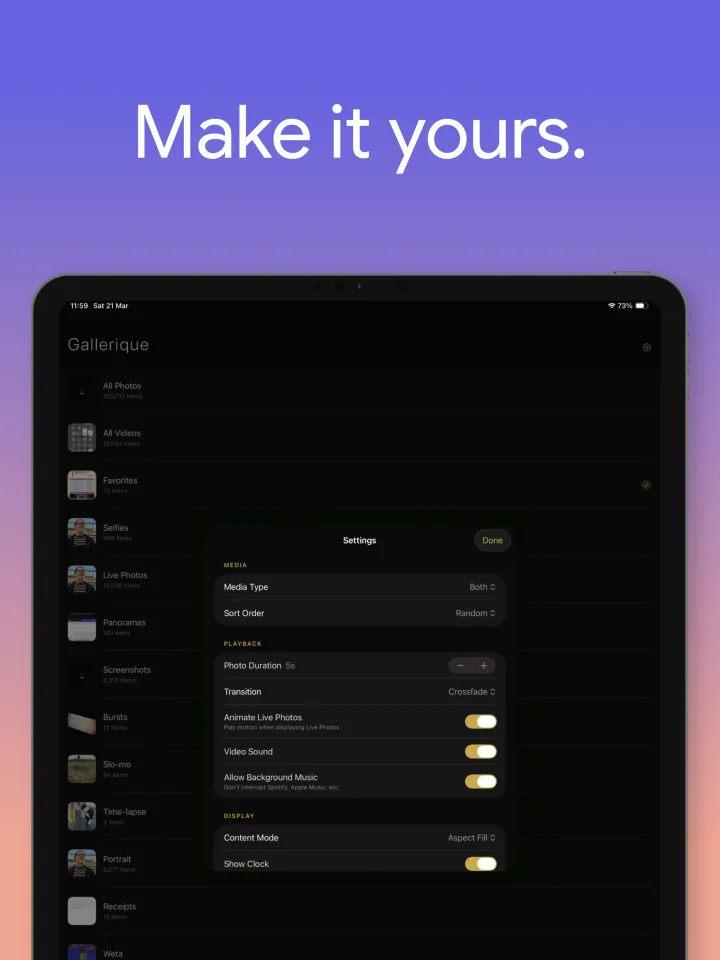

Hakkında
Geliştirici bu metni dilinizde sunmamış.
Gallerique turns your iPad into a fullscreen photo and video slideshow.
Pick an album, choose your settings, and tap "Begin Slideshow". Your photos fill the entire screen with smooth transitions between them. Videos play with sound. Live Photos animate. Everything stays out of the way so you can actually enjoy what you're looking at.
It started because every slideshow app I tried was either broken, bloated, or forgot that the whole point is to look at your photos.
HOW IT WORKS
Browse your albums in a clean grid. Select one (or use All Photos). Tap a button. The slideshow starts.
Photos display for as long as you want - from 2 to 30 seconds each. Videos always play to the end, so you never miss anything. Live Photos can animate or stay still, your call.
TRANSITIONS
Seven transition styles to pick from: crossfade, slide, zoom, blur dissolve, or Ken Burns (the slow cinematic pan-and-zoom you see in documentaries). You can also turn transitions off entirely if you prefer a clean cut.
BACKGROUND MUSIC
Gallerique respects whatever you're already listening to. If Spotify or Apple Music is playing, it keeps going. When a video with sound comes up, the music ducks down and comes back after. No fighting over the audio session.
AMBIENT DISPLAY
Turn on the clock overlay and your iPad becomes a bedside or desk display. The time floats in a small translucent pill - choose which corner it sits in. Enable auto-dim and the screen gradually lowers its brightness after a set number of minutes. Tap anywhere to wake it back up.
YOUR PHOTOS, YOUR RULES
- Show photos, videos, or both
- Pick any album or all of them
- Sort randomly, or by date added
- Choose aspect fill or aspect fit
- Animate Live Photos or keep them still
- Control video sound independently
DESIGNED FOR IPAD
Gallerique is built specifically for iPad and iPadOS 26. It supports both portrait and landscape, works in any window size, and keeps the screen awake during playback. The interface is dark by design - because the focus should be on your photos, not on chrome.
No ads. No subscription. No account. Just your photos on your screen.
Yenilikler
Sürüm 2.1 · 23.04.2026
- Added Previous and Next buttons to the slideshow overlay so you can skip between photos and videos without waiting.
- Fixed a bug where an all-video slideshow would stop after the first video instead of advancing.
- Fixed a bug where tapping to hide the overlay left the slideshow paused with no way to resume.
- The slideshow now handles rapid Previous/Next taps correctly, so the slide you land on always matches the counter.
- Your last-selected album is now remembered across launches.
- The clock overlay now attaches to the correct window when using Stage Manager or multiple windows.
- Performance and stability improvements to slide loading and audio handling.
Uygulama gizliliği
Bu uygulamanın verileri nasıl işlediği hakkında Lucas Young tarafından App Store üzerinde yapılan beyan.
-
Veri toplanmıyor
Geliştirici bu uygulamadan hiçbir veri toplamıyor.
Gizlilik uygulamaları, örneğin kullandığınız özelliklere veya yaşınıza göre değişiklik gösterebilir.
Bilgiler
- Satıcı
- Lucas Young
- Kategori
- Fotoğraf ve Video
- Sürüm
- 2.1
- Güncellendi
- 23.04.2026
- Yayın tarihi
- 30.03.2026
- Boyut
- 13,5 MB
- Gereksinim
- iOS 26.4 veya sonrası
- Yaş sınırı
- 4+
- Fiyat
- Ücretsiz
- Diller
- İngilizce
- Telif hakkı
- © 2026 Lucas Young
Bunları da beğenebilirsiniz
-
 Crumbly PhotosFotoğraf ve Video
-
 MantleboxFotoğraf ve Video
-
 PicDock: Digital Photo FrameFotoğraf ve Video
-
 Video Oynatıcı - FOCADöngü, Çevrimdışı ve Medya
-
 Digital Photo Frame with MusicFotoğraf ve Video
-
 Pixette – Slideshow for NASFotoğraf ve Video
-
 Slideshow Maker・SlideFlowFotoğraf ve Video
-
 Face Swap AI: Head SwapFotoğraf ve Video
-
 Remote Shutter: camera connect2 cihazı tek kameraya çevirin
-
 Fotoğraf Slayt Sunusu PixFolioDijital Çerçeve & Bulut Albümü