
- Độ tuổi4+
- Danh mụcẢnh & Video
- Nhà phát triểnLucas Young
- Ngôn ngữTiếng Anh
- Kích thước13,5 MB
Liên kết đến trang App Store chính thức
Download.org không lưu trữ tệp nào của Gallerique. Nút này mở trang ứng dụng trên App Store, nơi Lucas Young phát hành ứng dụng. Trang được kiểm tra lần cuối: 07/11/2026.
Ảnh chụp màn hình


Giới thiệu
Nhà phát triển chưa cung cấp nội dung này bằng ngôn ngữ của bạn.
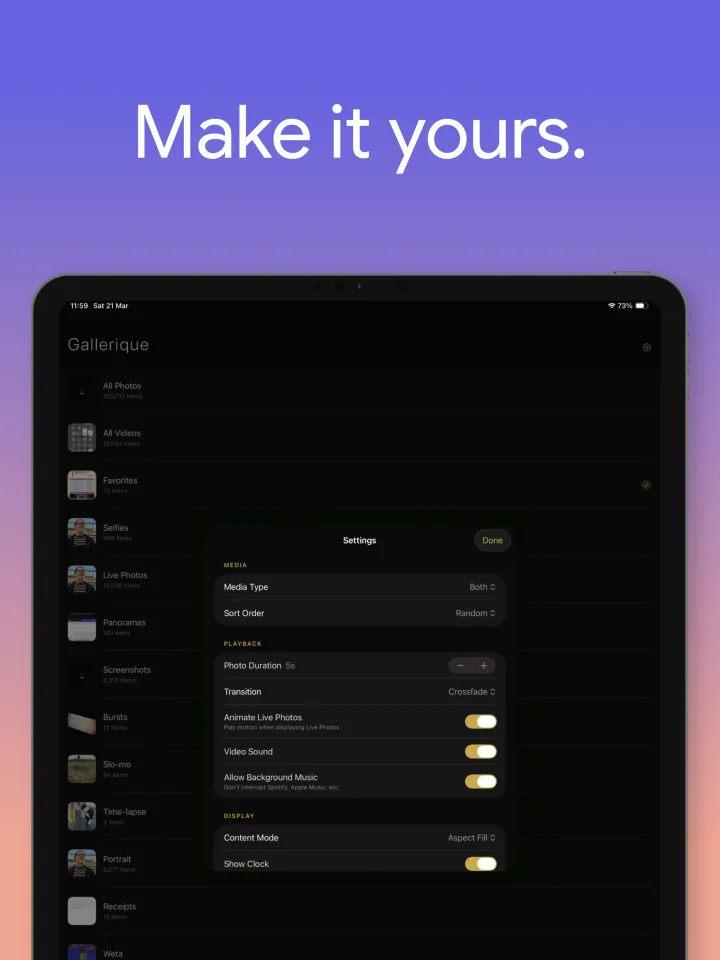
Gallerique turns your iPad into a fullscreen photo and video slideshow.
Pick an album, choose your settings, and tap "Begin Slideshow". Your photos fill the entire screen with smooth transitions between them. Videos play with sound. Live Photos animate. Everything stays out of the way so you can actually enjoy what you're looking at.
It started because every slideshow app I tried was either broken, bloated, or forgot that the whole point is to look at your photos.
HOW IT WORKS
Browse your albums in a clean grid. Select one (or use All Photos). Tap a button. The slideshow starts.
Photos display for as long as you want - from 2 to 30 seconds each. Videos always play to the end, so you never miss anything. Live Photos can animate or stay still, your call.
TRANSITIONS
Seven transition styles to pick from: crossfade, slide, zoom, blur dissolve, or Ken Burns (the slow cinematic pan-and-zoom you see in documentaries). You can also turn transitions off entirely if you prefer a clean cut.
BACKGROUND MUSIC
Gallerique respects whatever you're already listening to. If Spotify or Apple Music is playing, it keeps going. When a video with sound comes up, the music ducks down and comes back after. No fighting over the audio session.
AMBIENT DISPLAY
Turn on the clock overlay and your iPad becomes a bedside or desk display. The time floats in a small translucent pill - choose which corner it sits in. Enable auto-dim and the screen gradually lowers its brightness after a set number of minutes. Tap anywhere to wake it back up.
YOUR PHOTOS, YOUR RULES
- Show photos, videos, or both
- Pick any album or all of them
- Sort randomly, or by date added
- Choose aspect fill or aspect fit
- Animate Live Photos or keep them still
- Control video sound independently
DESIGNED FOR IPAD
Gallerique is built specifically for iPad and iPadOS 26. It supports both portrait and landscape, works in any window size, and keeps the screen awake during playback. The interface is dark by design - because the focus should be on your photos, not on chrome.
No ads. No subscription. No account. Just your photos on your screen.
Có gì mới
Phiên bản 2.1 · 23/04/2026
- Added Previous and Next buttons to the slideshow overlay so you can skip between photos and videos without waiting.
- Fixed a bug where an all-video slideshow would stop after the first video instead of advancing.
- Fixed a bug where tapping to hide the overlay left the slideshow paused with no way to resume.
- The slideshow now handles rapid Previous/Next taps correctly, so the slide you land on always matches the counter.
- Your last-selected album is now remembered across launches.
- The clock overlay now attaches to the correct window when using Stage Manager or multiple windows.
- Performance and stability improvements to slide loading and audio handling.
Quyền riêng tư của ứng dụng
Những gì Lucas Young khai báo trên App Store về cách ứng dụng này xử lý dữ liệu.
-
Dữ liệu không được thu thập
Nhà phát triển không thu thập bất kỳ dữ liệu nào từ ứng dụng này.
Phương thức đảm bảo quyền riêng tư có thể khác nhau, chẳng hạn như tuỳ theo các tính năng bạn sử dụng hoặc độ tuổi của bạn.
Thông tin
- Người bán
- Lucas Young
- Danh mục
- Ảnh & Video
- Phiên bản
- 2.1
- Cập nhật
- 23/04/2026
- Phát hành
- 30/03/2026
- Kích thước
- 13,5 MB
- Yêu cầu
- iOS 26.4 trở lên
- Độ tuổi
- 4+
- Giá
- Miễn phí
- Ngôn ngữ
- Tiếng Anh
- Bản quyền
- © 2026 Lucas Young
Có thể bạn cũng thích
-
 Crumbly PhotosẢnh & Video
-
 MantleboxẢnh & Video
-
 PicDock: Digital Photo FrameẢnh & Video
-
 Trình phát Video - FOCAVòng lặp, Ngoại tuyến & Media
-
 Photo & Video Slideshow MakerPicture Shuffle & Album Viewer
-
 Pixette – Slideshow for NASẢnh & Video
-
 Slideshow Maker・SlideFlowẢnh & Video
-
 Face Swap AI: Head SwapẢnh & Video
-
 Remote Shutter: camera connect2 thiết bị thành 1 máy ảnh
-
 Thư viện ảnh - PixFolioTrình chiếu, khung ảnh số