
Screenshot Editor - Redact
Blur & Pixellate Text Privacy
iPhone için tasarlandı
Ücretsiz · Uygulama içi satın alma
- Yaş sınırı4+
- KategoriYardımcılar
- GeliştiriciChris Wakefield
- Dillerİngilizce
- Boyut6,5 MB
Resmi App Store sayfasına bağlanır
Download.org, Screenshot Editor - Redact için hiçbir dosya barındırmaz. Düğme, uygulamanın App Store üzerindeki sayfasını açar; uygulamayı orada Chris Wakefield yayınlar. Sayfanın son kontrolü: 14.11.2026.
Ekran görüntüleri

Hakkında
Geliştirici bu metni dilinizde sunmamış.
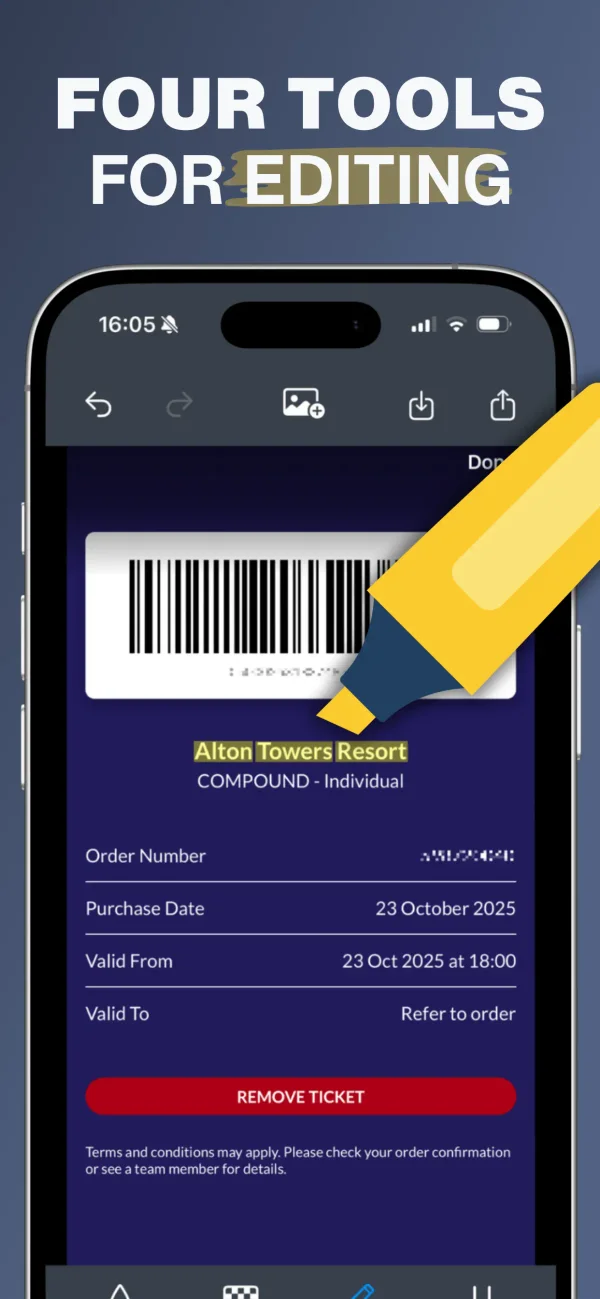
Screenshot Editor is the essential tool for protecting your privacy and enhancing your screenshots with professional editing capabilities. Whether you need to hide sensitive information, highlight important details, or simply redact confidential text before sharing, Screenshot Editor makes it effortless with its intelligent text detection and powerful editing tools.
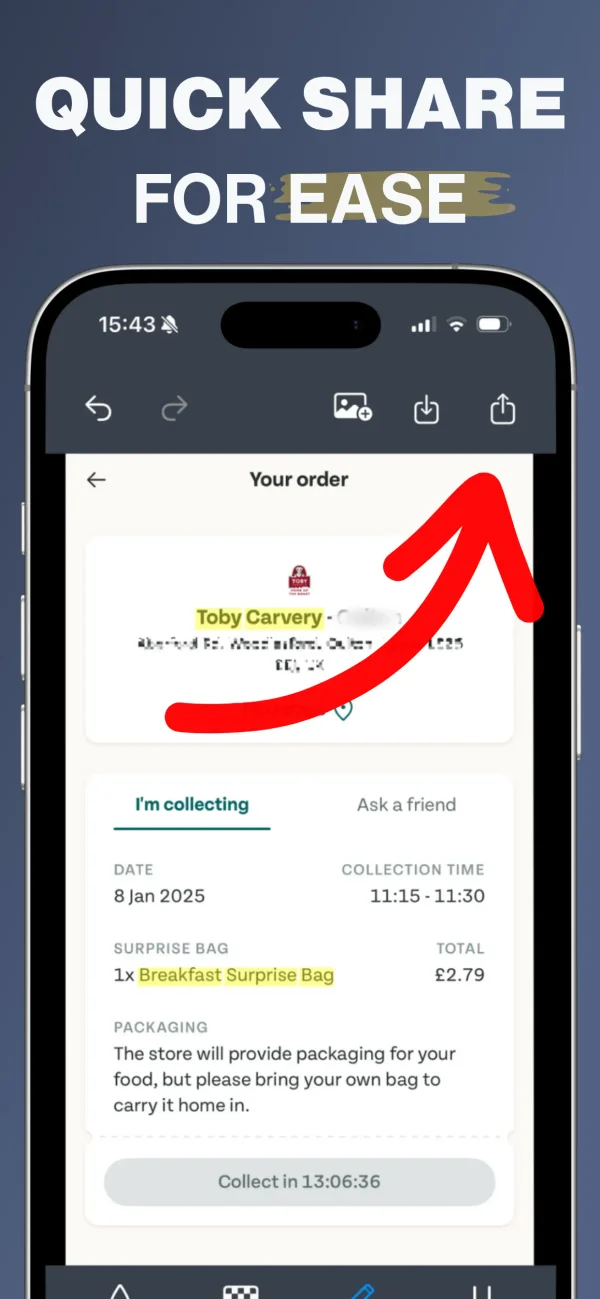
Simply select any screenshot or image, and Screenshot Editor instantly detects all the text within it using advanced OCR technology. Tap on any word to apply your chosen effect with precision. Blur sensitive information like passwords, emails, or personal details until they're completely unreadable. Pixelate text for a modern, stylized look that maintains privacy. Add bright yellow highlights to draw attention to key information. Or underline important text to emphasize what matters most.
The app's intuitive interface makes editing feel natural and effortless. Zoom in for pixel-perfect precision on any word, or work quickly through multiple edits with the easy-to-use toolbar. Made a mistake? No problem. Full undo and redo support means you can experiment freely and perfect your edits without worry. Switch between blur, pixelate, highlight, and underline tools seamlessly as you work through your screenshot.
Once your edits are complete, save your professionally edited screenshot directly to your Photos library or share it instantly with colleagues, friends, or social media. Screenshot Editor ensures your sensitive information stays private while keeping your workflow smooth and efficient.
Perfect for business professionals sharing work documents, students protecting personal information in assignments, social media users redacting private details, or anyone who needs to edit screenshots quickly and professionally. Screenshot Editor puts powerful privacy protection and professional editing tools right at your fingertips.
Note: An active subscription is required in order to save/share your final images
EULA: https://www.apple.com/legal/internet-services/itunes/dev/stdeula/
Uygulama gizliliği
Bu uygulamanın verileri nasıl işlediği hakkında Chris Wakefield tarafından App Store üzerinde yapılan beyan.
-
Veri toplanmıyor
Geliştirici bu uygulamadan hiçbir veri toplamıyor.
Gizlilik uygulamaları, örneğin kullandığınız özelliklere veya yaşınıza göre değişiklik gösterebilir.
Bilgiler
- Satıcı
- Chris Wakefield
- Kategori
- Yardımcılar
- Sürüm
- 1.0
- Güncellendi
- 07.11.2025
- Yayın tarihi
- 07.11.2025
- Boyut
- 6,5 MB
- Gereksinim
- iOS 17.6 veya sonrası
- Yaş sınırı
- 4+
- Fiyat
- Ücretsiz
- Uygulama içi satın alma
- Evet
- Diller
- İngilizce
- Telif hakkı
- © 2025 Chris Wakefield
Bunları da beğenebilirsiniz
-
 Tabletop: Mac Uzak MasaüstüVNC Ekran Paylaşımı & Fare
-
 BithashYardımcılar
-
 Emko-Isometric_PipefitterYardımcılar
-
 Blur Info: Bilgileri GizleEkran görüntüsü, foto sansürü
-
 Blur Text - Censor & RedactHide Text or Face in Image
-
 Text Remover & Editor - QutuYardımcılar
-
 LocalMind: Ollama & LM StudioGizli AI, çevrimdışı ve bağlı
-
 Screenshot Stitching -Long PicYardımcılar
-
 Authenticator App 。Yardımcılar