
ShellPhone - SSH client
Terminal, SFTP, Docker & AI
iPhone, iPad, Mac, iPod touch için tasarlandı
Ücretsiz · Uygulama içi satın alma
- Yaş sınırı4+
- KategoriGeliştirici Araçları
- GeliştiriciAntonio Martinez Gimeno
- Dillerİngilizce+ 8 dil daha
- Boyut80,5 MB
Resmi App Store sayfasına bağlanır
Download.org, ShellPhone - SSH client için hiçbir dosya barındırmaz. Düğme, uygulamanın App Store üzerindeki sayfasını açar; uygulamayı orada Antonio Martinez Gimeno yayınlar. Sayfanın son kontrolü: 23.11.2026.
Ekran görüntüleri


Hakkında
Geliştirici bu metni dilinizde sunmamış.
ShellPhone 3.1: your servers, closer.
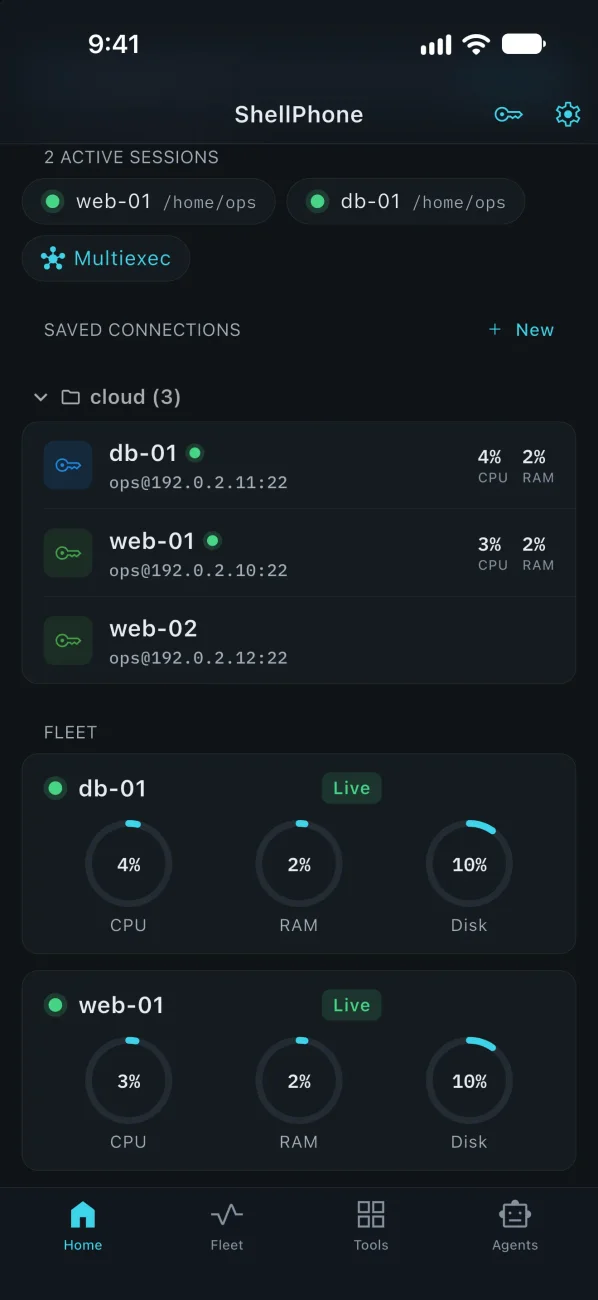
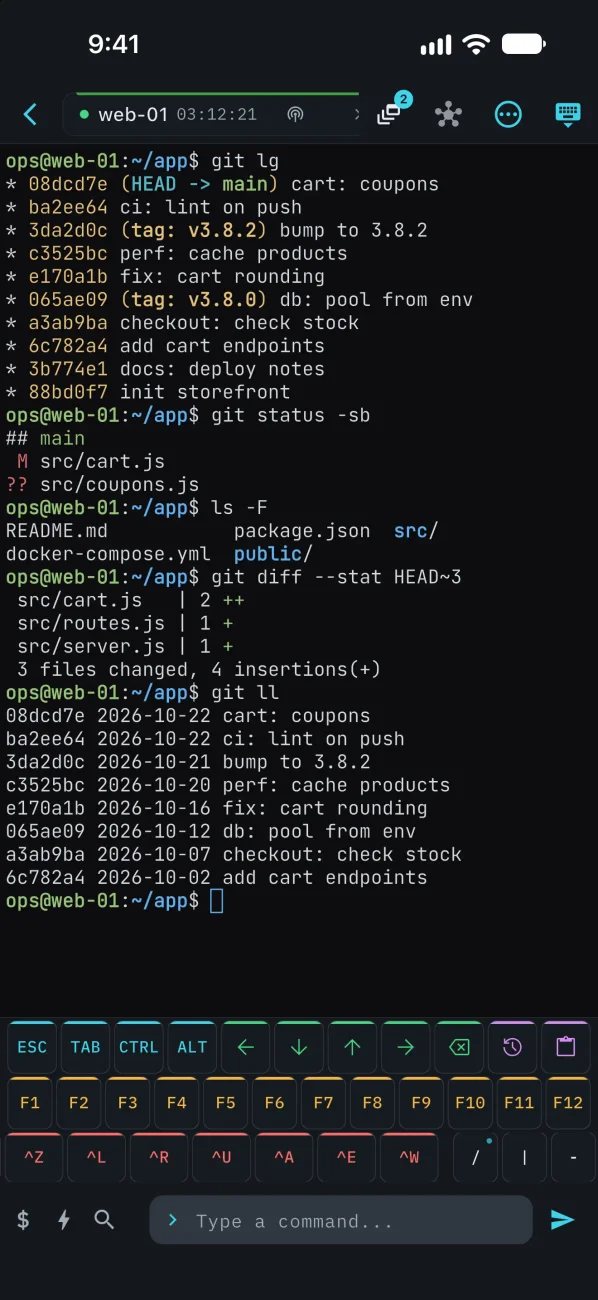
A complete, native SSH client for iPhone, iPad and Mac: a real xterm terminal, SFTP, tunnels and, since 3.0, containers, widgets, push notices, an AI assistant with your own key and coding agents. No account and no tracking.
TRY THE WHOLE APP FOR 30 DAYS
When you install, you get a 30-day trial of the whole app without paying anything. While it lasts, every paid feature shows its bundle's label, and 3 days and 1 day before the end the app reminds you.
NEW IN 3.1
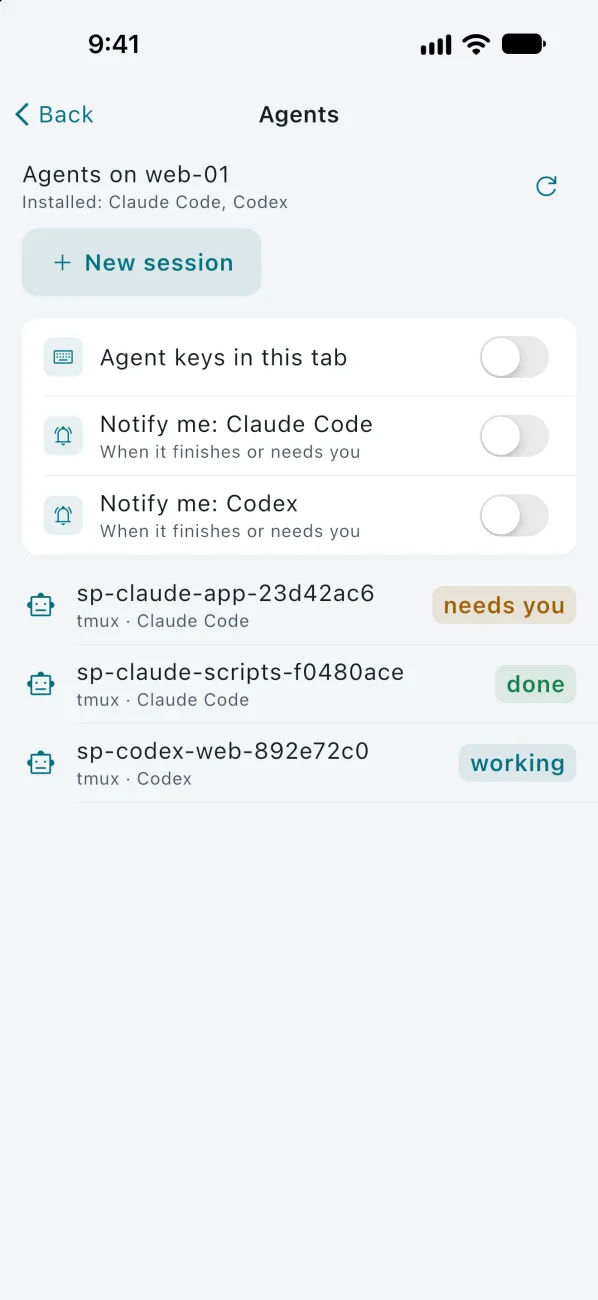
• Claude Code and Codex in the tab: see whether they're working, have finished or need you, and get notified even when you're not looking
• Live Activity on iPhone (iOS 18 or later): your agents' status on the Lock Screen and in the Dynamic Island
• Native tmux: each tmux window and pane as an app tab
• Images in the terminal: Sixel and the most widely used graphics protocols
• File preview: hover over or tap a path to see it, and open links from the terminal
• Command marks: jump from one command to the next and copy just its output
• On the Mac, full mouse and keyboard for Claude Code and other full-screen apps
• Widgets and the Live Activity, in the language you choose in the app
• Agent notifications your way: choose for each server whether every session on it notifies you or only the ones you open from ShellPhone
ALSO INCLUDED
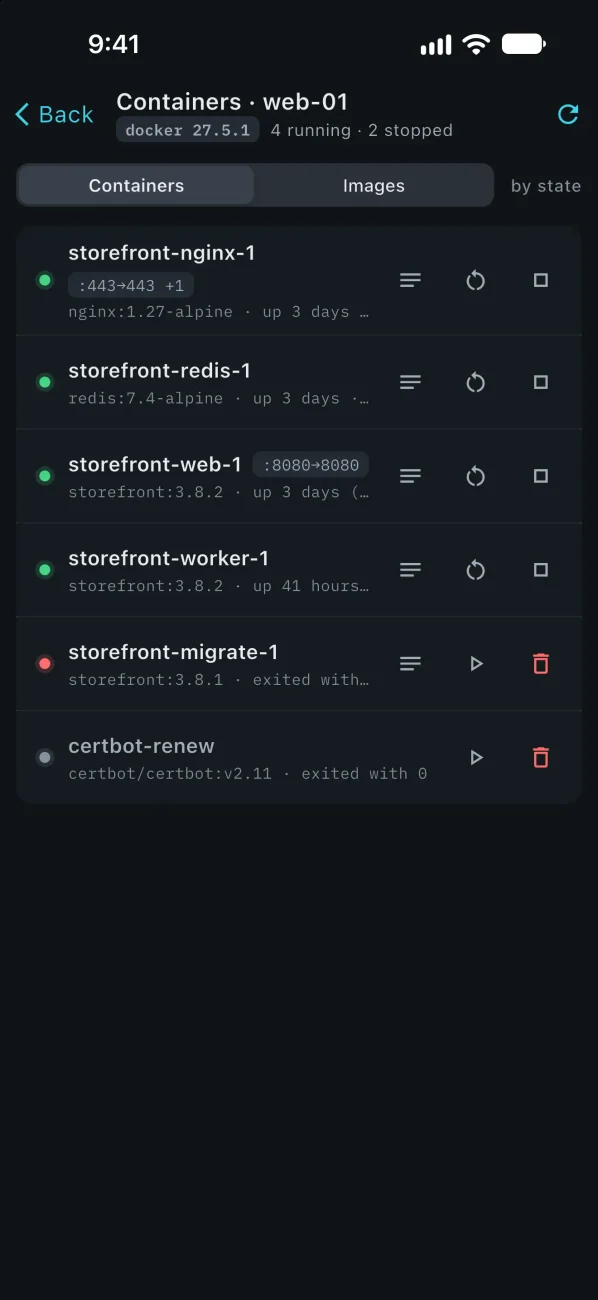
• Docker and Podman containers: live logs, start, stop, restart or open a shell inside, without an agent
• Widgets on the Home Screen and the Mac desktop with CPU, memory, disk and network (iOS 17 and macOS 14 or later)
• Push notices from your servers with notify, even with the app closed, and CPU, memory, disk and temperature alerts, no root needed
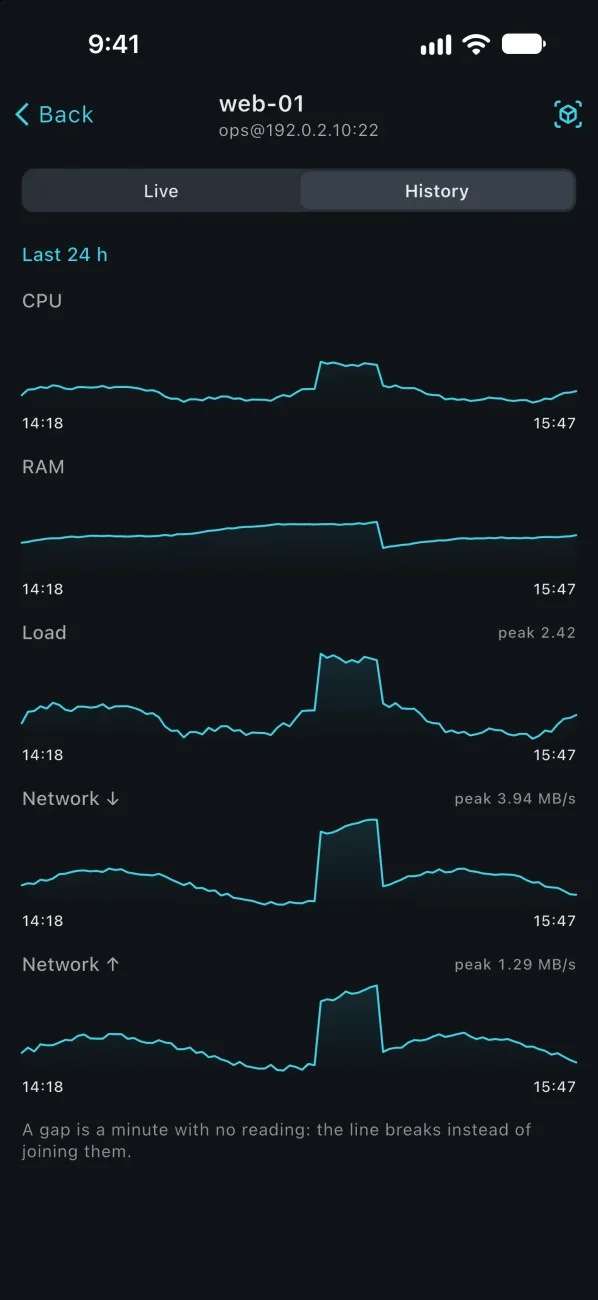
• Extended monitor: NVIDIA GPU, temperature, 24 hours of history in charts and ending processes after you confirm
• AI assistant with your own key: it starts in plan mode and every command is confirmed
• zellij sessions · ZMODEM (rz/sz) · two-factor login · agent forwarding · fallback server · startup script
USE CASES
The in-app glossary explains everything you can do, each with an example. Some use cases:
• The nightly backup finishes and a notice reaches your phone
• A container goes down: read its logs and restart it from your iPhone
• Leave Claude Code working on the server and come back when it tells you
• Reach your private database through a tunnel or a bastion
• Type once and the command reaches several servers with Multiexec
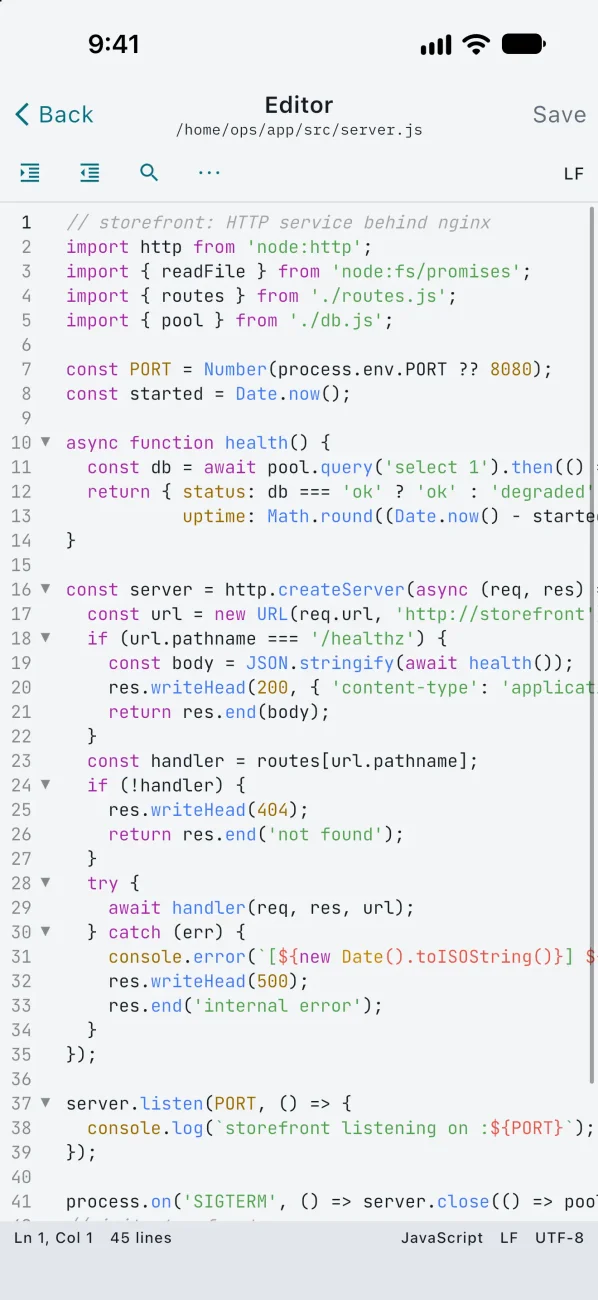
• Edit a server file in the built-in code editor
FREE AND PAID
When the trial ends, without any bundle you still have: quick connect, using and editing your saved connections, one terminal at a time (remote, or local on the Mac) with 15-minute connections you reconnect straight away, browsing and downloading over SFTP, SSH keys and known hosts, seeing and pasting snippets, the monitor of the connected server, two-factor login, the extra keyboard, command history, themes and fonts. Any bundle removes the one-terminal limit and the 15-minute cut.
• Power user: saved connections, tunnels, ProxyJump, Telnet, WireGuard, snippets and macros, SFTP uploads and file management, code editor, fleet, Cloud Sync and encrypted backup, containers, widgets, push notices, AI assistant, agents, tmux and zellij, ZMODEM and the local tools
• Network tools: subnet and port scanners, ping, DNS, Whois, TLS, HTTP, iperf3, Wake on LAN, HTTP proxy, remote tunnel (-R) and startup script
• Remote desktop: VNC viewer
• All-in-one: the whole app
Auto-renewable yearly subscriptions; cancel anytime. No data is collected: no analytics or tracking, and your keys stay in the device keychain.
Terms of Use (EULA): https://shellphone.sggyamg.com/terms/
Privacy Policy: https://shellphone.sggyamg.com/privacy/
Yenilikler
Sürüm 3.1.2 · 21.11.2026
• Scrolling the terminal with your finger no longer opens the keyboard: it only appears when you tap.
• If a connection has no saved password, or the server rejects it, ShellPhone asks for it when you connect, like ssh.
• With your phone in landscape and the keyboard open, the screen no longer gets cut off and the ⌨ button is always within reach.
• If you close the keyboard from the system, ⌨ opens it again with a single tap.
Uygulama gizliliği
Bu uygulamanın verileri nasıl işlediği hakkında Antonio Martinez Gimeno tarafından App Store üzerinde yapılan beyan.
-
Veri toplanmıyor
Geliştirici bu uygulamadan hiçbir veri toplamıyor.
Gizlilik uygulamaları, örneğin kullandığınız özelliklere veya yaşınıza göre değişiklik gösterebilir.
Bilgiler
- Satıcı
- Antonio Martinez Gimeno
- Kategori
- Geliştirici Araçları
- Sürüm
- 3.1.2
- Güncellendi
- 21.11.2026
- Yayın tarihi
- 19.07.2026
- Boyut
- 80,5 MB
- Gereksinim
- iOS 15.0 veya sonrası
- Yaş sınırı
- 4+
- Fiyat
- Ücretsiz
- Uygulama içi satın alma
- Evet
- Diller
- İngilizce, Fransızca, Almanca, İtalyanca, Japonca, Korece, Portekizce, Basitleştirilmiş Çince, İspanyolca
- Telif hakkı
- © 2026 SGGyAMG
Bunları da beğenebilirsiniz
-
 RSSHGeliştirici Araçları
-
 Shelify SSH Remote ConnectGeliştirici Araçları
-
 ChibyooShellGeliştirici Araçları
-
 ChatSSH - Terminal & Local LLMSSH için özel yerel yapay zekâ
-
 PanelicaGeliştirici Araçları
-
 PocketSSHGeliştirici Araçları
-
 SofaCode - VS Code Vibe CodingGeliştirici Araçları
-
 SSH SpeedSSH Terminali, SFTP İstemcisi
-
 Hop — SSH ClientGeliştirici Araçları
-
 Termalin: SSH & SFTP ClientGeliştirici Araçları